Grungetastic 2.0 Is Out

GrungetasticGrungetastic 2.0 is out in the App Store. This is a major update for JixiPix’s app.

The UI of the app underwent a considerable renovation. Now preset categories are all conveniently accessible from the bottom menu in the main edit area; all the presets in each category are also scrollable from the bottom menu, so that choosing and applying the right preset is much easier than before. Rendering times were also significantly improved in 2.0 and Grungetastic now is faster when processing and saving photos. Slow rendering times were one of the issues of the past versions of Grungetastic.
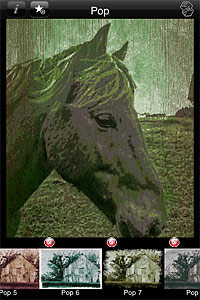
Grungetastic 2.0Another noteworthy change in the latest release is the new content. Grungetastic now offers 140+ additional items to process photos. The content includes textures, scratches and splatters, which are arranged into four new themed packs: Gritty Grunge, Distressed Grunge, Worn Grunge and Worn Pop Grunge. All packs are available individually through in-app purchase, each for $0.99.
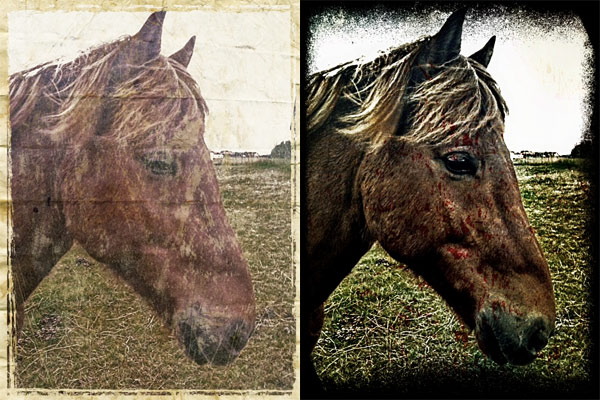
Grungetastic 2.0
Worn Grunge (left) and Gritty Grunge (right).

Please note that installing version 2.0 will delete all your custom presets, so be aware that your personal styles will be lost after updating.

Grungetastic is currently on sale. The updated version of JixiPix app for iPhone is now $0.99/€0.79/£0.69.

Grungetastic - JixiPix Software

iPhone 5 to Have 8MP Camera, Suggests “Leaked” Photo

A photo uploaded on Flickr, supposedly taken by an Apple engineer at Cupertino, could be the first “leaked” image taken with an iPhone 5. Pocketnow.com, a website focusing on smartphones, discovered the photo while browsing Flickr looking for images taken with the new iPhone 5. ArsTechnica also commented on the find, considering the leak plausible enough.

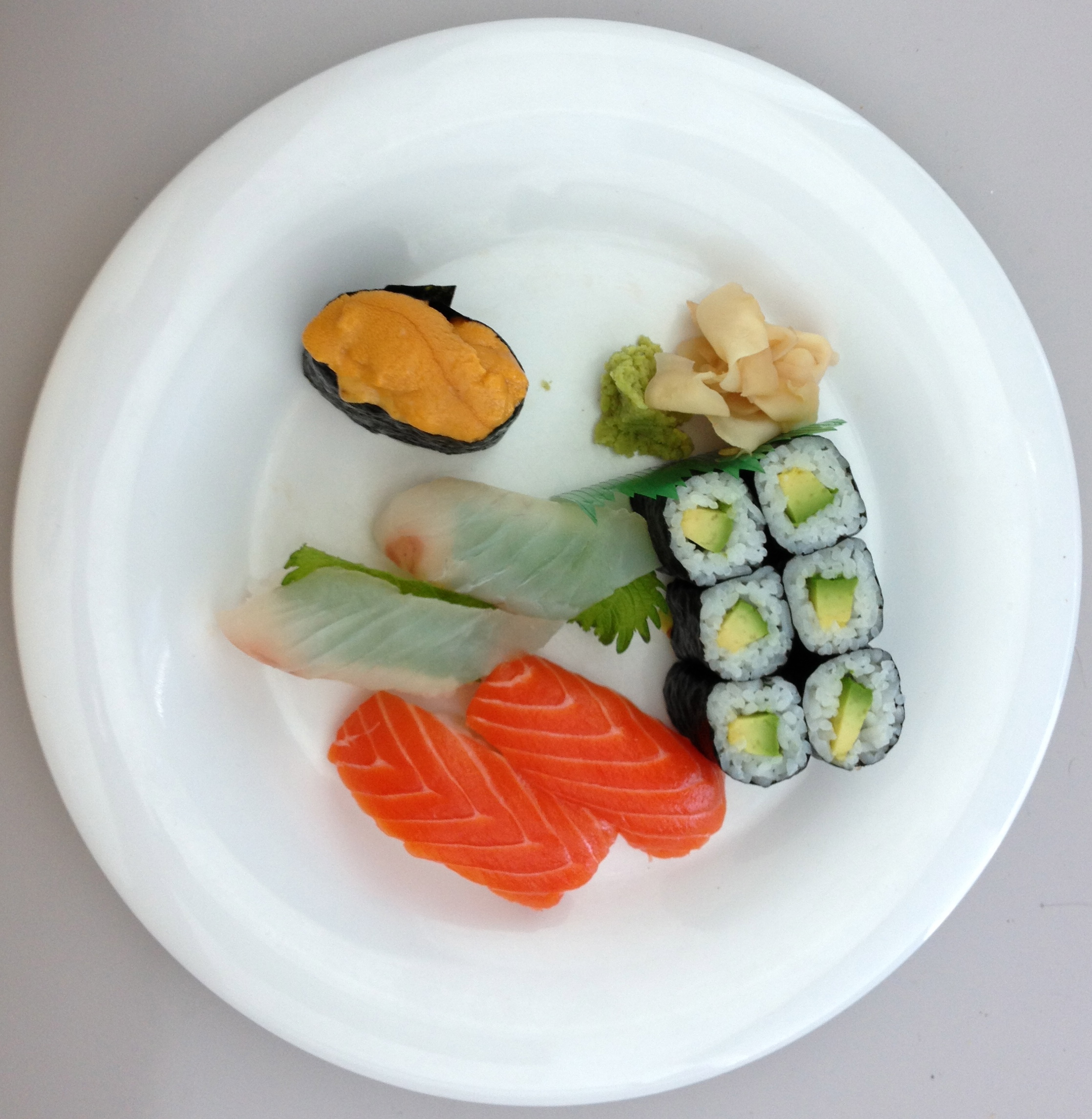
iPhone 5 leaked photo, depicting a sushi plate
The leaked photo, supposedly taken with an iPhone 5 prototype

According to the GPS data contained in the photo (which, of course, could also be forged) and the info on the Flickr profile, the photo was uploaded by an engineer at Cupertino this July, during lunch. Soon after the news about the leaked photo started spreading, the guy removed the photo from public viewing.

While the EXIF of the photo lists the camera as an iPhone 4, the pixel dimensions of the photo (2291 x 2235) don’t match those of the current iPhone 4 (2592 x 1936). According to the EXIF data, the photo was also cropped from an original resolution of 3264 x 2448 pixels, or 8MP.

Other interesting data in the EXIF include:

  • Maximum aperture: f/2.4 (current iPhone 4 maximum aperture is f/2.8)
  • Focal length:4.28mm (current iPhone 4 focal length is 3.85mm)

ArsTechnica goes on with an analysis of the EXIF and a comparison with photos taken with current generation smartphones equipped with 8MP sensors, concluding that that new iPhone might offer little improvements over the current iPhone 4 camera, especially in terms of noise reduction.

Whether this leak is an hoax or not, the iPhone 5 is expected to launch in the next months, possibly as early as October. In fact, while details on the device are scarce, according to the latest reports, suppliers are already manufacturing the iPhone 5 components at full speed, with 150,000 units being assembled each day.

This fall will also see the release of iOS 5, which will be compatible also with current generation iPhone 4 and iPhone 3GS.

Coming Soon: Adobe Carousel

Adobe announced Carousel, a new cloud-based service dedicated to photo storage and sharing. Adobe Carousel, which will be released later this month, will make it possible to store, edit and share images across Apple devices.

After downloading Carousel from the App Store, users will be able to browse their entire photo libraries from anywhere, perform post-processing making use of the same technology of Lightroom, and share their images with their contacts — all without the need to sync. Carousel will allow its users to catalogue photos, enhance them by adjusting various settings and by applying presets, and to create unlimited image galleries which they will be able to share with up to five people. A single Adobe ID will be required to access the service from all iDevices — that is, Macs running OS X Lion and iPhone 3GS/iPhone 4, iPod Touch 4G and iPad/iPad 2.

The introductory price for subscribers will be $59.99 a year or US$5.99 a month — the offer will be valid until  January 31, 2012 —  while the regular price to access the service will be $99.99 a year or US$9.99 a month. As for other Adobe products, a 30-day free trial period will be available.

Although Adobe state on their site that support for Windows and Android is in the works, Carousel will be open at the beginning only to Apple users.

PhotoViva Review

PhotoViva is an advanced photo application compatible both with iPhone and iPad that serves the purpose of enhancing photos and turning them into complex artworks.

Main Features

  • Up to 1600×1200 pixels;
  • 20 brushes;
  • Paint or clone;
  • HDR correction;
  • Crop;
  • Adjust saturation and sharpening;
  • Undo/redo;
  • Add noise;
  • Adjust hue, saturation and tint;
  • Channel mixer;
  • Color picker;
  • Adjust brightness, midtones and shadows;
  • Autopainting.

Appotography Opinion

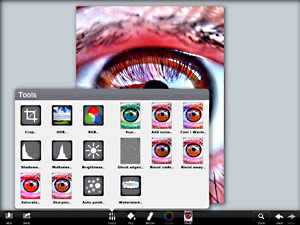
To enhance your photo of choice, PhotoViva gives you several editing instruments, like a basic channel mixer, hue, saturation, brightness, sharpen tools and more. For a quick fix, you can use the freehand crop and rely on the HDR correction to bring out details lost in the dark or light areas of your original photo.
PhotoViva
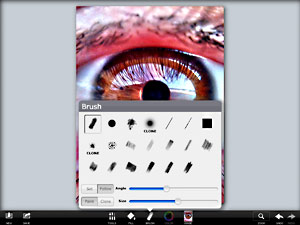
To turn photos into paintings and sketches, you have a collection of 20 different brushes, ranging from pastels to watercolor. To make the brush strokes blend organically with the subject of the photo or to obtain special effects, you can change angle and size of each brush and either pick colors of your choice or use the original as the source image. A clone feature is also included.
PhotoViva iPad
PhotoViva iPad
PhotoViva offers a variety of tools in a well-balanced format, succeeding where most photo-to-painting apps for iDevices failed. Results benefit significantly from the app’s great flexibility and from its wide range of available choices. Although the app comes with an autopainting feature, the best results are achievable by manually fingerpainting and adjusting settings where and when necessary. PhotoViva represents a good compromise between fully automated artistic filters and drawing applications. The app works great both on iPhone and iPad, but for obvious reasons painting on iPad’s larger screen feels more comfortable.

PhotoViva iPad
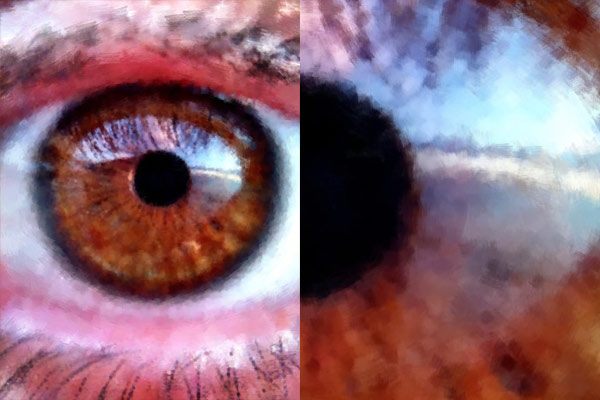
The processed image (left) and a detail in actual resolution (right).

The only notable problem with this app is the final saving resolution of 1600×1200 pixels, which could definitely be improved.

Overall

Name: PhotoViva
Developer: Lamina Design
Compatibility: iPhone, iPod Touch, iPad. iOS 3.0 or later.
Price: £1.49||$1.99||€1.59
Vote: 4/5

PhotoViva - Lamina Design

Get to Know Your Hipstamatic with AppJudgement & Doc Pop

The folks at AppJudgment recently released a “Master iPhone Photography” episode focusing on the best-selling photo app Hipstamatic. The show was co-hosted by Doctor Popular, who, as his moniker suggests, is a well-known name, especially in the Instagram community. Thanks to his creative use of iPhone apps in his “appsperiments”, Doc Pop gained a huge following and succeeded in winning the media’s attention — which also includes a feature in the New York Times.

AppJudgement’s Hipstamatic episode is entirely dedicated on uncovering tips and tricks to make the most of Hipstamatic. How much do you really know about the app? Are you a timid user or an experimenter? Wanna find out?

If you want to know more on Appjudgment, you can visit their official page here.

5 Things Photo Stats Taught Me About My Photographing Habits

How much do you know about your photo taking practices and how much do you ignore? Can you learn a lesson or two from the hundreds of photos you take? An answer to all these questions is offered by Photo Stats, the infographic creator for iPhone photos, available in the App Store for $0.99/€0.79/£0.69.
Photo Stats iPhonePhoto Stats gathers data from images stored in your device and uses the collected information to generate a summary in the form of clear and minimal eleven-part infographic charts. The charts will tell you everything, from your favorite photo locations to your most productive shooting days.
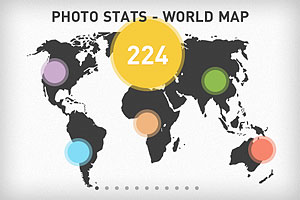
I have used Photo Stats to have an overview of my personal iPhone photography habits and a handful of relevant aspects appeared in my generated stats.

Four bad habits

  1. Most photos miss metadata – The greatest majority of photos I have stored in my iPhone lack proper metadata. It results I have taken most photos in just a couple of locations. Not that I have been traveling a lot lately, but the list of places where I have taken photos stored in my Camera Roll is definitely longer than that. In some cases I intentionally turn off iPhone’s location services, especially to save battery, but what about the other cases? It’s not a big deal, really, as I know more or less where each photo was taken. Still, it may be a good idea to make sure metadata is intact. At any rate, it’s easier to strip photos of their metadata than adding or restoring it later.
    Photo Stats
  2. Most photos were taken in the evening – That is, most of my photos were taken between 6PM and 11PM. I know that in theory evening is one of the best times to shoot and that, after all, everybody has a favorite time of the day to take photos. In my case though this result is mostly indication of laziness. It is also indication my lifestyle is a bit “off”. It’s not a surprise, but the reminder is always quite shocking. After all, as they say, it’s the early bird that catches the worm.
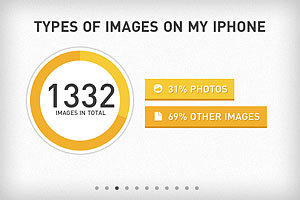
  3. Almost 70% of images are “other” than photos – As I see it, this means that either I keep in my Camera Roll too many work-in-progress copies of my images or that I keep too many extra resources, like textures for instance. More likely, it’s both. Time to sort all these images out and to tidy my Camera Roll up!
    Photo Stats
  4. A lot of photos were taken using Camera – I can’t even remember using iPhone’s native camera app, at least recently. How did I end up with so many photos taken with it? I don’t know if this should be included in a list of bad habits, but more in general this means that I have a perception of my overall app usage that is not completely accurate.

And one good habit

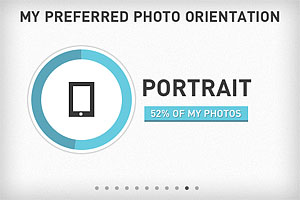
  1. Photos show a good balance of portrait vs landscape orientation – Don’t I choose portrait orientation most of the times? Nope, it seems I am better than I thought at balancing the two. Just a little more than 50% of my photos are portrait-oriented. That’s good!
    Photo Stats

Conclusion

I am not sure I can brag and post my Photo Stats results everywhere. I am sure though that there are many things that I can do to improve and Photo Stats offered some useful hints by summing up briefly a few of my bad photographing habits — together with a few good habits I can work on further.

Photo Stats – infographic creator for your iPhone photos - Dear Future Astronaut AB

Halftone Free for the Weekend

For the rest of the weekend, and for the weekend only, Halftone will be free in the App Store. If you like the idea of spicing up your images and you are into the comics style, then this is the right occasion to try Juicy Bits’ app — if you haven’t done so already!
Halftone Free Weekend
Halftone turns your photos into single panel comics: set the right halftone style, choose one among the available templates and add dialogue and stickers. Halftone comes with several extra items, such as paper textures, colored stamps, caption and speech bubble styles, which you can change and fit to your photos.

Halftone is a universal app and fully compatible with iPhone, iPod Touch and iPad.

Halftone - Juicy Bits

PhotoForge2 Back to School Sale!

Back to school sale: PhotoForge2 is 70% off in the App Store. GhostBird Software’s photo editing app is now available at the special price of $0.99  (€0.79/£0.69).
Photoforge2 on sale
PhotoForge2 is universal and fully compatible both with iPhone and iPad. Some of the features that make PhotoForge2 one of the most advanced applications on iDevices yet: import and edit RAW files, use masks and layers, fine-tune images with curves, channel mixer, shadows and highlights; make use of crop and rotate tools; add special effects, like blur, vignette, frames and textures, manage metadata and finally share your photos on Twitter, Flickr, Facebook, DropBox FTP and more.

The current offer is valid for a limited time only.

PhotoForge2 - GhostBird Software

Luminance Review

What’s the meaning of luminance? Luminance, also referred to as photometric brightness, is a term from the photometry glossary indicating the amount of light radiated or reflected by a particular surface.

Subsplash’s Luminace is a universal photo app that takes advantage of adjustment layers to perform quick and effective photo enhancement without affecting your original photos.

Main Features

  • Full resolution available;
  • 19 presets;
  • Hue, saturation and white balance filters;
  • Brightness, contrast and exposure filters;
  • Tone curve and color filters;
  • Vignette;
  • Split toning and sepia effects;
  • History/undo;
  • Retina support;
  • Send photos via email or share on Facebook and Twitter.

Appotography Opinion

Luminance offers a good selection of filters and effects which can be applied to photos either loaded from Camera Roll or taken in-app. What Luminance does is adding a series of adjustment layers, which affect the image’s final look, while the original always remains intact.
Luminance iPhone
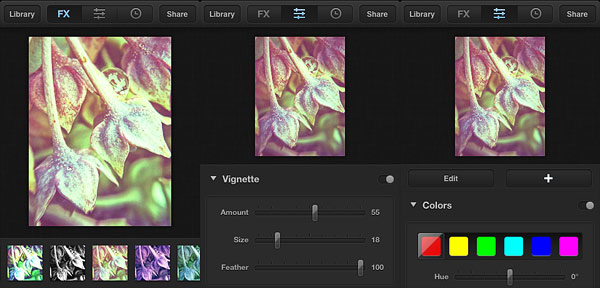
By scrolling the menu located at the bottom of the FX panel, with one tap you can add one among the ready-to-use styles to your photos. When necessary, you can modify the given presets by switching from the FX panel to the filter editor, where you can tweak settings to go with the mood or the look you want. If you prefer, you can build your style from scratch. By tapping on the plus sign, you can add as many adjustment layers as you see fit and you can keep on editing the layers you have until you are satisfied.

When you are done, you can save to Camera Roll or share the photo via email, Facebook and Twitter. Photos processed in Luminance are stored in the Library, where you can access them in any moment and make changes using the History feature.

Luminance iPhone
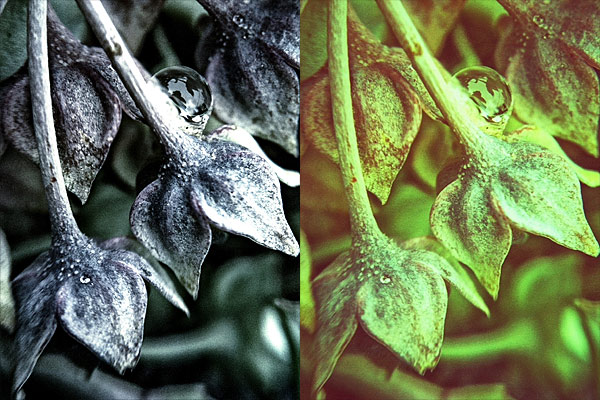
Crush B&W (left) and a custom style (right).

As many users noted, Subsplash’s app definitely lacks a few useful features. However, effects in Luminance are beautifully done and the app works as a charm both on iPhone and iPad. Creating filters by modifying the original presets or building them from scrach is also quite easy once you get the hang of it, although for a beginner the control panel can be a little confusing. It would be nice to have a little more flexibility in the handling of the presets: for instance, it would be easier to have the possibility to save your custom presets and have them displayed along those coming with the app, instead of having to copy edits from a photo to another to use your personal styles.

Users looking for a way to add attractive and polished looking effects to photos easily while maintaining a certain degree of customization will definitely love Luminance.

Overall

Name: Luminance
Developer: Subsplash Inc.
Compatibility: iPhone, iPod Touch, iPad. iOS 4.0 or later.
Price: £0.69||$0.99||€0.79
Vote: 4/5

Luminance - Subsplash

The Original iPhone Film Festival Open for Submissions

In recent years, thanks to new technologies, it has become significantly easier for independent film-makers to shoot, edit and find alternative channels of distribution for their works. Both amateurs and  professionals in the movie and TV industry are exploring the possibilities offered by hugely popular consumer devices like the Apple iPhone and iPad. Several initiatives to promote creative efforts in connection to these new media are emerging everyday.

The Original iPhone Film FestivalWorth mentioning to the creative iPhone and iPad community is the Original iPhone Film Festival, which is currently looking for passionate videographers to take part in the first edition of the event. The Original iPhone Film Festival is an online festival addressed to those who are into indie film-making and have embraced the possibilities offered by their iDevice as a means of expression.

The festival’s rules are simple: submitted videos must be entirely shot on iPhone, iPod Touch and iPad 2. Editing on iOS devices is recommended but not mandatory. Videos can be submitted to any of the accepted categories: fiction, non-fiction, brand film and music video. Submitting is 100% free and there is no limit to number of entries per person. A jury composed by experts will choose the winners of the festival — Lasse Hallström will be judging too!

Deadline for submissions is October 31, 2011. If you want to know more about the Original iPhone Film Festival, please visit the event’s official page.