TouchRetouch Review

A cat entering the frame at the moment of shooting, an overlooked detail, a shadow or spot in the wrong place, something unexpectedly breaking the harmony of the composition: they’re all examples of how even to the greatest professionals can now and then end up with a few unsatisfying photos.

TouchRetouch by Adva-Soft for the iPhone provides users with a set of tools to remove undesired objects and details from photos. Sometimes it doesn’t take much to save a regretful photo from damnation, with the right instruments.

Main Features

  • Full resolution available;
  • Finger move hint;
  • Undo/redo;
  • Zoom in/out;
  • In-app tutorial;
  • Share on Facebook, Twitter, Picasa, Flickr.

Appotography Opinion

Let’s imagine I have a photo I like of my friend’s amazing fish tank, but for some reason there is one fish that materialized in the bottom corner at the last second that annoys the hell out of me. I don’t know why, I just don’t want that stupid fish to be there. Why don’t I take another photo? Maybe I just can’t, for a reason or another. Do I have to keep the photo as it is? Seems like it, but I don’t really like the idea. Then what can I do?

I open TouchRetouch.

First of all, I load into the workspace the fish tank photo. I have a few options to fix the problem.

I can use the brush tool to paint a mask over the less than desired object I intend on removing. By moving the photo around with the hand tool and by pinching to zoom in and out, I can do it quickly and easily. If I make mistakes, I can undo as many times as I need or I can adjust the masked area using the eraser tool. Another method to create the mask and achieve the same result is by using the lasso.

Finally, there is the clone stamp tool, which allows sampling pixels to paint over a given area. I can set the clone stamp size, opacity and direction for better results. The clone stamp is particularly useful with patterned surfaces, like walls or paving, for example.
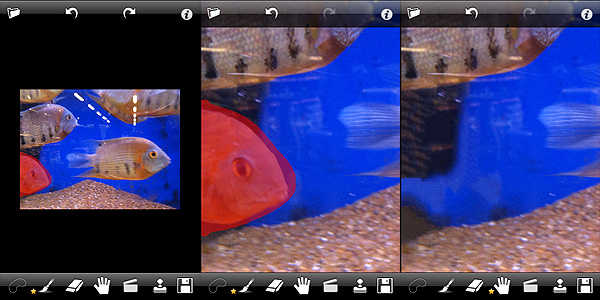
TouchRetouch app by Adva-Soft for iPhone

In the specific case, I said I used a photo I had taken previously, but I could have also taken a photo with the built-in camera. In both cases, the process is exactly the same.
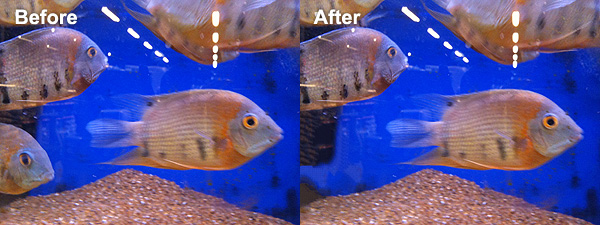
TouchRetouch app by Adva-Soft for iPhone

TouchRetouch is one of these must-have apps that you will inevitably find yourself using, eventually. Adva-Soft’s app will definitely add value to your collection.

If you want to see how the app works before buying, why not getting TouchRetouch Free?

Overall

Name: TouchRetouch
Developer: Adva-Soft
Compatibility: iPhone, iPod Touch, iPad. iOS 3.1 or later.
Price: £0.59||$0.99||€0.79
Vote: 5/5

TouchRetouch - Adva-Soft

PhotoToolbox Review

Are you tired of using the same effects all the time on your iPhone? Do you want to make your own filters? Do you want something different but you do not have any ideas? Do you think you could use some help from random effect generation?

If any of the above is true, perhaps developers at Sun Inlet Labo have something for you: their PhotoToolbox allows you to fully customize your filters or to have them randomly generated by the app. PhotoToolbox is a good option when you don’t want to rely exclusively on pre-made filters for your iPhone photography.

Main Features

  • Full resolution available;
  • Angle lock on/off;
  • Full-screen shutter button on/off;
  • Geotagging on/off;
  • Undo/redo;
  • Random filter;
  • Save and import/export custom filters.

Appotography Opinion

PhotoToolbox can be used either with the built-in camera or with photos stored in your device. While shooting, a square indicator will help you in taking straight photos by turning yellow when the device is being held vertically. Tapping on the Angle Lock Button, you will be able to enable automatic shooting when the device is held at a given angle. This feature is especially useful if you are taking self-portraits. Another feature you can enable for easier shooting is the Full-screen shutter button that, as the name suggests, will turn the whole iPhone screen into a shutter button.

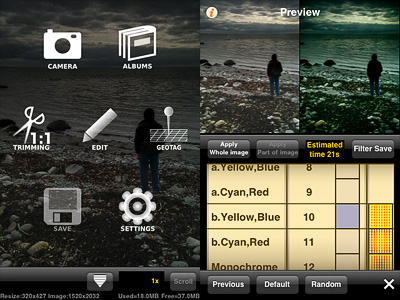
PhotoToolbox app for iPhone by Sun Inlet Labo.

Once you have your photo, you can apply post-processing. By tapping on the Filters icon, you have access to several parameters that you can adjust by scrolling different wheels individually. The first wheel sets the parameter (Brightness, Contrast, Saturation, Hue, Vignette, Blur, etc.), while the others influence intensity and affected area. From the Preference screen, you can choose to enable or disable any of the app’s variables or you can set their overall strength. By combining variables together, you can create highly personalized presets, which you can save and reuse later. Thanks to the preview, you can know how your changes are going to affect your pictures at all times. PhotoToolbox also allows importing and exporting presets.

PhotoToolbox app for iPhone by Sun Inlet Labo.
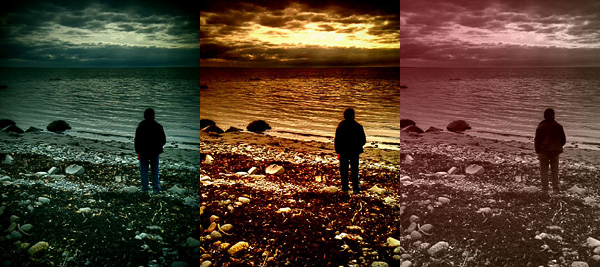
Examples of custom filters in PhotoToolbox.

With the exception of borders — an extra not included in Sun Inlet Labo’s app — PhotoToolbox is a bit like Infinicam, both in the way you can generate almost endless effects and in the way you can save them for further use. The difference with Infinicam, which only allows random generation, resides in the fact you can actually create your filters from scratch in PhotoToolbox. This in my opinion truly makes a difference, but it is also the greatest obstacle to full enjoyment of this app. PhotoToolbox is not a perfect app: first of all, it requires time to be used at its full potential. The effects you can achieve are many, but getting to know and mastering all the features is definitely not a cinch. The initial difficulties might drive more than a few users away.

I can definitely see myself using PhotoToolbox as often — if not more — as I am using Infinicam. It would be nice though to make the Import/Export filter more user-friendly and straightforward: as it is now, it’s somewhat clumsy.

PhotoToolbox is one of the most interesting things I have seen in the Photography category of the App Store in some time. If you have patience and you like to tweak, you should try it. I am confident it will be rewarding.

Overall

Name: PhotoToolbox
Developer: Sun Inlet Labo.
Compatibility: iPhone, iPod Touch, iPad. iOS 4.1 or later.
Price: £1.19||$1.99||€1.59
Vote: 4/5

PhotoToolbox - Sun Inlet Labo.

HalfCamera Review

Half-frame cameras, also known as split-frame or single frame, are cameras using an 18x24mm format on regular 35mm film. Exposure orientation on these devices is vertical, whereas it is horizontal on average 35mm cameras. Half-frame cameras allow taking twice the number of exposures that would normally fit onto a roll of film. Each exposure taken with split-frame devices occupies on film half the space than that of devices using the standard format.

The technology used by split-frame cameras was originally developed for being used in movies, thus the definition half-frame — as opposed to standard — is only applied to still cameras.

Not only thanks to the fact they allowed taking double the amount of pictures than standard devices using the same film, but also thanks to their compact and stylish design, half-frame cameras enjoyed a great popularity, especially during the 60’s. While not as popular as before, they’re far from being extinct. Half-frame cameras are still in production up to this day.

HalfCamera brings to the iPhone the fun of authentic split-frame cameras.

Main Features

  • Up to 1208 x 800 pixels (3GS);
  • 12 effects;
  • 12 border styles;
  • Viewfinder grid on/off;
  • Flash on/off (on supported devices only);
  • Switch between rear and front camera (on supported devices only);
  • Share on Twitter and Facebook.

Appotography Opinion

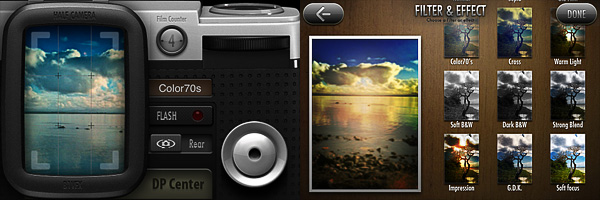
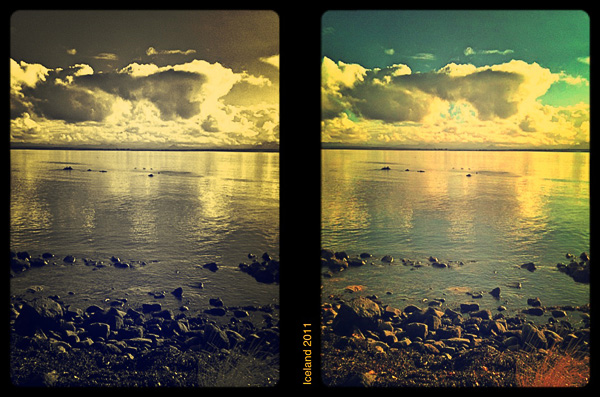
With HalfCamera by B1VISUALEFFECTS, it’s possible to create diptychs, applying effects, frames and text. It’s possible to both import photos from your device and use the built-in camera.

HalfCamera by B1VISUALEFFECTS

You take each shot separately, choosing a filter among twelve available. The effects, definitely not overdone, cover a variety of styles, from classic black and white to cross process. Shots are stored in the app’s DP Center in batches of twelve, simulating film, which means you can take up to twelve shots in succession before HalfCamera switches to the next batch. Single photos are also saved to your Camera Roll.

At any moment, you can retake any of the shots in a batch. On the other hand, if you choose to apply a filter when taking the photo, you cannot change it later from the DP Center: by choosing a new filter from the Filters & Effects screen, you will have your photo filtered twice and this may not be intuitive at all at first. You can choose any consecutive couple of pictures in the film batch for your diptych creation.

After you pick your two photos, by tapping on the Printing button, you’re introduced to the text editor, which you can use to input text of your choice to the inner border of your diptych. After that, all you have to do is picking a frame among the twelve available — ranging from classic film to grungy borders — and save.

HalfCamera by B1VISUALEFFECTS

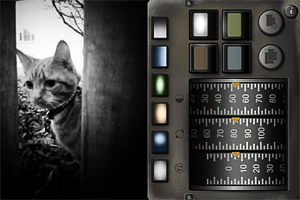
If you decide to load the photos from your device, the process is more or less the same. You load your photo, adjust it to the frame by pinching and zooming, choose a filter, add text if you wish, choose a border and then save or share your image.

HalfCamera by B1VISUALEFFECTS

The UI of HalfCamera is very polished and appealing, although understanding how the whole process leading to the final picture works in the very beginning may be perceived as very chaotic. Also, getting used to the notion of working with bundles of shots and in couples may be confusing at first. However, final images are very pretty and this probably is the strongest point of this app: it invites the user to make the most out of it. The idea behind HalfCamera retains some of the unique charm of actual split-frame devices, lending itself to a series of creative uses that is up to the photographer to discover.

Overall

Name: HalfCamera
Developer: B1VISUALEFFECTS
Compatibility: iPhone, iPod Touch, iPad. iOS 4.0 or later.
Price: £0.59||$0.99||€0.79
Vote: 4/5

HalfCamera - B1VISUALEFFECTS Co.,Ltd

Noir Photo Review

Film noir is a denomination associated with crime films from the 40’s and 50’s. Although the term is commonly identified with Hollywood’s production, examples of film noir can be found before and after the aforementioned two decades and outside Hollywood. As a matter of fact, many of the most renown film noir directors were émigrés, especially from Austria, Germany and Eastern Europe, who arrived in America in the late 20’s and 30’s as a consequence of the political turmoil preceding World War II. You have probably heard of Josef von Sternberg, Fritz Lang, Michael Curtiz, Otto Preminger, Billy Wilder and, of course, Alfred Hitchcock. These are just a few of the most representative names that come to mind speaking of film noir.

Categorization of film noir is nothing but a vague notion and in some cases, cinema critics and historians have contrasting opinions. Even if we accept the point of view of those that consider film noir a genre on its own, there is no such thing as common ground when it comes to style and motifs. However, most examples of film noir are characterized by well-defined stylistic traits, first of all the extreme use of low-key lighting and the highly eloquent use of black and white.

Red Giant‘s Noir Photo takes inspiration both for its name and for its idea from film noir’s highly stylized looks. There are those taking snapshots just for fun and those wanting their photos to convey a feeling or tell a story. Noir Photo will delight the latter group.

Main Features

  • Full resolution available;
  • Six presets;
  • Adjustable contrast and exposure;
  • Adjustable vignetting;
  • Save custom presets;
  • In-app guide.

Appotography Opinion

Given the expertise of Red Giant, it’s not a surprise the UI of Noir Photo works so smoothly and everything is so simple and user-friendly. The app presents a very straightforward approach to photo editing: in a single screen, you have access to all the necessary features. A concise in-app guide is included for reference.

Noir Photo universal app by Red Giant Software

You upload a photo from your device. As a starting point, you have six presets ready for use. If you prefer, you can make your own presets by setting each parameter according to your personal need.  The app not only allows quick conversion of pictures into rich black and white monochrome, but also easy relighting, which is particularly important for granting photos a highly stylized, expressive effect.

The three dials representing three different parameters, with values ranging from 0 to 100, are at the core of Noir magic: Contrast, Inner and Outer Exposure. Each of these settings will influence your picture’s lighting. By playing with their values, you can have your photo look like average black and white or extremely contrasted and highly dramatic.

Vignetting is another crucial element in Noir Photo. Vignetting changes when you adjust Inner and Outer Exposure values, but it’s by pinching to enlarge and contract it or by moving it around that you actually affect the photo. The four available color tints are the final touch to widen the possible combinations and the effects you can achieve. The preview lets you know in every moment how your photo will look like.

Noir Photo universal app by Red Giant Software

It’s undeniable that Noir Photo’s developer’s expertise shows in the app’s incredible sleekness and in its well-balanced consistency. The interface not only is conceived to allow immediate use, but, as I said before, it actually works very smoothly. What one could object is the fact options are not many, especially for the app’s price tag. Some more freedom in choosing tints or in arranging more light sources, for instance, would increase the app’s value.

Overall

Name: Noir Photo
Developer: Red Giant
Compatibility: iPhone, iPod Touch, iPad. iOS 4.0 or later.
Price: £1.79||$2.99||€2.39
Vote: 4/5

Noir Photo - Red Giant Software

GIFVid Review

As probably all of you already know, GIF (which stands for Graphics Interchange Format) is a widely used image format which, for its characteristics, is especially suited for web use. It was introduced back in 1987 by CompuServe, a subsidiary of AOL, one of the major online service providers in the US. GIF is a compressed format which supports a palette of up to 256 colors per image, which is incompatible with requirements of high quality photography. However, GIF supports animation, which is another reason behind its popularity.

Sharing animated GIF images on the web, on social networks especially, has become a hugely widespread pastime, but creating the files from scratch, using image editing software not specifically designed for this purpose, can require more effort than one would expect.

With their GIFVid, developers Eiji Nishidai (of Toy Camera Analogcolor fame) and Tomonaga Tokuyama brought to the App Store a tool for easy creation of lightweight animated GIF using the Apple iPhone or the iPod Touch (both latest generations).

Main Features

  • 240 x 240 pixels resolution;
  • Choose GIF quality (from 16 to 256 colors);
  • Change FPS rate;
  • Watermark on/off;
  • Dithering on/off;
  • Share on Facebook, Twitter, Tumblr or send via email.

Appotography Opinion

GIFVid allows animated GIF creation both by taking individual still frames and by recording short videos. In the first case, you set the time interval between shots and tap on the start button: the app will shoot as many photos as you need, until you stop it by tapping on the End button. In the second case, you simply record a video as with any other video recording app. In order to extract still frames, you can set a time interval between frames or choose the Manual mode. A third option for the creation of your animations consists in loading videos stored in your Camera Roll.

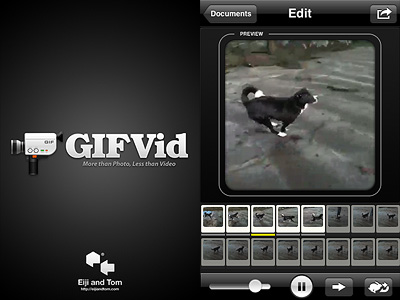
GIFVid app for iPhone and iPod Touch

GIFVid gives you several options. First of all, from the Settings you can choose file quality (from Low, featuring 16 colors only, to Best, the maximum allowed by the format with 256 colors), you can enable dithering (intentionally distributed noise to prevent pattern issues in images) and you can disable the app’s watermark. Other features you can play with concern animation frame rate, speed and direction. Last but not least, you can edit your animation by selecting and deselecting frames and by dragging and dropping them individually.

Once you are done, you can share your creation by email or by uploading it to Facebook, Twitter and Tumblr. In any case, every animation is saved within the app so that you can access each project whenever you want and make changes as you see fit.

GIFVid app for iPhone and iPod Touch
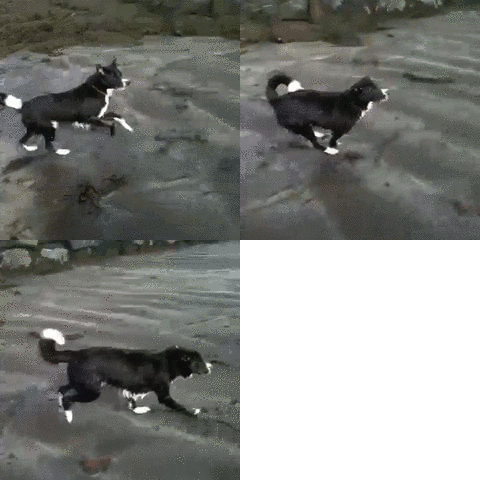
Animated GIF 12.5 fps, 256 colors.

Thanks to the lucky and functional combination format/sharing, GIFVid succeeds in giving iPhone casual and creative users alike the right balance between amusement and ease of use. As I said, GIF animations are all the rage on the web and this GIFVid makes everything about the process going from their creation to their sharing as easy as it can get. Of course, compared to videos, animated GIFs have a very limited scope of employ and for this reason perhaps some may find GIFVid a bit pricey for its possibilities.

Overall

Name: GIFVid
Developer: Eiji and Tom
Compatibility: iPhone (3GS, 4), iPod Touch (4). iOS 4.1 or later.
Price: £1.79||$2.99||€2.39
Vote: 4/5

GIFVid - Eiji Nishidai

Camer8: A Classic Super 8 Camera On Your iPhone

Super 8, introduced in 1965 by Kodak as a format accessible to everybody for its low costs and ease of use, is right now experiencing a huge revival: not only in its actual analog form, but also through its many digital imitations.

With Camer8 (formerly Super 8), Booom! intended to bring to iPhone, iPod Touch and iPad the authentic feel of old Super 8 home movies.

Main Features

  • Show video up to HD resolution;
  • Two filters with three intensity levels for each (light, medium, heavy);
  • Recording limit on/off;
  • 12 or 18 FPS.

Appotography Opinion

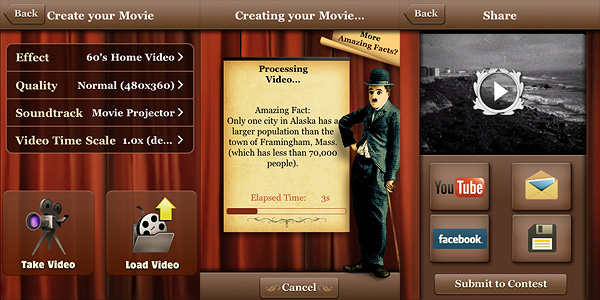
Camer8 lets you process videos taken from within the app — not external videos. Before recording your video, you have to choose among 12 or 18 FPS (Frames Per Second, the number of still frames displayed per second). You can set either of those as a default from your device settings. In general, given the phenomenon of persistence of vision in relation to human mind, the briefer the interval between still images, the smoother the perceived movement. Original Super 8 worked at 18 FPS; the most widely used standard for film is 24 FPS, although today there are many other popular formats (25, 30, etc.).

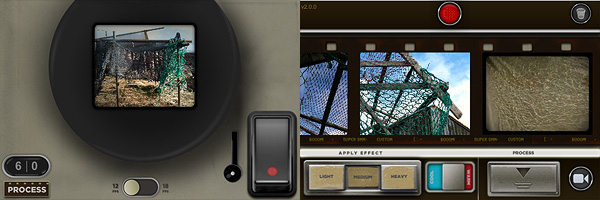
Camer8 app for iPhone by Booom

To record a video, you either keep the trigger button pressed or you tap on the latch, which will keep the trigger pressed in your stead. In both cases, a large viewfinder is brought up and you have a clear view of what you’re actually recording. You have a default time limit of sixty seconds per recording session, which is a lot better than the previous twenty-second limit of the first releases of Camer8; if it weren’t enough, this can be disabled or changed from Settings. Enabling recording time restrictions can be seen as a way to bring back the limitations of the original medium, although Super 8 allowed a much longer continuous filming time (a little more than three minutes per reel).

The recorded material is sent right away to the Camer8 Process Lab, a gallery where all unprocessed videos are stored. The filters add a colored layer of a warm golden color or of a cobalt blue over the clips, other than some dirt, scratches and dark framing. The intensity of the filters varies a little depending on whether you choose light, medium or heavy processing. Overall, the filters are quite good. You can filter the same video clip over and over, choosing warm or cold effect and different intensity every time. Rendering times are perfectly in the norm; to make things easier you can add to the processing queue several items at once — in this case, be careful because the app may crash if too many items are added. Processed videos are saved directly to your Camera Roll.

Compared to other video processing apps in the same league, Camer8 lacks some useful features, especially in the sharing department and, from my experience,  it’s also crash-prone. The effects, however good, are not as eye-catching as the ones of this app’s direct competitor, iSupr8. Still, Camer8 is a fairly decent app and a valuable addition to your collection, especially after the last update which fixed some of its major issues.

Overall

Name: Camer8
Developer: Booom!
Compatibility: iPhone 3GS-4, iPod Touch, iPad 2. iOS 4.1 or later.
Price: £0.59||$0.99||€0.79
Vote: 4/5

Camer8 - Bits of Cat Software

Silent Film Director Review

Once upon a time, MacPhun released a video editing app called Vintage Video Maker, a nice but perhaps a little overlooked video utility to turn videos into old looking footage. This story has an happy ending: Vintage Video Maker was recently upgraded and its name was changed to Silent Film Director. With enhanced features, a newly designed UI and more stability than its predecessor, Silent Film Director is what you need for giving your plain videos a beautiful vintage flavor.

Main Features

  • Up to HD video resolution;
  • Six vintage film styles;
  • Add custom soundtrack;
  • Accelerate or slow down footage;
  • Crop video clips;
  • Add title cards and transitions;
  • Share via email, Facebook, YouTube.

Appotography Opinion

As I said, Silent Film Director allows users  to process their videos in a delightful retro style. MacPhun’s app is more than that though: it also allows basic video editing, which includes cropping, adding transitions, title cards, and custom soundtracks.

Silent Film Director is available in two versions: one called Standard, that is basically what you get with your initial purchase, and the Pro one, which requires an additional in-app purchase (£0.59||$0.99||€0.79).

The Standard version mainly allows video post-processing. You can record the video from within the app or load it from the camera roll. You can also import external videos to your device through iTunes and ftp connection.

Silent Film Director App for iPhone by Macphun

Six different styles are available for giving your videos a believable vintage look. Choices range from the dusty and scratchy black and white of 20’s films to the washed-out and overly saturated lo-fi style of 70’s home movies. All the effects are very well-done. Other than applying filters, you can choose a soundtrack from the app’s limited selection, from your iPod or from your computer  — and of course, you can choose to keep the original audio of your video. As a bonus, you can also alter the video’s speed, decreasing or increasing it.

Rendering times are very fast compared to other apps, even on older devices — thumbs up to developers for the amazing improvement from the older Vintage Video Maker app. After you generate your processed video, you can either save it, mail it or share it on Facebook and Youtube.

The Pro version lets the user create more complex projects than Standard mode. It’s in fact possible to add more video clips to a single project and to enrich it with photos, transitions, and titles; by dragging and dropping each element independently and by cropping segments of footage, you have a portable editing studio at your fingertips. When your project is complete, you can proceed to the post-processing stage and then you finally save.

For the quality of the effects, for the features included, for the clear and stylish interface and for the overall experience, Silent Film Director deserves a full score. If you’re into all things vintage, this is one of the apps you must have in your collection.

Overall

Name: Silent Film Director
Developer: MacPhun
Compatibility: iPhone, iPod Touch, iPad. iOS 4.2 or later.
Price: £0.59||$0.99||€0.79
Vote: 5/5
Silent Film Director - MacPhun LLC

AutoPainter Review

What would have Van Gogh, Cezanne and Benson thought if somebody told them that several decades later they would be lending their artistic skills to just anybody with an iPhone?

Nobody knows. And honestly… Whatever. The genius of these artists is so immense that it wouldn’t make a great difference to them, even if they were alive today.

Mediachance give all iPhone, iPod Touch and iPad users the illusion of becoming a nouveau Vincent in a couple of minutes, with their AutoPainter, a portable version of their desktop application Dynamic Auto Painter.

Main Features

  • 1280 x 960 pixels resolution (3GS);
  • 4 artistic filters.

Appotography Opinion

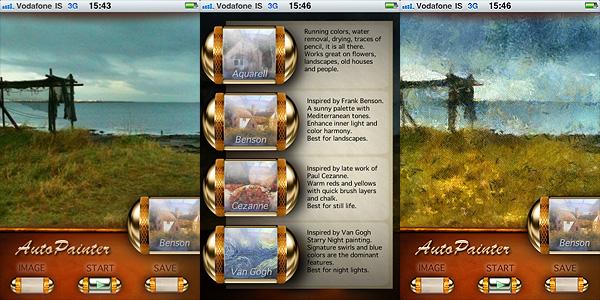
AutoPainter includes four artistic filters (Aquarell, Benson, Cezanne, Van Gogh) which you can easily use to process your photos to turn them into strikingly beautiful little works of art. All you have to do is choosing a photo from your camera roll or take one with the built-in camera, select your favorite filter and tap on the start button. It’s easy as that. You don’t have to adjust settings, move sliders, and so on.

AutoPainter app by Mediachance for iPhone

The artistic effects applied, simulating paint strokes and canvases, according to the style of choice, are very nicely rendered. Actually, they are among the best you will be able to find on iPhone in their genre, I think. The processing takes some time, but the fact you can watch how your picture is affected step by step is kind of entertaining, at first at least. This app, at least in its current version, will be a little disappointing for those wishing for a full resolution. On 3GS, which is what I used to test it, I was able to obtain a 1280 x 960 resolution. If this is it, it can be improved, definitely.

AutoPainter app by Mediachance for iPhone
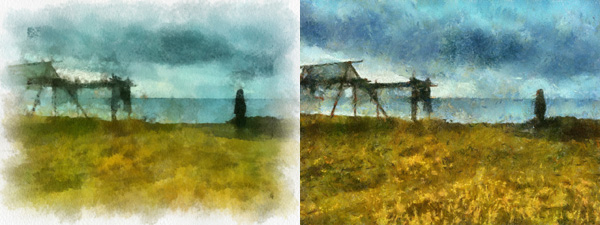
Aquarell and Benson filters.
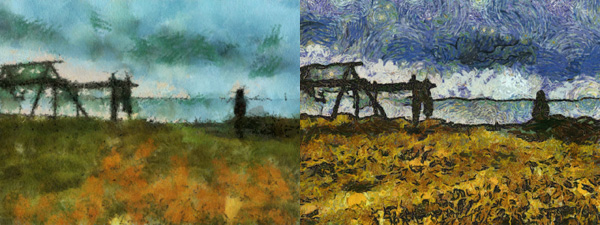
Cezanne and Van Gogh filters.

I said the filters are well done, but they do not work great on all photos. Sometimes the engine will be unable to make out some important details, so don’t be offended if after editing that portrait of your fiancée you love so much, she ends up with a huge yellow swirl on her forehead. Overall, better exposed and clearer photos are those that are able to give you better results.

Overall

Name: AutoPainter
Developer: Mediachance
Compatibility: iPhone, iPod Touch, iPad. iOS 4.0 or later.
Price: £1.19||$1.99||€1.59
Vote: 3/5

AutoPainter - Mediachance

TTV Camera: At This Stage, Nothing More Than A Nice Idea

Through the viewfinder photography, or more simply TtV, is a photographic technique which consists in shooting photos with a camera through the viewfinder of another camera. Very often the top camera, the one used for taking the actual photo, is a digital one, while the preferred surrogate viewfinder, the one of the bottom camera, belongs to a twin-lens reflex (TLR) camera. The two cameras are usually connected together through a contraption made of cardboard boxes, plastic or plumbing tubes and other materials. Because of the angle of the TLR camera, pictures taken with this technique are mirrored and need to be rotated in order to be used, especially in presence of lettering. Also, since the format of the bottom TLR camera and that of the top camera differ, the first being usually square, some cropping is required in post-processing.

TtV photography is characterized by intense framing, vignetting and presence of imperfections like dust, scratches or unexpected blurred areas. This photographic technique, allowing unique combination of old and new to obtain sometimes extremely stylized results, has become fairly popular with the advent of digital photography.

Main Features

  • Up to 640 x 640 pixels resolution;
  • Real-time processing;
  • 15 effects;
  • B&W and Sepia toning on/off;
  • Switch between back and front facing camera.

Appotography Opinion

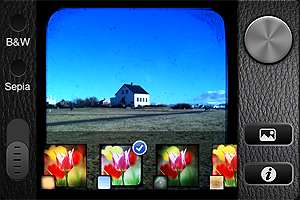
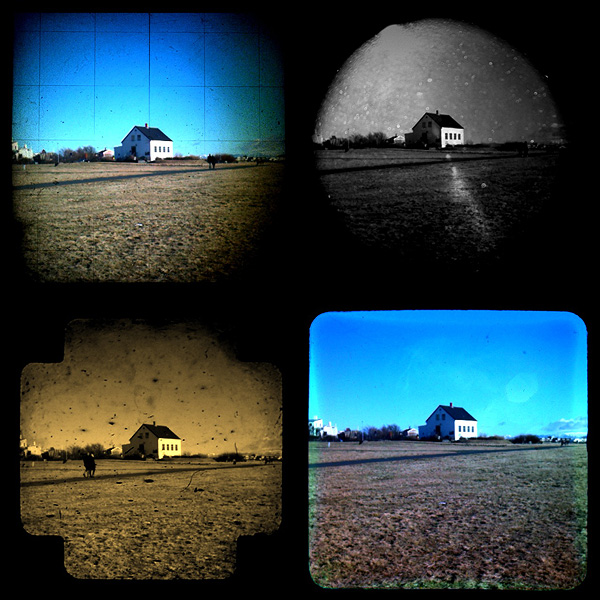
TtV Camera by Taplayer tries to bring to the iPhone the look and feel of Through the Viewfinder photography. What TtV Camera does, basically, is to stick a colored TtV texture on top of what you see through your viewfinder. The effects are all ready-to-use, you don’t have to make any adjustments. The app is as basic as it can get, with no sharing options or other extra features whatsoever.

You open the app and point the camera at your subject of choice. From the menu appearing at the bottom,  you select your effect among the fifteen available. Everything works in real time, so you have a precise idea of the effect that’s going to be applied before tapping on the shutter button. By tapping on the B&W or Sepia buttons, you can apply the same effects but with a desaturated or Sepia toning. When you are pleased with what is shown in the preview, you simply tap on the shutter button and your image is directly saved to the Camera Roll.

TtV Camera app by Taplayer for iPhone

The effects of Taplayer’s app are all right, especially some of them, but the fact the output resolution is so small greatly limits the usefulness of the pictures taken with TtV Camera. On their site, developers state the small resolution is at this stage necessary to make the real-time processing work smoothly. This may be true, but of course it doesn’t change the fact such resolution deeply affects the value of this app, especially if you compare it to other photography apps which provide convincing TtV look and higher resolution. Also, a recent release was supposed to fix an issue with rotated images. It’s true that the saved images are OK when they are saved now, but if you try sending them via email from the Camera Roll, for some reason they still appear to be rotated by 90 degrees.

TtV Camera app by Taplayer for iPhone

A few final words must be spent on the textures used in the TtV camera app: I could easily recognize some TTV textures released through Creative Commons under non-commercial license among those included in this app. After contacting the owners of the textures, I have gathered developers didn’t ask for permission to use the textures within their commercial app and they couldn’t be bothered crediting in any way the creators of the textures, either.

I don’t think I have to stress the fact this is a highly improper behavior which should be opposed — but sadly, there is little to be done about it these days. Especially from the developer of a photography app whose purpose is to make use of somebody else’s efforts extensively as it happens with TtV camera, this is totally unacceptable. In this case, I could recognize the textures right away, but I am sure there are many other developers doing the same and happily getting away with it. I don’t know how this specific matter will be settled and frankly it’s not my role to do more than reporting an improper use.

Licensing anything under Creative Commons doesn’t automatically mean the material is free to use for anybody under any circumstance. Non-commercial use means you cannot redistribute the material for a profit, unless of course you acquire a special permission to do so by the rights holder. Attribution is also necessary unless otherwise specified. I suggest to developers to carefully take a look at what different Creative Commons licenses imply before releasing their products.

Overall

Name: TTV Camera
Developer: Taplayer
Compatibility: iPhone, iPod Touch, iPad. iOS 4.0 or later.
Price: £0.59||$0.99||€0.79
Vote: 2/5

TtV Camera - Taplayer

iWatermark: Easy Universal Watermarking App

Call me naive, but I am not too fond of the notion of watermarking photos. It’s merely a problem with aesthetics, nothing intrinsic.  Photos with huge watermarks on them make me want to gouge my eyes out — but that’s probably my problem only. This doesn’t mean I can deny the usefulness or the necessity of watermarks, especially in times when everybody assumes that, just because it’s available over the Internet, any photo is free for anybody to use without even giving credit to the photographer. Alas, watermarks are one of the few weapons still available to discourage dishonest Internet users to take advantage of your creations. Again, nothing wrong with it: after all, painters have been signing their artworks for a long time now and nobody has complained so far.

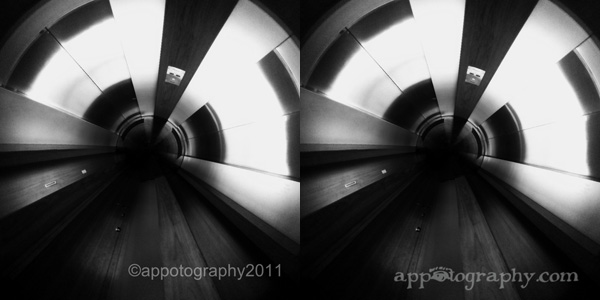
Being able to watermark photos relying entirely on devices like iPhone/iPad is a concern of many users willing to protect their work, especially if intended for Internet sharing. Plum Amazing offers with their iWatermark a tool that will come in handy to anybody in need to put a signature or other recognizable mark on their photography, in order to prevent misuse and other unpleasant surprises.

Main Features

  • Create personalized text and graphic watermarks;
  • Move, resize and rotate ;
  • Adjust color and opacity;
  • 10+ available fonts;
  • Add watermarks to multiple photos at once;
  • Create QR watermarks;
  • Save custom watermarks;
  • Integrated guide;
  • Share via email, Twitter, Facebook.

Appotography Opinion

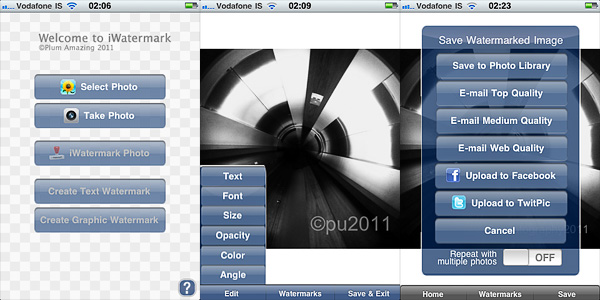
In iWatermark, it’s possible to work with photos stored in the Camera Roll, but it is also possible to use the built-in camera. The user can both create a text watermark or use graphic elements to attach to the photo. Using the app is quite easy for those who have some experience with more complex photo editing utilities. For others, using the app might require a little more effort, but a clear and extensive in-app guide was included to help beginners.

iWatermark app by Plum Amazing for iPhone

Some of the most common fonts come with the app, providing a certain degree of customization. It’s not a rich collection perhaps, but to make up for this lack of variety, it’s possible to switch from text watermark to graphic watermark creation; the latter allows to import external graphics like transparent png files to be used as watermarks. In the case of text, it’s possible to change color, opacity, size and angle of the watermark both by pinching and rotating with your fingers on screen and by moving sliders knobs for each parameter; you have access to the same parameters also for graphic watermarks, apart from the color value. You can freely move the watermark to find the more convenient placement over the base image.

In iWatermark you can also create QR (also known as Quick Response codes, bi-dimensional codes containing information of various nature) watermarks, which these days can be read by many scanning devices, Apple iPhone included — there are several  apps to decode QR codes in the App Store too.

One of the most interesting features of iWatermark, besides its full usability on multiple platforms, is the possibility to use your own graphics. Several other apps offer text watermarking, more or less as iWatermark does. But not as many offer to import custom graphics that can easily be used as pre-made logos.
iWatermark app by Plum Amazing for iPhone

What I would probably improve in this app is the selection of included fonts. Also, I would give the user the opportunity to disable the sample watermarks, which are many but frankly not very usable — who would want to attach a Tchaikovsky or a Mahatma Gandhi signature to their photos anyway? Or at least I would arrange the watermarks into separate lists, to access the custom watermarks more quickly.

Overall, iWatermark is an app that I feel like recommending: it definitely makes watermarking more accessible, quick and less frustrating.

Overall

Name: iWatermark
Developer: Plum Amazing
Compatibility: iPhone, iPod Touch, iPad. iOS 3.1.2 or later.
Price: £0.59||$0.99||€0.79
Vote: 4/5

iWatermark - Plum Amazing