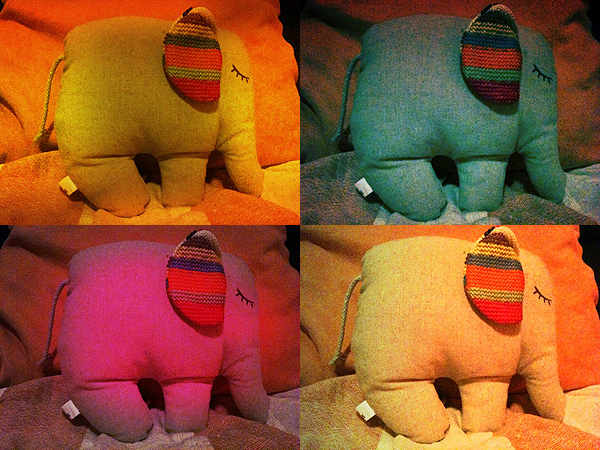
Best Camera: Simple And Straightforward, But Not Too Up-To-Date

Best Camera is an old acquaintance of the App Store. Ubermind’s app is easy and especially good for beginners that don’t need many different options and huge collections of filters, but still want to make their photos better with just a few touches. Best Camera got a recent update, so we seized the opportunity to review it at once.

Main Features

  • Full resolution available;
  • 14 filters available;
  • Disable single filters at any time;
  • Share via Facebook, Twitter, Flickr, email.

Appotography Opinion

Best Camera is a great app for users that are looking to apply very basic modifications to their photos. Ubermind’s app features simple functionalities and allows you to share your photos either via email or Flickr, Twitter, Facebook or on the bestcamera.com community.
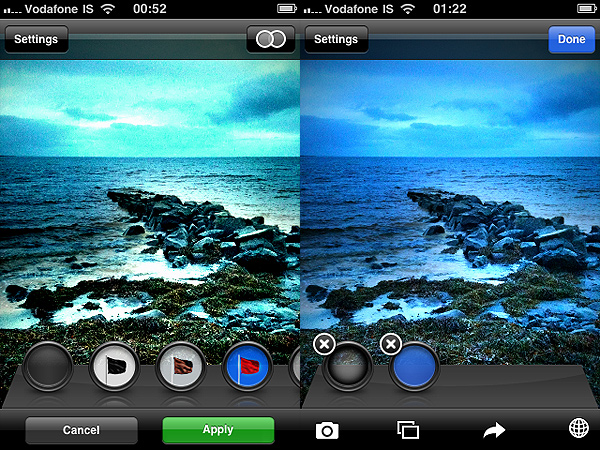
Best Camera for iPhone by Ubermind

The interface of this app is very pleasant and it still holds very well, even if you compare it to most of the more recent apps. It’s quite an impressive result and evidence if you develop a good app it will be valid for a longer time than you might have expected.
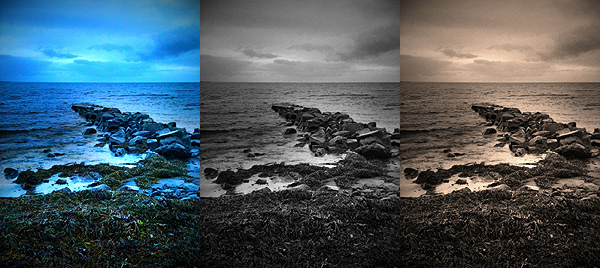
Best Camera for iPhone by Ubermind

You either take the photo or load it from your camera roll, then you can enhance contrast, saturation, turn your pictures into black and white or sepia, add a simple white border or black vignette, and so on. You can apply as many filters as you like to your photo and very conveniently disable each of them separately at any moment, but you are not given many customization options. It’s true that from the settings you can choose a 50% intensity for some of the filters, but you cannot adjust single parameters more than that; you cannot choose the right format to crop your photo (the app will automatically crop your photo); you cannot define intensity of vignetting. Despite these limitations, Best Camera works quite well and it’s amazingly easy to use. But honestly, despite the recent update, Best Camera remains a little behind many of its more up-to-date colleagues, which for the same price or even less offer you much more choice and much more freedom.

Overall

Name: Best Camera
Developer: Ubermind
Compatibility: iPhone, iPod Touch, iPad. iOS 3.1.3 or later.
Price: £1.79||$2.99||€2.39
Vote: 3/5

Best Camera - Ubermind, Inc.

ToonPAINT: Neat-Looking Sketches From Your Photos

ToonPAINT by Toon-Fx was conceived as a tool to allow even people who don’t have a knack for drawing to come up with nice looking stylized pictures. Using image processing algorithms, ToonPAINT creates for you an easy to customize sketch.

As with all apps in the same league though, you have to make sure from the start you understand the difference between actual drawing and processing an image to make it look as if it was drawn. Usually, results are much better if you know how this kind of apps work and how and when they can come in handy.

Main Features

  • Up to 850×565 pixels resolution (3GS);
  • Zoom and pan;
  • Restore from previous session;
  • Undo/redo;
  • Basic and advanced settings;
  • Integrated guide;
  • Share via email, Facebook, Twitter.

Appotography Opinion

ToonPAINT is very simple to use and straightforward; yet, you have some reasonable control over your image. The effect is similar to what you would be able to achieve with a tracing tool in a vector editing software. ToonPAINT doesn’t actually turn images into vectors though; it only imitates the vector tracing style.

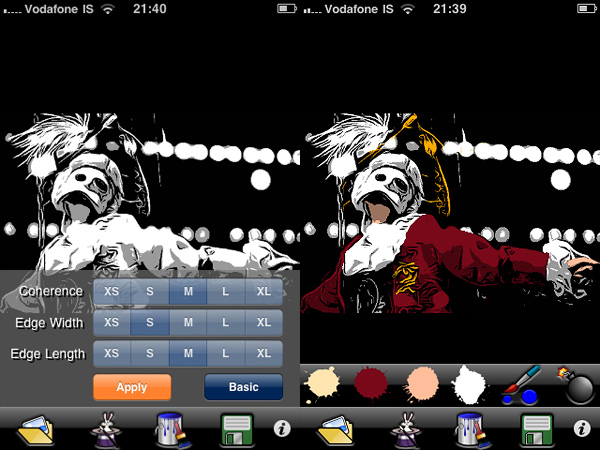
You start either with a picture you have previously taken or you take a snapshot with the built-in camera. With sliders you can adjust parameters — edges accuracy, amount of black/grey, etc. — but if you want even more control, you can switch to advanced settings and have at your disposal some more flexibility. After you apply the toon filter and your picture of choice is turned into a sketch-like image, you can proceed to apply color, if you wish. With a brush and a no-frills color-picking method, you can enrich your monochrome images. Getting the hang of the coloring process won’t be a problem, if you are already quite gifted in finger painting; it will be a bit harder if you are a total beginner, but the undo feature, with the possibility to zoom in and out and pan, will definitely help you. After you are done, you can save of share on Facebook and Twitter.

ToonPAINT by Toon-FX
Turn photos into sketches and apply color.

ToonPAINT by Toon-FX

At this stage, ToonPAINT is a cool little app you can use, for example, in combination with a strip creator app for developing your own instant comics. Many users in fact say they use this app especially for this purpose. However, there are a few things that could be improved even more to make ToonPAINT more functional. For example, it would be useful to have a preview in advanced settings to know exactly how your choices are actually affecting the image before applying them; a full-fledged undo command, to be used not only in the painting stage; full resolution, to make use of the images also outside your portable devices.

ToonPAINT allows the user to obtain very neat results, probably among the best on iPhone/iPod Touch/iPad. If you want a photo-to-sketch app, Toon-Fx’s app is what you need.

Overall

Name: ToonPAINT
Developer: Toon-Fx
Compatibility: iPhone, iPod Touch, iPad. iOS 3.0 or later.
Price: £1.19||$1.99||€1.59
Vote: 3/5

ToonPAINT - Toon-FX

Instagram and 8mm updates

Instagram and 8mm got an update. Here is what’s new in the updated version for both apps:

8mm

  • Added projector sound; you can also choose mute or microphone only;
  • Enabled video geo-tagging when location service is on;
  • Fixed audio sync issue;
  • Fixed video orientation bug when device orientation is locked;
  • Fixed app crashing during phone calls;
  • Improved gallery loading speed.

Instagram

  • Tag topics in your posts: type a topic with a # in front of it to add your own photo to the stream for that tag;
  • Manage comments-delete comments on your photos, or your own comments on other photos;
  • Flag and block problematic users;
  • Korean and Portuguese translation and updates;
  • Bug fixes.

Phoster: Graphic Designing In A Couple Of Clicks

Is there truly anybody who hasn’t tried to act as a graphic designer these days? From creating a custom avatar for social networks to setting up your own blog, almost anybody with a working Internet connection at some point felt the urge to create slick graphics to use them in the most diverse ways.

Bucket Labs delivers to the App Store their excellent Phoster, a tool with a lot of potential that will let any user believe he can become a graphic designer in just a couple of clicks.

Main Features

  • Full resolution available;
  • 50+ adjustable templates;
  • AirPrint support;
  • iOS retina-display support;
  • Share via email, Facebook, Twitter, Flickr.

Appotography Opinion

Let me get this straight from the beginning: Phoster is fun. Even if you don’t actually need to make posters, fliers or invitations and print them, still this app is a joy to use. Phoster works really well both on iPad and on iPhone and it is quick and intuitive and printer friendly. Creating a clean-cut poster and integrating your photos into it require just a few minutes, all thanks to a neat assortment of pre-made templates and very easy to follow customizing steps. Forget about all those apps with cheesy and awfully awkward layouts: Phoster is what you need.

Phoster by Bucket Labs
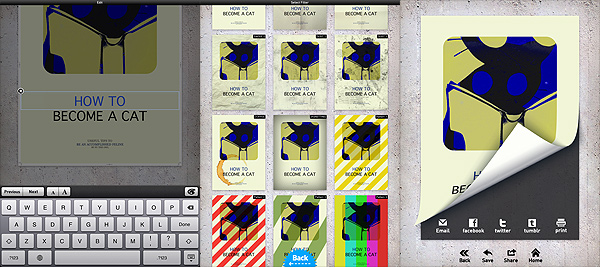
The various stages of your poster's creation.
Phoster by Bucket Labs
I adjusted colors with external help and... voilà!

All the user has to do is choosing among the templates; an image from the camera roll can be added to the chosen template; by zooming in and out or rotating, it can be adjusted to the layout. To customize your work further, you can change font size and color and, obviously, you can input your own text. After you’re done, you can add one of the effects and save — or print or share — your creation.

Of course, you cannot expect to use Phoster for everything. Phoster is mainly aimed at the creation of posters/fliers/invitations. Bucket Labs’ app is excellent for people that want to create slick graphics without having any particular training or skill, but it is also a nice pastime and a good shortcut for those who are already into design.  A little more customization — moving the text around, possibility to change colors of templates’ without resorting to other apps, etc. — would truly make this app perfect.

Overall

Name: Phoster
Developer: Bucket Labs
Compatibility: iPhone, iPod Touch, iPad. iOS 3.2 or later.
Price: £1.19||$1.99||€1.59
Vote: 5/5

Phoster - Bucket Labs

Lo-Mob: Awesome Retro Lo-fi For All Tastes

Photography as we know it dates back to the first decades of XIX century. Low fidelity, although maybe with slightly different connotations from more up-to-date ones, has always been an intrinsic factor to visual representation.

Lo-Mob by Aestetis brings dated lo-fi to the App Store, with an interesting collection of filters imitating techniques from several different ages in photography history. The results are quite interesting. Lo-Mob was one of the first apps I got many months ago when I first decided to make the most of my iPhone photography. So far, I am not disappointed.

Main Features

  • Full resolution available;
  • 40+ different filters;
  • Switch on/off individual filter parameters;
  • Integrated manual;
  • Share via email, Facebook, Twitter, Picasa, Flickr.

Appotography Opinion

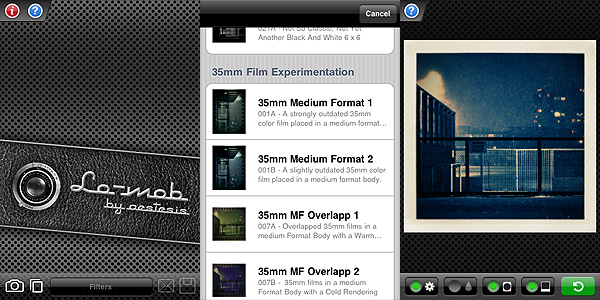
Lo-Mob combines a nifty look with actual handiness. The interface is quite clean and simple; accurate description comes with each filter, which you can choose from a scrollable menu once you either take a photo or upload it from your camera roll; a user’s manual is also available in-app for beginners. The effects are enough to work with and all of them have adjustable parameters. Frame, vignetting, color and blur: you can switch either of these on and off to customize your photos or just choose the presets as they come with the app. Some filters only have a few of these selectable elements, not all of them. You can anyway choose from the settings to disable permanently each parameter individually, without having to do it every time. To adjust your photo to the frames more effectively, you can zoom and pan with your fingers. When the result pleases you, you can either save or share via email or through some of the most widely known social networks.

Lo-Mob by Aestetis iPhone

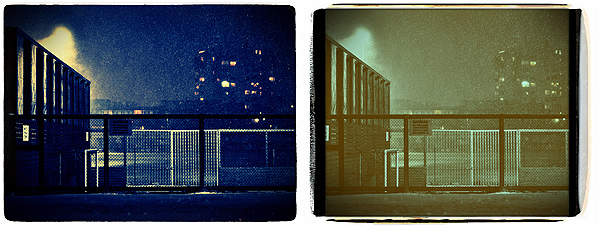
The filters range from simulation of instant squared formats to 35mm slides and much more, with an assortment of color virages and outdated black and white. As you can see, the imitation is quite accurate, making edited pictures look believable in their retro look.

Lo-Mob by Aestetis iPhone

Some aspects could definitely be improved. Processing times can be irritatingly long for a photo app. Also, the app sometimes crashes when you switch from an image to the other or from a filter to the other. It must be said, it doesn’t happen all that frequently. Although not absolutely necessary, some more features beside basic zooming in and out could be added to better adjust images to frames. The quality of some of these frames in itself isn’t excellent, especially at higher resolutions.

Despite these flaws, Lo-Mob remains one of the apps I enjoy using when I want to change dramatically the looks of my iPhone photos. Given the possibility to use any filter’s parameter as an independent element, Lo-Mob is also good to just add a frame or a little toning without using each filter as a whole.

If you’re into vintage and lo-fi, Lo-Mob is a great addition to your collection of photographic apps.

Overall

Name: Lo-Mob
Developer: Aestetis
Compatibility: iPhone, iPod Touch, iPad. iOS 3.1.2 or later.
Price: £1.19||$1.99||€1.59
Vote: 4/5

lo-mob - aestesis

DXP: Mix and Blend Your Pictures

Dear addicts of photo editing, I know it’s hard for you sometimes to do all the things you’d like to on your Apple devices. A full-fledged computer with a proper software is what you are most comfortable with, but transferring photos to edit them properly is not something you can be bothered to do all the times. Among other fancy effects, many apps come with ready-made textures that make up for your unsatisfied editing cravings. However, being able to use your own personal textures is all another story, right? Also, being able to mix pictures is not an easy thing to do on iPhone/iPod Touch.

DXP stands for “double exposure”. Tandem Systems’ app goes beyond the simple double exposure suggested by its name. With its range of blending modes and other options, it will provide you with some very interesting features that to this day most apps are not able to offer. Blending pictures effectively could almost be considered a branch of photography on its own. In fact, choosing the right blending mode can sometimes change the final look of your pictures. DXP will help you achieve the right effects.

Main Features

  • Full resolution available;
  • Take photos in different formats (4:3, 3:2, 1:1);
  • Grid on/off;
  • Flip and rotate;
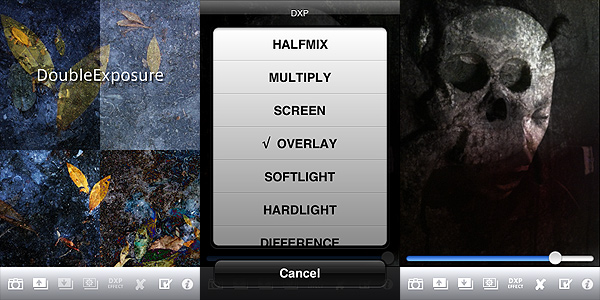
  • 18 blending modes (multiply, overlay, screen, hardlight, saturation, etc.).

Appotography Opinion

Basic but adequate features for effective picture blending are included in DXP. You can work either with shots taken with the built-in camera, with photos you have in your roll or with both at the same time. The blending modes’ intensity can be adjusted to generate different effects to suit your needs; you can desaturate or turn your pictures to sepia hues; you can make other adjustments, like choosing to adapt the superimposed images to fit the first layer or having the app crop them; you have a “push to/pop from stack” feature that will make it simpler to work with layers without having to handle them all at the same time.

DXP by tandem Systems for iPhone

DXP by tandem Systems for iPhone
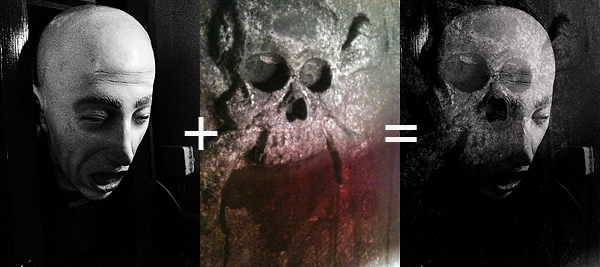
Example of fancy things you can do with DXP

DXP brings iPhone photography to another level, giving the user that doesn’t feel satisfied with pre-packed effects more freedom, opening new possibilities of expression.

There are a few changes which would improve the usability of DXP: the possibility to not have the layers merge as soon as you choose to turn them into black and white or sepia; more flexibility in the “push to/pop from stack”, in order to process a larger number of layers without risking to mess everything up; a wider choice of masking features; more customizable image rotation and layer cropping; at least an email sharing option. Also, I reckon up to a few updates ago an undo feature was available in DXP. I’m not sure why right now it isn’t available anymore. It was quite handy, because it allowed to make corrections without having to start over.

At the moment, for blending images properly, DXP is the best app available in the App Store. This app also comes in a lite version that you can try for free, so check it out!

Overall

Name: DXP
Developer: Tandem Systems
Compatibility: iPhone, iPod Touch, iPad. iOS 3.1.3 or later.
Price: £1.19||$1.99||€1.59
Vote: 4/5

DXP - Tandem Systems

PhotoArtista Oil: Let’s Pretend We Can Paint!

Whoever spread the notion that photos can successfully be digitally turned into paintings with a couple of clicks should be spanked very badly. This is how I see it; everybody is free to disagree. But so far I haven’t found a single successful way to make a photo look like a real painting with digital filters, not even from the most renown developers. Be careful: I haven’t said a “realistic” painting.

Even the best results obtained with ready-made filters are nothing like actual paintings, photos of paintings or even like photographs of actual paintings taken from photos. Or… whatever. They retain that certain lousy artificial quality that is terribly unattractive. To obtain an effective painterly effect, first of all you need to work a lot on your photo, concentrating not on reproducing useless trivialities like the embossing or the direction of the strokes or similar, but on trying to recreate a general feeling, an atmosphere, that is usually very subtle; you have to work on bringing out that certain something, if you know what I mean. So far, even the best filters are more focused on the trivialities I was talking about than in defining and trying to reproduce this something, that is what truly differentiates painting and photo. Let’s be honest though: we cannot ask too much of mere filters. When technology will reach a higher degree of sophistication and artificial intelligence will be improved, maybe the visible results will be more convincing.

I’d like to add that painting and photography can be considered sisters in the realm of visual arts, but they are definitely not interchangeable, especially after the achievements they both have conquered over the years. To fulfill their role, they should take different paths and give different interpretations, even of the same subjects.

Main Features

  • Full resolution available;
  • Different painting styles ready to use;
  • Adjustable brush, brightness, color and canvas;
  • Add borders;
  • Possibility to create and save custom presets;
  • Share via email.

Appotography Opinion

With PhotoArtista Oil, JixiPix tries to give anybody the ability to become an accomplished oil painter with very little effort. I’ve read comments of some people using this app boasting about the fact with PhotoArtista Oil they could fix even the most outrageously horrible photos they had taken. I’m not sure how the developers should feel reading comments like these; I hope they’re not particularly proud of such publicity.

PhotoArtista

PhotoArtista Oil by JixiPix iPhone

PhotoArtista Oil works both with camera roll and with shots you take with the built-in camera. As with other apps in the same range (PhotoArtista Haiku, PhotoArtista Sketch and Vintage Scene), you have an array of presets ready for using from which you can start working. You can simply choose one of those presets and save your photo or you can adjust several variables to make your picture suit your personal taste. You can modify intensity and type of strokes, canvas texture and color, color tones, apply edges, and so on. If you want to use again the preset you have created yourself, you can save it.

Processing times are extremely long and unnerving; deciding to choose a style and then changing your mind can make you waste 5+ minutes of your life. Each time, not in a lifetime. This can be OK for you, I don’t want to imply you are in a hurry… I’m just saying.

Overall, the results are good, but not astonishing — but this depends of course on your personal idea of astonishing. The canvas in particular doesn’t look very realistic, especially if you choose to look at your picture at full resolution. If you are not very careful with your parameters, the strokes will not look natural at all. Not to mention that you shouldn’t expect the app to make a good job equally with any single photo you throw at it. Anyway, if you want to turn your photos into paintings at all costs on your Apple device, this is perhaps as good as it can get.

Overall

Name: PhotoArtista Oil
Developer: JixiPix Software
Compatibility: iPhone, iPod Touch, iPad. iOS 4.0 or later.
Price: £1.79||$2.99||€2.39
Vote: 3/5
PhotoArtista - Oil - JixiPix Software

iSupr8: Super 8 Makes a Comeback

History time: Super 8 was released by Kodak in 1965 as an upgrade from the previous 8 mm format. Differently from the previous format, its perforations were smaller thus allowing a larger area to be exposed. It also allocated space enough for magnetic sound recording.

Born as an improvement from basic 8 mm home movies, Super 8 acquired a legendary status, also thanks to achievements of indie film-makers that resorted to making use of it as a means to keep production costs lower. It’s not a surprise then that more than a few experimental film-makers continue to use this format extensively and that even Hollywood’s J.J. Abrams is going to pay his tribute to it with his upcoming Super 8.

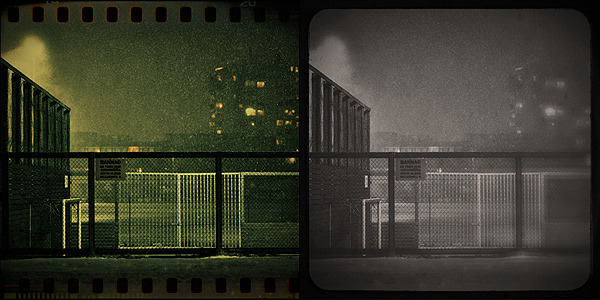
Together with many other developers, New Zealand-based MEA Mobile jumped on the revival wagon, releasing iSupr8, that according to them, is an app “designed by vintage film enthusiasts” as an “effort to revive and increase awareness of a commercially dying format to a new generation”. For this app, MEA Mobile developed Tru8™, a post-processing algorithm capable to grade each pixel separately according to exposure, adding at the same time other effects like film flickering, projector framing and other realistic elements. All in the name of the most accurate authenticity of looks possible.

Main Features

  • Record in 360p, 480p or 720p (on supported devices only);
  • Tru8™ processing;
  • LED enabled (on supported devices only);
  • Share via email and Facebook.

Appotography Opinion

Note: A more recent review of iSupr8 is available here.

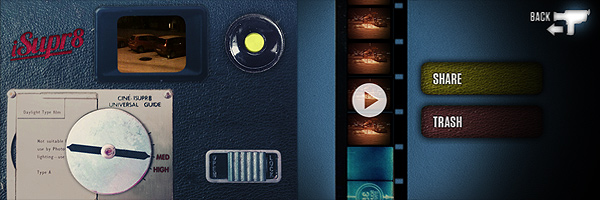
iSupr8 doesn’t work in real-time and doesn’t process videos previously taken. You take your video on the spot and once you recorded it, it is stored in your rolls gallery. From there you can either decide to process it or to trash it. Processing times are perfectly average for this kind of apps. Memory usage is also quite in the norm, meaning this app won’t cause much troubles, overloading your device beyond its capabilities and crashing continuously. The interface is clean and stylish, making the use of the app an enjoyable and rewarding experience from this point of view.

iSupr8 by MEA Mobile for iphone and iPod Touch

There is only one filter you can choose from, so if you expect a filter collection this app is not for you. The emulation of original Super 8 is very good though, especially in the fact the developers wisely decided to take another path from that already chosen by their colleagues: they didn’t overdo it, adding all kinds of visual mumbo jumbo, with too much dirt and scratches and extreme overly saturated or desaturated tones. As far as the final outcome is concerned, iSupr8 holds very well.

This video was shot in some of the worst possible conditions, at night and with snowy weather. Keeping in mind these considerations, the results aren’t half bad.

Despite all my previous comments, I don’t feel like giving a higher rating to iSupr8. There is a very serious issue I find with this app and it concerns the viewfinder: accurately framing your subject is absolutely frustrating and sometimes it requires a lot of testing and retakes, unless of course you’re careless enough to not mind about what will be in your final video. Some other apps in the Photography category used to have, or have still, this same issue. Just to mention a famous example, Hipstamatic developers too at first had released their app with this same problem — but partially corrected it adding a “precision framing” alongside the “classic” and imprecise one. Original Super 8 cameras did have some issues with framing, and as a matter of fact many users complained about viewfinder’s lack of accuracy. Each camera had different troublesome framing, some being a little off vertically and some other horizontally. iSupr8 is a bit of both and getting your video right is not the most intuitive task, in spite of the app’s overall simplicity.

Emulating the feel of the original Super 8 is one thing; reproducing also issues and deficiencies of old cameras is another.

Overall

Name: iSupr8
Developer: MEA Mobile
Compatibility: iPhone (3GS, 4), iPod Touch. iOS 4.1 or later.
Price: £1.19||$1.99||€1.59
Vote: 3/5

iSupr8 - MEA Mobile

FX Photo Studio Review

Basic features like crop and rotate should at this point be included in most apps, with the only exception of those that strictly try to imitate instant cameras and their mechanics. Unfortunately even cropping and rotating aren’t all that common, so sometimes you end using three different apps instead of one just to make your picture look alright. Which is OK if you’re an iPhone geek or if you have a lot of time to devote to your mobile photography, but it’s definitely not convenient if you just want to make your photos look nicer.

FX Photo Studio is comprehensive and at the same time simple enough to make both the casual iPhone camera user and the geeky type happy. MacPhun’s FX Photo Studio is one of those apps whose aim is to offer the user a wide variety of photo editing possibilities within a single product.

Main Features

  • Full resolution available;
  • 180+ effects, including borders (more available with in-app purchase);
  • Crop and rotate;
  • Gamma correction;
  • Shake to randomize effects;
  • Create and save custom presets;
  • Hide/unhide effects;
  • Undo/redo;
  • In-app hints and trivia;
  • Share via email, Facebook, Flickr, Twitter and Tumblr.

Appotography Opinion

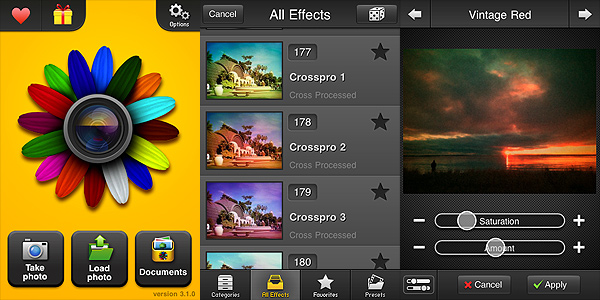
With FX Photo Studio, MacPhun offers a well-conceived and user-friendly multi-purpose utility, with special focus on photographic post-processing effects. The interface of FX Photo Studio is one of the simplest and yet most functional you will be able to find. Despite the assortment of tools and effects, the simplicity of use of this app is impressive. Everything is optimized to allow even the newbie to obtain good results with the minimum effort.

FX Photo Studio by MacPhun for iPhone

To use this FX Photo Studio, you can take a photo within the app or use pictures previously taken. You can adjust basic parameters, like gamma luminosity; you can straighten your photo by rotating and cropping; you can add single or multiple effects. Effects are divided into categories, ranging from vintage to pop, from overlays to borders, etc., and each of them is adjustable to suit your needs. More filters beside those you get with the initial purchase are available in-app (you can get each effect pack separately for $0.99 — €0.79 or £0.59). You can filter your photo over and over and create custom presets which you can save for future use. To make things even simpler while browsing through the effects collection, you can add effects you use more frequently to your favorites and hide those you don’t use at all. FX Photo Studio, unlike other photographic suites as Tiffen’s Photo FX, also has a great choice of sharing options, including email and most popular social networks, to make use of your photos outside your Apple device.

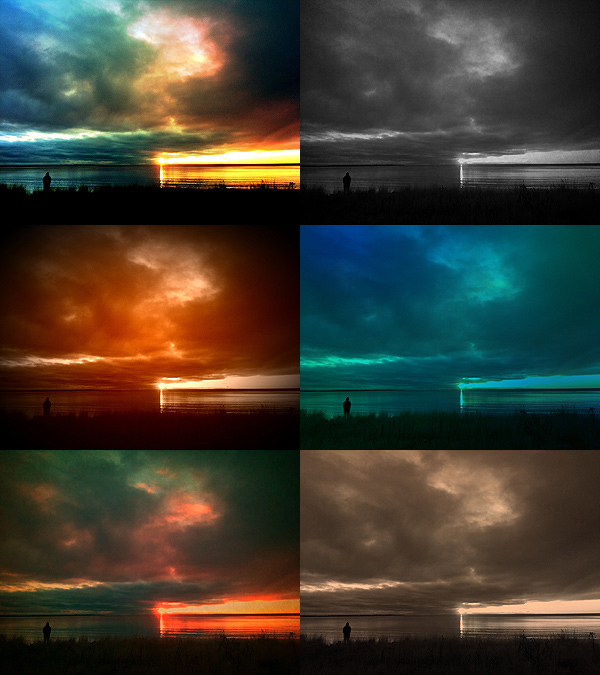
You can have a better idea of how FX Photo Studio affects your photography by looking at these pictures. The same image was edited each time with a different filter:

FX Photo Studio by MacPhun for iPhone

Being not a fan of corny effects in the photo booth style, my complaint about FX Photo studio concerns the inclusion of some effects in the app. Flowery frames or fake water ripples, decorations in the unbearable 80’s style, bubbles and stars, embossing and superimposed ghostly faces cheapen photos rather than embellishing them, at least according to my taste. This is why I have used FX Photo Studio a lot less frequently than other apps in the same league — again, like Photo FX or Camera+. But if you’re into these things, you’ll probably be puzzled reading my criticism. To this I can only reply: to each his own photography!

Enjoy the app!

Overall

Name: FX Photo Studio
Developer: MacPhun
Compatibility: iPhone, iPod Touch. iOS 3.1 or later.
Price: £1.19||$1.99||€1.59
Vote: 4/5

FX Photo Studio - MacPhun LLC

1001 Awesome Filters: Not So Awesome

When browsing through the App Store, one is inevitably drawn to some apps that seem to boast about their greatness with self-referential exaggerations and more than bombastic descriptions. However, very often apps that need to rely on these tricks as means of attraction are apps that are not worth your time — and money. Why is that? Maybe because if you truly have good material you don’t need to show off — results will definitely speak for themselves?

Main Features

  • Up to 640×480 pixels (3GS);
  • Filter on/off;
  • Flash on/off (on supported devices);
  • 140+ colored filters;
  • Seven series of filtering masks;
  • Four levels of intensity for each filter;
  • Integrated photo viewer.

Appotography Opinion

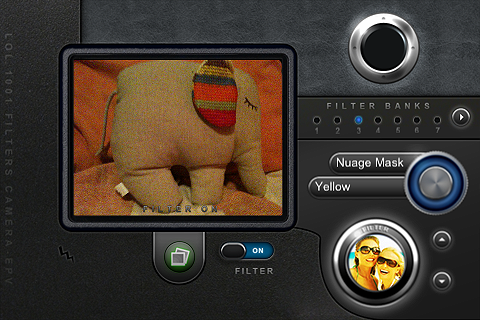
Simply put, this 1001 Awesome Filters is another app you should forget about. It doesn’t matter how many filters the developers say you have at your disposal, when none of these is even remotely good. The filters in this app are quite cheap-looking, especially the masks, and they don’t blend organically with most photos; more than improving your photo, you  will risk to spoil it utterly without having a second chance. Using 1001 Awesome Filters Digital Camera is quite confusing, especially at first: navigating through the filters is clunky and time-consuming. In general, the interface of 1001 Awesome Filters is not intuitive and buttons are not handy at all, first of all because of their size, and secondly for their poor responsiveness. The preview is not accurate enough to have a precise idea of the final outcome, and you have to use a filter several times in order to know more or less how your image will be affected. Even if you get the hang of this app, you cannot do much with the presets you are given anyway — you can only choose to change their intensity level after your photo is taken. Most filters resemble one another anyway, so there isn’t much variety to begin with. In the current version, you can only process images taken with the built-in camera, not those you have in your camera roll. This also means the photo viewer is quite useless a feature.

1001 Awesome Filters Digital Camera iPhone

It’s very easy, when you have not a clue about what high quality photographic effects are, to develop a product and sell it adding adjectives as “awesome”, etc. or suggestive numbers to its name to impress buyers. Accept the fact this approach won’t fool everybody, especially when there are so many other apps that are truly deserving available on the market. LOL Software seems to be more interested in developing heaps of apps of  any existing genre than focusing on less products and develop them more carefully. Too bad. If if it’s true this method can work for some categories of applications, it’s also true it doesn’t work very well with photographic apps, because to develop them not only you have to be very careful in creating a well-balanced and functional product, but you also have to have a good discerning eye.

1001 Awesome Filters Digital Camera iPhone

An update was announced some time ago, so we hope that some of these issues will be solved and that we will be able to reconsider our current opinion.

Overall

Name: 1001 Awesome Filters – Digital Camera
Developer: LOL Software
Compatibility: iPhone, iPod Touch. iOS 3.0 or later.
Price: £0.59||$0.99||€0.79
Vote: 1/5

1001 Awesome Filters - Digital Camera - LoL Software