MonoPhix Review

For most people, monochrome is just negation of color and thus a black and white picture is a mere desaturated version of something that in the original contained colors. For photographers specialized in monochrome though the question is not that simple. Black and white photography is first of all a matter of thinking in monochrome, carefully pondering before clicking the shutter button if monochrome is going to work or not with a certain subject. Not every photo that looks good in color looks also good in black and white and vice versa. Monochrome is a branch of photography that in the most accomplished instances follows rules that are slightly different than those of color photography.

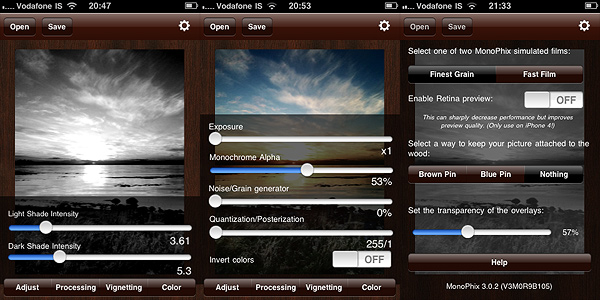
Currently in its third version, with revamped appearance and improved features, MonoPhix ranks among the best monochrome conversion apps for the iPhone, iPod Touch and iPad.

Main Features

  • Full resolution available;
  • Adjust light/dark level and exposure;
  • Set alpha opacity and posterization effects;
  • 2 types of vignetting on/off;
  • Grain generator;
  • Set tint (bw, sepia, antique, custom);
  • 2 types of film simulation;
  • Retina display support.

Appotography Opinion

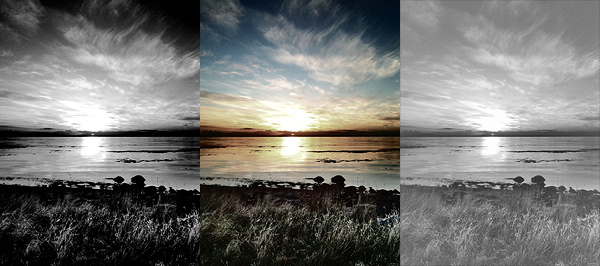
To use MonoPhix, all you have to do is to load a photo into the app. You are presented with several options to give you great control over your final outcome. By playing with sliders and switches you can handle several different aspects of the editing process. You can go for a vintage look, by adding intense noise (grain), vignetting and tint, or you can simply simulate slight desaturation making use of the monochrome alpha setting, which basically blends the monochrome version of the image with the original colored one. The interface works flawlessly and setting each parameter is very easy.

Monophix for iPhone

The black and white effects delivered by MonoPhix are rich and captivating. In photos where greatest importance must be given to contrast enhancement, MonoPhix truly gives its best and most convincing results.

Monophix for iPhone

What would be useful to have as an addition to an app as focused as MonoPhix on converting color to monochrome is an option for color sensitivity adjustment. MonoPhix already does its job pretty well. However, being able to work not only with parameters as exposure and light/dark balance is something photographers devoted to monochrome I am sure would appreciate. Unfortunately, not many apps to this moment offer this feature, but for more accurate control over black and white photography color sensitivity is fundamental.

Both for the quality of processing and for its user-friendly interface, MonoPhix 3 remains one of the best apps in its genre and a must have for users eager to make the most of their black and white photography.

Overall

Name: Monophix
Developer: UIC Phoenxsoftware
Compatibility: iPhone. iOS 3.0 or later.
Price: £0.59||$0.99||€0.79
Vote: 4/5

MonoPhix - Vintage meets Technology - UIC Phoenxsoftware

iSupr8 Updated to 1.2

iSupr8 got an update a few hours ago. I didn’t try the new version yet; here is what’s you will find in version 1.2:

  • Video import;
  • Large viewfinder;
  • Three levels to the filter’s intensity;
  • Share full resolution still frames of your films on Snapr community;
  • Reduced render times for 3GS;
  • Compression options for sharing.

Lomora 2 Review

The denomination lomography derives from LOMO, also known as Leningrad Optical & Mechanical Union, an originally French-Russian optical instruments manufacturer active in Russia since 1914. The story of this manufacturer is long, but I can keep my account brief by saying LOMO introduced to the market their renown LC-A (which stands for Lomo Kompakt Automat) consumer cameras only in relatively recent times, in 1984 to be more precise. The LC-A, a 35mm film camera, was able to deliver uniquely charming pictures, characterized by a dreamy feel due to their vibrant colors, blur, vignetting and other unfathomable accidents. Thanks to its idiosyncrasies, the LC-A was graced by unexpected popularity and it soon became a favorite of  many photographers looking for a more casual and fresh approach to photography. After a series of fortunate coincidences, the fame of the little unassuming camera produced by LOMO rapidly grew outside the Soviet Union, especially thanks to the enthusiasm of a group of devotees from Austria, future founders of Lomographische AG, the sole worldwide distributor of the LC-A. The Russian manufacturer discontinued the production of the original camera and all its components in 2007, but the production continues to this day in China.

The LC-A promoted an approach which proved particularly suitable for lo-fi and inexpensive photography. Lomography has become over the years almost a genre of its own: many photographers found the limitations of the medium particularly stimulating to discover new ways of shooting. Significant evidence of the huge success of this style is the great number of apps that tried to bring the feel and the experience of authentic lomography to iPhone photography.

Lomora 2 for the iPhone is, as the name suggests, one of them.

Main Features

  • Full resolution available;
  • Square format;
  • 18 film simulation effects;
  • Adjustable vignette;
  • Add colored flash or filter.

Appotography Opinion

I will say it from the start: I’m torn as I write this review. Torn because, in spite of all its qualities, Lomora 2 has some issues that can’t be overlooked, especially in comparison with other apps and also given its slightly higher than average price.

Since the point of Lomora 2 is to imitate the feel of analogue, you cannot load previously taken photos. Some people are usually annoyed by this solution. To them I say: this app is definitely not for you.

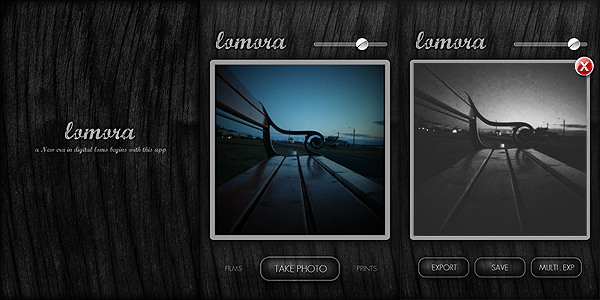
You have eighteen effects to choose from, all recreating the looks of authentic films — among them you can read names like Provia, Sensia, Ektachrome. In addition to these effects, you can apply vignetting, colored flashes and filters. When you shoot, you have a preview of what your photo looks like; if you are satisfied with it, you can save or export to the camera roll while if you aren’t, you can add to it another exposure by shooting again or you can simply delete it.
Lomora 2 for iPhone

Everything would seem very linear from my words. To be honest however, using Lomora 2 I felt somehow not very comfortable, at least in the course of the first hours. The user interface seems intuitive enough, but just finding out how things are exactly done isn’t that simple. Tapping on the Lomora logo, for example, opens the settings menu, but it took me some time to discover this trick. In a user-friendly app, it should be clear to anybody from the very beginning where you have to look to change the settings. To close the settings menu you have to tap again, this time outside the menu’s window. This works also for the film menu: you select the film and you have to tap outside the menu in order to close it, otherwise it won’t disappear. Another example that comes to mind: to trigger the multiple exposure, after you take the first shot, you have to tap on the “Multi. Exp” button, go back to the camera mode manually and take another shot. At this point the second shot is superimposed to the first and you can save your double exposed image. But there is no way to know how the multiple exposure works unless you find it by yourself by a process of trial and error. Yet another example concerns the vignette slider, which adds more vignetting as you move the knob towards lower values and it adds less towards higher values. Maybe it’s just me, but this is the kind of confusing thing that can put me off while using an app. These are all very insignificant details perhaps, but they can make you waste a lot of time at the beginning. In Lomora 2 there is no in-app guide or help, so using it properly may take a little more time than you would expect.

What makes up for the awkward interface is the quality of the effects, which on average are very believable. Although most are fully enjoyable only if lighting conditions are ideal — daylight, no harsh shadows, no overcast weather, etc. — some among them are really good, especially the black and white film that, in my opinion, truly stands out as different from any other black and white simulation we have seen up to this moment in photo apps.
Lomora 2 for iPhone

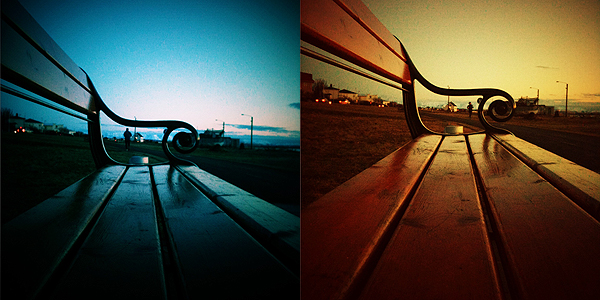
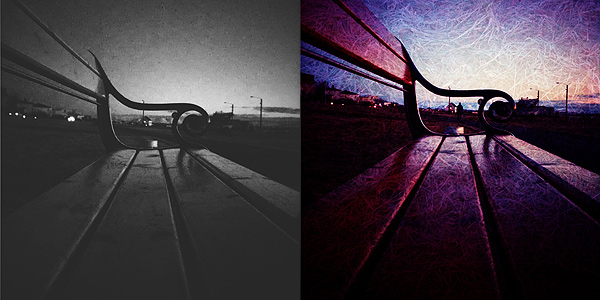
Above you can see results with random filters, respectively  Red/Cyan, Yellow/Orange Black/White and Sensia double exposed.

One processing problem I encountered is the fact 1 pixel of a lighter color is added on the left border of each and every image. It doesn’t matter which effects you pick or the chosen resolution: the pixel is most of the times very noticeable, especially in photos with intense vignetting. And of course, removing it can be a pain because you have to do it with another app, since Lomora 2 doesn’t allow cropping.

Lomora 2 needs some improvements to really be on par with other lomography simulation apps. In spite of the swell filters, the app is truly a bit too convoluted and frustrating to use. We hope in future updates.

EDIT: the issue with light pixels appearing in the left border was fixed in version 2.2. Updated review for Lomora 2 can be found here.

Overall

Name: Lomora 2
Developer: Marvin Lee
Compatibility: iPhone, iPod Touch. iOS 4.1 or later.
Price: £1.79||$2.99||€2.39
Vote: 3/5


Lomora 2 - Marvin Lee

Photoshop Express: OK As Long As You Don’t Expect THE Photoshop

Photoshop Express by Adobe got an update yesterday. For those who were already using this app before, there aren’t substantial differences in the new version. For the others, this could be a good starting point to spend a few words about it.

Where do you start writing about anything with the Photoshop label on it without making comparisons with THE Photoshop? It’s almost impossible. There is a risk that I will end writing something totally superfluous. Does it even make sense to review Photoshop Express? I guess not. But as there shouldn’t be a precise reason to talk about an app instead of another, bear with me, for even if it’s pointless in this case I’ll make an exception.

Main Features

  • Crop, flip and rotate;
  • Adjust exposure, tint, saturation, contrast;
  • Soft focus, sketch and sharpen;
  • Seven effects;
  • Eight borders;
  • Share on Facebook, TwitPic or Photoshop.com (requires Photoshop.com account).

Appotography Opinion

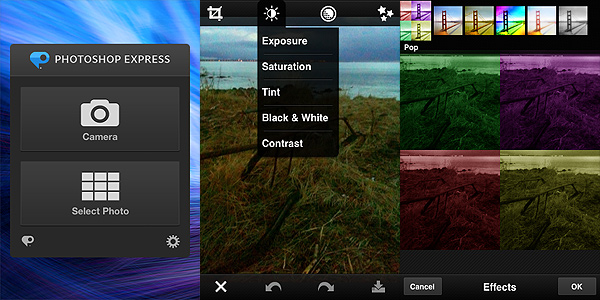
PS Express will probably displease those that associate the name Photoshop with a very sophisticated tool of graphics editing. The Express version for iPhone, iPod Touch and iPad has little in common with the full-fledged software by Adobe.

Photoshop Express by Adobe for iPhone

You can use the camera or photos in your camera roll. You can immediately upload or you can choose to edit the pictures, by cropping, rotating or fixing their orientation, by altering color properties, by applying filters, effects and frames. However, there is actually very little you can do with Photoshop Express, apart from very basic adjustments to your photo.

The effects, for instance, are few, very generic and not customizable. The frames are also not that varied and most have that conventional comic border look that not anybody will find appealing. You can adjust parameters like exposure, tint and contrast by swiping your finger on the screen, but personally I don’t find the app’s way of handling the whole process very user-friendly overall. For example, if you want to apply one of the filters, you have to imagine a fullscreen slider; if you raise your finger from the screen’s surface, the app will remember the value of the filter applied  in relation to the position your finger reached on the screen; if you want to make a slight adjustment without starting over, you have to reposition your finger more or less as it was before. Even for quick adjustments, this is not the most user-friendly approach, in my opinion. But again, even if there are other apps doing the same in a more satisfactory way, many will object that differently from them Photoshop Express is free thus one shouldn’t really complain.

The bottom line is: it’s true it’s Photoshop and it’s free, but from the photo editing colossus we honestly could have expected something more. If you want the closest thing to the actual Photoshop on the iPhone, this is not the right choice for you. Maybe in combination with other apps or for very basic and quick editing, Photoshop Express still has some use.

Overall

Name: Photoshop Express
Developer: Adobe Systems
Compatibility: iPhone, iPod Touch, iPad. iOS 4.2 or later.
Price: free!
Vote: 3/5

Adobe Photoshop Express - Adobe Systems Incorporated

Camera+ Updated to 2.1

Camera+ just got an update. Version 2.1 doesn’t add significant features, but improves features already included in version 2.0. Check out what’s new:

  • Optimization in effects processing. Improvements when trying out the different effects/borders and when saving/sharing photos that have effects applied;
  • More instances of the camera button so that you can instantly get to shooting from almost anywhere in the app.
  • Change of icon for multi-select;
  • Choose the order which your photos will be shared;
  • Save your photos automatically to Camera Roll as you shoot them;
  • Info panel’s improvements;
  • Access info on photos from the Lightbox without zooming;
  • Turn geotagging on and off;
  • Tap-and-hold buttons to display additional options;
  • Geotags and metadata are now retained when emailing photos;
  • Improvement in the quality of several effects and borders;
  • Location services are now only active when in camera view to save battery life;
  • Several bug fixes.

Join Us!

A quick post to let anybody know that you can now join us on Facebook and Flickr or follow us on Twitter. You can let us admire your photo creations, give us an opinion on your favorite apps, tell us what you like about iPhone photography or you can just stop by to say hello!

Here is where you can find us:

Appotography on FaceBook || on Flickr || on Twitter

As you can see, we are still working on the site to give you more and better services and we are trying as well to consolidate our presence on these networks in order to connect to our current and future audience more effectively: stay tuned for further updates!

Thanks to all the people that have already joined us or contributed any way!

Pixelet: Basic Toolkit For iPhone Photography

Snap, adjust, filter — one, two, three times or more — and share. That’s all there is to know about Pixelet by Pop Sprout, a photo toolkit with essential features to keep the process of taking and altering pictures as simple as possible.

Main Features

  • Full resolution available;
  • Adjust brightness and contrast;
  • Crop and rotate;
  • Undo/redo;
  • Eight filters;
  • Share via email, Facebook, Twitter.

Appotography Opinion

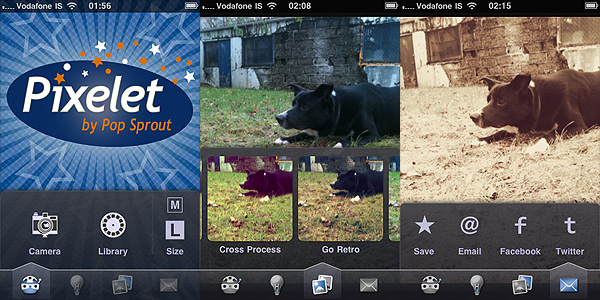
Pixelet is a photo app that has a bit of everything: from straightening and cropping to filtering. The features are few, but conveniently chosen. You can use the camera or your previous photos; you can make adjustments to brightness and contrast; you can crop and rotate the image as you see fit; you can apply one or more filters; finally, you save or share.

Pixelet by Pop Sprout for iPhone

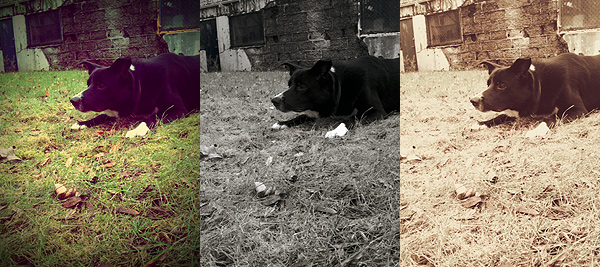
The filters included are alright, although you don’t have much choices in terms of diversification. Eight filters aren’t many for today’s apps standards, to be honest, and most of Pixelet’s filters have a retro/vintage feel to them. With such a little variety, having an impressionist effect among the others is quite a useless idea in my opinion, but maybe some user out there will find it a cool addition. You can apply filters in sequence without saving, but you have no way to save combinations you like in order to use them again.

Pixelet by Pop Sprout for iPhone

Pixelet is a lot like Best Camera in the way it works. It’s not as easy and manageable as Best Camera though and its processing times are also longer. It’s true that, differently from Best Camera, you do have some flexibility, for example when cropping and rotating, and that you can review your previous  edits and undo in the case you make mistakes, but you cannot delete individual effects at any time. Deleting single effects is one of Best Camera’s strongest features and one that still makes it stand out when you compare it to similar apps. In the case of Pixelet — and in the case of the greatest majority of apps allowing undo — the undo works simply like a history feature and if you want to correct some of your previous choices, in some cases you still have to start over. Also, one shouldn’t forget that Best Camera, although not many upgrades have been made in the course of these months, was released long ago; this makes its present limitations partly excusable. When Best Camera was originally released, it truly was one of the best photo apps for the iPhone. Pixelet, on the other hand, is a new app and yet it really doesn’t seem more up-to-date than Best Camera.

Anyhow, Pixelet by Pop Sprout delivers acceptable results in terms of quality and usability and it may still be a nice tool for people with little experience with other apps or with very basic needs. It’s very likely that, with all the other choices available in the App Store, other users will find it a bit of a disappointment.

Overall

Name: Pixelet
Developer: Pop Sprout
Compatibility: iPhone, iPod Touch, iPad. iOS 3.1 or later.
Price: £1.19||$1.99||€1.59
Vote: 3/5

Pixelet - Pop Sprout

Cameramatic: One Of The Best Toy Cameras On The iPhone

When at first I tried Cameramatic by youthhr, I didn’t pay enough attention to it. Maybe because toy cameras on the iPhone were popping up like mushrooms and it was hard at first sight to distinguish the one from the other. Also, the first release of this app had some bugs that prevented me to fully enjoy it. Thus I had forgotten about Cameramatic till the release of the last update. After that, I started paying more attention to this app and I realized Cameramatic has a lot  interesting qualities about it.

Main Features

  • Up to 1530×1530 pixels (3GS) or 1930×1930 pixels (4) resolution;
  • 30+ filters (more available with in-app purchase);
  • 25+ frames;
  • Light leaks, vignetting and grain on/off;
  • Access EXIF and geotagging data;
  • Share via email, Facebook, Twitter and Flickr.

Appotography Opinion

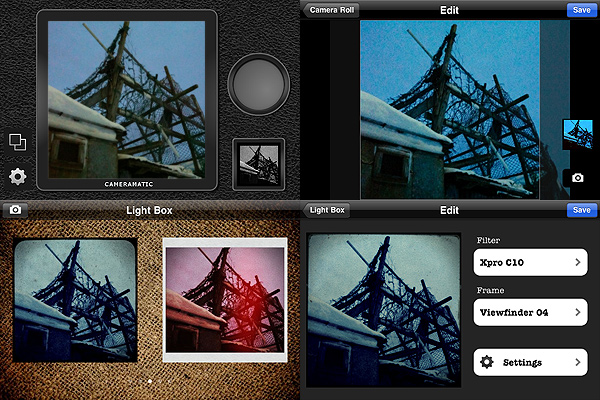
Cameramatic lets you both access your photo library or take photos from within the app. Photos you take are directly saved in a square format, while with previously taken photos you can adjust the cropping before the photo is processed. Saved images are stored into the app’s light box. From Cameramatic’s light box you can access each image’s data, change settings and share using email, Facebook, Twitter or Flickr. You can enable automatic saving to export directly to the camera roll as soon as your photo is processed, if you prefer.

Cameramatic by youthhr for iPhone

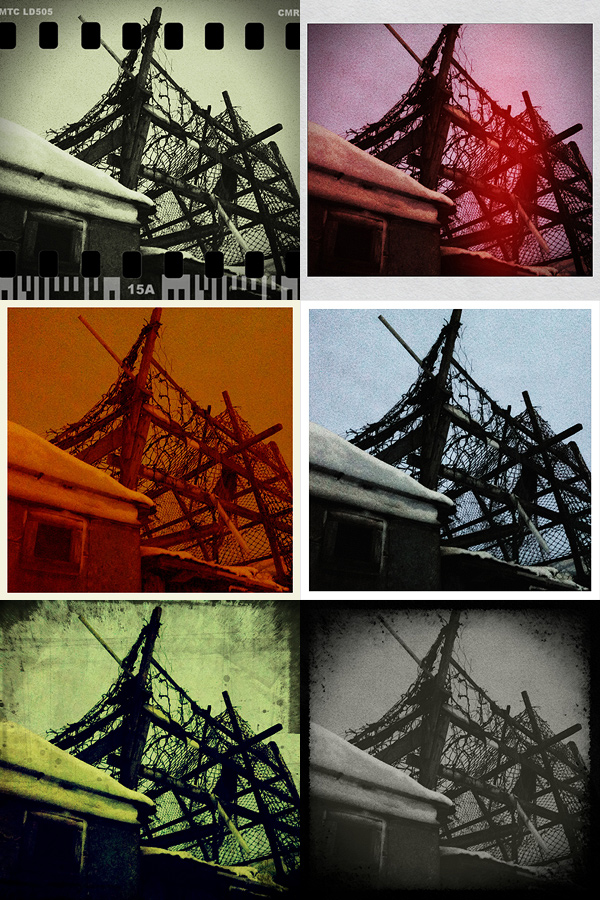
The filters you get with Cameramatic are all reminiscent of vintage lo-fi cameras and among them you will find cross processing and monochrome films, TTV frames, grungy textures, and so on. Each effect is carefully designed to convey the feel of original toy cameras.

Here is a preview of some combinations obtained with Cameramatic for iPhone:

Cameramatic by youthhr for iPhone

The filters are really good and the combinations you can obtain are many. To vary your results each time, you can enable vignetting, film grain (only for black and white filters) and light leaks — an element that, in my opinion, still needs some improvement to look more authentic. Purchasing the additional packs (each for $0.99/€0.79) will widen even more your possibilities. It’s true you cannot make too many adjustments to the photos or adapt single parameters, like each filter’s intensity, but the results are anyway believable and varied enough not only to justify the purchase, but also to be satisfied with it.

Another thing I like about this app is the fact it gives you access to EXIF data and geographical tagging information. It would be very convenient if all developers included this feature into their apps, so people would be able to avoid the hassle of relying on external services just to make sure their images are the right size or to know other useful information.

The only serious issue I have with Cameramatic is the lack of preview or some other reference for individual filters: my memory perhaps isn’t excellent, so I cannot remember every time which filter is which just from the name. For frames you have a preview and some filters are easy to guess, but with others it is more complicated. The problem is partly solved by the fact until your photo is stored in your light box, you can edit it and make changes to any of its parameters. Still, choosing among filters without visual reference can sometimes be annoying, especially if you decide to save directly to camera roll.

Among the number of toycam simulation apps, Cameramatic is one of the best and one I definitely feel like recommending, especially if you’re into the lo-fi analog look.

Overall

Name: Cameramatic
Developer: youthhr
Compatibility: iPhone, iPod Touch. iOS 4.0 or later.
Price: £1.19||$1.99||€1.59
Vote: 5/5

Cameramatic - youthhr

Percolator: Retro-style Effects That Will Surprise You

There are apps that can make a difference in your personal collection. Apps that will make you reconsider the way you look at your photo library. Apps that, although their sphere of activity may seem limited to the exceptional and to the peculiar at first, can be surprisingly adaptable to a multiplicity of uses. Percolator is one of them.

Main Features

  • Up to 2048×1536 pixels resolution;
  • 4 levels of accuracy;
  • 5 different effects;
  • Dark and light backgrounds;
  • Zoom and pan.

Appotography Opinion

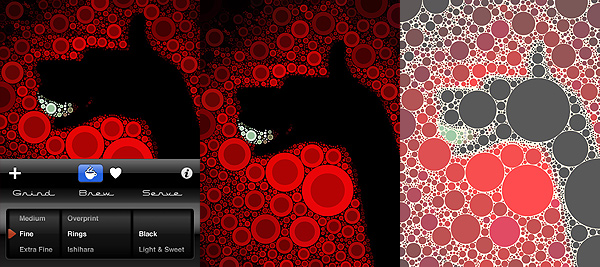
The strength of Percolator by Tinrocket resides in its extreme capability of stylization. Any photo — it doesn’t matter its original look, its subject, and so on — will be turned with extreme ease into a colorful retro-looking mosaic. Edited photos will thus gain a new life and a surprising verve.

“The main algorithm used in Percolator was developed in 2004, as a small piece of a larger project. This algorithm places circles in the empty areas of images, from the largest possible circle down to the smallest. The software computes a fast solution to a problem area known as circle packing.”

This is, in nuce, how percolator was conceived and the way it works. There is a chance knowing it won’t be very useful to your actual purposes. All you really need to know is Percolator is an app capable of delivering effects to add astonishing stylization to your photos very quickly and with minimum effort.

Percolator by Tinrocket for iPhone

Both if you choose to take a shot or if you load one from your camera roll, you will be able to radically change the look of your photos in a really quick way, without having to to do anything more than scrolling among the available settings, which are not many, but are anyway definitely enough for your purposes. You can pick one of the different styles ready for use, you can refine the accuracy of the effect in relation to your images, you can choose to apply a dark or light background depending on your specific needs. It doesn’t take more than a few seconds; excellent quality results are granted.

Percolator works particularly well with highly contrasted, colorful photos. However, experimenting with the various setting might surprise you and give you interesting outcomes even with other photos. In general, even in photos whose colors are washed out, colors are improved and revamped. Of course, better exposed photos will give you better results.

The only aspect that perhaps could be improved in future updates is offering the user a more comprehensive experience by adding a few sharing options, which for now are totally absent.

Percolator is an entertaining app that not only will let the average user play with photos is a surprising and refreshing way, but, if used in a clever way, will also provide the creative type new and interesting ideas.

Overall

Name: Percolator
Developer: Tinrocket
Compatibility: iPhone. iOS 3.1.3 or later.
Price: £0.59||$0.99||€0.79
Vote: 5/5

Percolator - Tinrocket, LLC

ColorSplash Review

Have you ever wanted to try something in the middle between color and black and white? Have you ever wondered how to achieve that cool effect so popular in a certain type of photography, which consists in bringing out one element in the photo, leaving all the rest in the background? Do you feel sometimes too many elements in your picture appear distracting at the expenses of its main subject?

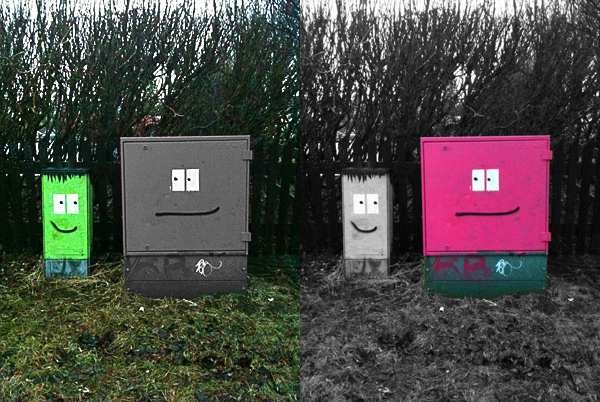
ColorSplash by Pocket Pixels allows you to desaturate portions of your image just using your finger. The final effect, if used correctly and on the right images, is indeed very dramatic and eye-catching.

Main Features

  • Full resolution available;
  • Restore from previous sessions;
  • Masking on/off;
  • Undo;
  • Four adjustable brushes;
  • Retina display support;
  • Possibility to share the photos via Facebook, Flickr, Twitter or email.

Appotography Opinion

ColorSplash has a fair usability. The developers conveniently offer video tutorials to help newbies understand how the app works and how to make use of its functionalities, from getting started to sharing.

ColorSplash by Pocket Pixels for iPhone

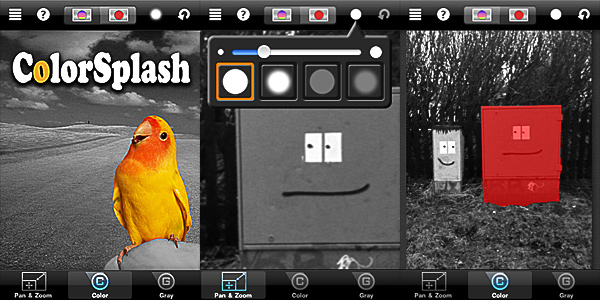
You load your photo or take a shot: the app will automatically desaturate the whole picture. You choose the right brush among those available (hard and soft edged, transparent and opaque) and then you can proceed to paint with your finger over the photo in order to define which areas of your image you want to retain the original color and which ones will appear in black and white. By zooming and panning you can make the process smoother. To make things even simpler, you can check the accuracy of your work at all times by enabling a mask. An undo function will allow to correct mistakes as you work on the image and you can always restore from previous sessions – an important  feature that I think should be added in almost every photo editing app, but that unfortunately is still not as common as it should be.

ColorSplash by Pocket Pixels for iPhone
Same image and session, inverted results.

ColorSplash has its pros and its cons: the app delivers exactly what it is supposed to; as far as actual usage is concerned, perhaps this is a limitation, since other apps include among their filters similar features, but at the same time I feel this is also a good aspect about this app, because you do not necessarily have to purchase a massive filter collection just to selectively desaturate an image. Some additional features could be added in order to play around more with the image saturation, but overall the app works well as it is now and it’s indeed very easy to use.

ColorSplash is also available in free version, so you can check it out before purchasing.

Overall

Name: ColorSplash
Developer: Pocket Pixels
Compatibility: iPhone, iPod Touch, iPad. iOS 3.0 or later.
Price: £0.59||$0.99||€0.79
Vote: 4/5

Color Splash - Pocket Pixels Inc.