Pixelet: Basic Toolkit For iPhone Photography

Snap, adjust, filter — one, two, three times or more — and share. That’s all there is to know about Pixelet by Pop Sprout, a photo toolkit with essential features to keep the process of taking and altering pictures as simple as possible.

Main Features

  • Full resolution available;
  • Adjust brightness and contrast;
  • Crop and rotate;
  • Undo/redo;
  • Eight filters;
  • Share via email, Facebook, Twitter.

Appotography Opinion

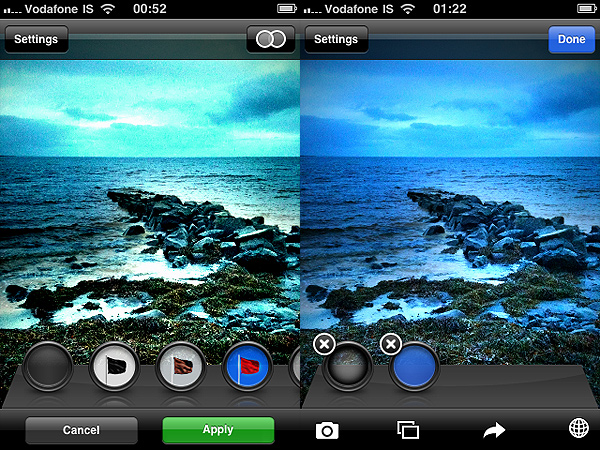
Pixelet is a photo app that has a bit of everything: from straightening and cropping to filtering. The features are few, but conveniently chosen. You can use the camera or your previous photos; you can make adjustments to brightness and contrast; you can crop and rotate the image as you see fit; you can apply one or more filters; finally, you save or share.
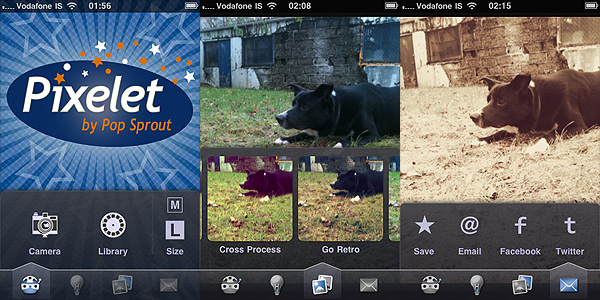
Pixelet by Pop Sprout for iPhone

The filters included are alright, although you don’t have much choices in terms of diversification. Eight filters aren’t many for today’s apps standards, to be honest, and most of Pixelet’s filters have a retro/vintage feel to them. With such a little variety, having an impressionist effect among the others is quite a useless idea in my opinion, but maybe some user out there will find it a cool addition. You can apply filters in sequence without saving, but you have no way to save combinations you like in order to use them again.
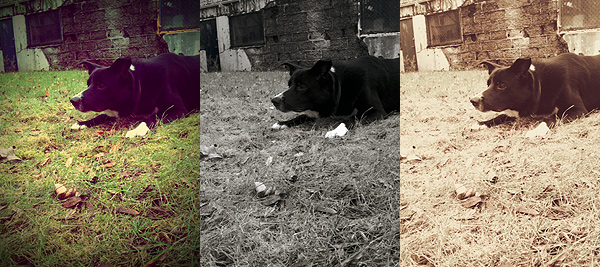
Pixelet by Pop Sprout for iPhone

Pixelet is a lot like Best Camera in the way it works. It’s not as easy and manageable as Best Camera though and its processing times are also longer. It’s true that, differently from Best Camera, you do have some flexibility, for example when cropping and rotating, and that you can review your previous  edits and undo in the case you make mistakes, but you cannot delete individual effects at any time. Deleting single effects is one of Best Camera’s strongest features and one that still makes it stand out when you compare it to similar apps. In the case of Pixelet — and in the case of the greatest majority of apps allowing undo — the undo works simply like a history feature and if you want to correct some of your previous choices, in some cases you still have to start over. Also, one shouldn’t forget that Best Camera, although not many upgrades have been made in the course of these months, was released long ago; this makes its present limitations partly excusable. When Best Camera was originally released, it truly was one of the best photo apps for the iPhone. Pixelet, on the other hand, is a new app and yet it really doesn’t seem more up-to-date than Best Camera.

Anyhow, Pixelet by Pop Sprout delivers acceptable results in terms of quality and usability and it may still be a nice tool for people with little experience with other apps or with very basic needs. It’s very likely that, with all the other choices available in the App Store, other users will find it a bit of a disappointment.

Overall

Name: Pixelet
Developer: Pop Sprout
Compatibility: iPhone, iPod Touch, iPad. iOS 3.1 or later.
Price: £1.19||$1.99||€1.59
Vote: 3/5

Pixelet - Pop Sprout

Cameramatic: One Of The Best Toy Cameras On The iPhone

When at first I tried Cameramatic by youthhr, I didn’t pay enough attention to it. Maybe because toy cameras on the iPhone were popping up like mushrooms and it was hard at first sight to distinguish the one from the other. Also, the first release of this app had some bugs that prevented me to fully enjoy it. Thus I had forgotten about Cameramatic till the release of the last update. After that, I started paying more attention to this app and I realized Cameramatic has a lot  interesting qualities about it.

Main Features

  • Up to 1530×1530 pixels (3GS) or 1930×1930 pixels (4) resolution;
  • 30+ filters (more available with in-app purchase);
  • 25+ frames;
  • Light leaks, vignetting and grain on/off;
  • Access EXIF and geotagging data;
  • Share via email, Facebook, Twitter and Flickr.

Appotography Opinion

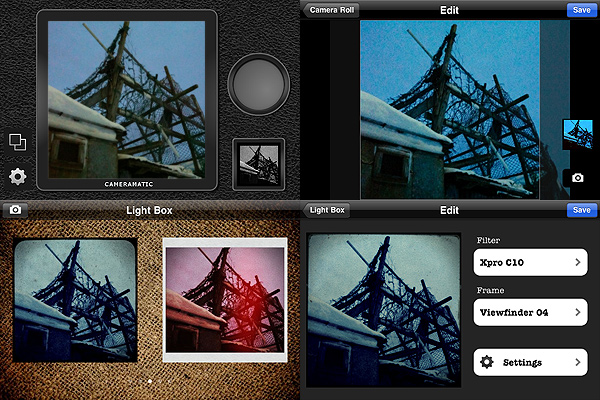
Cameramatic lets you both access your photo library or take photos from within the app. Photos you take are directly saved in a square format, while with previously taken photos you can adjust the cropping before the photo is processed. Saved images are stored into the app’s light box. From Cameramatic’s light box you can access each image’s data, change settings and share using email, Facebook, Twitter or Flickr. You can enable automatic saving to export directly to the camera roll as soon as your photo is processed, if you prefer.

Cameramatic by youthhr for iPhone

The filters you get with Cameramatic are all reminiscent of vintage lo-fi cameras and among them you will find cross processing and monochrome films, TTV frames, grungy textures, and so on. Each effect is carefully designed to convey the feel of original toy cameras.

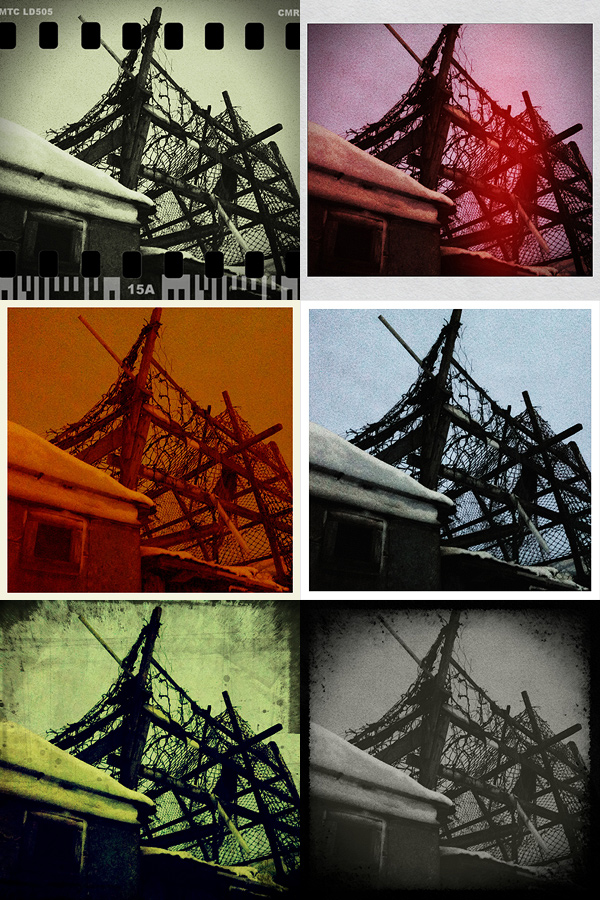
Here is a preview of some combinations obtained with Cameramatic for iPhone:

Cameramatic by youthhr for iPhone

The filters are really good and the combinations you can obtain are many. To vary your results each time, you can enable vignetting, film grain (only for black and white filters) and light leaks — an element that, in my opinion, still needs some improvement to look more authentic. Purchasing the additional packs (each for $0.99/€0.79) will widen even more your possibilities. It’s true you cannot make too many adjustments to the photos or adapt single parameters, like each filter’s intensity, but the results are anyway believable and varied enough not only to justify the purchase, but also to be satisfied with it.

Another thing I like about this app is the fact it gives you access to EXIF data and geographical tagging information. It would be very convenient if all developers included this feature into their apps, so people would be able to avoid the hassle of relying on external services just to make sure their images are the right size or to know other useful information.

The only serious issue I have with Cameramatic is the lack of preview or some other reference for individual filters: my memory perhaps isn’t excellent, so I cannot remember every time which filter is which just from the name. For frames you have a preview and some filters are easy to guess, but with others it is more complicated. The problem is partly solved by the fact until your photo is stored in your light box, you can edit it and make changes to any of its parameters. Still, choosing among filters without visual reference can sometimes be annoying, especially if you decide to save directly to camera roll.

Among the number of toycam simulation apps, Cameramatic is one of the best and one I definitely feel like recommending, especially if you’re into the lo-fi analog look.

Overall

Name: Cameramatic
Developer: youthhr
Compatibility: iPhone, iPod Touch. iOS 4.0 or later.
Price: £1.19||$1.99||€1.59
Vote: 5/5

Cameramatic - youthhr

Percolator: Retro-style Effects That Will Surprise You

There are apps that can make a difference in your personal collection. Apps that will make you reconsider the way you look at your photo library. Apps that, although their sphere of activity may seem limited to the exceptional and to the peculiar at first, can be surprisingly adaptable to a multiplicity of uses. Percolator is one of them.

Main Features

  • Up to 2048×1536 pixels resolution;
  • 4 levels of accuracy;
  • 5 different effects;
  • Dark and light backgrounds;
  • Zoom and pan.

Appotography Opinion

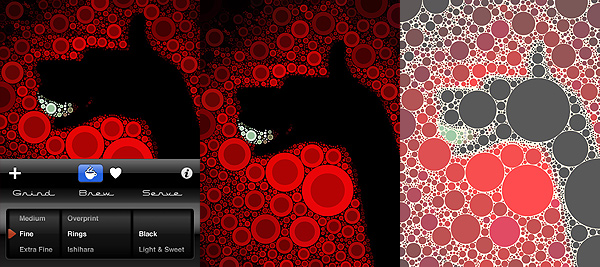
The strength of Percolator by Tinrocket resides in its extreme capability of stylization. Any photo — it doesn’t matter its original look, its subject, and so on — will be turned with extreme ease into a colorful retro-looking mosaic. Edited photos will thus gain a new life and a surprising verve.

“The main algorithm used in Percolator was developed in 2004, as a small piece of a larger project. This algorithm places circles in the empty areas of images, from the largest possible circle down to the smallest. The software computes a fast solution to a problem area known as circle packing.”

This is, in nuce, how percolator was conceived and the way it works. There is a chance knowing it won’t be very useful to your actual purposes. All you really need to know is Percolator is an app capable of delivering effects to add astonishing stylization to your photos very quickly and with minimum effort.

Percolator by Tinrocket for iPhone

Both if you choose to take a shot or if you load one from your camera roll, you will be able to radically change the look of your photos in a really quick way, without having to to do anything more than scrolling among the available settings, which are not many, but are anyway definitely enough for your purposes. You can pick one of the different styles ready for use, you can refine the accuracy of the effect in relation to your images, you can choose to apply a dark or light background depending on your specific needs. It doesn’t take more than a few seconds; excellent quality results are granted.

Percolator works particularly well with highly contrasted, colorful photos. However, experimenting with the various setting might surprise you and give you interesting outcomes even with other photos. In general, even in photos whose colors are washed out, colors are improved and revamped. Of course, better exposed photos will give you better results.

The only aspect that perhaps could be improved in future updates is offering the user a more comprehensive experience by adding a few sharing options, which for now are totally absent.

Percolator is an entertaining app that not only will let the average user play with photos is a surprising and refreshing way, but, if used in a clever way, will also provide the creative type new and interesting ideas.

Overall

Name: Percolator
Developer: Tinrocket
Compatibility: iPhone. iOS 3.1.3 or later.
Price: £0.59||$0.99||€0.79
Vote: 5/5

Percolator - Tinrocket, LLC

ColorSplash Review

Have you ever wanted to try something in the middle between color and black and white? Have you ever wondered how to achieve that cool effect so popular in a certain type of photography, which consists in bringing out one element in the photo, leaving all the rest in the background? Do you feel sometimes too many elements in your picture appear distracting at the expenses of its main subject?

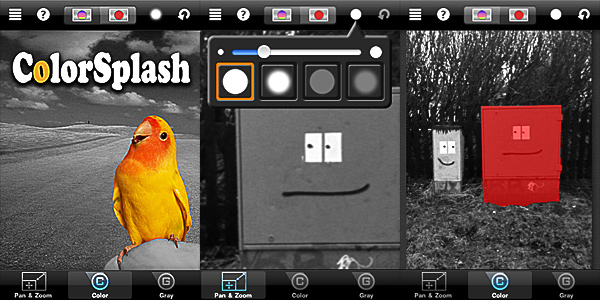
ColorSplash by Pocket Pixels allows you to desaturate portions of your image just using your finger. The final effect, if used correctly and on the right images, is indeed very dramatic and eye-catching.

Main Features

  • Full resolution available;
  • Restore from previous sessions;
  • Masking on/off;
  • Undo;
  • Four adjustable brushes;
  • Retina display support;
  • Possibility to share the photos via Facebook, Flickr, Twitter or email.

Appotography Opinion

ColorSplash has a fair usability. The developers conveniently offer video tutorials to help newbies understand how the app works and how to make use of its functionalities, from getting started to sharing.

ColorSplash by Pocket Pixels for iPhone

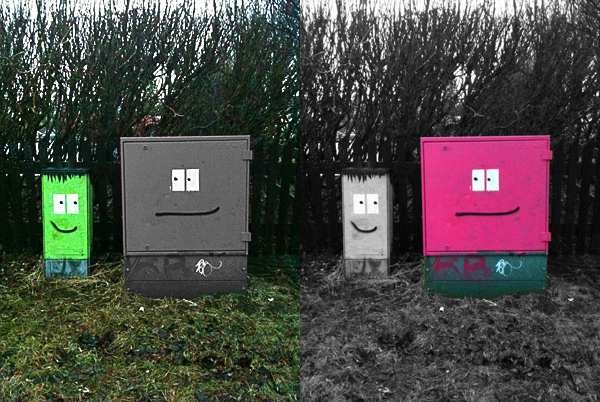
You load your photo or take a shot: the app will automatically desaturate the whole picture. You choose the right brush among those available (hard and soft edged, transparent and opaque) and then you can proceed to paint with your finger over the photo in order to define which areas of your image you want to retain the original color and which ones will appear in black and white. By zooming and panning you can make the process smoother. To make things even simpler, you can check the accuracy of your work at all times by enabling a mask. An undo function will allow to correct mistakes as you work on the image and you can always restore from previous sessions – an important  feature that I think should be added in almost every photo editing app, but that unfortunately is still not as common as it should be.

ColorSplash by Pocket Pixels for iPhone
Same image and session, inverted results.

ColorSplash has its pros and its cons: the app delivers exactly what it is supposed to; as far as actual usage is concerned, perhaps this is a limitation, since other apps include among their filters similar features, but at the same time I feel this is also a good aspect about this app, because you do not necessarily have to purchase a massive filter collection just to selectively desaturate an image. Some additional features could be added in order to play around more with the image saturation, but overall the app works well as it is now and it’s indeed very easy to use.

ColorSplash is also available in free version, so you can check it out before purchasing.

Overall

Name: ColorSplash
Developer: Pocket Pixels
Compatibility: iPhone, iPod Touch, iPad. iOS 3.0 or later.
Price: £0.59||$0.99||€0.79
Vote: 4/5

Color Splash - Pocket Pixels Inc.

Best Camera: Simple And Straightforward, But Not Too Up-To-Date

Best Camera is an old acquaintance of the App Store. Ubermind’s app is easy and especially good for beginners that don’t need many different options and huge collections of filters, but still want to make their photos better with just a few touches. Best Camera got a recent update, so we seized the opportunity to review it at once.

Main Features

  • Full resolution available;
  • 14 filters available;
  • Disable single filters at any time;
  • Share via Facebook, Twitter, Flickr, email.

Appotography Opinion

Best Camera is a great app for users that are looking to apply very basic modifications to their photos. Ubermind’s app features simple functionalities and allows you to share your photos either via email or Flickr, Twitter, Facebook or on the bestcamera.com community.

Best Camera for iPhone by Ubermind

The interface of this app is very pleasant and it still holds very well, even if you compare it to most of the more recent apps. It’s quite an impressive result and evidence if you develop a good app it will be valid for a longer time than you might have expected.

Best Camera for iPhone by Ubermind

You either take the photo or load it from your camera roll, then you can enhance contrast, saturation, turn your pictures into black and white or sepia, add a simple white border or black vignette, and so on. You can apply as many filters as you like to your photo and very conveniently disable each of them separately at any moment, but you are not given many customization options. It’s true that from the settings you can choose a 50% intensity for some of the filters, but you cannot adjust single parameters more than that; you cannot choose the right format to crop your photo (the app will automatically crop your photo); you cannot define intensity of vignetting. Despite these limitations, Best Camera works quite well and it’s amazingly easy to use. But honestly, despite the recent update, Best Camera remains a little behind many of its more up-to-date colleagues, which for the same price or even less offer you much more choice and much more freedom.

Overall

Name: Best Camera
Developer: Ubermind
Compatibility: iPhone, iPod Touch, iPad. iOS 3.1.3 or later.
Price: £1.79||$2.99||€2.39
Vote: 3/5

Best Camera - Ubermind, Inc.

ToonPAINT: Neat-Looking Sketches From Your Photos

ToonPAINT by Toon-Fx was conceived as a tool to allow even people who don’t have a knack for drawing to come up with nice looking stylized pictures. Using image processing algorithms, ToonPAINT creates for you an easy to customize sketch.

As with all apps in the same league though, you have to make sure from the start you understand the difference between actual drawing and processing an image to make it look as if it was drawn. Usually, results are much better if you know how this kind of apps work and how and when they can come in handy.

Main Features

  • Up to 850×565 pixels resolution (3GS);
  • Zoom and pan;
  • Restore from previous session;
  • Undo/redo;
  • Basic and advanced settings;
  • Integrated guide;
  • Share via email, Facebook, Twitter.

Appotography Opinion

ToonPAINT is very simple to use and straightforward; yet, you have some reasonable control over your image. The effect is similar to what you would be able to achieve with a tracing tool in a vector editing software. ToonPAINT doesn’t actually turn images into vectors though; it only imitates the vector tracing style.

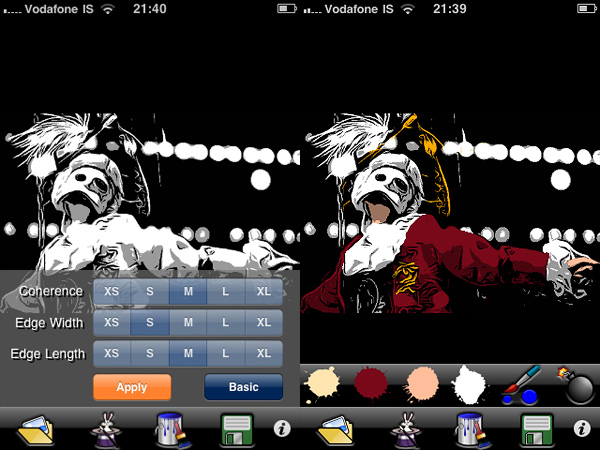
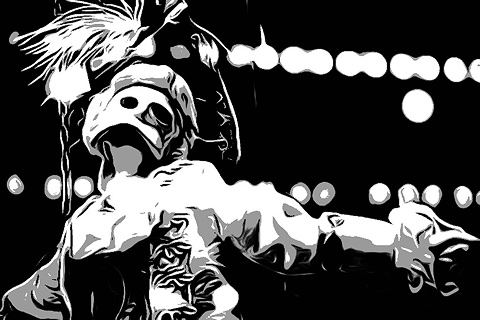
You start either with a picture you have previously taken or you take a snapshot with the built-in camera. With sliders you can adjust parameters — edges accuracy, amount of black/grey, etc. — but if you want even more control, you can switch to advanced settings and have at your disposal some more flexibility. After you apply the toon filter and your picture of choice is turned into a sketch-like image, you can proceed to apply color, if you wish. With a brush and a no-frills color-picking method, you can enrich your monochrome images. Getting the hang of the coloring process won’t be a problem, if you are already quite gifted in finger painting; it will be a bit harder if you are a total beginner, but the undo feature, with the possibility to zoom in and out and pan, will definitely help you. After you are done, you can save of share on Facebook and Twitter.

ToonPAINT by Toon-FX
Turn photos into sketches and apply color.

ToonPAINT by Toon-FX

At this stage, ToonPAINT is a cool little app you can use, for example, in combination with a strip creator app for developing your own instant comics. Many users in fact say they use this app especially for this purpose. However, there are a few things that could be improved even more to make ToonPAINT more functional. For example, it would be useful to have a preview in advanced settings to know exactly how your choices are actually affecting the image before applying them; a full-fledged undo command, to be used not only in the painting stage; full resolution, to make use of the images also outside your portable devices.

ToonPAINT allows the user to obtain very neat results, probably among the best on iPhone/iPod Touch/iPad. If you want a photo-to-sketch app, Toon-Fx’s app is what you need.

Overall

Name: ToonPAINT
Developer: Toon-Fx
Compatibility: iPhone, iPod Touch, iPad. iOS 3.0 or later.
Price: £1.19||$1.99||€1.59
Vote: 3/5
ToonPAINT - Toon-FX

Phoster: Graphic Designing In A Couple Of Clicks

Is there truly anybody who hasn’t tried to act as a graphic designer these days? From creating a custom avatar for social networks to setting up your own blog, almost anybody with a working Internet connection at some point felt the urge to create slick graphics to use them in the most diverse ways.

Bucket Labs delivers to the App Store their excellent Phoster, a tool with a lot of potential that will let any user believe he can become a graphic designer in just a couple of clicks.

Main Features

  • Full resolution available;
  • 50+ adjustable templates;
  • AirPrint support;
  • iOS retina-display support;
  • Share via email, Facebook, Twitter, Flickr.

Appotography Opinion

Let me get this straight from the beginning: Phoster is fun. Even if you don’t actually need to make posters, fliers or invitations and print them, still this app is a joy to use. Phoster works really well both on iPad and on iPhone and it is quick and intuitive and printer friendly. Creating a clean-cut poster and integrating your photos into it require just a few minutes, all thanks to a neat assortment of pre-made templates and very easy to follow customizing steps. Forget about all those apps with cheesy and awfully awkward layouts: Phoster is what you need.

Phoster by Bucket Labs
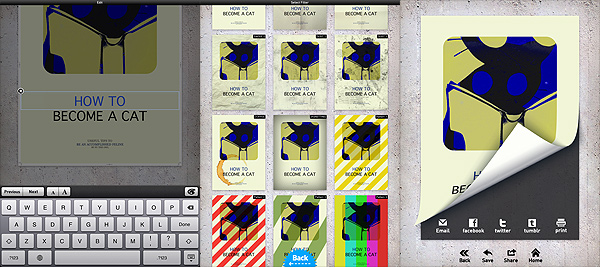
The various stages of your poster's creation.
Phoster by Bucket Labs
I adjusted colors with external help and... voilà!

All the user has to do is choosing among the templates; an image from the camera roll can be added to the chosen template; by zooming in and out or rotating, it can be adjusted to the layout. To customize your work further, you can change font size and color and, obviously, you can input your own text. After you’re done, you can add one of the effects and save — or print or share — your creation.

Of course, you cannot expect to use Phoster for everything. Phoster is mainly aimed at the creation of posters/fliers/invitations. Bucket Labs’ app is excellent for people that want to create slick graphics without having any particular training or skill, but it is also a nice pastime and a good shortcut for those who are already into design.  A little more customization — moving the text around, possibility to change colors of templates’ without resorting to other apps, etc. — would truly make this app perfect.

Overall

Name: Phoster
Developer: Bucket Labs
Compatibility: iPhone, iPod Touch, iPad. iOS 3.2 or later.
Price: £1.19||$1.99||€1.59
Vote: 5/5

Phoster - Bucket Labs

Lo-Mob: Awesome Retro Lo-fi For All Tastes

Photography as we know it dates back to the first decades of XIX century. Low fidelity, although maybe with slightly different connotations from more up-to-date ones, has always been an intrinsic factor to visual representation.

Lo-Mob by Aestetis brings dated lo-fi to the App Store, with an interesting collection of filters imitating techniques from several different ages in photography history. The results are quite interesting. Lo-Mob was one of the first apps I got many months ago when I first decided to make the most of my iPhone photography. So far, I am not disappointed.

Main Features

  • Full resolution available;
  • 40+ different filters;
  • Switch on/off individual filter parameters;
  • Integrated manual;
  • Share via email, Facebook, Twitter, Picasa, Flickr.

Appotography Opinion

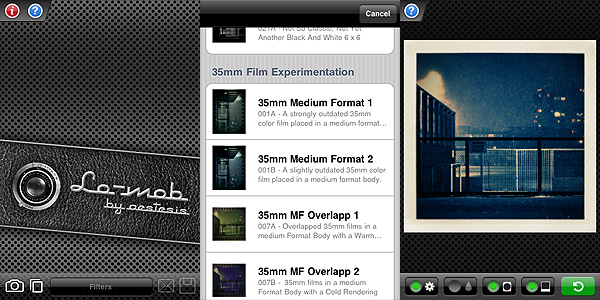
Lo-Mob combines a nifty look with actual handiness. The interface is quite clean and simple; accurate description comes with each filter, which you can choose from a scrollable menu once you either take a photo or upload it from your camera roll; a user’s manual is also available in-app for beginners. The effects are enough to work with and all of them have adjustable parameters. Frame, vignetting, color and blur: you can switch either of these on and off to customize your photos or just choose the presets as they come with the app. Some filters only have a few of these selectable elements, not all of them. You can anyway choose from the settings to disable permanently each parameter individually, without having to do it every time. To adjust your photo to the frames more effectively, you can zoom and pan with your fingers. When the result pleases you, you can either save or share via email or through some of the most widely known social networks.

Lo-Mob by Aestetis iPhone

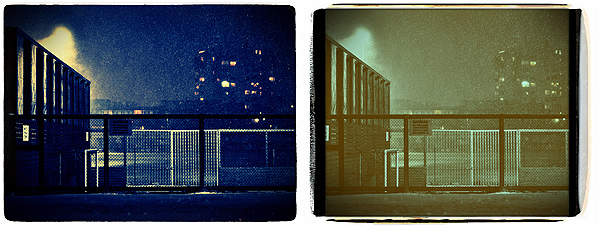
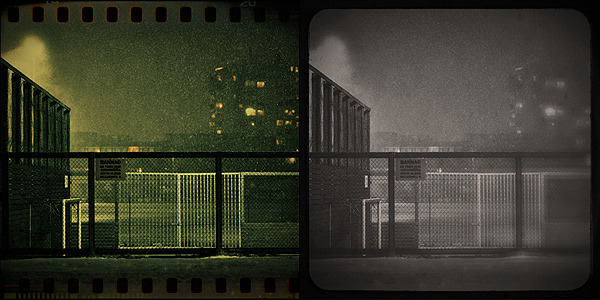
The filters range from simulation of instant squared formats to 35mm slides and much more, with an assortment of color virages and outdated black and white. As you can see, the imitation is quite accurate, making edited pictures look believable in their retro look.

Lo-Mob by Aestetis iPhone

Some aspects could definitely be improved. Processing times can be irritatingly long for a photo app. Also, the app sometimes crashes when you switch from an image to the other or from a filter to the other. It must be said, it doesn’t happen all that frequently. Although not absolutely necessary, some more features beside basic zooming in and out could be added to better adjust images to frames. The quality of some of these frames in itself isn’t excellent, especially at higher resolutions.

Despite these flaws, Lo-Mob remains one of the apps I enjoy using when I want to change dramatically the looks of my iPhone photos. Given the possibility to use any filter’s parameter as an independent element, Lo-Mob is also good to just add a frame or a little toning without using each filter as a whole.

If you’re into vintage and lo-fi, Lo-Mob is a great addition to your collection of photographic apps.

Overall

Name: Lo-Mob
Developer: Aestetis
Compatibility: iPhone, iPod Touch, iPad. iOS 3.1.2 or later.
Price: £1.19||$1.99||€1.59
Vote: 4/5

lo-mob - aestesis

DXP: Mix and Blend Your Pictures

Dear addicts of photo editing, I know it’s hard for you sometimes to do all the things you’d like to on your Apple devices. A full-fledged computer with a proper software is what you are most comfortable with, but transferring photos to edit them properly is not something you can be bothered to do all the times. Among other fancy effects, many apps come with ready-made textures that make up for your unsatisfied editing cravings. However, being able to use your own personal textures is all another story, right? Also, being able to mix pictures is not an easy thing to do on iPhone/iPod Touch.

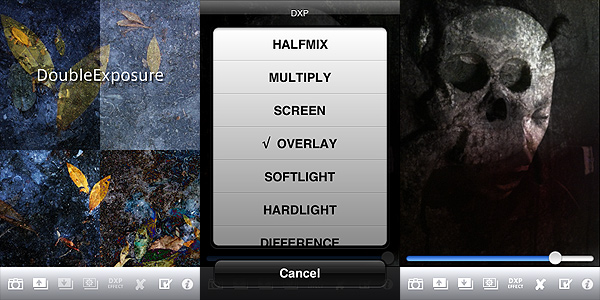
DXP stands for “double exposure”. Tandem Systems’ app goes beyond the simple double exposure suggested by its name. With its range of blending modes and other options, it will provide you with some very interesting features that to this day most apps are not able to offer. Blending pictures effectively could almost be considered a branch of photography on its own. In fact, choosing the right blending mode can sometimes change the final look of your pictures. DXP will help you achieve the right effects.

Main Features

  • Full resolution available;
  • Take photos in different formats (4:3, 3:2, 1:1);
  • Grid on/off;
  • Flip and rotate;
  • 18 blending modes (multiply, overlay, screen, hardlight, saturation, etc.).

Appotography Opinion

Basic but adequate features for effective picture blending are included in DXP. You can work either with shots taken with the built-in camera, with photos you have in your roll or with both at the same time. The blending modes’ intensity can be adjusted to generate different effects to suit your needs; you can desaturate or turn your pictures to sepia hues; you can make other adjustments, like choosing to adapt the superimposed images to fit the first layer or having the app crop them; you have a “push to/pop from stack” feature that will make it simpler to work with layers without having to handle them all at the same time.

DXP by tandem Systems for iPhone

DXP by tandem Systems for iPhone
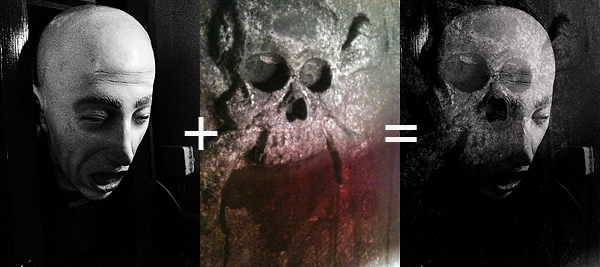
Example of fancy things you can do with DXP

DXP brings iPhone photography to another level, giving the user that doesn’t feel satisfied with pre-packed effects more freedom, opening new possibilities of expression.

There are a few changes which would improve the usability of DXP: the possibility to not have the layers merge as soon as you choose to turn them into black and white or sepia; more flexibility in the “push to/pop from stack”, in order to process a larger number of layers without risking to mess everything up; a wider choice of masking features; more customizable image rotation and layer cropping; at least an email sharing option. Also, I reckon up to a few updates ago an undo feature was available in DXP. I’m not sure why right now it isn’t available anymore. It was quite handy, because it allowed to make corrections without having to start over.

At the moment, for blending images properly, DXP is the best app available in the App Store. This app also comes in a lite version that you can try for free, so check it out!

Overall

Name: DXP
Developer: Tandem Systems
Compatibility: iPhone, iPod Touch, iPad. iOS 3.1.3 or later.
Price: £1.19||$1.99||€1.59
Vote: 4/5

DXP - Tandem Systems

PhotoArtista Oil: Let’s Pretend We Can Paint!

Whoever spread the notion that photos can successfully be digitally turned into paintings with a couple of clicks should be spanked very badly. This is how I see it; everybody is free to disagree. But so far I haven’t found a single successful way to make a photo look like a real painting with digital filters, not even from the most renown developers. Be careful: I haven’t said a “realistic” painting.

Even the best results obtained with ready-made filters are nothing like actual paintings, photos of paintings or even like photographs of actual paintings taken from photos. Or… whatever. They retain that certain lousy artificial quality that is terribly unattractive. To obtain an effective painterly effect, first of all you need to work a lot on your photo, concentrating not on reproducing useless trivialities like the embossing or the direction of the strokes or similar, but on trying to recreate a general feeling, an atmosphere, that is usually very subtle; you have to work on bringing out that certain something, if you know what I mean. So far, even the best filters are more focused on the trivialities I was talking about than in defining and trying to reproduce this something, that is what truly differentiates painting and photo. Let’s be honest though: we cannot ask too much of mere filters. When technology will reach a higher degree of sophistication and artificial intelligence will be improved, maybe the visible results will be more convincing.

I’d like to add that painting and photography can be considered sisters in the realm of visual arts, but they are definitely not interchangeable, especially after the achievements they both have conquered over the years. To fulfill their role, they should take different paths and give different interpretations, even of the same subjects.

Main Features

  • Full resolution available;
  • Different painting styles ready to use;
  • Adjustable brush, brightness, color and canvas;
  • Add borders;
  • Possibility to create and save custom presets;
  • Share via email.

Appotography Opinion

With PhotoArtista Oil, JixiPix tries to give anybody the ability to become an accomplished oil painter with very little effort. I’ve read comments of some people using this app boasting about the fact with PhotoArtista Oil they could fix even the most outrageously horrible photos they had taken. I’m not sure how the developers should feel reading comments like these; I hope they’re not particularly proud of such publicity.

PhotoArtista

PhotoArtista Oil by JixiPix iPhone

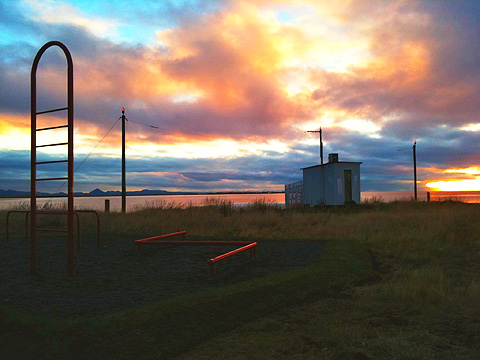
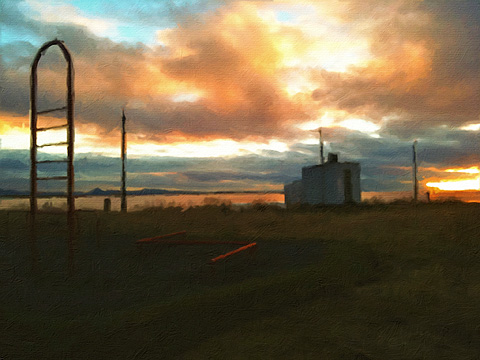
PhotoArtista Oil works both with camera roll and with shots you take with the built-in camera. As with other apps in the same range (PhotoArtista Haiku, PhotoArtista Sketch and Vintage Scene), you have an array of presets ready for using from which you can start working. You can simply choose one of those presets and save your photo or you can adjust several variables to make your picture suit your personal taste. You can modify intensity and type of strokes, canvas texture and color, color tones, apply edges, and so on. If you want to use again the preset you have created yourself, you can save it.

Processing times are extremely long and unnerving; deciding to choose a style and then changing your mind can make you waste 5+ minutes of your life. Each time, not in a lifetime. This can be OK for you, I don’t want to imply you are in a hurry… I’m just saying.

Overall, the results are good, but not astonishing — but this depends of course on your personal idea of astonishing. The canvas in particular doesn’t look very realistic, especially if you choose to look at your picture at full resolution. If you are not very careful with your parameters, the strokes will not look natural at all. Not to mention that you shouldn’t expect the app to make a good job equally with any single photo you throw at it. Anyway, if you want to turn your photos into paintings at all costs on your Apple device, this is perhaps as good as it can get.

Overall

Name: PhotoArtista Oil
Developer: JixiPix Software
Compatibility: iPhone, iPod Touch, iPad. iOS 4.0 or later.
Price: £1.79||$2.99||€2.39
Vote: 3/5

PhotoArtista - Oil - JixiPix Software