Labelbox: Fun & Free Photo Labelling, But Flawed

Attaching text to your photos should be one of the simplest features, but have you actually tried doing it? Very few apps let you do something as easy as this  and most of them are not that groovy. How frustrating is it?

Good news is Labelbox by Stepcase finally allows you to take get this feature for free. The bad news is there are still improvements to be made in order to fully enjoy this app.

Main Features

  • Up to 960 x 720 pixels (3GS);
  • 9 free styles (4 more available with in-app purchase);
  • Upload to Steply or share via Facebook, Twitter, Tumblr, Sina Weibo, e-mail.

Appotography Opinion

Labelbox enables users to apply labels on their pictures in a fun and easy way. You have nine styles to begin with that come with the initial download, but you can purchase a few more by in-app purchase for $0.99 or €0.79. The app’s styles include fancy and multicolored stripy designs or more neutral and all-purpose labelling tapes.

Stepcase Labelbox for iPhone

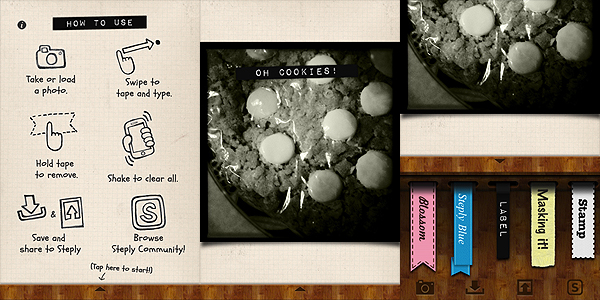
After you take or open your photo, all you have to do is swiping your finger over it in any direction and orientation. The blank label in your style of choice will appear immediately and you’ll be able to input your text by using the default keyboard. If you make mistakes or if you want to start over, you simply shake the device and the previous changes will be reset. When you are done, you can save, send your picture to your friends using email, or share it by connecting to one of the supported networks – Facebook, Twitter, Tumblr, Sina Weibo. If you have a Steply account, you can upload it to their community.

Labelbox is a cute little tool that goes along with some of the latest lo-fi photo trends, which include fakearoids and, more in general, instant photography revival. Labelbox is a cool power-up for your iPhone photography and since it is free, you have nothing to lose.

Stepcase Labelbox for iPhone

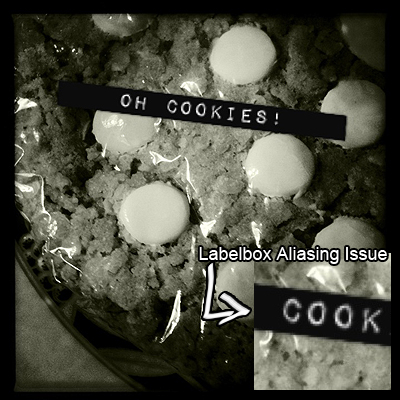
A couple of complaints one could have concern the final resolution of the photos, a mere 960 x 720 pixels on 3GS on which I have tested it — definitely not much — and the quality of the label applied – an annoying aliasing is clearly noticeable especially on some of the styles. If you plan to use the photos on iPhone/iPod Touch screen only, these issues will hardly affect you; however, if you plan on using the images more extensively, you’ll think about it twice. We hope future updates will at least solve the aliasing problem.

Overall

Name: Labelbox
Developer: Stepcase
Compatibility: iPhone, iPod Touch, iPad. iOS 4.0 or later.
Price: free!
Vote: 2/5

Labelbox - Stepcase

Panoramatic 360 Review

Panoramic photography is a technique producing images with elongated field of view. It is also commonly referred to as wide format photography. Panoramic images are usually composites of several images stitched together. These days, the stitching process is often carried out with the aid of a photo editing software.

Panoramatic 360° brings to Apple devices a tool conveniently designed to allow accurate stitching of individual images to be assembled as panoramic views.

Main Features

  • Panorama and Poster modes;
  • Exposure, contrast and vignetting correction;
  • Automated stitching;
  • Autosave and restore;
  • 360° panorama creation;
  • 3D VR visualization of 360° panorama;
  • In-app tutorial;
  • Share via email, Facebook, wi-fi, Panoramatic 360°

Appotography Opinion

Panoramatic makes the task of creating panoramic photos as easy and immediate as it can get.

You can can choose among Panorama and Poster modes. The first mode allows the user to take pictures either in landscape or in portrait orientation in order to create the final wide format image. Poster mode works in a similar manner, but images can be imported also from your albums and they don’t necessarily have to be horizontally taken.

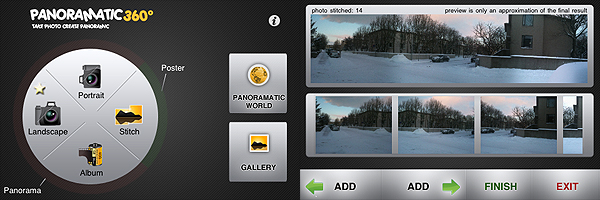
All you have to do to create your wide format views in Panoramatic is taking a series of photos following the help of the app’s visual guide. As an additional reference, you are also shown the inclination of the camera and the total number of pictures taken. The more you get used to keep an eye on these indicators, the more accurate the stitching of your photos will be. After you take the pictures, you have a preview of what your panoramic image will look like. You can improve it by deleting a few shots, by adding some others, or you can just proceed to the final rendering.

Panoramatic 360° for iPhone

You can take photos manually or use the Auto function that will help you to know when to shoot. To be honest, the Auto function is the one thing I really didn’t feel very comfortable with while using the app. If you rotate too much or too fast or even in other unfathomable circumstances, the calculations of the compass won’t be accurate enough and you won’t be able to shoot when in the right position. It may seem a paradox, but from my experience I would say you need more training to make Auto function work properly than you need to make the app do a good job when this feature is disabled. Anyway, to get the most out of Panoramatic, I suggest getting used to shooting with Auto turned off.

When you have enough photos to work with — a minimum of two is required, but how many photos to take is up to you, depending on how you want your final image to look like — you can make a few adjustments to contrast, exposure, colors and vignetting; then the app will create the composite image for you to save in your camera roll, to share, or to explore as a 360° panorama. All the rendered panoramic images are stored in the app’s gallery, where you will be able to access them at any moment.

Panoramatic 360° is not difficult to use but, differently from the greatest majority of other apps, getting used to it does require some time. All the elements in it can at first seem overwhelming and I recommend reading the tutorial before starting taking photos. Although the app works very well and in general results are quite accurate, some of Panoramatic’s features are not perfect, so you have be in the best possible conditions to expect extremely good results. For example, the picture below was taken with Panoramatic 360° with auto vignetting correction enabled. As you can see, some flaws due to vignetting are still visible on the upper part of the final image. Color correction was also enabled, but lighting conditions sometimes are hard to overcome and it’s probably not completely the app’s fault.

Panoramatic 360° for iPhone
Panoramic image generated with Panoramatic 360° - Click for larger view

Obtaining a panoramic photo and obtaining a good panoramic photo are different things entirely and it goes without saying that Panoramatic 360° can only help you in the first task. Taking the photos to be stitched together and making them actually look good together is up to you.

Overall

Name: Panoramatic 360°
Developer: floaty
Compatibility: iPhone, iPod Touch, iPad. iOS 3.1 or later.
Price: £1.19||$1.99||€1.59
Vote: 4/5

Panoramatic 360 - floaty

Picfx Review

Picfx by ActiveDevelopment is another of these apps that will appeal iPhone photographers who like to use several apps at the same time to process a single photo. What Picfx does is mainly adding grungy textures to your original pictures, to give them a dirty and decayed look. Which means: if you’re not interested in the grungy style, Picfx is definitely not for you.

Main Features

  • Up to 1366×1366 pixels (3GS);
  • Square format;
  • 27 textures;
  • 13 filters;
  • Share via email, Facebook, Twitter and Tumblr.

Appotography Opinion

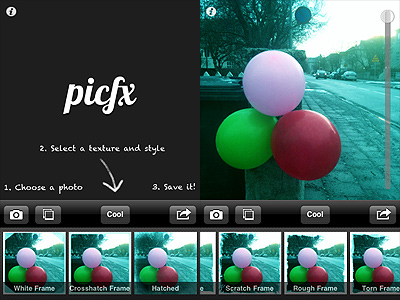
Picfx is a recent addition to the App Store. ActiveDevelopment’s app allows to process photos both loaded from the camera roll and taken from within the app, using the built-in camera feature. Once there is a photo to process, all the user has to do is choosing among the available filters and among the textures, adjusting the opacity of each one of them to suit the image. Adding several levels of filtering is possible without saving. Sharing options include Facebook, Twitter and Tumblr.

Picfx by ActiveDevelopment for iPhone

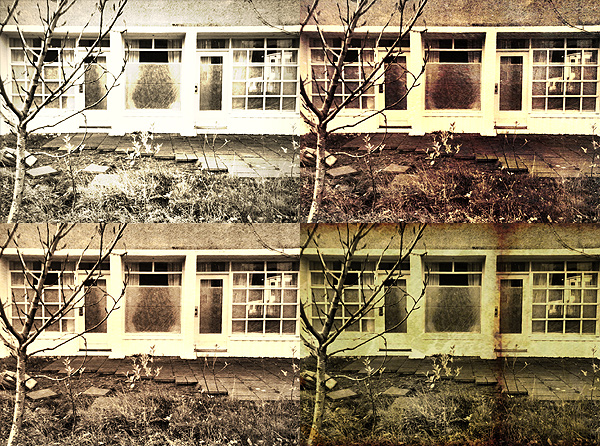
Filters, varying from oversaturation to black and white, affect not only the original image but also the texture that is applied on it. Most of the textures included in the app’s selection are conceived to add stains, scratches and corrosion to the photos.

Picfx by ActiveDevelopment for iPhone

Picfx only allows basic processing. The filters to enhance tones and saturation are fairly well done, although most of them will only slightly affect the photos; the textures — also including a few smudged and old style frames — are not varied and versatile enough to grant endless use; customization of each texture only consists in adjusting its opacity. Some of the textures require patience to look convincing on pictures with no previous processing. In favor of Picfx I have to say you can filter over and over again, and multiple filtering in succession definitely expands possibilities.

As a stand-alone app, I doubt Picfx can stand out in any way, especially given its current very limited features. In combo with other apps, Picfx can still be an acceptable enhancement to your collection.

Overall

Name: Picfx
Developer: ActiveDevelopment
Compatibility: iPhone, iPod Touch, iPad. iOS 3.2.2 or later.
Price: £1.19||$1.99||€1.59
Vote: 3/5

picfx - ActiveDevelopment

iDarkroom: Déjà Vu

Some developers, conveniently for them, take an easier path than their colleagues: instead of trying to create something that is completely original or new, they simply take this and that from other apps and reshuffle it a bit to make it seem they are releasing something more valuable than it probably is. Since many users  like to try several different options at the same time and other people usually follow the general trend, this approach can sometimes prove very successful, as in the case of iDarkroom, which right now appears to be selling quite well in many App Stores worldwide.

Main Features

  • Full resolution available;
  • 20 color filters;
  • 11 paper textures;
  • 13 light leaks/bokeh;
  • 4 noise effects;
  • 7 borders;
  • Share with email, Twitter, Facebook.

Appotography Opinion

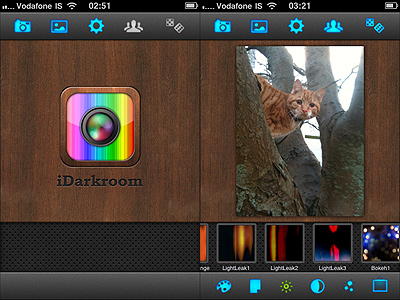
At first glance, iDarkroom contains enough filters and effects to please almost any average user; it is also very easy to use. By choosing among its assortment of effects, that range from colored filters to vignetting and borders, iDarkroom lets you process your photos with minimum effort. The app works both with built-in camera and with camera roll, and you can share via email, Facebook and Twitter. In case you’re short of ideas, you have the random effect generator that will pick effects for you and return different combinations.

iDarkroom by Maple Studio
Déjà vu?

Comparing Maple Studio’s app to FX Photo Studio or to Picture Show, which are more or less capable of offering the same, it seems evident iDarkroom simply is not on their same level. Especially when compared to Picture Show, iDarkroom bears an uncanny resemblance in the way it works and in the choice of effects.

iDarkroom by Maple Studio
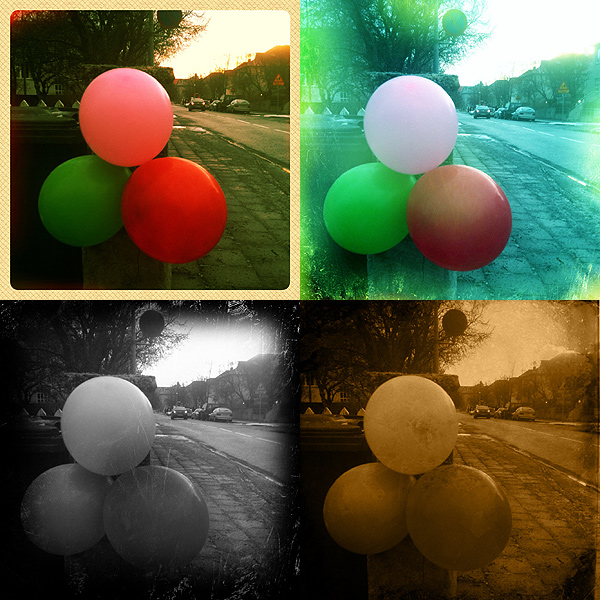
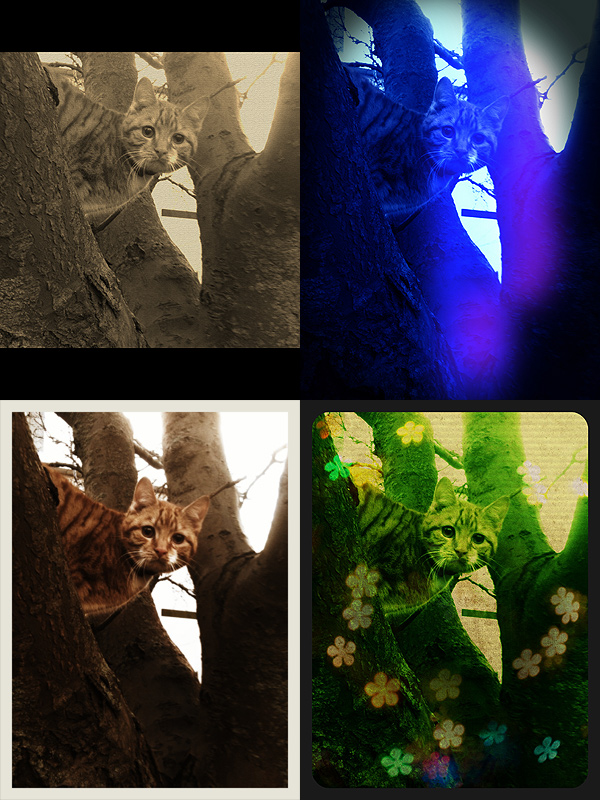
Some randomly generated effects with iDarkroom.

The color filters look remarkable, but other effects, like the textures, the light leaks, the noise or the vignetting, are not always as good-looking. The only department where perhaps iDarkroom does better than Picture Show is the simpler UI, probably mostly because it has less features than its direct rival — but mind, in ease of use it cannot beat FX Photo Studio. In any case, both Picture Show and FX Photo Studio have so much more to offer in terms of quality and quantity. In iDarkroom  you have much less possibility to customize, to adjust filters, to play with each parameter’s values. iDarkroom tries to give you what both FX Photo Studio and Picture Show give you — it even has a randomizer button like Picture Show’s — but processed photos are just not as convincing to me as those I processed with the other two apps I mentioned. To me there is not much more I can do with iDarkroom after I apply the color filters. For example, the bokeh and the textures look so-so and, also considering the flexibility you are given, their number after a few uses feels kind of limited. Definitely, the less effects are involved, the better the results you can obtain with iDarkroom. Again, maybe I’m too picky and what you will see will  appeal to you, but to me iDarkroom by Maple Studio looks like a watered-down and less versatile version of other renown iPhone/iPad photography tools. This doesn’t mean the app is bad; it simply means that there are some better choices available.

All things considered, my suggestion would be: if you want the same features and functionalities and you value your photos enough, get FX Photo Studio or Picture Show.

Overall

Name: iDarkroom
Developer: Maple Studio
Compatibility: iPhone, iPod Touch, iPad. iOS 3.0 or later.
Price: £0.59||$0.99||€0.79
Vote: 3/5

iDarkroom - Maple Studio

Old Picture: Free Old Style Texture Collection For Your Photos

Personally, most of the times I like to choose carefully when I use photos and textures together. I prefer using something more highly customizable and make sure the final effect is as I want it to be. Even on the iPhone or iPad, I tend to rely on one or multiple textures I choose myself, rather than on presets that I  cannot modify. However, you probably know that for a reason or another sometimes you cannot go and look for the perfect texture: this is when apps loaded with ready to use textures especially come in handy.

Sometimes a texture, if chosen well, is enough to make a boring picture special. Old Picture gives its users this ability with just one simple click.

Main Features

  • Full resolution available;
  • 50 textures;
  • Share with email.

Appotography Opinion

Old Picture provides users with a collection of textures to turn their photos into old-looking images. All the app does is to stick a more or less grungy layer on the photo. You cannot adjust intensity of the effect or colors or anything else. Once you find a texture you like, you save the image. There are fifty different textures available, divided into five sets of ten textures each. Honestly, although the final outcome is fair enough — better than anything you could come up with  some other paid-for app that basically does the same, at any rate — the textures are not varied and I don’t really get according to what criteria they are arranged — if there is a criterion in their arrangement at all. It seems to me most are slightly different versions of the same texture. Chances are you’ll end picking a texture at random most of the times, because you won’t be bothered to browse through the whole gallery, since in any case there is not a significant difference in style and look among textures.

Old Picture by Orbit Sofware iPhone
A few nice effects but not enough variety.

Anyway, the final result is OK and the output quality too, and let’s not forget the app is free: isn’t that enough? Is there really anything to complain about, you’ll wonder? Well, yes, I do have a complaint: Old Picture has issue you cannot really ignore if you’re going to download it to actually use it. It concerns photo orientation: Old Picture, up to this moment, doesn’t support portrait, it only supports landscape orientation. In the case of portrait-oriented photos, you’ll have to rotate the images with the aid of some other app and save them again. You know, this can be a real bother, especially if you take mainly portrait oriented photos.

As I said, although not even remotely perfect, Old Picture is an all right photo app and on top of that it is free, so if you think you have some use for its grungy effects, you can download it right away. It might be a useful extension in your collection.

Overall

Name: Old Picture
Developer: Orbit Sofware
Compatibility: iPhone, iPod Touch, iPad. iOS 4.0 or later.
Price: free!
Vote: 3/5

Old Picture - Orbit Software

Photo Style: Create Your Own Effects

Premade filters, however good, are not everybody’s cup of tea. Some photographers don’t like at all the notion of applying ready-to-use filters, such as those offered by the greatest majority of iPhone apps that dramatically change the looks of their original photos; some others cannot be bothered to apply effects over and over just to get close to the initial result they wanted to achieve.

Photo Style is especially conceived to please these photographers, but it can be a handy processing instrument also to others.

Main Features

  • Full resolution available;
  • Adjust shadows, highlights, midtones;
  • Adjust tint and saturation;
  • Crop and rotate;
  • Save presets.

Appotography Opinion

Along the same lines of other famous apps like Mill Colour, Photo Style presents the user with basic tools to alter photos in their essential components. You have just a few presets which you can use at first, but you can enlarge the collection by saving your own presets for later use.

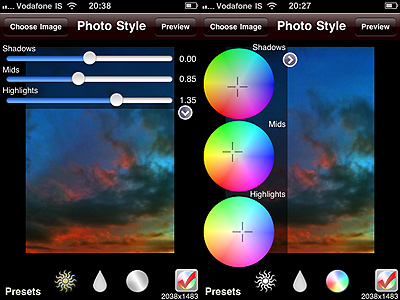
You load the image into the work area. By tapping three times you can rotate the image by 90 degrees; you can crop it; you can apply a preset. If no preset suits you, by playing with sliders and color wheels, you can create custom effects, which you can also name and save. At this point you are done and you can proceed to save the photo to the camera roll.

Photo Style for iPhone

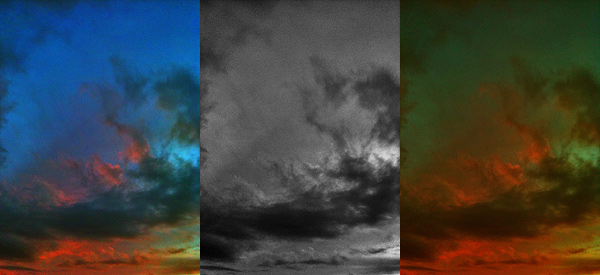
Alterations can be made to single parameters of the image, since shadows, midtones and highlights are handled separately. You can switch on/off the unfiltered image at any time for reference. However, for a full preview that also includes any cropping, you have to rely on the “Preview” button, leading to a screen from where no changes can be applied — but you can always go back to editing if you need to make further adjustments or, in the case you want to start over, you can reset. From the preview area you can also save.

Photo Style for iPhone

Photo Style is a little no-frills app that operates at the core of photo editing. You don’t necessarily need to have dozens of filters from the beginning, because by playing with values of individual aspects of your photos, such as shadows/highlights or tint adjustment, you can create your own. Photo Style won’t probably please much people that are more into heavy post-processing or fancy effects, but will perhaps make a difference in the app collection of users willing to have a little more control over their  photos.

Overall

Name: Photo Style
Developer: Chris Clogg
Compatibility: iPhone, iPod Touch, iPad. iOS 4.2 or later.
Price: £0.59||$0.99||€0.79
Vote: 4/5

Photo Style - Chris Clogg

ClassicSAMP: Some Action To Your Photography

Bringing action to your photography sometimes is not the easiest task. Shooting multiple exposures and showing them in sequence is one of the tricks that allows static images to convey the feeling of motion to the viewer. Differently from animation, which is at its core founded on the same principles, this kind of photography still conveys the original idea of stillness which is proper of photographs.

ClassicSAMP by misskiwi will help you in bringing action to your iPhone photos by providing you with a neat collection of effects and colored filters in the toycam style, a stylish and easy interface and just the right amount of customizability for an app of its kind.

Main Features

  • Full resolution available (but check review for in-depth resolution description);
  • 6 camera effects;
  • 14 film simulations;
  • Set shooting speed;
  • Share via email and Facebook.

Appotography Opinion

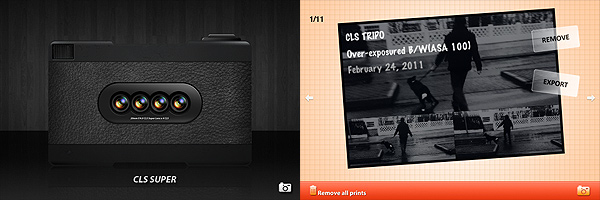
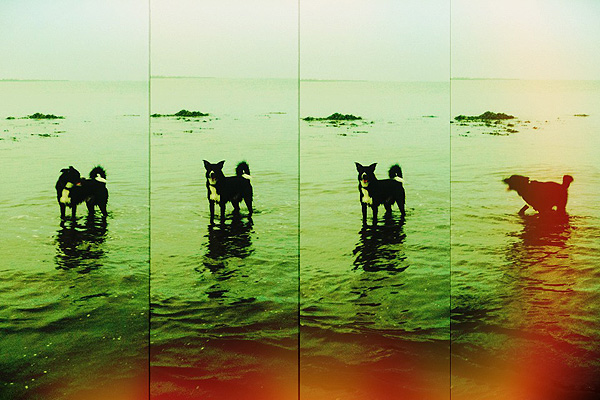
ClassicSAMP is an app that brings together the features of a multi-shot with those of misskiwi’s ClassicTOY camera. The app offers a rich variety of options in the assortment both of formats and filters. You have six different cameras — from two to nine shots — and many films covering a range of possibilities which include classic and high contrast black and white, sepia, overly saturated and lomo-like colors, overexposed, etc. Randomly generated light leaks are a cool extra to reinforce the toycam feel of this app.

ClassicSAMP by misswiki for iPhone

The films and some of the cameras featured in this app are also included in ClassicTOY, so if you have ClassicTOY already and you are not especially into multi-shots, you won’t gain much from getting ClassicSAMP as well.

After choosing your camera and film, you can also adjust the shooting speed. If you want more freedom in composing your photo without being forced to follow the timer’s limitations, you can decide to select the manual mode, which allows you to press the shutter button for each separate shot.

ClassicSAMP by misswiki for iPhone

From what I could see, the app doesn’t have any major issue, and in fact it is quite fun and pleasing to use, but I found the way resolution is handled a little confusing. You can choose to save your photos at small, medium or high resolution, but formats differ slightly depending on the effect applied. I tested the app on 3GS: with both the CLS TRIPO and with the CLS POP effects I found the resolution of processed photos to be once saved unusual, to say the least. While applying all the other effects on 3GS gives you images at 960×640, 1200×800 and 2048×1366 pixels, the aforementioned effects save respectively at 960×642, 1200×801 (TRIPO) and 1200×798 (POP), 2048×1368 (TRIPO) and 2049×1368 (POP). The fact the difference is one or two pixels only made me think maybe it wasn’t intentional. This issue is perhaps not too interesting in practice, but I still found it to be quite… unexpected. Thus I thought about sharing my experience.

ClassicSAMP works quite well for multi-shot photography purposes. The effects are nicely done, processing times are very reasonable and, although being familiar with other apps by the same developer probably made things easier for me to understand right away, the UI of this app is quite intuitive even to a newbie.

Even if personally I am not very passionate about multi-shot cams, I think ClassicSAMP is an app that will please fans of the genre and those who are willing to take advantage of this kind of photography for their creative projects.

Overall

Name: ClassicSAMP
Developer: misskiwi
Compatibility: iPhone, iPod Touch. iOS 4.1 or later.
Price: £1.19||$1.99||€1.59
Vote: 4/5

ClassicSAMP - misskiwi

MonoPhix Review

For most people, monochrome is just negation of color and thus a black and white picture is a mere desaturated version of something that in the original contained colors. For photographers specialized in monochrome though the question is not that simple. Black and white photography is first of all a matter of thinking in monochrome, carefully pondering before clicking the shutter button if monochrome is going to work or not with a certain subject. Not every photo that looks good in color looks also good in black and white and vice versa. Monochrome is a branch of photography that in the most accomplished instances follows rules that are slightly different than those of color photography.

Currently in its third version, with revamped appearance and improved features, MonoPhix ranks among the best monochrome conversion apps for the iPhone, iPod Touch and iPad.

Main Features

  • Full resolution available;
  • Adjust light/dark level and exposure;
  • Set alpha opacity and posterization effects;
  • 2 types of vignetting on/off;
  • Grain generator;
  • Set tint (bw, sepia, antique, custom);
  • 2 types of film simulation;
  • Retina display support.

Appotography Opinion

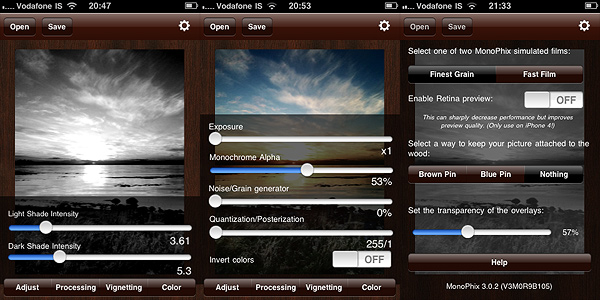
To use MonoPhix, all you have to do is to load a photo into the app. You are presented with several options to give you great control over your final outcome. By playing with sliders and switches you can handle several different aspects of the editing process. You can go for a vintage look, by adding intense noise (grain), vignetting and tint, or you can simply simulate slight desaturation making use of the monochrome alpha setting, which basically blends the monochrome version of the image with the original colored one. The interface works flawlessly and setting each parameter is very easy.

Monophix for iPhone

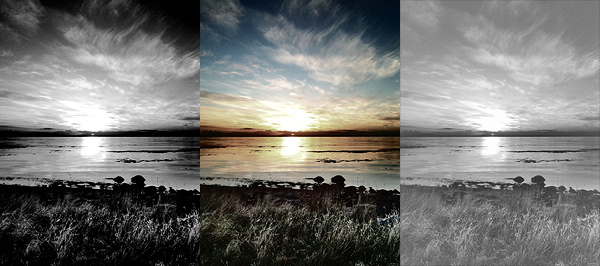
The black and white effects delivered by MonoPhix are rich and captivating. In photos where greatest importance must be given to contrast enhancement, MonoPhix truly gives its best and most convincing results.

Monophix for iPhone

What would be useful to have as an addition to an app as focused as MonoPhix on converting color to monochrome is an option for color sensitivity adjustment. MonoPhix already does its job pretty well. However, being able to work not only with parameters as exposure and light/dark balance is something photographers devoted to monochrome I am sure would appreciate. Unfortunately, not many apps to this moment offer this feature, but for more accurate control over black and white photography color sensitivity is fundamental.

Both for the quality of processing and for its user-friendly interface, MonoPhix 3 remains one of the best apps in its genre and a must have for users eager to make the most of their black and white photography.

Overall

Name: Monophix
Developer: UIC Phoenxsoftware
Compatibility: iPhone. iOS 3.0 or later.
Price: £0.59||$0.99||€0.79
Vote: 4/5

MonoPhix - Vintage meets Technology - UIC Phoenxsoftware

Lomora 2 Review

The denomination lomography derives from LOMO, also known as Leningrad Optical & Mechanical Union, an originally French-Russian optical instruments manufacturer active in Russia since 1914. The story of this manufacturer is long, but I can keep my account brief by saying LOMO introduced to the market their renown LC-A (which stands for Lomo Kompakt Automat) consumer cameras only in relatively recent times, in 1984 to be more precise. The LC-A, a 35mm film camera, was able to deliver uniquely charming pictures, characterized by a dreamy feel due to their vibrant colors, blur, vignetting and other unfathomable accidents. Thanks to its idiosyncrasies, the LC-A was graced by unexpected popularity and it soon became a favorite of  many photographers looking for a more casual and fresh approach to photography. After a series of fortunate coincidences, the fame of the little unassuming camera produced by LOMO rapidly grew outside the Soviet Union, especially thanks to the enthusiasm of a group of devotees from Austria, future founders of Lomographische AG, the sole worldwide distributor of the LC-A. The Russian manufacturer discontinued the production of the original camera and all its components in 2007, but the production continues to this day in China.

The LC-A promoted an approach which proved particularly suitable for lo-fi and inexpensive photography. Lomography has become over the years almost a genre of its own: many photographers found the limitations of the medium particularly stimulating to discover new ways of shooting. Significant evidence of the huge success of this style is the great number of apps that tried to bring the feel and the experience of authentic lomography to iPhone photography.

Lomora 2 for the iPhone is, as the name suggests, one of them.

Main Features

  • Full resolution available;
  • Square format;
  • 18 film simulation effects;
  • Adjustable vignette;
  • Add colored flash or filter.

Appotography Opinion

I will say it from the start: I’m torn as I write this review. Torn because, in spite of all its qualities, Lomora 2 has some issues that can’t be overlooked, especially in comparison with other apps and also given its slightly higher than average price.

Since the point of Lomora 2 is to imitate the feel of analogue, you cannot load previously taken photos. Some people are usually annoyed by this solution. To them I say: this app is definitely not for you.

You have eighteen effects to choose from, all recreating the looks of authentic films — among them you can read names like Provia, Sensia, Ektachrome. In addition to these effects, you can apply vignetting, colored flashes and filters. When you shoot, you have a preview of what your photo looks like; if you are satisfied with it, you can save or export to the camera roll while if you aren’t, you can add to it another exposure by shooting again or you can simply delete it.
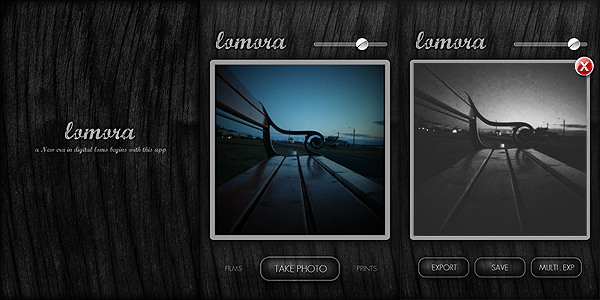
Lomora 2 for iPhone

Everything would seem very linear from my words. To be honest however, using Lomora 2 I felt somehow not very comfortable, at least in the course of the first hours. The user interface seems intuitive enough, but just finding out how things are exactly done isn’t that simple. Tapping on the Lomora logo, for example, opens the settings menu, but it took me some time to discover this trick. In a user-friendly app, it should be clear to anybody from the very beginning where you have to look to change the settings. To close the settings menu you have to tap again, this time outside the menu’s window. This works also for the film menu: you select the film and you have to tap outside the menu in order to close it, otherwise it won’t disappear. Another example that comes to mind: to trigger the multiple exposure, after you take the first shot, you have to tap on the “Multi. Exp” button, go back to the camera mode manually and take another shot. At this point the second shot is superimposed to the first and you can save your double exposed image. But there is no way to know how the multiple exposure works unless you find it by yourself by a process of trial and error. Yet another example concerns the vignette slider, which adds more vignetting as you move the knob towards lower values and it adds less towards higher values. Maybe it’s just me, but this is the kind of confusing thing that can put me off while using an app. These are all very insignificant details perhaps, but they can make you waste a lot of time at the beginning. In Lomora 2 there is no in-app guide or help, so using it properly may take a little more time than you would expect.

What makes up for the awkward interface is the quality of the effects, which on average are very believable. Although most are fully enjoyable only if lighting conditions are ideal — daylight, no harsh shadows, no overcast weather, etc. — some among them are really good, especially the black and white film that, in my opinion, truly stands out as different from any other black and white simulation we have seen up to this moment in photo apps.
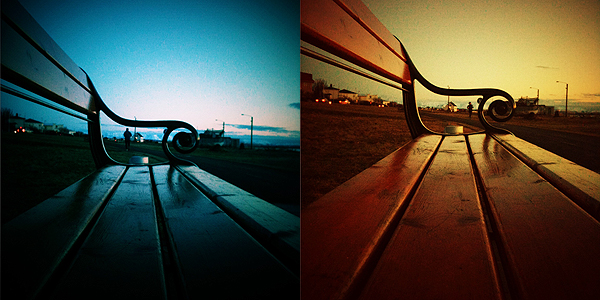
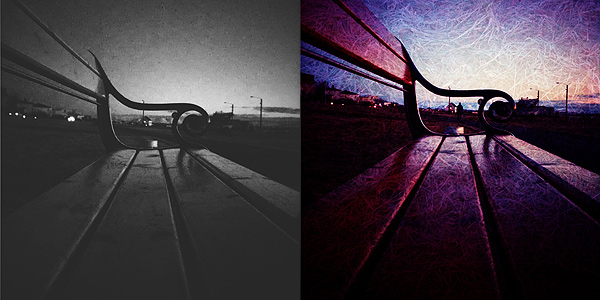
Lomora 2 for iPhone

Above you can see results with random filters, respectively  Red/Cyan, Yellow/Orange Black/White and Sensia double exposed.

One processing problem I encountered is the fact 1 pixel of a lighter color is added on the left border of each and every image. It doesn’t matter which effects you pick or the chosen resolution: the pixel is most of the times very noticeable, especially in photos with intense vignetting. And of course, removing it can be a pain because you have to do it with another app, since Lomora 2 doesn’t allow cropping.

Lomora 2 needs some improvements to really be on par with other lomography simulation apps. In spite of the swell filters, the app is truly a bit too convoluted and frustrating to use. We hope in future updates.

EDIT: the issue with light pixels appearing in the left border was fixed in version 2.2. Updated review for Lomora 2 can be found here.

Overall

Name: Lomora 2
Developer: Marvin Lee
Compatibility: iPhone, iPod Touch. iOS 4.1 or later.
Price: £1.79||$2.99||€2.39
Vote: 3/5


Lomora 2 - Marvin Lee

Photoshop Express: OK As Long As You Don’t Expect THE Photoshop

Photoshop Express by Adobe got an update yesterday. For those who were already using this app before, there aren’t substantial differences in the new version. For the others, this could be a good starting point to spend a few words about it.

Where do you start writing about anything with the Photoshop label on it without making comparisons with THE Photoshop? It’s almost impossible. There is a risk that I will end writing something totally superfluous. Does it even make sense to review Photoshop Express? I guess not. But as there shouldn’t be a precise reason to talk about an app instead of another, bear with me, for even if it’s pointless in this case I’ll make an exception.

Main Features

  • Crop, flip and rotate;
  • Adjust exposure, tint, saturation, contrast;
  • Soft focus, sketch and sharpen;
  • Seven effects;
  • Eight borders;
  • Share on Facebook, TwitPic or Photoshop.com (requires Photoshop.com account).

Appotography Opinion

PS Express will probably displease those that associate the name Photoshop with a very sophisticated tool of graphics editing. The Express version for iPhone, iPod Touch and iPad has little in common with the full-fledged software by Adobe.

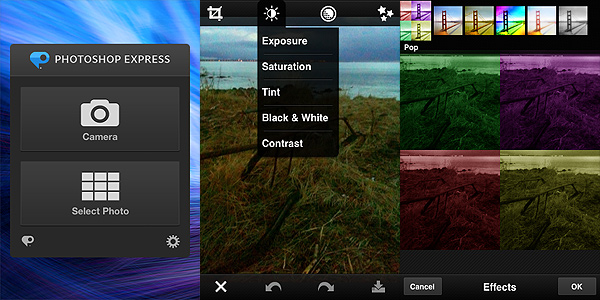
Photoshop Express by Adobe for iPhone

You can use the camera or photos in your camera roll. You can immediately upload or you can choose to edit the pictures, by cropping, rotating or fixing their orientation, by altering color properties, by applying filters, effects and frames. However, there is actually very little you can do with Photoshop Express, apart from very basic adjustments to your photo.

The effects, for instance, are few, very generic and not customizable. The frames are also not that varied and most have that conventional comic border look that not anybody will find appealing. You can adjust parameters like exposure, tint and contrast by swiping your finger on the screen, but personally I don’t find the app’s way of handling the whole process very user-friendly overall. For example, if you want to apply one of the filters, you have to imagine a fullscreen slider; if you raise your finger from the screen’s surface, the app will remember the value of the filter applied  in relation to the position your finger reached on the screen; if you want to make a slight adjustment without starting over, you have to reposition your finger more or less as it was before. Even for quick adjustments, this is not the most user-friendly approach, in my opinion. But again, even if there are other apps doing the same in a more satisfactory way, many will object that differently from them Photoshop Express is free thus one shouldn’t really complain.

The bottom line is: it’s true it’s Photoshop and it’s free, but from the photo editing colossus we honestly could have expected something more. If you want the closest thing to the actual Photoshop on the iPhone, this is not the right choice for you. Maybe in combination with other apps or for very basic and quick editing, Photoshop Express still has some use.

Overall

Name: Photoshop Express
Developer: Adobe Systems
Compatibility: iPhone, iPod Touch, iPad. iOS 4.2 or later.
Price: free!
Vote: 3/5

Adobe Photoshop Express - Adobe Systems Incorporated