Appysnap Review

Taking photos with an Apple iPhone is not only about saving memories from oblivion or about creating. The iPhone camera can be used also for pure amusement and to discover new ways of taking photos.

Appysnap combines the features of a photo sharing app with those of a treasure hunting game and nicely bundles them for the iPhone format.

Main Features

  • Full resolution available;
  • In-app guide;
  • Share on Facebook and Twitter.

Appotography Opinion

As a refreshing way to explore themes and ideas, Appysnap can be used by everybody, expert photographers and beginners or casuals alike. In fact, using Appysnap requires no previous knowledge of how the iPhone camera and other photography apps work. Following the instructions and taking snapshots is all that is necessary to play.
Appysnap iPhone
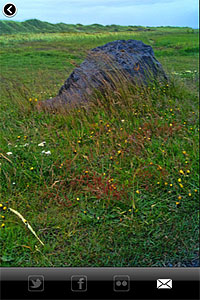
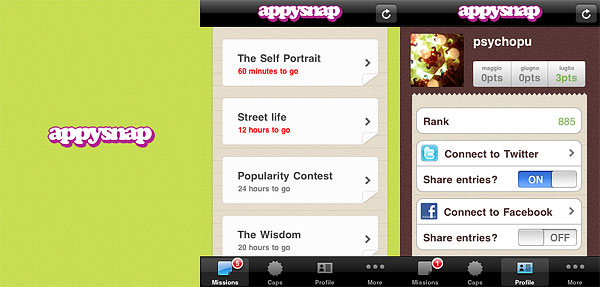
To use the app, you need to create an Appysnap profile (note that the profile is unique and it cannot be shared on more devices), which you can connect to Twitter and Facebook accounts to post evidence of your achievements. From the missions panel, you can read briefs and choose missions you feel like completing. Mission themes vary a lot and come in many forms. They can be about taking snapshots of specific objects, people, situations. For obvious fair play reasons, importing photos from the Camera Roll is not allowed. For missions you successfully complete, you are awarded points that will determine your personal Appysnap rank. Points are not always automatically updated: for some missions, all entries have to be reviewed before assigning points. Other missions will award points only to the quickest players.
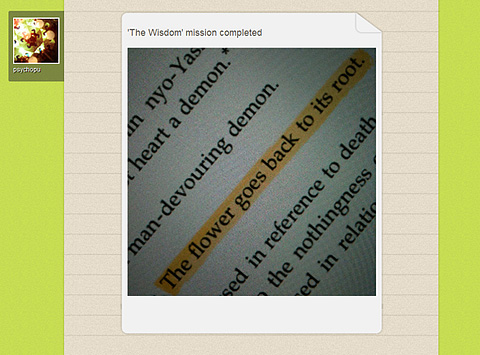
Appysnap iPhoneSecret or local missions can be available as well from time to time. In general, this kind of missions doesn’t assign points, but caps (exclusive badges which you can collect to unlock special content) or prizes.

There might be times when you have completed all the missions before new ones are generated, so you will have to check back often or enable push notifications to allow Appysnap tell you when new missions become available. Mission downtimes can vary and occasions in which you will not be able to complete any mission for various reasons (you don’t own some required item or you don’t live in areas where matching situations can occur) will be frequent.

Appysnap is a nice diversion from the usual way of conceiving iPhone’s photographic capabilities and, even though there is definitely space for improvements, using this app can suggest fresh ideas and different approaches to photo taking.

Overall

Name: Appysnap
Developer: Never Odd Or Even LLP
Compatibility: iPhone, iPod Touch, iPad. iOS 3.1.3 or later.
Price: free!
Vote: 4/5

Appysnap - Never Odd Or Even LLP

New Telephoto Lens for Your Camera Phone

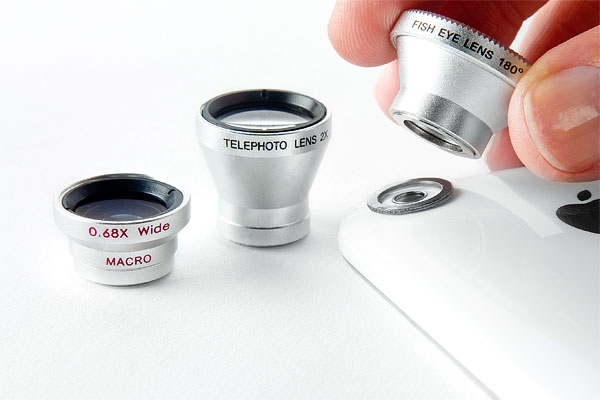
Photojojo just released their new telephoto cell phone lens, out now and available from their shop. The new lens is the third release in a series of cell phone camera add-ons, which also include a macro/wide angle and a fisheye lens.

With a 2x zoom capability, the telephoto is the aid you are looking for if you want to make subjects look closer in your photos. Like the macro/wide angle and the fisheye, the telephoto lens is compatible with most cell phone cameras. Yes, also with your older iPhone model. To attach it to the camera, the lens features a detachable magnetic ring. Front and back covers come with the lens to prevent scratching.

Photojojo camera phone lens kit.
The complete lens kit.

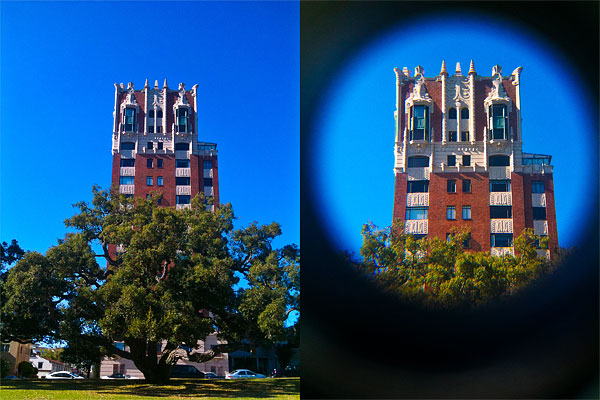
Note that in Photojojo FAQ it is stated that lenses will fit most cell phone bodies, but iPhone 3GS and 4 users will experience some issue due to the design of their devices (the curved body in 3GS and the flash in 4 getting in the way). Note also that the lens produces intense vignetting around the borders of photos taken with it. The vignetting may be a problem for some users, although for others it may be a point in favor, as it gives photos a peculiar style.

Photojojo telephoto lens
Photo with (right) and without (left) telephoto lens.

The new telephoto ships for $20, but it’s possible to get the complete three-lens kit at the special price of $49.

Click! Updated to 3.1.1

Click! iPhoneClick! is now version 3.1.1. The new release of Room1337’s single-handed photo app mainly improves without changing the way Click! works and without introducing new features as well.

Especially noteworthy the fix concerning the app’s preview feature. The issue prevented users from previewing images taken with Click! from within the app (note that, as we explained in our previous review, this didn’t affect saved or sent images). I could verify that the preview feature now works perfectly fine.

Click! iPhone
Fixed preview bug in 3.1.1

Version 3.1.1 improvements include fixes both to interval timer on older devices and to continuous photo memory, enhancements concerning devices running iOS 3.x, and optimization for Flickr photo sharing.


Gyro Cropper Review

Even photos that at first glance might look defective can be given a new life with proper editing. Editing often simply means adequate cropping. Gyro Cropper by FANG is a specialized iPhone/iPad/iPod Touch utility to perform easy cropping on images.

Main Features

  • Full resolution available;
  • 3 cropping tools;
  • Rotate;
  • Adjust aspect ratio;
  • In-app guide;
  • Send to Squaready or Instagram.

Appotography Opinion

Gyro Cropper offers a simple and effective way to crop photos. The app comes with a set of tools, allowing users to crop and adjust images with the minimum effort.

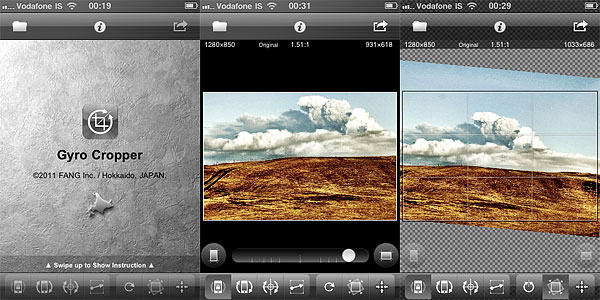
Gyro Cropper by FANG for iPhoneRotate by Device Posture calculates cropping thanks to the device’s position. By rotating the device, the user gives the app all the necessary indications without having to touch the screen. This tool is especially convenient in instances in which covering the screen with fingers may cause inaccurate results. Although at first it might take some time getting used to, Rotate by Device Posture is not hard to use. In this mode, the app relies on methods that entirely depend on the device’s capabilities to figure out cropping: on iPhone 4, iPod Touch 4th and iPad 2, Gyro Cropper uses the gyroscope, on iPhone 3GS and iPad both the accelerometer and the compass, while on iPhone 3G and iPod Touch 2nd and 3rd it uses the accelerometer only. Thus, user experience may vary according to the device you are using. Rotate by Device Posture is in any case the most interesting element in Gyro Cropper.
Rotate by Finger Tapping is more of a classic tool, relying on finger rotation to determine cropping. A number of apps come with similar tools to perform cropping.

Rotate by Drawing a Line is basically a straightening tool and thus it is useful to fix crooked images, especially landscapes. By drawing a line on the photo, the user tells the app how cropping should be performed. A few apps offer this kind of cropping instrument.

Additionally, aspect ratio and rotate by 90 degrees are included to broaden the available possibilities. Both are common in apps that support cropping.

Gyro Cropper by FANG for iPhone
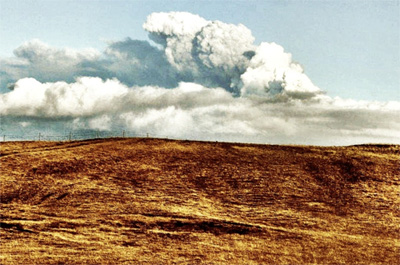
The eruption at Eyjafjallajökull doesn't look very hideous at this resolution.

Gyro Cropper is great for photos in need of quick cropping and for fixing crooked images. FANG’s app is better than most cropping features that come with the majority of do-it-all editors. The app is easy enough to use and its workflow is very smooth. Although flip and rotate by degrees could come in handy in some instances, this app is pretty much a flexible aid for most cropping needs. While people using older devices may encounter issues with less accurate results now and then, iPhone 4/iPod Touch 4th/iPad users will enjoy Gyro Cropper at its full potential.

Gyro Cropper is currently on sale and available in the App Store at the special launch price of $0.99/€0.79/£0.69.

Overall

Name: Gyro Cropper
Developer: FANG Inc.
Compatibility: iPhone, iPod Touch, iPad. iOS 4.0 or later.
Price: £1.19||$1.99||€1.59
Vote: 4/5

Gyro Cropper - FANG Inc.

PhoneGrafer on Sale!

PhoneGrafer iPhonePhoneGrafer is on sale! The multi-purpose camera by emotionale is currently 50% off its original App Store price tag.

PhoneGrafer is an old acquaintance of many photographers who priced iPhone as a quick and easy means of expression. Thanks to a balanced selection of photographic tools and to a neat user interface, the app preserved well its original freshness and it’s still a fine alternative to those in need of a smart and comprehensive enough multi-purpose camera.

PhoneGrafer on Sale!You can now get PhoneGrafer at the special price od $0.99/€0.79/£0.69. The offer is valid for a limited time only.
Monophix Updated to 3.1

I have been hoping for this update. Monophix 3.1 is out and with it comes the long-awaited color filter feature.

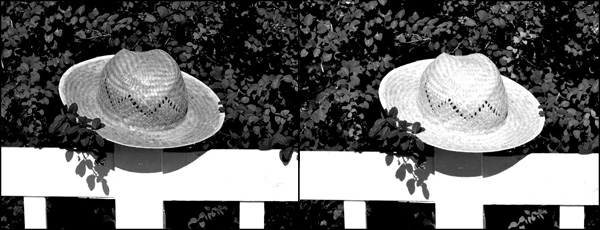
Monophix is one of the most valuable tools in the App Store for easy conversion from color to black and white. In our previous review, although we recognized the worth and the potential of the app, we also explained how the final score reflected the absence of a color filtering feature. Color filtering is an essential aspect in color to monochrome conversion. To avoid mediocre results, every photographer has to take into account color filtering. In traditional photography different results are obtained by blocking certain colors by using various photographic filters. In digital photography, the same can be easily achieved in photo editing.

MonoPhix 3.1 for iPhone
Different filters can change the look of your black and white photo.

In Monophix 3.1 you have now filters for red, green, blue, cyan, yellow and magenta. The average weight black and white is also still available. This allows better control over final results, depending on the photo and on the effect you want to achieve.

In Monophix 3.1 major improvements to the vignette feature were also made. Vignette is now more manageable, thanks to the intensity slider which was added in this version. For users who experienced this issue in previous releases, the developer informs that the vignette preview glitch was also fixed: with a slider it’s now possible to correct vignette preview distortion.

Thanks to these and other minor enhancements, we feel like reviewing the previous score of Monophix, which now gets 5 out of 5.

Note: version 3.1 contains a glitch affecting the app’s opening screen. Since we have verified the issue does not concern the app’s functioning, our final score is not influenced by it. Anyhow, the developer lets Monophix users know that with the upcoming update to 3.1.1 the problem will be solved.

Overall

Name: Monophix
Developer: UIC Phoenxsoftware
Compatibility: iPhone. iOS 3.1 or later.
Price: £0.69||$0.99||€0.79
Vote: 5/5

MonoPhix - Vintage meets Technology - UIC Phoenxsoftware

AstroClip: iPhone 4’s Best Stargazing Friend

How many committed stargazers are there? Among those, there are also many iPhone users with a passion for photography. If you are into both astronomy and iPhone photography, an ongoing project on Kickstarter will perhaps interest you: AstroClip will help you taking photographs of the starry sky directly on your iPhone 4.

AstroClip is a special iPhone 4 mount to fit all telescopes with a 1.25″ wide eyepiece — which is to say, most telescopes, since 1.25″ is the most popular size for eyepiece barrels. The body of the mount, in black or white color, is made of rigid plastic material and features three screws to allow perfect fit to the telescope’s eyepiece. AstroClip is minimally designed and sturdy enough to keep the iPhone steady while taking photos at night. Using AstroClip, you won’t need other camera equipment to take photos of the moon with your telescope (it goes without saying: you have to have a telescope to use AstroClip).


With a pledge of $25 or more, the project backers will get an AstroClip mount in the color of their choice, while by pledging $40 or more they will get a limited Kickstarter edition AstroClip in red color and a T-Shirt. For higher pledges, there are more extras available.

The goal is to raise $15,000 by September 3, 2011. The funds will be used to start the production, which will employ quality injection molding. Matthew Geyster, the project starter, points out that AstroClip will be entirely manufactured in the US. For now, AstroClip is only designed to work with iPhone 4. However, if pledging will be successful, it’s likely AstroClip’s compatibility will be extended also to upcoming iPhone models.

If you want to know more on AstroClip, please visit the project’s page on Kickstarter.

BoothClub Review

BoothClub is a new photo booth for iPhone that comes with an assortment of effects and themed skins. If anybody thought photo booths are a thing of the past, the iPhone proved them wrong. Photo booths are indeed enjoying great popularity in their new pocket format.

Main Features

  • 2692 x 520 pixels resolution;
  • 3 border styles;
  • 10 effects (+6 more with in-app purchase);
  • Front camera support (on enabled devices);
  • AirPrint support (on enabled devices);
  • Security switch;
  • Send via email or share on Facebook and Twitter.

Appotography Opinion

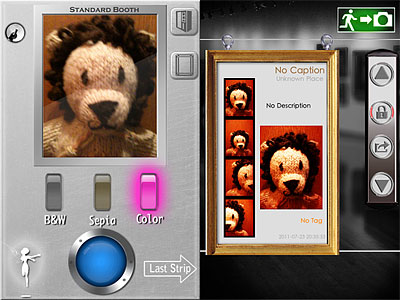
BoothClub comes with two different sets of themed effects and two booth skins. The Standard Booth includes 3 basic effects, color, black and white and sepia. The Fantasy Booth features 7 effects (red, orange, golden, yellow, cyan, blue, violet), characterized by oversaturation and colored vignetting, to match different situations and moods.

BoothClub for iPhoneA collection of 6 additional special effects are available with the Memory Booth (in-app purchase: $0.99/€0.79/£0.69). Memory effects revolve around a general vintage look, but they are quite varied and range from high contrast black and white to aged paper. From the in-app settings, it’s possible to choose a border style among black, white and gray.

BoothClub for iPhoneTo take pictures, you simply point the camera at your subject (being a photo booth, at yourself, for example) and press the shutter button. BoothClub automatically takes four shots. You cannot set timer or shoot manually, which in some instance can be not very convenient. You can review the last strip of photos taken with the chosen booth after taking it. All strips are saved in the app’s vault. From the vault, strips can be deleted, shared, printed, emailed or, simply, saved to Camera Roll.

Switching from front to rear camera is enabled on supported devices, and so is using the AirPrint option. As I said, a security feature is also available, allowing to input a code to protect photos once they are saved in the app’s gallery. The code can be changed and security can be disabled.

Even without purchasing the extras, BoothClub has a decent selection of effects, especially for a photo booth app. Although not all effects are great in any situation, especially indoors, there is enough to have some fun and try different looks. The interface feels a little confusing at first, especially because each skin has buttons and switches placed differently. Anyway, getting used to BoothClub doesn’t take too much effort. The app offers tips to learn about some of its most obscure features, like the security switch, but even where available, help is not exhaustive. In general, the app feels a bit less intuitive than it could have been.

Overall

Name: BoothClub
Developer: Glowing Butterfly Inc.
Compatibility: iPhone, iPod Touch, iPad. iOS 4.0 or later.
Price: £0.69||$0.99||€0.79
Vote: 3/5

BoothClub - Glowing Butterfly Inc.

King Camera & Iris Photo Suite for iPad on Sale!

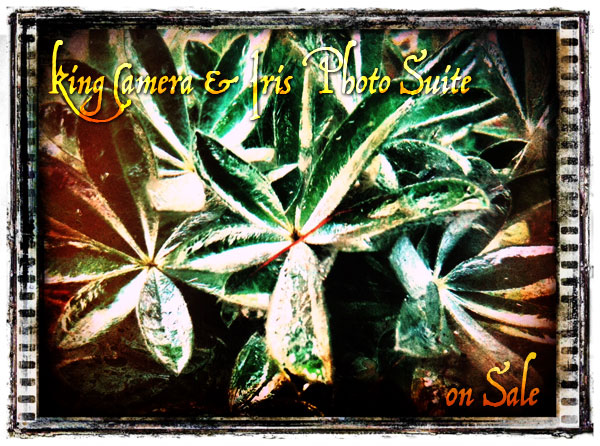
Two special offers in the App Store not to be overlooked: King Camera and Iris Photo Suite for iPad are currently on sale! Whereas multi-purpose cameras are often weak either in camera or in editing features, King Camera is capable of handling both aspects of image crafting. As for Iris Photo Suite, this app is what many users described as one of the best Photoshop replacements for iDevices.

King Camera & Iris Photo Suite on Sale!

Both apps are available at the special price of $0.99/€0.79/£0.69 for a limited time.

iPhone Photography Tutorials #3 – Create A Little Post-Apocalyptic Scenery

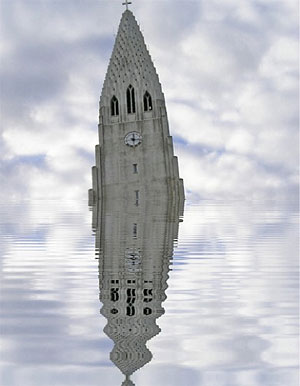
The film industry, and Hollywood in particular, have filled our imagination for years using post-apocalyptic visions of submerged cities in ruins and all that jazz. To achieve the effect in a sumptuous Hollywood-style would take too much money, I am afraid. Anyhow, with little effort and simple means, you too can recreate on the iPhone your own little post-doomsday scenery.

This effect works great on bold architectural details, like the top of bell towers, skyscrapers or other buildings, but it can be applied successfully to a number of other objects, so feel free to experiment.

Apps I used: WaterMyPhoto, Cameramatic, Infinicam.

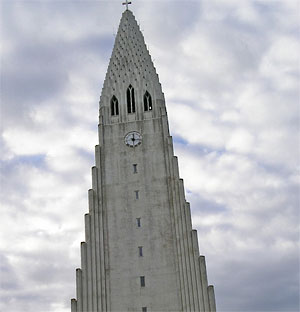
  1. I choose an average photo of the Hallgrímskirkja, a local church with an impressive and unique bell tower. The photo is slightly tilted. I load the photo into WaterMyPhoto (->Photo Album). For quickness’ sake I choose this app, mainly because it’s so simple to use and you don’t have to make other adjustments apart from selecting the area of the image you want reflected. Unfortunately, the app only saves at very small resolution (a less than satisfactory 390×502 pixels). The app is free, but it displays ads. If you care to remove them, you can purchase the in-app remove ads feature for $0.99. I adjust the photo, making sure I am keeping the cross on top of the tower into the frame (I like that detail) and tap on the Crop button to confirm. After the app generates the water reflection, all I have to do is saving (->Done Editing->Save Photo).
    Choosing the Photo
    Choosing the photo.

    Applying Water Reflection
    Applying the water reflection effect.
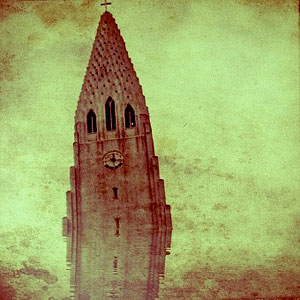
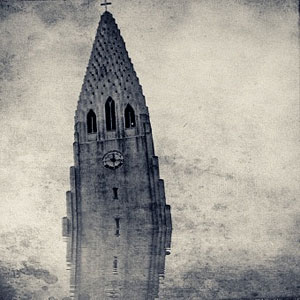
  2. I open the image in Cameramatic. I adjust the image to the square cropping tool and from the Light Box, I tap on the monkey wrench button to access the edit area. From filters, I select a monochrome filter. In this case I picked Retrochrome (Filter->B&W->Retrochrome), but anything balanced, not too contrasted or faded, would have worked. Then I apply a frame (Frame->Texture->Grunge Paper 03). I save to Light Box and then to Camera Roll by tapping on the “+” sign.

    Add Texture
    Turning into monochrome and adding texture.
  3. I open the photo in Infinicam because I know it has some lovely hazy effect. Autochrome, which is one of the presets that come with the app, is my personal choice. Since I like the hazy look, which makes the texture and reflection look subtler, but I don’t think the reddish hue fits the mood I am trying to convey, I apply another filter: this time it’s one of my own presets (whose code is DJX-63A0), which turns the image into a more appropriate sepia. All I have left to do is saving.
    Applying Autochrome
    Applying haze with Autochrome.

    Turning Into Sepia
    Turning the photo into sepia.

This is what I did in this very specific case. There are many other ways to achieve the same overall result. For example, you could choose other tools to apply your favorite textures and borders, to fix exposure or to tilt your subject further, for a more dramatic effect. You could go either for an uncropped image or for a different format than square, which I used here. It all depends on what makes you more comfortable or what pleases your eye.