One of the most important changes introduced in version 2.0 of iSupr8 is the possibility to purchase more films to process video clips. Together with the original Tru 8, iSupr8 now features a selection of effects ranging from black and white to a variety of color film stocks. All films are customizable: users can choose default settings or they can create and save their own custom presets by altering basic parameters for each effect.
After the update to 2.0.2, iSupr8 now offers 7 film types (+ Tru 8 and Levi’s® Film Workshop, available for free with the app’s download):
VibraChrome 100D: slightly faded color film with warm, radiant tones.
SuprChrome 40: desaturated colors with a slight magenta cast.
PenneMaker B&W Reversal Film: bold high contrast black and white in the style of the 60’s.
Prime-X B&W Reversal Film: black and white with a faded look and a subtle sepia tint.
ThermaChrome: vibrant colors with an emphasis on blue shadows and warm midtones.
AltroVerdi 100: ultra-vivid colors and strong green hues, especially noticeable in darker areas.
WestmanRosa 64T: bright red shadows contrasting with cool midtones.
Here is a preview of all the extra films that are available as in-app purchases in iSupr8.
Thermachrome, AltroVerdi and WestmanRosa were added with the last update (2.0.2), while the other films were already in version 2.0. Effects are not bundled together: each of the available items can be purchased individually for $0.99/€0.79/£0.69.
iSupr8 is still free in the App Store, thanks to the sponsorship of Levi’s Film Workshop.
FX Photo Studio for iPhone will be on sale throughout the weekend. MacPhun’s photo editing app is currently available at the special price of $0.99/€0.79/£0.69 (-50%) in the App Store.
FX Photo Studio was recently updated. You will find our full review of version 4.0 here. The current version of iPhone’s app comes with 194 ready-to-use filters (vintage, monochrome, sketch, distortion effects and more), masking feature and several photographic tools for fine-tuning your images.
The anticipated Mac 1.1 update of FX Photo Studio, with upgraded editing tools, integration with Aperture and iPhoto and new effects, is also coming next week.
The new release of PhotoToolbox improves performance of image processing on iPhone 4. This is not the only change in version 2.8.0: other than the new app icon, the most important addition is the introduction of a layer blend feature.
Blending can be enabled by scrolling the first menu wheel in Filter mode. There are 6 presets for quick blending; however, by tapping on the Blend button, you can access the blend editor and import any image in JPG and PNG format from your own device. This lets you use custom textures and allows to merge more photos together.
There are 16 classic blending modes available in all: Normal, Multiply, Screen, Darken, Lighten, Overlay, Soft Light, Hard Light, Color Burn, Color Dodge, Difference, Exclusion, Hue, Saturation, Color, Luminosity. For each mode, it’s possible to set overall intensity.
Imported textures or images can be resized according to different aspect ratios and they can also be rotated independently from the base photo you want to apply them to. Using the Front/Back switch, the order of the layers can be inverted.
Custom blends you create can be saved among the app’s presets.
Cameramatic 1.4.0 is now available in the App Store. The latest version introduces new filters and frames to its already rich collection.
The new filters, Instant and Deep, are both added to the Standard collection of Cameramatic. Their overall looks are not significantly different, but while Instant is bright and vivid, Deep has a slightly faded character. Several new frames (9 new items in total: White 07, White 08, Ivory 02, Sloppy, Film 01, Film 02, Film 03, Film 04, Hassy 02) are also part of this update. They are added to Film and Standard frame collections.
Here is a preview of the filters in combination with two of the new borders.
Deep + Sloppy border (left), Instant + Film 04 (right)
Pholeido is not only a photo editing app with several tools and effects to retouch and spice up your pictures, but also a photo community where you can share your images with other members.
Main Features
Full resolution available;
Grid on/off;
Self-timer;
Flash on/off (only on supported devices);
15 borders;
11 photographic effects;
9 fun effects;
Crop, resize and rotate;
Adjust saturation, color, brightness, contrast;
Adjust focus, blur, sharpness;
Red eye remover;
24 bubble styles;
27 cliparts;
100+ available fonts;
Undo;
Send via email or share Pholeido, Facebook, Twitter, Tumblr and Flickr.
Appotography Opinion
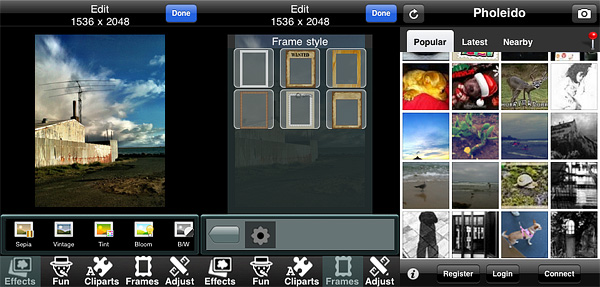
Pholeido lets you import photos from your Camera Roll and in addition offers a built-in camera equipped with self-timer (5,10,15 seconds delay) and rule of thirds grid. Photos, either taken in-app or imported, can be edited before sharing them.
A series of tools are available to retouch images. Various presets, like basic sepia and black and white, oil painting and sketch filters, blend modes (eight in all), tint, solarize and negative, allow a quick edit, while more control can be achieved by adjusting brightness, contrast, saturation and color settings together with blur and sharpening. Most of these tools feature adjustment sliders. The collection of Pholeido photographic tools counts also a red eye remover. Other effects which can applied are different types of distortion (mirror, fisheye, warp, swirl, among others) and cliparts to be used as stickers. Adding text and speech bubbles is also possible. For a final touch, you can add a frame and change its color to match your picture (matching won’t be easy though, as there are only a few colors to choose from, anyway).
Once you are done with editing, you develop the photo, which at this point can be sent using email or shared on several social networks, including Pholeido’s community.
The app’s community works more or less like any other community: you upload your photos and decide whether you prefer to share them with everybody or with your approved contacts only. You can set permissions for each contact separately. For example, you can decide to share photos with some of your contacts only. Other than sharing, you can browse photos uploaded by your contacts in your feed or search for popular and nearby entries. Users can comment and like photos from other community members. It is not required to have a community account in order to use the photo app.
The plain white border is the only one I actually like.
One the most annoying elements in Pholeido is the wavy effect that is applied to photos during processing times. Was it supposed to offer distraction to the user? Was it the first thing developers could come up with? Is it totally random? I am confused. There are other confusing things in Pholeido, like blend modes, that are mysteriously hidden behind an effect called “Bloom”, or the fact you can apply as many effects as you like, but you only have a single undo. In general, a few of the effects are nice, like the black and white and the vintage ones, but most of them are nothing more than average. Frames and cliparts are sort of generic as well and they include a variety of cliched items, from wanted poster to Santa Claus hat. Processing times are unusually long. It feels like this app offers very limited possibilities and it was developed without a coherent idea. Pholeido tries to please everybody without really being successful at pleasing anybody.
As we already wrote in a previous news today, the developers of Hipstamatic have now added an option to delete your photos from public albums.
I think it is still important to remind our readers that everything we wrote in previous posts about the Creative Commons license applied to your photos on Hipstamatic Family Albums and the general rights Hipstamatic has on your photos once you have used their online services is still valid. So, deleting your photos from the Family Albums will not remove the Creative Commons license from them – which means that if somebody downloaded your photos, they can use them freely for as long as they want – and it will not remove the rights you gave Hipstamatic on your photos once you have used their online services – rights of using your photos in any way they want, including reselling them to third parties.
While many advocates of the “free for all” Internet consider Creative Commons the only way to go for sharing of information on the Internet, you must always be careful when deciding to go this route with your photos. And you must always remember that the Creative Commons license does not overwrite the rights you gave to a company when you accepted their Terms of Service.
I know – a lot of users just want to have fun with their iPhone and do not really care about who is using their photos. But there is a substantial number of users, also according to the number of e-mails and comments we had on the topic, that do care and that should thus always read the small notes in the Terms of Service of the apps they are using.
And if you are interested in different ways of sharing your photos, somebody is working on them – read our post about OpenPhoto – and even Flickr and Google+ have much more relaxed Terms of Service when it comes to photo sharing.
Simply B&W 1.1 is out. The latest release of MR. B. Ware’s monochrome converter for iPhone comes with enhanced interface and new useful features.
It’s now possible to apply two different vignetting styles, black and white. Vignette intensity is easily adjustable with a slider. Another new feature is grain simulation, to imitate effects obtained with different types of film. Version 1.1 also adds EXIF data preservation for devices running iOS 4.1 or later.
Other noteworthy updates include:
PicTools 1.1: new effects, overlays and borders with names for easier reference, added border opacity control, save up to 5 RGB curves settings;
Hipstamatic 221: added the requested delete from Family Album feature;
Appysnap 1.1: added leaderboard and Snap tab, improved upload stability;
Many alternatives to common photo sharing are emerging. iPhone users are more and more challenged to make use of their photos in new creative ways and to take advantage of photo sharing also as a way to tell others something meaningful. Tracks can be used simply to share photos, but also to tell a story, compose a visual essay, or simply put together a thematic collection with photos you take with your iPhone.
Main Features
Create and delete tracks;
Comments.
Appotography Opinion
The idea behind Tracks is nice, but I was not completely convinced by its actualization: in the present state, Tracks looks more like a service still in need of testing than like a full-fledged sharing platform. The interface is minimally designed and very slick, but features are also very limited. All in the name of simplicity, but exaggerated simplicity is not always desirable.
Users create a profile and then they can either load photos from their device or use the built-in camera feature. By loading photos, users create albums (or tracks, if you wish) they can share with people they personally choose, like friends and family. Whole tracks can be deleted as well as individual photos in them. From Tracks website you can have an overview of all the tracks you have created. The main quality of Tracks, as I said, is also the app’s main flaw: extreme simplicity. The fact it’s not possible to rearrange the photos in any logical order or edit the location defies in part the purpose of the app. Moreover, once they are logged in, users are given no further indications. How does Tracks work in detail? What about Terms of Service and Privacy Policy? And so on and so forth. In the absence of a guide, tips or help of any kind, you have to find answers to all your questions on your own (if you’re the fussy type, you can contact the support service: they are very polite and more than willing to help their users). Anyway, most of the times, if you cannot figure it out, it means you cannot do it.
Right now, Tracks is a hassle-free app that makes it possible to privately share photos — which is something, it must be said, several other services allow as well and with more options. But Tracks has the potential to become something more refined and useful: we will be looking forward to future updates.
Overall
Name: Tracks™
Developer: Tracks Media Inc.
Compatibility: iPhone, iPod Touch, iPad. iOS 4.0 or later.
Price: free!
Vote: 3/5
ScratchCam is currently on sale with a discount of 50% off the original App Store price.
ScratchCam is easy to use: you can generate random effects to turn your photos into old and worn out images with one single tap. You can save your favorite effects to apply them over and over to all your photos.
Right now, ScratchCam is available at the special price of $0.99/€0.79/£0.69 for a limited time. If you haven’t tried this app, this could be the right occasion.
Some news that caught my attention earlier this month concern an open source project that could definitely bring some fresh air and, hopefully, new exciting possibilities both to casual and dedicated photographers. OpenPhoto — this is the name of the project — will be an open source equivalent of many photo sharing services we are already acquainted with, like the various Flickr, Smugmug, Picasa, Photobucket and so on.
Do we need another photo sharing service?
The answer to this question depends, of course, on what kind of photo sharing we are talking about. The principle inspiring OpenPhoto is, at its core, very simple: you shouldn’t be forced to commit yourself to a company when all you want to do is simply enjoying the sharing of your own photos. The difference between OpenPhoto and other services is that you will be given the freedom to use your photos as you like and the photos will remain yours and yours alone. No more dealing with cryptic terms of service that, ultimately, go to the advantage of the service provider; no more situations in which somebody has a final say on what you can do and what you cannot do with your own creations.
OpenPhoto will provide a sharing service that will rely on users’ cloud storage accounts like those on Dropbox, Rackspace and Amazon S3, to host not only photos, but also tags and comments.
In the words of Jaisen Mathai, former software engineer for Yahoo! and project founder, OpenPhoto is the “digital equivalent of shoe-boxes filled with photos”, only safer and more convenient: take your photos with you always, use them as you wish, post them on other services like Twitter and Facebook. The project’s funding on Kickstarter was successful and updates are expected in the forthcoming months.
As for the question that probably interests many of you: will a mobile (iPhone, Android) version be available? The project founder clearly stated that it’s in his intention to bring OpenPhoto to mobile platforms. However, both iPhone and Android applications are not the top priority for the present moment. This means it’s very likely OpenPhoto will eventually arrive to your mobile device, but it’s not possible at the moment to predict when or how this will happen.
If you are interested in learning more about this project and if you want to keep yourself updated on further developments, please visit the official OpenPhoto page or follow OpenPhoto on Twitter.

 iSupr8 is the possibility to purchase more films to process video clips. Together with the original Tru 8, iSupr8 now features a selection of effects ranging from black and white to a variety of color film stocks. All films are customizable: users can choose default settings or they can create and save their own custom presets by altering basic parameters for each effect.
 FX Photo Studio
 The anticipated Mac 1.1 update of FX Photo Studio, with upgraded editing tools, integration with Aperture and iPhoto and new effects, is also coming next week.
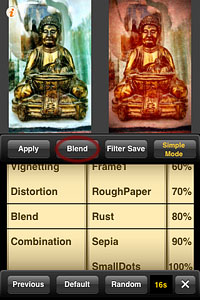 There are 16 classic blending modes available in all: Normal, Multiply, Screen, Darken, Lighten, Overlay, Soft Light, Hard Light, Color Burn, Color Dodge, Difference, Exclusion, Hue, Saturation, Color, Luminosity. For each mode, it’s possible to set overall intensity.
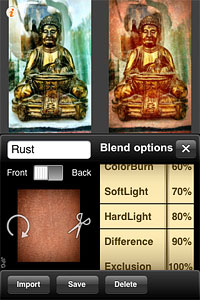 Imported textures or images can be resized according to different aspect ratios and they can also be rotated independently from the base photo you want to apply them to. Using the Front/Back switch, the order of the layers can be inverted.
 Cameramatic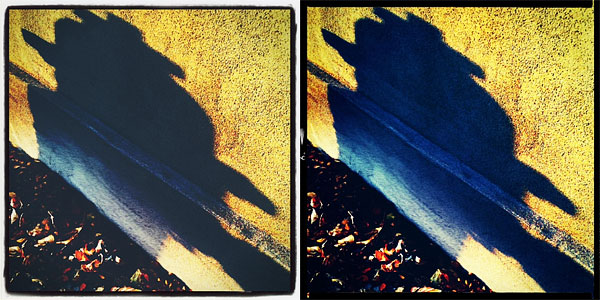

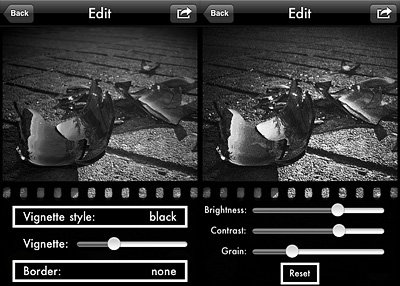 Version 1.1 also adds EXIF data preservation for devices running iOS 4.1 or later.
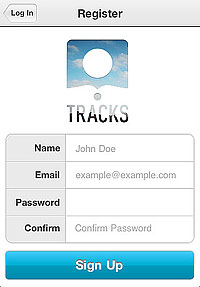 The main quality of Tracks, as I said, is also the app’s main flaw: extreme simplicity. The fact it’s not possible to rearrange the photos in any logical order or edit the location defies in part the purpose of the app. Moreover, once they are logged in, users are given no further indications. How does Tracks work in detail? What about Terms of Service and Privacy Policy? And so on and so forth. In the absence of a guide, tips or help of any kind, you have to find answers to all your questions on your own (if you’re the fussy type, you can contact the support service: they are very polite and more than willing to help their users). Anyway, most of the times, if you cannot figure it out, it means you cannot do it.
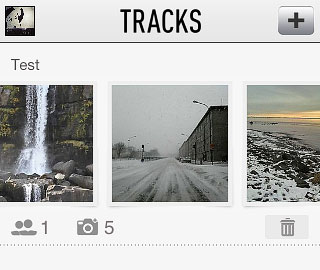 Right now, Tracks is a hassle-free app that makes it possible to privately share photos — which is something, it must be said, several other services allow as well and with more options. But Tracks has the potential to become something more refined and useful: we will be looking forward to future updates.
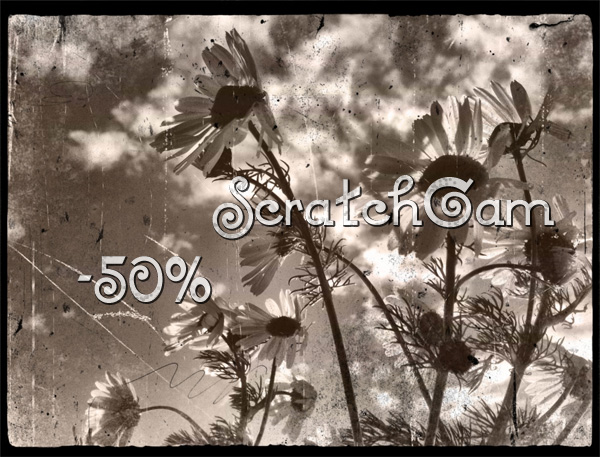 Right now, ScratchCam is available at the special price of $0.99/€0.79/£0.69 for a limited time. If you haven’t tried this app, this could be the right occasion.