FX Photo Studio Review

Basic features like crop and rotate should at this point be included in most apps, with the only exception of those that strictly try to imitate instant cameras and their mechanics. Unfortunately even cropping and rotating aren’t all that common, so sometimes you end using three different apps instead of one just to make your picture look alright. Which is OK if you’re an iPhone geek or if you have a lot of time to devote to your mobile photography, but it’s definitely not convenient if you just want to make your photos look nicer.

FX Photo Studio is comprehensive and at the same time simple enough to make both the casual iPhone camera user and the geeky type happy. MacPhun’s FX Photo Studio is one of those apps whose aim is to offer the user a wide variety of photo editing possibilities within a single product.

Main Features

  • Full resolution available;
  • 180+ effects, including borders (more available with in-app purchase);
  • Crop and rotate;
  • Gamma correction;
  • Shake to randomize effects;
  • Create and save custom presets;
  • Hide/unhide effects;
  • Undo/redo;
  • In-app hints and trivia;
  • Share via email, Facebook, Flickr, Twitter and Tumblr.

Appotography Opinion

With FX Photo Studio, MacPhun offers a well-conceived and user-friendly multi-purpose utility, with special focus on photographic post-processing effects. The interface of FX Photo Studio is one of the simplest and yet most functional you will be able to find. Despite the assortment of tools and effects, the simplicity of use of this app is impressive. Everything is optimized to allow even the newbie to obtain good results with the minimum effort.
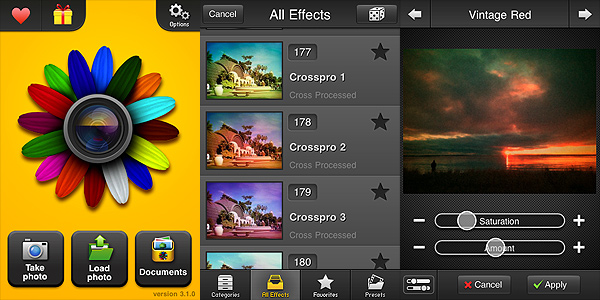
FX Photo Studio by MacPhun for iPhone

To use this FX Photo Studio, you can take a photo within the app or use pictures previously taken. You can adjust basic parameters, like gamma luminosity; you can straighten your photo by rotating and cropping; you can add single or multiple effects. Effects are divided into categories, ranging from vintage to pop, from overlays to borders, etc., and each of them is adjustable to suit your needs. More filters beside those you get with the initial purchase are available in-app (you can get each effect pack separately for $0.99 — €0.79 or £0.59). You can filter your photo over and over and create custom presets which you can save for future use. To make things even simpler while browsing through the effects collection, you can add effects you use more frequently to your favorites and hide those you don’t use at all. FX Photo Studio, unlike other photographic suites as Tiffen’s Photo FX, also has a great choice of sharing options, including email and most popular social networks, to make use of your photos outside your Apple device.

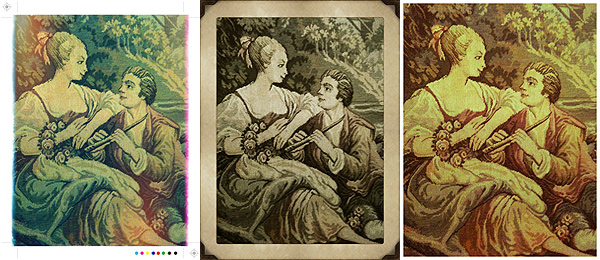
You can have a better idea of how FX Photo Studio affects your photography by looking at these pictures. The same image was edited each time with a different filter:
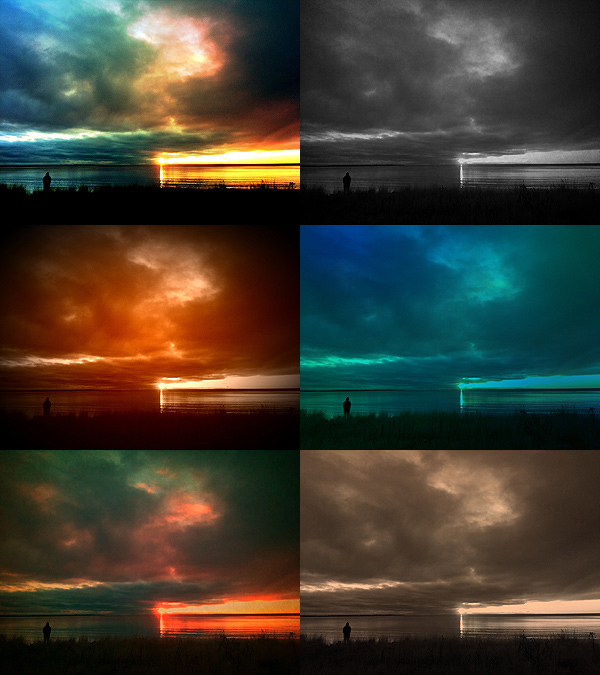
FX Photo Studio by MacPhun for iPhone

Being not a fan of corny effects in the photo booth style, my complaint about FX Photo studio concerns the inclusion of some effects in the app. Flowery frames or fake water ripples, decorations in the unbearable 80’s style, bubbles and stars, embossing and superimposed ghostly faces cheapen photos rather than embellishing them, at least according to my taste. This is why I have used FX Photo Studio a lot less frequently than other apps in the same league — again, like Photo FX or Camera+. But if you’re into these things, you’ll probably be puzzled reading my criticism. To this I can only reply: to each his own photography!

Enjoy the app!

Overall

Name: FX Photo Studio
Developer: MacPhun
Compatibility: iPhone, iPod Touch. iOS 3.1 or later.
Price: £1.19||$1.99||€1.59
Vote: 4/5

FX Photo Studio - MacPhun LLC

1001 Awesome Filters: Not So Awesome

When browsing through the App Store, one is inevitably drawn to some apps that seem to boast about their greatness with self-referential exaggerations and more than bombastic descriptions. However, very often apps that need to rely on these tricks as means of attraction are apps that are not worth your time — and money. Why is that? Maybe because if you truly have good material you don’t need to show off — results will definitely speak for themselves?

Main Features

  • Up to 640×480 pixels (3GS);
  • Filter on/off;
  • Flash on/off (on supported devices);
  • 140+ colored filters;
  • Seven series of filtering masks;
  • Four levels of intensity for each filter;
  • Integrated photo viewer.

Appotography Opinion

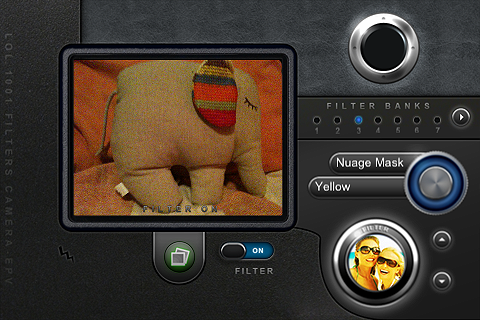
Simply put, this 1001 Awesome Filters is another app you should forget about. It doesn’t matter how many filters the developers say you have at your disposal, when none of these is even remotely good. The filters in this app are quite cheap-looking, especially the masks, and they don’t blend organically with most photos; more than improving your photo, you  will risk to spoil it utterly without having a second chance. Using 1001 Awesome Filters Digital Camera is quite confusing, especially at first: navigating through the filters is clunky and time-consuming. In general, the interface of 1001 Awesome Filters is not intuitive and buttons are not handy at all, first of all because of their size, and secondly for their poor responsiveness. The preview is not accurate enough to have a precise idea of the final outcome, and you have to use a filter several times in order to know more or less how your image will be affected. Even if you get the hang of this app, you cannot do much with the presets you are given anyway — you can only choose to change their intensity level after your photo is taken. Most filters resemble one another anyway, so there isn’t much variety to begin with. In the current version, you can only process images taken with the built-in camera, not those you have in your camera roll. This also means the photo viewer is quite useless a feature.

1001 Awesome Filters Digital Camera iPhone

It’s very easy, when you have not a clue about what high quality photographic effects are, to develop a product and sell it adding adjectives as “awesome”, etc. or suggestive numbers to its name to impress buyers. Accept the fact this approach won’t fool everybody, especially when there are so many other apps that are truly deserving available on the market. LOL Software seems to be more interested in developing heaps of apps of  any existing genre than focusing on less products and develop them more carefully. Too bad. If if it’s true this method can work for some categories of applications, it’s also true it doesn’t work very well with photographic apps, because to develop them not only you have to be very careful in creating a well-balanced and functional product, but you also have to have a good discerning eye.

1001 Awesome Filters Digital Camera iPhone

An update was announced some time ago, so we hope that some of these issues will be solved and that we will be able to reconsider our current opinion.

Overall

Name: 1001 Awesome Filters – Digital Camera
Developer: LOL Software
Compatibility: iPhone, iPod Touch. iOS 3.0 or later.
Price: £0.59||$0.99||€0.79
Vote: 1/5

1001 Awesome Filters - Digital Camera - LoL Software

8mm Vintage Camera: Old-fashioned Video Recorder on the iPhone

Old amateur films have that special flavor you cannot find on average in contemporary videos recorded with digital cameras. The polished look, the absence of grain and other imperfections, seem sometimes to be a defect rather than an added value. On the other hand, even the most technically rough family movie has that something… that something that truly make it look special, in spite of its actual merits; do you know what I mean?

From Nexvio, already known in the App Store for its many other video processing tools, we get now 8mm Vintage Camera, an app that will let you shoot videos in the vintage style on the iPhone. All in real-time.

Main Features

  • Up to 480×360 pixels;
  • Real-time processing;
  • Five filters (1920, 70s, Sakura, XPro, Siena);
  • Five lenses (clear, flickering frame, spotlight, light leak and Color Fringed);
  • Switch between front and back camera (on supported devices only);
  • Microphone on/off;
  • Flash on/off (on supported devices only);
  • Jitter button;
  • Share via email or Youtube.

Appotography Opinion

8mm Vintage Camera’s aesthetics lay on the same line of many other apps that try to recreate the feel of retro equipment. So far, it’s one of those I liked the most. Not only the 8mm Vintage Camera is very easy to use, without confusing features and weird knickknacks of no use whatsoever, but it’s also very good in delivering captivating results. The filters and additional lens effects — differing the one from the other enough to cover a variety of possibilities, from very old black and white to more up-to-date lo-fi — do convey the feel of authentic old cameras, unlike what happens with some other apps in the same category, that  more than anything will often make your video appear like you have applied a colored dirty layer on it. Not to forget, the real-time feature allows you to know right away how your final recording will be like.

There aren’t post-processing waiting times: what you see in your viewfinder is exactly how your video will look like. You just have to go through the filters and lenses, which you can also interchange while you are recording; for additional variety, you can press the jitter button to simulate frame displacement. After the video is recorded, you can go to your gallery and decide either to save it to the camera roll, to send it via email or to upload it to your Youtube account.

In general, the app works fairly well: especially replacing lenses is a cinch and all the effects are very well-done. The app works both on iPhone 3GS and 4, but on the 3GS especially there can be slowdowns due to real-time processing.

8mm Vintage Camera iPhone

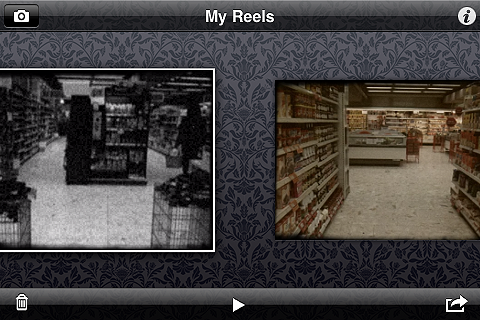
Here you can watch a little video that shows how the 8mm Vintage Camera app works. As you can see, switching from a filter to the other is very easy.

The only serious flaw one could find in this app is the resolution of the videos: disappointingly small. Although this is totally excusable in consideration of the real-time processing factor — it wouldn’t be possible to obtain the same immediateness at higher resolutions, given the iPhone’s current capabilities — it is still quite unsatisfactory if you intend making the videos fully usable also outside the iPhone. If you think you can bear with the resolution issue though, I am confident  you will love 8mm Vintage Camera for its simplicity of use and visually pleasing results.

Overall

Name: 8mm Vintage Camera
Developer: Nexvio
Compatibility: iPhone (3GS/4), iPod Touch (4th). iOS 4.1 or later.
Price: £1.19||$1.99||€1.59
Vote: 3/5

8mm Vintage Camera - Nexvio Inc.

Darkroom Pro: Get Rid of Motion Blur

There are times when using your iPhone camera becomes a pain: situations of low light are some of these. Although the iPhone 4 represents an improvement, it still has serious issues when it comes to motion blur that can make your potentially best shots truly impossible to use even after serious attempts at salvaging them with photo editing. The truth is the iPhone’s camera isn’t especially designed to take pictures in extreme conditions, and low light can be very detrimental even for full-fledged cameras without a tripod or the right lens. But all these considerations don’t really matter when you want to take a picture at night time and you cannot manage to keep the hand holding your iPhone still: what to do then?

Darkroom Pro by Stepcase is an app that helps you with taking pictures that could be subjected to motion blur, thanks to a handful of useful features as stabilizer, self-timer and fullscreen shutter button.

Main Features

  • Full resolution available;
  • Steady mode;
  • Self-timer mode;
  • Fullscreen shutter button mode;
  • Grid on/off;
  • Autosave on/off;
  • Share via email or upload to Steply.

Appotography Opinion

Darkroom Pro contains a series of tools which can be of use when you absolutely want to end with a decent-looking picture even if the iPhone native camera shows clear signs it’s not likely to achieve that. The timer and full screen button for example are useful if you want to take a self-portrait; the stabilizer will come in handy in situations of poor lighting.

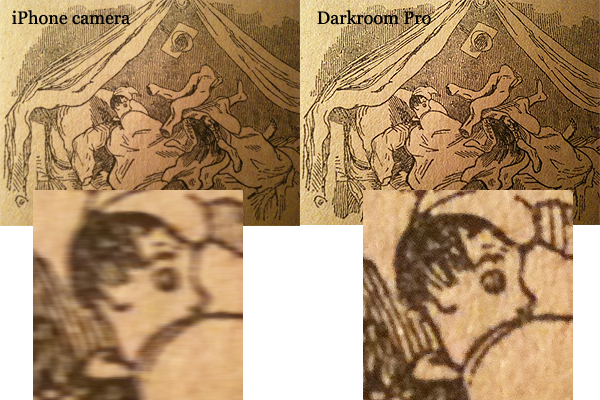
Here is an example of a picture with very clear detail in evidence. Both panels show a detail of the same subject at full resolution in the same light conditions (book page under dim table light): the first one is taken with iPhone native camera, the second with Darkroom Pro for the iPhone. As you can see, in the second there’s significantly less blur.

Darkroom Pro iPhone

Darkroom Pro is very good to achieve better results in difficult conditions, but it’s obvious you have to help it. This means you shall try in any case to keep the iPhone as still as possible, otherwise the app will be unable to perform properly its duty. However, when taking pictures in the dark, expect noise to increase proportionally.

A free version of the app is available in the App Store as well. Although the free version has only very basic features —  steady mode only –, it will help you have an idea, so I suggest to check it out.

Of course, it goes without saying that you shouldn’t expect miracles from this or from any similar app: there are cases in which iPhone limitations can’t be overcome in any way and whatever app you use, taking a good shot is impossible. A sensible user should be able to recognize the limitations and make use of the available tools without expecting to rely on hocuspocus.

Overall

Name: Darkroom Pro
Developer: Stepcase
Compatibility: iPhone. iOS 3.1 or later.
Price: £0.59||$0.99||€0.79
Vote: 4/5

Darkroom Pro - Stepcase

Visual Poet: Creativity Without Handiness

Visual Poet was originally released as an exclusive iPad app, but recently it has been released also on the iPhone/iPod Touch. As the name suggests, this is an app aimed at achieving creative results that combine two different but adjacent typologies of media: words and images. More in general, it could be a nice little tool for graphic artists who are interested in making use of their Apple devices to create something that goes a little beyond basic photography or simple writing. Alas, the app has some problem that might prevent users from truly enjoying it.

Main Features

  • 940 x 320 pixels resolution;
  • Single three-paneled layout;
  • Share via email or Tumblr;
  • Use photos from Flickr, Tumblr, Google or photo library.

Appotography Opinion

I have to admit, I like a lot the idea behind this app. It’s one of these little discoveries that can make using your iPad and iPhone a lot more creative and entertaining. I said “can”, but I should more appropriately write “could”. Because, as I said, the idea is good, but the way it was carried out leaves a lot to be desired.

Visual Poet is not strictly a photography app, however it has a lot to do with photos and their employment. Thus, the first issue is that the resolution of the final image is not that great in the current version of Visual Poet. More features should also be added to widen the possibilities of the app and obtain more varied outcomes. For instance, a few features that would make this app better are: less sketchy interface; more layouts to choose from; flipping and rotating of the photos to adjust them to the layout; more options for editing the text and make it easier to fit it in.

Visual Poet App iPad/iPhone

Apart from these considerations, how does the app actually work?

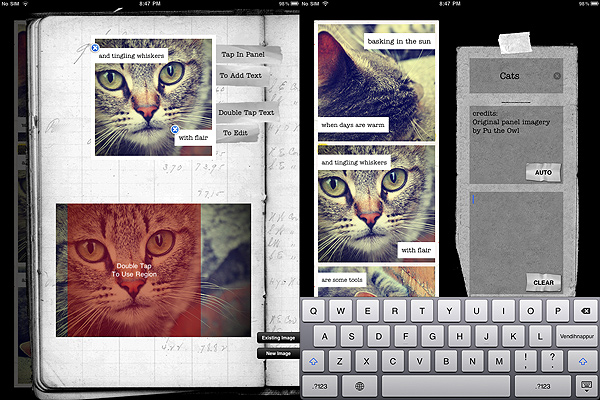
At first, you have three panels which you have to fill with pictures, either taken from your personal library or from services like Flickr, Tumblr, Google — depending on the service, you can browse by terms or interestingness factors, or you can specify the user from which you want to get the photos. Once you define your preferences, you are either redirected to your library or to a screen where images from one of the external services are being loaded. If you want to use the external services, be prepared to accept loading times that can be very unnerving. After the right image is chosen, you can select a square area from it that you want to appear on your visual poetry file. Only enlarging and shrinking of this area is allowed though, nothing else. After that, you can add your own text, which will be displayed in a magnet poetry style. You are given two different sizes for your text: by choosing smaller size, when you try to move it close to right border, it always shows an annoying  little gap between text and border, so if you want them to merge properly you cannot achieve the right effect — this doesn’t happen with large text size.

You basically have to do the same for all three panels, and then you can also input info as your visual poetry’s title and additional comments. You can then share by email or post on tumblr.

Visual Poet App iPad/iPhone

As I said, the idea for this app is really nice, but a little more refinement is absolutely required to make it more usable and flexible, otherwise Visual Poet is destined to remain one of these curious apps that nobody truly wants to use after a couple of times.

Overall

Name: Visual Poet
Developer: Patrick McNally
Compatibility: iPhone, iPod Touch. iOS 3.2 or later.
Price: £1.79||$2.99||€2.39
Vote: 2/5

Visual Poet - Patrick Summerhays McNally

Camera+: Finally Back!

Camera+ — not to be confused with Camera Plus — is back after a long and troubled absence from the Apple Store. We are happy to finally see it back and to be able to write our opinion on it.

For those who don’t know what I am talking about, Camera+ is an old acquaintance of the Apple Store: despite its popularity, at some point it had to be retired for violation of Apple’s developer agreement — the app introduced with an update the possibility to use iPhone’s volume button as a shutter button. The app got many positive opinions both from the media and from users, so it was quite a shock for some to see it was gone.

Camera+ is now available again for the iPhone, iPad and iPod Touch owners, without the volume button trick (not the developers’ fault), but with some interesting improvements.

Main Features

  • Full resolution available;
  • Stabilizer, burst and self-timer shot modes;
  • Crop and rotate;
  • Grid on/off;
  • Digital zoom;
  • Twenty-seven available filters (+ nine available with in-app purchase);
  • Different scene modes for easy photo enhancement (digital flash, etc.);
  • Eighteen photographic borders;
  • Exif and location data available;
  • Share via email, Twitter, Flickr and Facebook.

Appotography Opinion

Camera+ is one of those multi-purpose cameras that will be very helpful especially when choosing to use a single tool to accomplish what several different apps are able to offer separately. Camera+ includes tools like self-timer and stabilizer for making your shooting easier and more immediate, together with editing features like crop, rotate and several different post-processing adjustable filters and presets. If this weren’t enough, you also have the possibility to access your pictures’ data, which is something whose importance many apps stupidly don’t regard as a priority.

The interface is quite simple, although maybe not the simplest available. Anyhow, people with a little familiarity with their Apple devices won’t encounter difficulties getting used to it.

Camera+ iPhone

Your pictures, both taken with the built-in camera or uploaded from the camera roll, will be stored in the Camera+ Lightbox. From this dedicated space, you’ll be able with ease to modify your photos without having to start over all the times. The Lightbox works a lot like the Gallery feature within other apps: pictures taken or uploaded will remain there until you either remove them or save them once and for all.

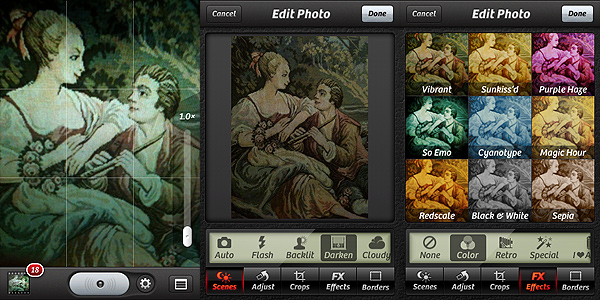
To edit and enhance your photos, you crop and flip and rotate, and you can also access a variety of scenes — presets like the digital flash and other simulations of lighting conditions — or you can add a photographic filter and a border. Most filters are available right away with the app, but a few more can be added with in-app purchase. Having also a few more borders for a wider choice of styles to fit more appropriately the filters wouldn’t hurt.

These are a few examples of filters applied with Camera+, with or without borders:

Camera+ iPhone

As you can see for yourself, the results obtained with Camera+ are really nifty; the filters are high quality and they can truly make a difference in complementing your photos. This app is definitely a purchase I would recommend to anybody in need of a comprehensive photography tool on the iPhone, iPad or iPod Touch.

To sum it up in just a few words: welcome back Camera+!

Overall

Name: Camera+
Developer: tap tap tap
Compatibility: iPhone, iPod Touch, iPad. iOS 3.1 or later.
Price: £0.59||$0.99||€0.79
Vote: 5/5

Camera+​ - tap tap tap

100 Cameras in 1: 100? A Good One Would Have Been More Than Enough…

I will never stop asking this question: is quantity equal to quality? In some cases, isn’t quantity just a way to conceal the fact quality is too difficult to achieve? Your opinion may differ from mine, of course, but you  can’t deny that not all the time more is better, especially when this more is only apparent. In the case of photography, creative photography in special way, having freedom to adjust your standards to your means without limitations is much better than having somebody presenting you with a pre-packaged variety of choices.

100 Cameras in 1 claims to offer you the easiest tool to make your pictures unique on your Apple device. Is it really so?

Main Features

  • Up to 1536 x 1536 pixels (3GS), 1936 x 1936 pixels (4);
  • 100 different textures to choose from;
  • Integration with GameCenter;
  • Share via email, Facebook, Twitter, Flickr.

Appotography Opinion

Despite what the previews and demo videos affirm, this is not even remotely the fastest photography app available and it doesn’t even come close to accomplishing greatness and uniqueness. In fact, compared to other photography apps, 100 Cameras in 1 is definitely more than sketchy: not only its performance  doesn’t stand out in any way, but also as far as photographic outcomes are concerned, the overall quality of this app remains on a very poor level.

100 Cameras in 1 iPhone

100 Cameras in 1 iPhone

You can use pictures stored in your library or take photos with the built-in camera. After that, you’ll be asked to adjust your photo to the square format required by this app. You can move and enlarge/shrink your photo a bit before proceeding to add your filter of choice.

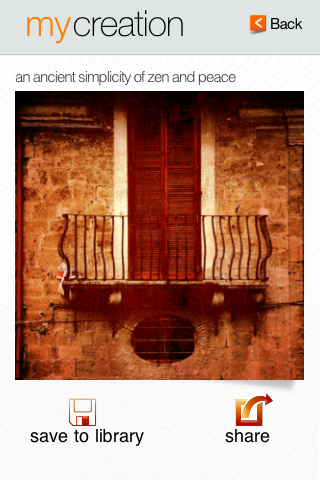
It’s true that you have 100 different textures you can apply to your photos, but most of them aren’t of great quality: in fact, they are quite ugly and they don’t merge organically and convincingly with any picture. Do we need one hundred presets when you cannot even play around with them to adjust basic parameters to suit your photos? Unless the preset is well-conceived enough to stand on its own, which is not the case with 100 Cameras in 1, you do need a little freedom, otherwise the effect will always look like a separate layer with rudimentary textural elements applied over the photo, no matter how many of these textures you will try hoping to find one that will do. This brings into discussion also  the supposed app’s immediateness: sure, it’s easy to reach the point where you have to pick your texture of choice, but it’s not a great point in favor considering you’ll get frustrated in the process of finding among all those textures one that won’t actually ruin your photo instead of enhancing it.

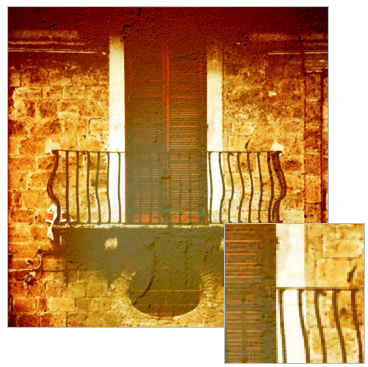
100 Cameras in 1 iPhoneThe above image was saved at 600×600 pixels. The square isn’t a magnified detail, it is how the picture looks at its actual resolution. As you can see, the saved images result in very noticeable low quality. At first, I tried playing around with different resolutions, trying the maximum allowed and then going down to the minimum, but it changed nothing. Even at the lowest resolution, the results are not even remotely acceptable. This is undeniably a huge issue that could alone be a reason to stay away from this app at all costs. If it’s not an issue, then tell me what it is, because you’re not supposed to have to resort to superpowers to get an acceptably looking photo at the chosen resolution…

I wouldn’t suggest you to download this app even if it were free, let alone purchasing it for any price. There are gazillions of apps that will help you achieving similar results and in a much better and organic way. All in all, as it is now, this app is useless.

Blending layers is not just a matter or fooling people by sticking a texture over a photo, and I assume even the developer of the app knows it, as he clearly shows with his own works on his website. It seems the developer took more time trying to make the interface look minimally slick and in inventing fancy names for each texture than in actually creating the textures themselves and in making the app usable. It’s all good on the surface, but for decent iPhone photography this isn’t a recommendable approach. This proves that being a reasonably skilled graphic artist doesn’t imply you’re also a good app developer. And honestly, this app looks more than anything else like a convenient way for its creator to advertise his other activities.

Overall

Name: 100 Cameras in 1
Developer: Stuck In Customs
Compatibility: iPhone, iPod Touch, iPad. iOS 3.0 or later.
Price: £1.19||$1.99||€1.59
Vote: 1/5

100 Cameras in 1 - Stuck In Customs

Swankolab: A Stylish Handheld Digital Darkroom

Swankolab has a different approach to image editing on Apple devices: you cannot take photos within the app, you can only alter images stored in the camera roll. As with its famous sibling Hipstamatic — but differently from it, as Hipstamatic does exactly the opposite by not letting the user alter previously taken photos — Synthetic Corp created an app that is very focused and specialized. Although many may object it’s not convenient in terms of creativity and also of money, Swankolab and its strategic limitations represent a very interesting take on photo editing, especially considering most apps in App Store’s Photography category are hybrids, letting the user both take and edit their images at the same time.

Main Features

  • Full resolution available;
  • Eight photo-altering  chemicals (+ nine available to subscribers);
  • New chemicals added with updates (for subscribers only);
  • Create and save custom formulas;
  • Retina display support;
  • Share via email and Facebook.

Appotography Opinion

From the very first instants, one cannot help noticing how Swankolab is very stylish. Every detail is incredibly refined and also the sound effects and the animations are definitely above most apps’ standards. To process your image, you can choose among previously used formulas, which you can always save as a reference, or mix the different available chemicals. As with actual darkroom processing, sometimes you’ll get appealing results and some others you’ll have to start over because the outcome is so-so.

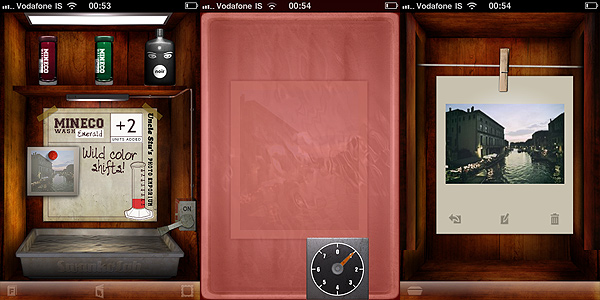
Swankolab iPhone
Swankolab: the darkroom

Here are a few examples. The same photo was edited using different chemical combos in Swankolab.

Swankolab iPhoneSwankolab iPhone

You are given a basic kit of chemicals with the initial purchase, but you can subscribe (for other $1.99) and access Uncle Stu’s Photo Emporium, which will grant you a variety of new chemicals and lifetime upgrades and extras with future updates.

There are many valuable aspects about Swankolab. Most of all, the quality of post processing you can achieve. The filters obtained by mixing the chemicals are very neat and being a little creative you can indeed enhance the looks of your photos. The fact the app is focused only on post processing will hardly make you feel uncomfortable with its relative complexity. You cannot expect to edit a photo in a cinch, but since you’re supposed to use the app only on photos you have previously taken, it’s not very likely you’ll end up using Swankolab when you intend to edit a photo in just one click.

The app has its cons. As I have explained, you are not allowed to take photos within the app, so basically you have to rely either on the native camera of your device or on other apps to take your photos before you can edit them with Swankolab. The massive use of animations, especially on older iPhone models, can cause the app to slow down significantly, making the experience more unnerving than it should be. The price may also be an issue for some people, as  Swankolab is on the expensive side for the category, especially considering you don’t have many options coming with the app before upgrading (although the quality of effects achieved is well worth both the price of the app and the in-app subscription).

If you want a more complete darkroom, one that allows you to obtain quick results and not only to filter the photos, but also for instance to do some more, like cropping and adding fancy frames, Swankolab is not what you should be looking for.

Overall

Name: Swankolab
Developer: Sythetic Corp
Compatibility: iPhone, iPod Touch, iPad. iOS 3.0 or later.
Price: £1.19||$1.99||€1.59
Vote: 4/5
SwankoLab - Synthetic Corp

FotoRoid: Some Good Potential But It Isn’t Enough

There are no official quality standards and guidelines when it comes to Polaroid — and more in general instant — photography: some photographers apply to it  the same rules that they are comfortable with and use in other genre of photography; some others completely change their style according to the medium they are using and prefer to consider instant photography as a world of its own, where general rules are not applicable. This is one of the reasons in Polaroids anything seems to be acceptable, even things that often wouldn’t be well-received in full-fledged photography. Many instant photographers for example are very much in love with the cheap look of Polaroids, and even those who converted to more up-to-date formats try to replicate it digitally. A cheap digital photograph isn’t like a cheap analog one, and if it’s true that in the case of Polaroids anything is acceptable, it’s also true that in the case of digitally imitations perhaps it is not.

Main Features

  • Full resolution available;
  • Zoom, pan and rotate;
  • Nine instant film types (+nine more with in-app purchase);
  • Four instant frames (+four more with in-app purchase);
  • Undo button;
  • Share via email and Facebook.

Appotography Opinion

FotoRoid is another of these apps that try to simulate the Polaroid effect on the iPhone. Differently from a few other apps in the same group, you don’t have any simulation of the developing process, so if this means for some people part of the magic will be lost, for others it will conveniently mean quicker results. You can use pictures from your camera roll or use the built-in camera. Using the camera, the app crashes easily. Saving can also cause the app to crash.

FotoRoid iPhone
FotoRoid combos: please note the annoying black border

Several films and frames are available, ranging from expired to black and white to overly saturated, etc. Some filters are OK, but the quality on average is quite poor. More than a few filters in FotoRoid just look ugly on almost any photo you will come up with, and just in very rare cases they will give you decent results. Some may argue this is what makes Polaroids what they are, but considering we are talking about digital photos instead of genuine Polaroids, on this point I beg to differ.  When you have to adapt your photography to the app, it means the app has serious issues. To adjust the photo to the frame, you can use your fingers to pan, zoom and rotate. These features, although very useful, don’t work very smoothly in FotoRoid and getting exactly what you want can at times become frustrating. A feature to save the original photo is also not available for the present moment, but in the case of this app it would be useful to have it. Not to forget, an annoying black border is added around the frame to each saved picture.

FotoRoid is free, but to better enjoy the app you have to purchase film and frame upgrades in order to broaden your possibilities — in-app purchases unlock either frames or films, or they disable ads. The problem is: are these upgrades worth it, in terms of quality and also of what they allow the user to achieve? To be totally honest, I don’t think they are.

Overall

Name: FotoRoid
Developer: Gen Kiyooka
Compatibility: iPhone, iPod Touch, iPad. iOS 4.0 or later.
Price: free!
Vote: 2/5

FotoRoid - Gen Kiyooka

The Problem with Instagram

We liked Instagram enough. It is a no-frills, simple application which is already extremely popular among iPhone photographers. It is obvious that the guys at Instagram, after they raised consistent funds for their project (“We raised a $500,000 seed round from Andreessen-Horowitz and Baseline Ventures”, they write on their website’s FAQ), followed the minimalist approach that has always characterized Mac platforms, and that has now become a distinctive feature of a lot of iPhone and Mac apps, but also of online applications. The developers of the hugely popular Basecamp, a web-based project management tool which brilliantly exemplifies this tendency, even wrote a small book on the topic, “Rework”, which seems to have become a must-read for startups and small entrepreneurs (or “starters” as they are called in the book). While some may hate the book, I think it is a fast read that could be worth your time and money (or if you prefer to go the cheap way, just read the authors’ blog), also to understand how a lot of these young companies try to work and market their products. In brief, the authors of “Rework” propose a way of doing business based on building as-simple-as-possible and easy to use products, and trying to avoid complications along the way.

By all means, Burbn Inc., the development team behind Instagram, seems to have followed this philosophy – at least for the phase 1 of their project. Instagram is lacking a lot of features that one would find in other apps, but they built their app with the features they considered necessary for most of their users (or for the average user), and launched it as fast as possible, after a beta period.

And Instagram is free, for God’s sake, so what have you got to lose, right? This is what a lot of Instagram users must have thought, us included, and you could see the community associated with the product growing exponentially, day by day. Enter Chrysti and Chris Prakoso, Instagram users and the heroes of this post, who noticed something peculiar in the Terms of Service agreement of the application:

“By displaying or publishing (“posting”) any Content on or through the Instagram Services, you hereby grant to Instagram and other users a non-exclusive, fully paid and royalty-free, worldwide, limited license to use, modify, delete from, add to, publicly perform, publicly display, reproduce and translate such Content, including without limitation distributing part or all of the Site in any media formats through any media channels, except Content not shared publicly (“private”) will not be distributed outside the Instagram Services. Instagram and/or other Users may copy, print or display publicly available Content outside of the Instagram Services, including without limitation, via the Site or third party websites or applications (for example, services allowing Users to order prints of Content or t-shirts and similar items containing Content).”

Which basically meant that anybody could grab your photos on Instagram and do with them whatever they wanted, including selling prints or using them to decorate a sleek collection of underwear for dogs. Some other parts of the TOS seemed to mitigate this a tiny bit, but the loophole was there. After I have no idea how many users (some say 1 million users are already using Instagram), Chrysti and Chris were the first ones to actually read the TOS, or at least the first users with the willpower to read and understand the TOS. A small discussion of mostly concerned users and professionals with dozens of their photos already uploaded into Instagram’s servers followed and added interesting nuances to the matter (you can find the discussion created by Chris and Christy here). After a few hours, surprise! – Instagram’s TOS was updated to remove the paragraph above, and everybody was happy.

But I am not. Such a fundamental change in the TOS in a matter of a few hours since a user and some important blogs first reported the issue is at least suspicious. It almost feels like the developers were aware of this loophole in their TOS, but tried to keep things as simple as possible for themselves, for as long as possible. Nothing easier for a “starter” in the online application business than to ignore any possible copyright lawsuits between members of their community in the first weeks (or months, maybe) of activity. Then, in case a smarter user notices and makes his concerns public, you always have plan B ready: a pre-written and more acceptable TOS, and a chance to look like you listen to your customers’ concerns.

Of course, there is also another possible explanation. Instagram developers really did not know what they were doing when they wrote their TOS; maybe they grabbed your average safe TOS and threw it into the application and into their sleek, minimalist website. Possible. But not better. As a user, this could make you doubt Instagram’s dedication and commitment in providing an environment that is respectful of the users and of their media. If the developers did not take the time to review their TOS, is it possible that they are taking other dangerous shortcuts, maybe in their code? And if you were one of the investors that gave them $500,000 to create and manage the application, would you feel comfortable having them running the company? This is exactly the kind of mistake that in these days, where discussions about privacy and ownership of your online “things” make the first page of major newspapers, would call for a resignation from the person directly responsible for it. And a big public apology, maybe here.

1 million users, each sharing at least 10 photos (a very conservative estimate; in most cases, dozens of photos). This means that for nearly two months, millions of photos were in the land of copyright wilderness, ready to be used in ways that I am sure a consistent percentage of Instagram users did not want them to be used.

Yes, you are right. These users should have read the TOS, so in the end they were technically responsible for their choice of using Instagram and uploading their photos. But as a small professional software developer and website owner, I like to think about my potential users as people I must protect, and I must know that almost nobody, these days, will read the TOS. Maybe photographers are not good businessmen or scrupulous Internet users, but they are often very passionate about their work. It’s their art.  And this deserves respect and assumption of responsibility – especially if you are a “starter” planning to make a living out of your users’ art.

Edit (11/07/2010): Chris, the Instagram user that reported the issue, was kind enough to point out that user Chrysti was the one that actually led him to read the TOS with greater attention. We updated the article to reflect this and to link to their websites.