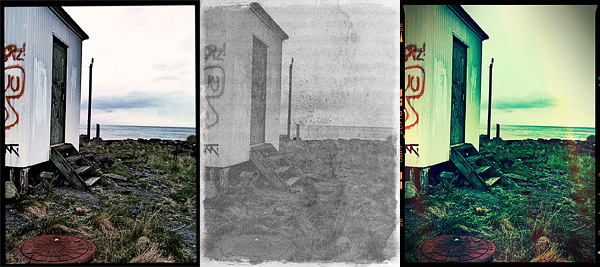
PhotoForge2 was released a few hours ago. Version 2.0.1 comes with many fixes and improvements, both to features and interface. Here ‘s what’s new in detail:
Enabling location services to load photos no longer required;
Remove metadata when sharing photos online;
Disable GPS tagging when using the built in camera;
Set editor background opacity when editing;
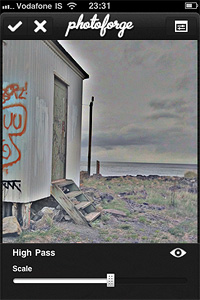
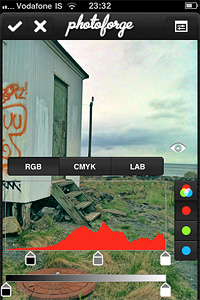
High Pass filter added;
Configurable polar filter edge blending and zoom added;
Camera connection kit RAW support added;
Auto-approve images uploaded to Facebook;
Disabled location service when cancelling the image picker;
Metadata disappearing when emailing photo fixed ( it can now be configured from settings);
Camera roll is now always at the top of the list in the image picker;
Facebook login problem on devices without multi tasking fixed;
Minor interface fixes;
Speed of gaussian blur filter increased;
Various optimizations and speed enhancements.
The High Pass filter.Transparent editor backgrounds.
There were reports of a bug preventing users to load their previous projects correctly after updating to PhotoForge2 2.0.1 (the bug doesn’t affect new projects). Developers stated they couldn’t test the app for this specific issue, but they are currently working on it and a new version will be available soon.
Instagram 1.8 was released in the App Store a few hours ago. This latest version of the free photo sharing and micro-blogging app by Burbn presents some interesting improvements that will make your experience with Instagram smoother.
Here is what’s new:
Added double-tap on photos to ‘Like’ them;
Added username auto-completion feature;
Newly introduced interactive comment screen;
Improvements to reliability and speed.
Double-tap on photos to 'Like' them.
Enhancements in this version mainly involve the social side of the app and will especially improve the interaction among users.
ClassicSAMP, the toy camera sampler for iPhone by misskiwi, is now version 5.1. Although this is not a major update, there are changes worth mentioning.
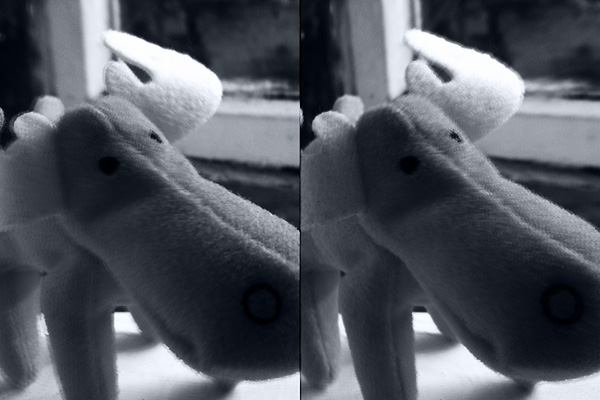
Most notable in the latest release is the expansion of the app’s film collection (counting after this update 16 films in total), which now includes two new filters. If you’re familiar with other misskiwi apps, you probably already had a taste of the funky lomo-ish look of the Scarlet film. The other addition is a monochrome film, the slate gray Sodachrome.
The new filters bring yet more variety in the already rich combination of effects of ClassicSAMP camera.
Occipital recently released 360 Panorama in the App Store. As the name suggests, the app is a 360° panoramic photo creator, one of the many already available for iPhone. The app also runs on iPad 2 and iPod Touch 4th generation.
Main Features
Fully automated panorama creation process;
Reference grid;
Light indicator;
View panoramas in 360° or stereographic mode;
Retina display support;
Send via email or share on Twitter and Facebook (requires 360 Verse account).
Appotography Opinion
As soon as you start the 360 Panorama, you are immediately introduced to the main screen, whose most noticeable feature is a curved grid that will help you in taking straight shots to assemble your panorama. By tapping on the shutter button, you set the starting point of the panorama creation. While panning around, the app automatically takes consecutive shots to be merged at a later stage. As soon as you have enough shots, you tap again on the shutter button and let the app do the rest.
After the panorama is assembled, you can decide to save it to your camera roll, to send it as a flat image with email or to share it as a 360° view. To take advantage of the latter, you must create an account to 360 Verse — the portal connected to 360 Panorama — through in-app registration. The free account has only limited features and storage capacity, but if you want you can upgrade to a Pro account by purchasing credits from within 360 Panorama. Note to developers: adding an extensive and clear in-app guide to the whole ordeal would help more than a few users, I am sure.
360 Panorama has very basic options: you cannot do much to enhance your panoramic image, apart from trying to be careful when you pan. Using the automated capture feature can be all right in some instances, but most of the times it’s definitely too problematic to handle in order to take accurate shots, especially in absence of a tripod: being able to adjust angle and perspective before the shot is automatically taken is impossible sometimes. After a few unsuccessful tries, the task can become frustrating. iPhone photography should be fun, but making 360 Panorama do its work properly most of the times is not.
Especially in difficult lighting conditions (indoors, overcast weather, etc.), the app seems unable to correctly figure out proper settings on its own and therefore it messes up. The stitching is also intense in most cases (as in image below), making composites useless if not as a momentary curiosity.
Panoramic image created with 360 Panorama. Click for larger view.
As I see it, 360 Panorama is not the best choice in the App Store if you want a solid and reliable application focused on panoramic images creation. I haven’t tested 360 Panorama on iPad 2, but I assume it must be even more complicated than using it with an iPhone, given the tablet’s size and weight. Unless you intend to use a tripod, creating a decent looking panoramic image in 360 Panorama will be a task requiring too much time and patience to be fully enjoyable.
PS: As a launch promotion, you can buy 360 Panorama with a -50% discount.
JQMRPFU7FGU9Dynamic Light version 1.7 is out now. With the latest release of the app by Mediachance you will get seven brand new effects for processing your photos.
The newly added effects are the following:
Solarize;
Re-Exposure;
Edgy;
Contrast Photo;
Old Timer;
Golden Age;
Calm Print.
And here is a preview:
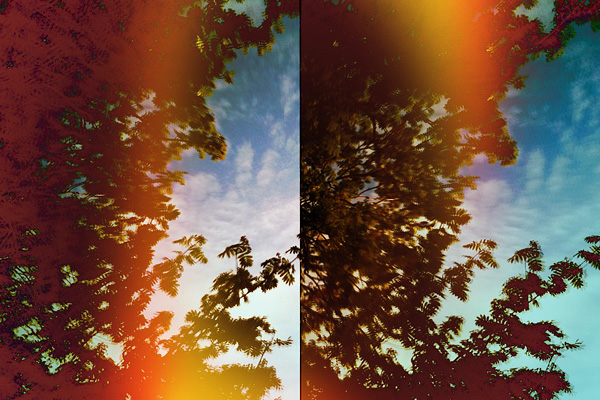
Golden Age and Old Timer effects.
The new effects will particularly please fans of monochrome photography with an old-style flavor.
Dynamic range is the ratio between maximum and minimum light intensity (or white and black, to say it more plainly); it varies a lot depending on the medium. The human eye is a highly sophisticated instrument, able to perceive the world in its complexity more efficiently than most artificial devices. It’s a crucial problem for photographers to be able to capture a scene in all its tonal richness, overcoming the technical limitations of the camera medium.
In digital photography, tone mapping is a technique allowing to process images so that they display a wider range of tonal detail than the medium allows. This technique permits to make up for technical deficiencies of cameras, monitors, printers, etc., bringing out what seems to be either lost in the shadows or in the highlights. HDR photography heavily relies on tone mapping processing.
iCamera HDR uses three different tone mapping engines for creating HDR composites. What are the differences and when to use them? Read on to know more.
Tone Balancer
Tone Balancer is a local tone mapping engine. Local means the engine processes each pixel extracting information from its surrounding area. Tone Balancer is aimed at balancing light and dark areas in pictures, so that resulting images are highly contrasted and sharp; the negative side concerns the fact the images often feature exaggerated, unreal colors, frequently in combination with intense halo artifacts.
Image processed with Tone Balancer
Adjustable parameters in Tone Balancer:
Strength – Sets the contrast of the image;
Local lighting – Sets the brightness of the image.
Tone Enhancer
Tone Enhancer is also a local tone mapping engine, which means pixels are processed according to their local context. Differently from Tone Balancer, Tone Enhancer is more targeted at bringing out fine detail. Images processed with Tone Enhancer are not as “overdone” as those processed with Tone Balancer (their colors are especially much more realistic), but they are also prone to feature emphasized halo artifacts and noise.
Image processed with Tone Enhancer
Adjustable parameters in Tone Enhancer:
Strength – Sets the color saturation of the image;
Fill Light – Reduces contrasts and lights up dark areas of the image.
Tone Compressor
Tone Compressor is a global mapping engine. Global means that every pixel of the image is processed in the same way, regardless of the values of other surrounding pixels. The resulting images lack in contrast, but they are also less likely to be affected by halation and noise. Tone Compressor delivers more natural looking images, at the expenses of detail.
Image processed with Tone Compressor
Adjustable parameters in Tone Compressor:
Strength – Sets the global contrast of the image.
Closing comments
Which among the three tone mapping engines in iCamera HDR is the best? Which among them will make photos look better? These and other similar questions are frequent among iCamera HDR users. However we look at it, there is not a general rule as to what is more proper to use to process photos in iCamera HDR. It all depends on what kind of effect you are looking for and on what photos you are going to use. The best suggestion is not to stick to a single processing, but to try for every image different solutions, knowing before starting what kind of feeling and look you want to convey.
A photo is worth a thousand words and it’s up to you, using a camera, to express something. Like photography, typography is an art on its own. Text alone can create visually appealing images, but mastering it is not the easiest of tasks. Using text in combination with photos can be a good point to start.
WordFoto by bitCycle lets you play with photos and text to create fancy typographic works on your iDevice.
Main Features
Full resolution available;
Use custom text;
Create custom styles;
15+ fonts available;
8 preset styles;
Zoom in/out;
Crop;
Send via email or share on Facebook.
Appotography Opinion
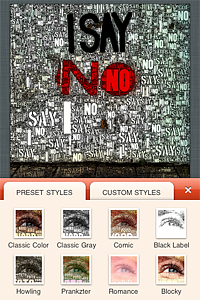
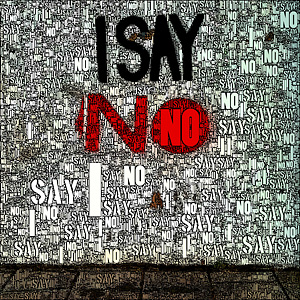
You can start both with photos from your camera roll or you can take one with the built-in camera. After that, you can proceed to alter your original image. You can start by cropping it — you can edit cropping at any moment, if you are not satisfied. Then you can choose text to be merged with your original photo. You use your custom word set by inputting single words that will be combined together or you can pick one among the many preset messages included — you can also delete them, if you want to. After you have decided on the text, you can set your style.
There are eight presets that come with the app, but you can create your very own by playing with foreground and background parameters, adjusting for each values such as blur amount, saturation, contrast, padding, and so on. Obviously, you can also change the font. The font selection is perhaps not that great and varied, but at least you can use more than a font in a single image. To finish up, you can fine-tune by changing values for edge width and threshold and color tolerance of your text. You can also render multiple times to try different randomly generated final effects. Finally you can save, email or share your photo on Facebook.
One of the aspects I found more unnerving when using WordFoto is the absence of an undo feature — at least, I couldn’t find any undo feature. If you want simply to go back to a previous setting, you cannot do it by undoing, you have to manually re-set parameters. Not a big deal most of the times, but still quite annoying and time-consuming.
As I see it, WordFoto is definitely not a memorable app, one you cannot do without after you try it, mainly because the effects you can achieve are very limited and not particularly original. They are OK, but they can get quite stale after a few times. Nevertheless, WordFoto is still a curious app that can still have some use in a few instances, especially if used creatively.
AutoPainter II “The Illustrators” is the second instalment in the AutoPainter app series. The effects included in Autopainter II are themed after classic illustration techniques, differently from AutoPainter that was more focused on painting styles inspired by famous artists – Cezanne, Van Gogh, etc.
Main Features
1280 x 960 pixels resolution (3GS);
Portrait masking for enhanced detail;
4 artistic filters.
Appotography Opinion
AutoPainter II “The Illustrators” features four more artistic filters for processing your photos. Although they are sold as a separate app, the new filters (Chalk, Book, Felt Tip, Water Ink) basically represent an expansion to the first AutoPainter. Reason why I feel it would have been more convenient for the user to be able to access them from within a single app. For example, it would have made more sense to sell the new filters as an additional pack, available through in-app purchase.
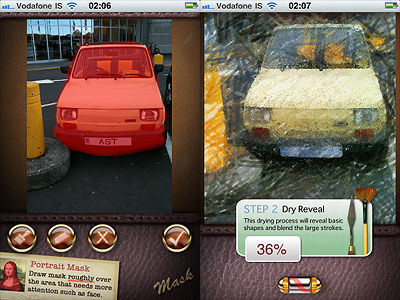
The UI of AutoPainter II is exactly the same as AutoPainter, the only difference with the first instalment being, as I mentioned, the available styles you can choose from. Applying filters is a cinch. Rendering times are fair and you can watch the engine as it processes your photo for fun. You can pick the photo to process from your camera roll or take one with the built-in camera; then all you have to do is selecting a filter among those available and tap on the start button. For better results, especially on portraits, developers added the portrait mask feature, allowing to finger-paint a mask over areas of your image where you’d expect details to be better defined.
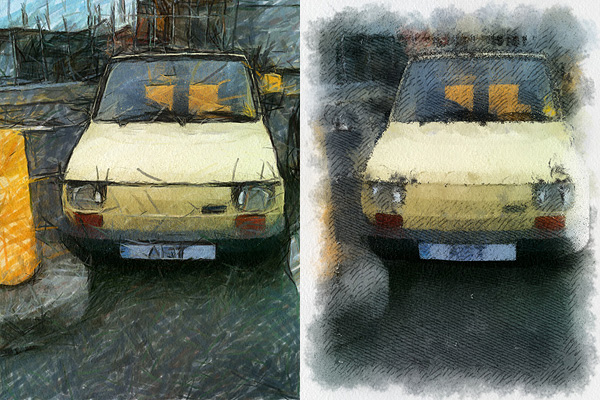
Felt Tip and Book filters.
As with the previous AutoPainter app, one cannot deny the quality of the filters. Too bad for the final resolution. Too bad that the filters, however pretty, don’t work that well on most photos, too. It took me some time to find a photo that wouldn’t lose significant detail after processing. The masking feature doesn’t dramatically enhance the final result: the render engine is still unable to catch relevant elements in most photos. That’s why I think overall AutoPainter works better on landscape photography, which most of the times looks all right even when only its essential elements are caught, or on extreme close-ups.
Overall
Name: AutoPainter II
Developer: Mediachance
Compatibility: iPhone, iPod Touch, iPad. iOS 4.0 or later.
Price: £0.59||$0.99||€0.79
Vote: 3/5
PhotoForge2 is a universal app that comes as an upgrade to the previous PhotoForge editing and painting application for iPhone and iPod Touch. PhotoForge was already a very comprehensive app, allowing sophisticated photo editing before other apps also added similar tools. For instance, working with curves was a rarity at first, therefore PhotoForge was regarded by many users as the ideal replacement of famous desktop editing software on iPhone.
The new PhotoForge2 contains most of the elements that were already included in its predecessor, adding at the same time much more.
Main Features
Full resolution available;
Crop and resize;
25 adjustable filters (more available with in-app purchase);
Send via email or share with Twitter, Flickr, Facebook, Drop Box, Picasa, Tumblr, FTP.
Appotography Opinion
In PhotoForge2, you can start a project either with a shot taken with the built-in camera or with any image from your iDevice. All your projects are stored in the project list and you can go back to any of them at any moment. Projects you are working on are automatically saved.
You can edit your photos using Adjustments, FX, Tools and Layers. The visual history feature will let you undo unnecessary edits. While editing, you can zoom and pan as it pleases you by finger-pinching on the photo or you can examine the photo at its full resolution by double tapping.
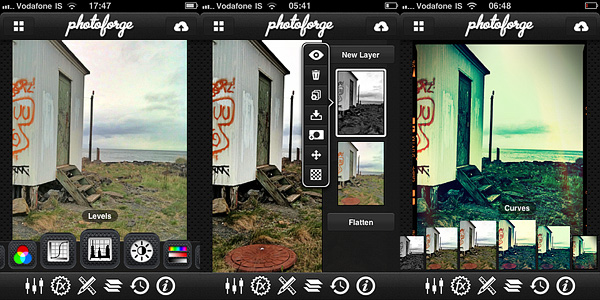
Adjustments includes a series of instruments that affect your photo at its core: Curves, Channel Mixer, Levels, Brightness/Contrast, Exposure, White Balance, Noise Reduction, Sharpen, etc. These are the tools you will be using the most if you’re used to work with full-fledged photo editing software.
Tools let you resize your photos, crop them (different aspect ratio and free cropping are both available), and add frames and textures. You have more than ten textures and eight borders that come with your initial purchase, but you can expand your collection by purchasing the Pop! Cam expansion.
Pop! Cam is available through the FX section (the in-app purchase is $1.99). As the name clearly states, FX contains a collection of various ready-to-use effects, much simpler to handle than editing using Adjustments. With a simple tap, you can turn your photo into black and white, add a 3D effect, add blur to the image, and so on. Pop! Cam contains additional effects (film simulation, different lenses, etc.), other than more borders and textures. It also contains a randomizer function, for randomly applying styles to your pictures. Before you buy, you are allowed to see Pop! Cam in action and try all its features.
Layers permits fully functional enhancement of your photos using layers: you can import multiple photos from your device, add masks, change blending modes, and more. Layer support is definitely one of the most interesting features in PhotoForge2 and one of the things that, alone, is worth the app’s purchase.
Among the aspects I find more interesting is that once your photo has effects added to it, you can filter it over. This means, for example, that if you add a border to your photo at first and the border doesn’t quite mix with the feel of the filtered image, you can re-filter both as a flattened image and have them blend beautifully. In other apps either you cannot filter over a border because it always remains on a separate layer — unless you save and re-open the image — or, if you can, you get a so-so looking image.
Different results obtained with PhotoForge 2 on iPhone.
Rendering times in PhotoForge2 are perhaps not that great on older iPhone models. Even to simply adjust brightness and contrast takes more than it does with other apps, where rendering is immediate.
What struck me as an atypical choice, to say the least, is the total absence of camera features. Editing a photo can be OK in most cases, but starting your work with a better image helps, too. PhotoForge2 is not exclusively a post-processing app: as a matter of fact, it allows taking photos; yet, developers did not spend time improving the built-in camera. The former PhotoForge was the same, but it definitely was a less complete application. Anyway, this is just a consideration and it won’t affect the general opinion I have of PhotoForge2, in case you’re wondering.
If you are looking for the closest thing to a complete editing photo app currently available for your iDevice, PhotoForge2 is a must-have: the number of features is impressive, making it a very comprehensive app, especially for iPhone — there are just a few others options, especially on iPad/iPad 2. It must be said though that the price of PhotoForge2, in-app expansions excluded, will be a turnoff for more than a few users, I am sure.
PhotoForge2 is on sale: you can get it now at the special price of $2.99.
First of all, I want to commend the developer for the attention paid to user feedback. I hope the willingness demonstrated up to this point will help the app getting better and better.
I also want to notify that previously observed aliasing issues concerning a few of the borders have now been fixed. Previous memory issues, especially those occurring when sharing photos via email from the in-app gallery, were also fixed in the new release.
But here is what’s new in Lumière 1.2 in detail:
Improved resolution: Lumière now supports full resolution saving;
Switch between High Quality (HQ) and Speed Quality (SQ);
Added three new filters: Orange Crush, Negative Colour and Negative BW;
Settings autosave: your settings are automatically saved upon exiting Lumière;
Improved startup times;
Bug fixes.
Some of the filters in this app are quite charming; up to the previous release, especially due to resolution limitations, one couldn’t actually make use of them outside of iDevices. The enabled full resolution feature will very likely please more than a few users.
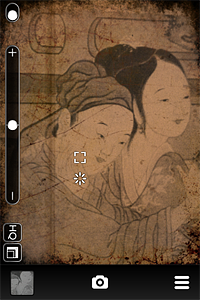
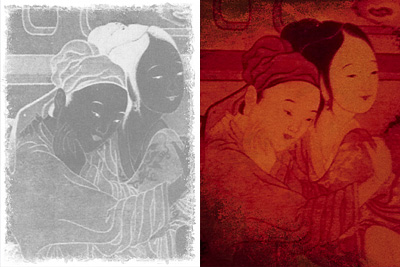
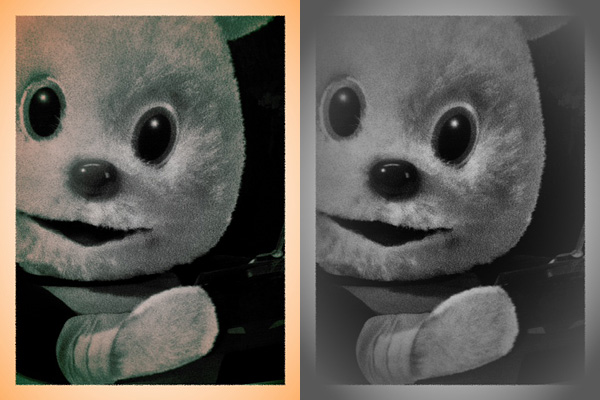
New filters: Negative BW and Orange Crush.
If you’re into real-time processing in combination with vintage photo effects, Lumière is, also for the customer service provided, among the best options available in the App Store right now.



 The new filters bring yet more variety in the already rich combination of effects of ClassicSAMP camera.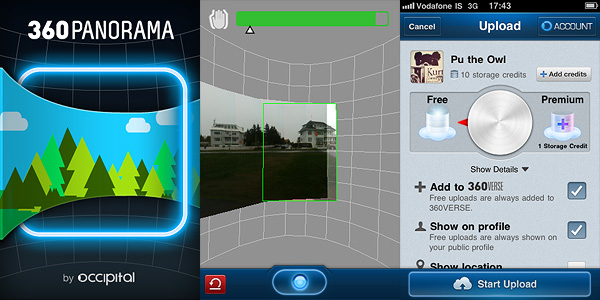


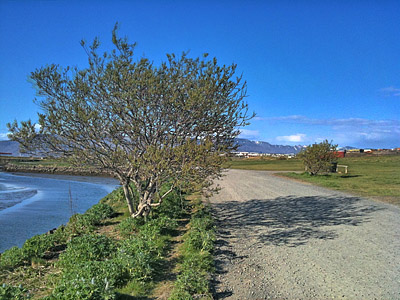
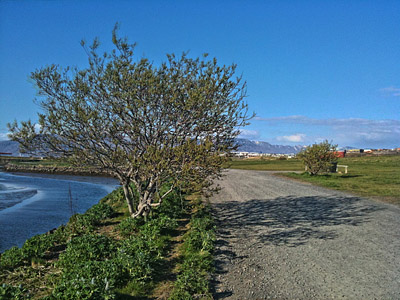
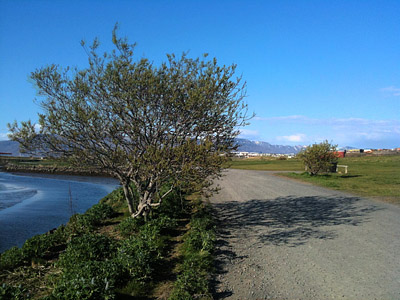
 Adjustments includes a series of instruments that affect your photo at its core: Curves, Channel Mixer, Levels, Brightness/Contrast, Exposure, White Balance, Noise Reduction, Sharpen, etc. These are the tools you will be using the most if you’re used to work with full-fledged photo editing software.