HDR Artist initially confused me with its icon: however I tried, I honestly couldn’t place such an icon in relation to HDR photography — moreover, it looked vaguely familiar, but I have not figured this out yet. I was even more baffled after downloading Union Well Limited’s app for iPhone from the App Store: hadn’t I seen it before?
Main Features
Up to 1200×900 pixels resolution;
12 effects;
Send via email or share on Facebook and Flickr.
Appotography Opinion
For processing photos in HDR Artist for iPhone, you can either use the built-in camera or photos stored in your device. You have a set of effects to apply HDR-like look to your images, but there are also effects that have nothing to do with HDR looks, like Halftone. In general, the effects work fairly decently, but they’re quite generic and their names seem to have been picked without any definite notion in mind. 70’s simply turns images to sepia, SoEmo to electric blue, Toy adds a cyan tone, just to give you an idea. There is a “Next” button on top of the effects page that for some reason doesn’t appear to be active and another browsable page of effects is nowhere to be found.
With a slider, you can adjust each effect’s intensity and enable original vs result view for comparison. When you are satisfied, you can save, send with email or share on Facebook and Flickr.
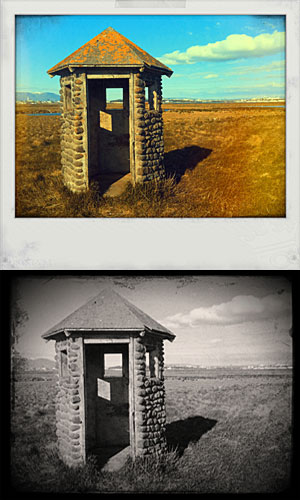
HDR Artist effects applied to the same photo.
Overall, the app feels like an assemblage of elements thrown in at random. Most importantly, HDR Artist’s uncanny resemblance to the first versions of Dynamic Light is so conspicuous it’s impossible to ignore it. It certainly is too evident to be a mere coincidence. I have no idea what went on behind the scenes, but sure enough developers of HDR Artist used Dynamic Light a little too heavily as their inspiration and, to say the least, didn’t put much imagination and originality into their own creation.
If you want a well conceived HDR imitation on your iPhone, then get Mediachance’s Dynamic Light, which now includes also more features, effects and extras that HDR Artist lacks.
Overall
Name: HDR Artist
Developer: Union Well Limited
Compatibility: iPhone, iPod Touch, iPad. iOS 4.0 or later.
Price: £1.19||$1.99||€1.59
Vote: 2/5
Fusioncam is a new app by Stepcase, developers of Actioncam, Phototreats, Darkroom Pro and Labelbox. Fusioncam is Stepcase’s answer on iPhone to classic toy cameras and thus it represents an expansion of their lineup.
Main Features
Full resolution available;
Square format;
Multiple exposure on/off;
Flash on/off;
Three filters available;
Share on Facebook, Twitter, Tumblr, Sina Weibo, Posterous & Flickr (requires Steply account).
Appotography Opinion
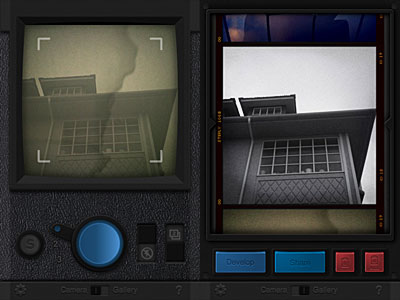
Fusioncam by Stepcase for iPhone doesn’t allow loading previously taken photos: you can only use the built-in camera. You can select one among the three available filters — cross process, black and white and a lomoish red. To take a normal photo with filter applied, you simply tap on the shutter button. All photos are stored in the app’s gallery and are browsable as a continuous film roll. From the gallery, you can save or share your creations on several social networks via the Steply community — which means you need to register an account to use the sharing options.
To activate the multi-exposure feature, you pull the switch and take another shot which will be superimposed over the previous photo. Multiple exposure in Fusioncam works only with the last photo taken, not with any photo in your gallery. The idea, I assume, is to make this feature work as closely as possible to multiple exposures obtained using roll of film without winding. This limitation, which I am sure many will find a drawback, can however be a catalyst to rethinking the whole process of taking photos with an iDevice. By using the multi-exposure feature, you can combine different filters together and create unique effects.
Single exposure and multi-exposure in Fusioncam.
The interface of Fusioncam is not very smooth and commands are not highly responsive. Rendering times are not the best I have experienced either. The filters included are all right, but not memorable or particularly original. What irks me most though is the annoying border which you cannot disable. It would be OK in theory, since Fusioncam’s purpose is to emulate the cheap and uncustomizable toy cam feel; in this case though, merely for aesthetic reasons, the border is a turnoff for me.
In general, given available features and overall functionality, also in relation to the price tag and competition, Fusioncam remains on average levels and it is not among the most satisfying iPhone toy cameras available in the App Store. Nevertheless some of ideas behind Stepcase’s app are quite interesting and worth exploring.
Recently launched in the App Store, King Camera (for iPhone, iPod Touch, and iPad) promises to become your perfect photo companion. I don’t know if I would speak about perfection, but sure enough, with its impressive array of tools, King Camera doesn’t look like your average newcomer.
Main Features
Full resolution available;
Switch between rear and front camera;
Set focus and exposure separately;
Zoom in/out;
Grid on/off;
Flash on/off;
Big shutter button;
Sound trigger;
Self-timer;
Burst mode;
Anti-shake;
Time lapse;
Video recording;
White balance and exposure lock;
Adjustable contrast, brightness, shadows and highlights;
Adjustable tints and saturation;
Undo/redo;
Crop, flip and rotate;
Adjustable vignetting;
Add simple and styled borders;
45 presets;
15+ textures;
Save custom presets;
EXIF data access;
Extensive video tutorial;
Send via email or share to Facebook, Twitter, Flickr, Dropbox.
Appotography Opinion
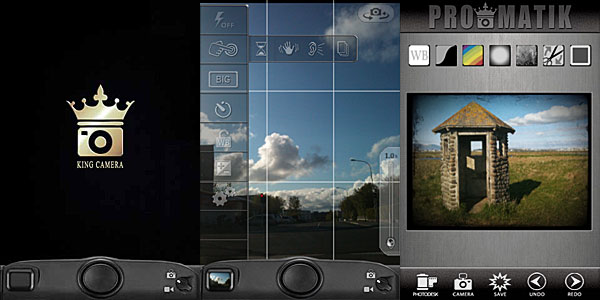
In King Camera, the built-in camera offers a wide range of instruments to help you take photos in the easiest way possible: from individually adjustable focus and exposure to the big shutter button, from stabilizing tools to burst mode, from flash options to white balance and exposure locks. For creating time lapse or stop motion animations, you can enable a dedicated feature.
Once the photo is taken, it is stored directly into the Photo Desk area, the app’s gallery where all photos are neatly organized in stacks and thus easily browsable. You can also load photos from your device. Other than photo taking, King Camera also allows video recording. However, videos taken cannot be edited and processed within the app; unlike photos, they are directly sent to your Camera Roll.
Effects can be applied to photos either in QuickMatik or ProMatik modes. Both modes can be accessed after your photo is stored in the Photo Desk. Photos can be re-edited over and over, but you can always retrieve the original from the Photo Desk. This way, you can keep multiple versions of the same photo and keep on working on the original.
As the name clearly suggests, QuickMatik allows quick — and easy — processing. QuickMatik is basically a collection of preset styles you can use right away without having to tweak. All the included presets are arranged in categories — Color, Monochrome, Grunge and Themes. Style intensity can be adjusted to suit your photo. You can add your own styles by using the ProMatik editing mode.
Styles created using King Camera.
In ProMatik mode, you have more control on individual aspects of post processing. You can adjust several parameters to affect the final look of your image, like brightness and contrast, shadows and highlights, tint and saturation, and more. By playing with sliders, you can fine tune everything as your photo requires. Finally, you can choose to add a border, either in a plain color of your choice or picking one among the available designs. If you particularly like a style you have created and want to use it further, you can save it as a preset. When you are done, your photo is saved to the Photo Desk.
Rather than with Camera+ like it was stated elsewhere, a comparison that inevitably came to mind while testing King Camera is with Camera Genius, another multi-purpose camera featuring very similar tools. However similar these two apps may seem at first, King Camera brings the experience a step further, especially concerning the post processing and photo organizing stages. Rendering and saving times are also very reasonable and the UI, in spite of the many options, remains very accessible.
If you’re looking for a valid replacement to the native iPhone app and also a very comprehensive processing utility, King Camera is a new excellent choice.
In occasion of the app’s launch, King Camera is available at a special price of $0.99 in the App Store for a limited time.
Overall
Name: King Camera
Developer: Saycheezzz.com
Compatibility: iPhone, iPod Touch, iPad. iOS 4.2 or later.
Price: £1.79||$2.99||€2.39
Vote: 5/5
Cameramatic version 1.2.4 is available in the App Store. The latest release features new filters and frames and a few other extras. Let’s see them in more detail.
4 new filters
Expired Film (Standard)
Dirty (Standard)
Infrated Red (Color)
Green D Street (Color)
1 new frame
White 06 (Standard)
“Apply only to the selected image” option added: you don’t need to create new filters to apply them to photos anymore.
Support for yfrog added.
And here is a preview of all the newly added frame and filters.
Cameramatic 1.2.4 - 2 standard + 2 color filters + 1 standard frame.
That Instagram is one of the biggest phenomenons in social networking that exploded in the last months isn’t great news. Evidence of the popularity of Burbn’s photo sharing app is the increasing number of third party services based on Instagram.
Yes, Instagram is undoubtedly connected to the iPhone, but this doesn’t mean you shouldn’t have the pleasure to make use of it also in other forms and on other platforms. Here’s a list — or rather, a selection — of services that will let you have fun with Instagram for free on your computer, iPad, and so on.
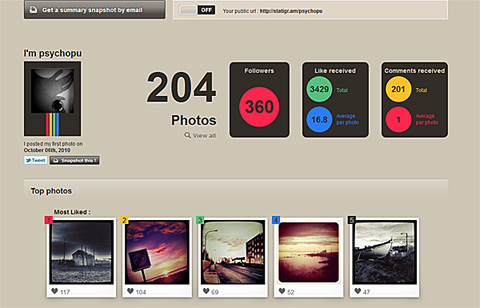
Statigram gives you access to all sorts of interesting stats and information about your Instagram account: from your most popular photos to your most used filters, from how you interact with your contacts to many other aspects concerning your activity.
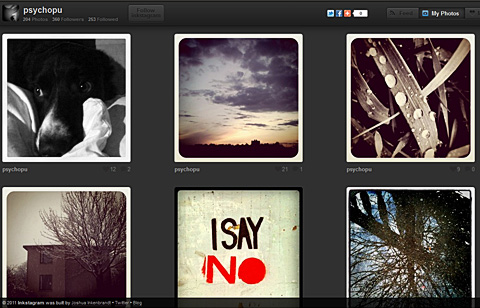
Inkstagram is a web interface for Instagram. Connecting your Instagram account to Inkstagram, you will be able to browse photos in the popular category, from your contacts, manage your likes, comments on posts by other members and so on.
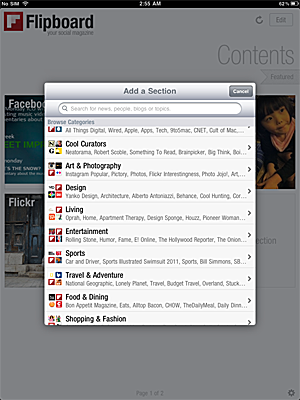
Flipboard was not specifically designed for Instagram but it does feature Instagram integration. Flipboard will let you browse in a visually appealing magazine-style manner content from Instagram, Facebook, Twitter, Flickr and much more, all at the same time.
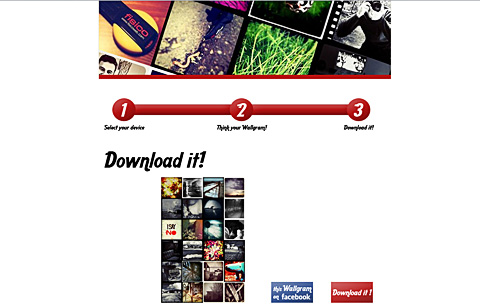
With Wallgram you can generate and download wallpapers for your iPhone and iPad — computer and poster options coming soon — using either your recent Instagram photos or recent photos from your feed. You can also choose recent popular entries.
Instabam lets you find Instagram public photos based on your location. You can define a distance radius for photos to be indexed. Instabam is also available on iPhone.
To celebrate the birthday of Marilyn Monroe, one of the most beloved and widely recognized icons in the history of cinema, MacPhun has a very special present for iPhone users:
Silent Film Director will be totally free for one day in the App Store! If you haven’t tried the vintage video making app yet (you can read our review of Silent Film Director by clicking here), this is an occasion not to be missed!
You will be able to get Silent Film Director for free only tomorrow, June 1, 2011!
ScratchCam is a little iPhone app programmed to turn your average photos into worn-out, damaged looking images in no time. Differently from many apps in the same genre and with the same purpose — look very promising at first, but failing horribly in terms of mere photographic value and quality –, ScratchCam looks kind of unassuming to the distracted eye, but it does its job well.
Main Features
Full resolution available;
Adjust filter opacity;
Share on Facebook and Flickr.
Appotography Opinion
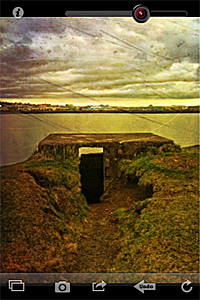
It’s very easy to get the hang of ScratchCam in just a few seconds. The interface is as simple as it can get and the app’s features are also very basic and focused on getting the job done with as little effort as it is possible. Both if you load photos from your device and if you use the built-in camera, all you’re supposed to do is tapping on the refresh icon till you obtain a combination you deem appealing. You can adjust the opacity of the effect applied with a slider placed on top of the working area. If you inadvertently tap on the refresh button, you can undo your last change. You can then share to Flickr and Facebook or save to your album.
Like with other photography apps heavily relying on randomly generated effects, the good of ScratchCam resides in the surprise factor, which is something that in part retains the charm of toy cameras; the trade-off, however, is that you cannot freely choose individual filters to apply to your photos. Although the random generation works in other apps whose effects are actually not so different the one from the other (like Plastic Bullet), in the case of apps like ScratchCam it may displease users looking for the right look at the right moment.
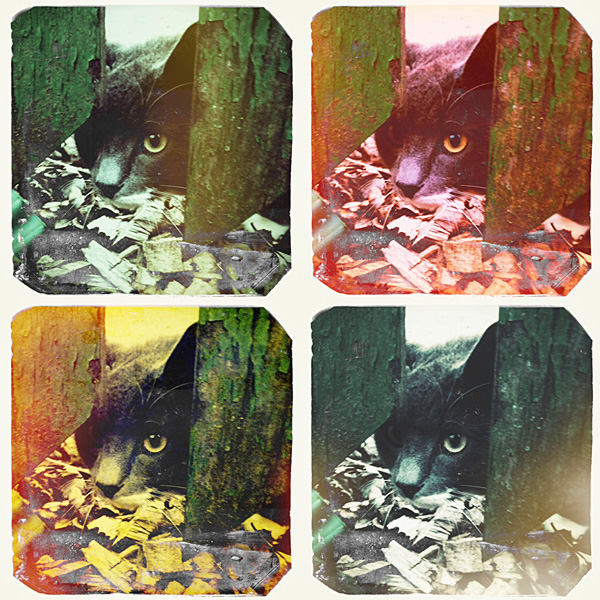
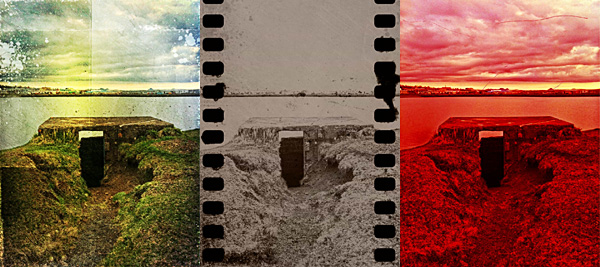
Various effects applied to the same photo in ScratchCam.
The filters, though not that many, do their work properly: unlike many other grunge/vintage cameras available in the App Store, ScratchCam’s effects blend convincingly with photos to give them an aged and distressed look. The quality of the textures holds extremely well also at full resolution. The black and white and sepia effects, reminiscent of old daguerreotypes, are especially impressive. ScratchCam, not only as a standalone tool but also if used in combination with other apps, may become a valid accessory in your iPhone photography collection.
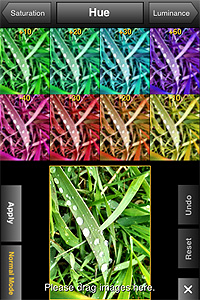
PhotoToolbox 2.7 is out now. The new version of Sun Inlet Labo’s app introduces Simple Mode.
Simple Mode is a new editing feature that you can access from PhotoToolbox’s Filters menu. Differently from Normal Mode, the only mode previously available to edit photos, Simple Mode gives easy and effective visualization of changes in each editing parameter.
Simple Mode in action.
In Normal Mode you could already have a preview of how each setting affected your photos, but Simple Mode brings the preliminary factor a step further, allowing to choose setting values by dragging and dropping thumbnails in your working area. It’s possible to exit Simple Mode and revert to Normal Mode at any time.

 Lo-mob for iPhone is on sale. You can get it now at $0.99 (€0.79/£0.59): 50% off the regular price!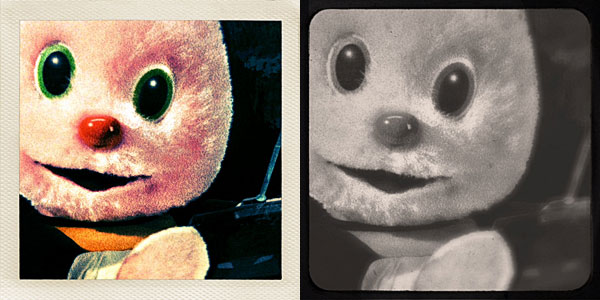

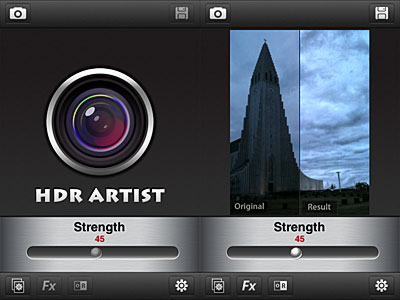 With a slider, you can adjust each effect’s intensity and enable original vs result view for comparison. When you are satisfied, you can save, send with email or share on Facebook and Flickr.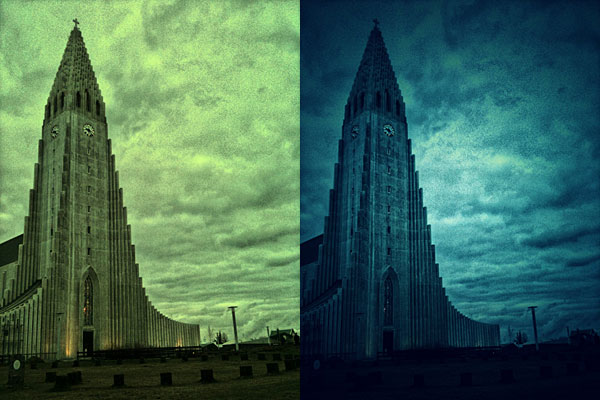
 To activate the multi-exposure feature, you pull the switch and take another shot which will be superimposed over the previous photo. Multiple exposure in Fusioncam works only with the last photo taken, not with any photo in your gallery. The idea, I assume, is to make this feature work as closely as possible to multiple exposures obtained using roll of film without winding. This limitation, which I am sure many will find a drawback, can however be a catalyst to rethinking the whole process of taking photos with an iDevice. By using the multi-exposure feature, you can combine different filters together and create unique effects.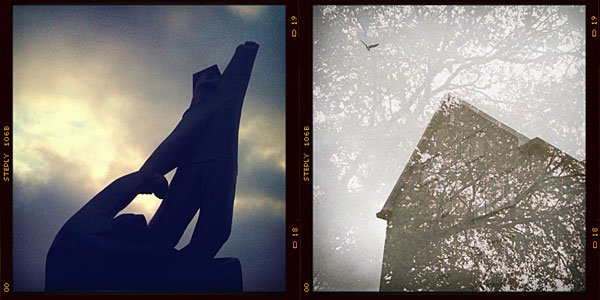
 Once the photo is taken, it is stored directly into the Photo Desk area, the app’s gallery where all photos are neatly organized in stacks and thus easily browsable. You can also load photos from your device. Other than photo taking, King Camera also allows video recording. However, videos taken cannot be edited and processed within the app; unlike photos, they are directly sent to your Camera Roll.