ClassicSAMP & ClassicINSTA On Sale!

ClassicINSTA and ClassicSAMP are currently on sale! Both apps in misskiwi’s Classic line are 50% off their original price.

ClassicINSTA comes with 12 lo-fi and toy camera effects plus 3 styled borders, to take photos that convey the appeal of classic instant cameras.

ClassicSAMP transforms your iDevice into a multi-shot camera. In addition to 6 camera modes, 16 effects are also included, for many different results.

ClassicINSTA & ClassicSAMP by misskiwi

You can get ClassicINSTA and ClassicSAMP at the special price of $0.99 (€0.79/£0.59) each in the App Store, for a limited period.

360 Panorama & A Few Other Updates

360 Panorama, Occipital’s panorama creator for iPhone, iPod Touch and iPad, got an update in the last hours. Release 4.0.1 brings no significant changes to the way the 360 Panorama works; nevertheless, the latest version improves a few features, especially to the benefit of Premium users.

360 Panorama for iPhone

  • Classic capture mode is back;
  • Improved capture quality, for smoother final images;
  • Cloud enhancement of previously uploaded panoramas (premium uploads only – free uploads coming soon);
  • Set captions;
  • Improved 2X resolution (premium uploads only);
  • In-app support for more effective help and feedback.

Other noticeable updates: Trover (1.1.1), ClassicSAMP (5.2.0), Old Photo Pro (1.0.4).

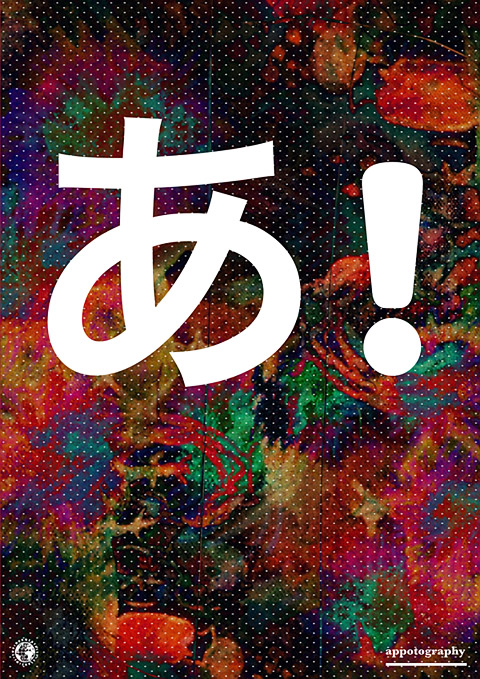
Phoster Updated to 1.2.0

Phoster 1.2.0 is now available in the App Store. Here are all the details about the latest release:

Phoster for iPhone/iPad

  • Added 6 new templates;
  • Added background color options;
  • Added new user manual;
  • Added Flickr upload available;
  • Added export to Instagram;
  • Added export to other photo apps;
  • Added bluetooth keyboard support;
  • Added high-definition device support;
  • Added iPad2 camera support;
  • Fixed font size adjustment error;
  • Fixed keyboard rotation problems.

As you can see, version 1.2.0 of Bucket Labs’ poster creator improves the app’s overall usability thanks to the newly added exporting (directly send to Instagram and to other photo apps) options and enhancements to many other features.

Phoster by Bucket Labs for iPhone/iPad
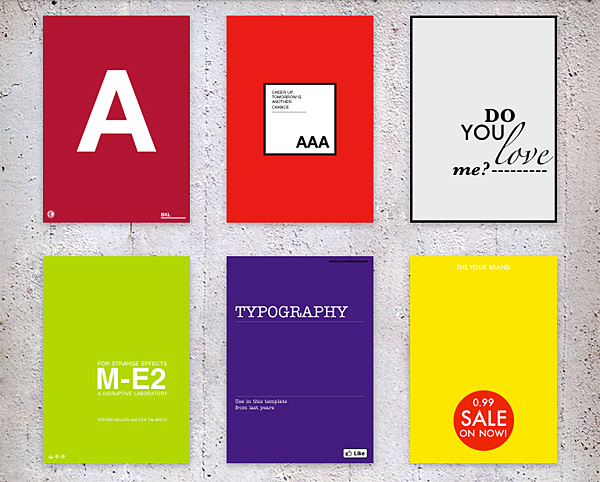
Phoster's new templates.

The new Phoster adds six more multi-purpose template designs to its already rich collection — now counting 72 templates in total. Thanks to the newly introduced change background color feature, which allows more accurate matching in photo/background combination, more customization is possible for the creation of your posters and invitations.

Phoster by Bucket Labs

FX Photo Studio For Mac Review

FX Photo Studio is a simple and hassle-free app for photo editing on your Mac. It comes packed with effects and other features to adjust photos you have taken, either with your iPhone/iPod Touch/iPad or with your favorite camera.

Main Features

  • Supports image resolution up to 16 mega-pixels;
  • Supports  different image formats, including JPEG, PNG, BMP, TIFF;
  • 150+ effects;
  • Save custom presets;
  • Adjust exposure, brightness and contrast;
  • Adjust hue and saturation;
  • Undo/redo;
  • Crop and rotate;
  • Send via email or share on Facebook, Twitter, Flickr, Tumblr.

Appotography Opinion

If you are familiar with FX Photo Studio for iPhone or iPad, you know what to expect. MacPhun’s photography apps are among the smoothest, slickest, smartest you will ever find in the App Store. FX Photo Studio for Mac is no exception. It only takes a few minutes and clicks from loading the photo to saving or sharing it. FX Photo Studio will help even total newbies to achieve neat results.
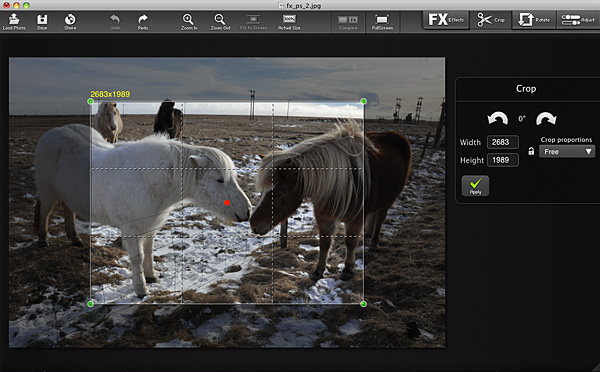
FX Photo Studio by MacPhun for MacFirst, you drag and drop or load a photo into the work area. You can start by adjusting a few settings, like exposure, saturation, brightness, contrast. If you need, you can rotate the image to straighten it using the right tool. You can also crop, freely or choosing one of the standard ratios (1:1, 4:3, 16:9, etc.).
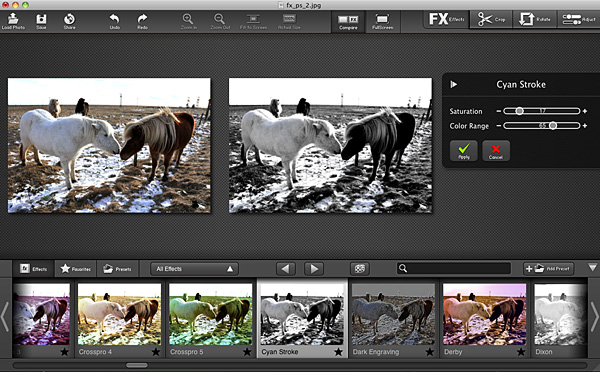
FX Photo Studio by MacPhun for MacYou can apply one of the over 150 ready-to-use filters to your photos. Effects are arranged into thematic categories, like Vintage, Vignette, Blur, Fantasy, and many others. Each category comes with a fair selection of possibilities, in order to satisfy any user, from the beginner with no experience or ideas about editing to the regular post-processing aficionado looking for a quick and well-balanced solution. Each effect can be adjusted with sliders to suit your taste and/or the feel of your photo. By combining the various effects together (you can apply more filters, one after the other), you can obtain personalized styles, which you can also save as presets for applying them over and over.

FX Photo Studio by MacPhun for MacWhen you are done with the processing, you can save your photo, mail it or share it on your favorite social networking site.

FX Photo Studio for Mac is a very focused photo editing application, whose aim is to help anybody to improve the look of their photos with the minimum effort. In comparison, FX Photo Studio is much easier to use than average photo editing software, especially for users with no previous experience: features are basic, but well conceived, the interface is so clean and clutter-free, processing and saving times are extremely fast.

MacPhun’s app is currently on sale! You can get it now for $9.99 (€7.99/£5.99) in the App Store.

The developer of FX Photo Studio kindly provided a promo code for reviewing purposes.

Overall

Name: FX Photo Studio
Developer: MacPhunn LLC.
Compatibility: Mac OS X 10.6 or later.
Price: £5.99||$9.99||€7.99
Vote: 5/5


FX Photo Studio - MacPhun LLC

Qbro Updated to 3.3

Qbro 3.3 by Jellybus is now available in the App Store. The latest release, in more detail:

qbro by Jellybus for iPhone

  • Added auto-saving of original photos to Camera Roll;
  • Added 3 new filter packs;
  • Optimization for iPhone3G;
  • Added support for uploading to RenRen.com;
  • Improved SNS sharing.

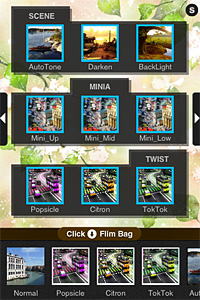
The filter packs added in version 3.3 contain each three filters, for a total of nine new filters for your iPhone photography.
qbro by Jellybus for iPhone
Scene Pack (filters included: AutoTone, Darken, Backlight) simply adjusts exposure; MiniA pack (filters included: Mini Up, Mini Mid, Mini Low) simulates tiltishift effects for creating miniature photos; Twist pack (filters included: Popsicle, Citron, TokTok) applies extreme color shifts to images.

qbro by Jellybus for iPhone
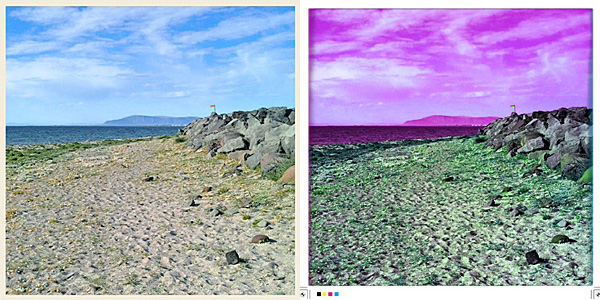
BackLight and TokTok filters.

Unfortunately, the overall value of qbro hasn’t changed since our previous review. Developers seem to prefer to add new features and gimmicks, rather than taking care of actual issues of their app.


PicFrame Review

PicFrame for iPhone allows mixing together your photos for creating funny and original montages. Compared to Diptic, its better known rival, PicFrame lacks some flexibility in photo management and editing (no built-in camera, no control over the look of your photos), but it makes up for it with a few additional border features.

Main Features

  • Full resolution available;
  • 4 image formats (1:1, 3:2, 4:3, 3:4);
  • 16 templates;
  • 12 border patterns;
  • Set border color;
  • Set corner angle;
  • Move, resize, mirror and rotate;
  • Send via email or share on Facebook, Twitter, Flickr, Tumblr.

Appotography Opinion

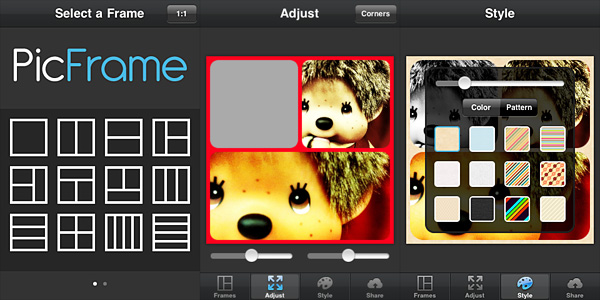
In PicFrame, you start your creation by picking a format for your final image and select one among the many frame templates, ranging from single to four panels.

PicFrame for iPhoneTo add photos to the frame panels, you simply tap on the desired panel and choose one of the photos from your device. You can adjust the photos individually to fit better by moving them around (sliders are also provided to expand and contract each panel’s area), by pinching to enlarge and shrink them, by tapping and holding to activate mirror and rotate functions.



The border of each frame is customizable: not only you can determine its thickness, make its corners more rounded and apply a plain color to it by adjusting color sliders, you can also pick one of the available patterns that come with the app, including geometric, stripy and textured designs.

Picframe for iPhone

ActiveDevelopment’s app is not the first, nor it will be the last of its kind. Nevertheless, PicFrame is an easy and fun way to achieve fancy visual mishmash on your iPhone. The app manages to keep everything clean and simple, so that even less than experienced users will enjoy creating images with it.

Picframe for iPhone

The only complaint I have about PicFrame concerns the tap and hold feature to activate rotation and mirroring: while trying to adjust the photos inside the frame, especially in instances where you need a lot of precision, it takes nothing to exercise the required pressure to prompt the rotate and mirror buttons, even when they’re not needed. It’s not a big issue, of course, but still it can get in the way.

Edit: the developer promptly pointed out that from iPhone Settings there is an option to switch from tap and hold to double tap to activate the mirror and rotate functions. My bad, I hadn’t seen it. So yes, tap and hold is the default, but you can switch to double tap mode and this definitely solves the aforementioned problem.

Overall

Name: PicFrame
Developer: ActiveDevelopment
Compatibility: iPhone, iPod Touch, iPad. iOS 3.2.2 or later.
Price: £0.59||$0.99||€0.79
Vote: 4/5

PicFrame - ActiveDevelopment

Photo Toaster Review

You maybe like your bread toasted well and quickly. And maybe you like your photos edited well and quickly as well. Photo Toaster is a newly released iPhone photo app, allowing at the same time fast and efficient photo editing: for newbies or casual users looking for the right look without having to sweat over it and also for those wanting quick results without forgetting about a certain degree of customization.

Main Features

  • Full resolution available;
  • 13 adjustable lighting scenes;
  • 16 adjustable effects;
  • 14 adjustable vignetting styles;
  • 17 borders;
  • 38 presets;
  • In-app guide;
  • Zoom in/out;
  • Shake to random effects;
  • Crop;
  • Undo/redo;
  • Send via email and SMS or share on Tumblr, Facebook and Twitter.

Appotography Opinion

Photo Toaster works both with built-in camera and with photos stored in your Camera Roll. From the main work area, you can access all the necessary tools controlling the photo editing process: Global Settings, Lighting, FX, Vignette and Borders at the bottom of the screen, plus Crop and share options on top.

Photo Toaster for iPhone

Global Settings contains a collection of ready-to-use presets, particularly useful when you need one-tap editing. The presets are arranged into groups (Basic, Deluxe and Supreme) and they cover a variety of styles, from simple black and white to Lomo. You can also add all the presets you create in a new category.

Differently from Global Settings, the categories Lighting, FX, Vignette and Borders offer more specialized instruments to adjust individual parameters. For each category, you can choose the degree and type of effects applied by scrolling a thumbnail list; if you need more control, you can switch to Full Control mode, which relies on adjustment sliders.

Lighting controls exposure, brightness and contrast, temperature and tint of your photo. With FX you can sharpen, control general saturation  of the image or add colored filters. There are also special features to apply cross process and technicolor effects.Vignetting is also customizable: you can set size, brightness and softness. Unlike vignetting, borders are not adjustable. It’s also possible to crop images according to different standard formats. The crop tool is not very flexible though.

By combining together all the different elements, you can create a fair collection of personalized presets to use on your photos.

Photo Toaster is especially good for quick edit. The UI is polished enough and it works smoothly. Processing times are also great. However, one thing I don’t get is the “fresh approach to mobile photo edit” aspect that was clearly emphasized by developers as a huge point in favor to the app. As far as I know, many other apps give you a combination of presets and more specific tools to use during the editing process. Not only this. Several apps grant the ability to restore the original photo or undo during editing. Some apps plainly offer more tools and customization and have more sophisticated features than Photo Toaster, like PhotoForge2 with its History feature or King Camera with its the Photo Desk, just to name a couple of excellent examples. I don’t get why some developers, even when they have good material, should not resist the temptation to spoil everything with misleading or inaccurate descriptions. Photo Toaster gives iPhone users nothing new, fresh or groundbreaking: the app is good and it does its work well and this alone can suffice to justify the purchase.

Overall

Name: Photo Toaster
Developer: East Coast Pixels, Inc.
Compatibility: iPhone, iPod Touch, iPad. iOS 4.0 or later.
Price: £1.19||$1.99||€1.59
Vote: 4/5

PhotoToaster - East Coast Pixels, Inc.

ScratchCam 1.3 Update

ScratchCam for iPhoneThe new release of ScratchCam for iPhone will shortly be available in the App Store. ScratchCam adds a grungy, aged and distressed look to any photo. If you want to know more, you will find an in-depth review of the app by clicking here.

Although version 1.3 will not change the way ScratchCam works overall, it will add an essential feature to the app. In fact, with the new release, it will be possible to save favorite styles. Up to version 1.2, ScratchCam relied exclusively on effect randomization. The new feature will make it easier to make a list of preferred styles, to allow quicker selection of the right look at the right moment. Frequent users in special way will appreciate this addition, for it will definitely give them more control over their final results. Favorited styles will be accessible and manageable from the main work area.

ScratchCam for iPhoneIn version 1.3, sharing via email was also added and enhancements to the included effects were made.

ScratchCam for iPhone
Different styles in ScratchCam for iPhone.

The new release clearly shows that ScratchCam’s developer is very responsive to sensible feedback: he actually listened to what his users deemed important to make adjustments and improve the overall usability of ScratchCam.

Last but not least, the Lite version of ScratchCam is also coming to the App Store. ScratchCam Lite will be a fully functional release, including all the features of the paid version, with the only exception of high resolution saving and a limit to the number of styles users can add to their favorites. If you want to try before purchasing, go ahead and get the Lite version.

NOTE: The developer of ScratchCam kindly provided us with preview code for this ScratchCam update.

Trover Review

Trover is a new iPhone-based social network whose purpose is to become a personalized guide to the world. Trover is not strictly about photography; in fact Trover is rather a social networking app that uses photography as a means of exploration.

Main Features

  • Full resolution available;
  • Square format;
  • Share on Facebook.

Appotography Opinion

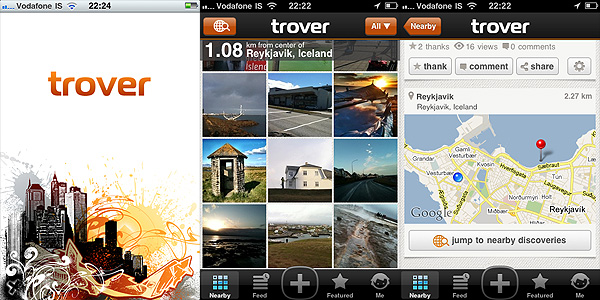
Trover helps users to discover interesting locations in an easy and entertaining visual way. By letting Trover know about your location, you give the app’s search engine elements to explore your nearby area in search for places of interest. In the Nearby section, you are thus presented with results of special interest, arranged by distance from your default location. The number of results you can get varies a lot, depending on the popularity of your location. The greater the number of users that discovered things around your area, the more results you will get. Likewise, you can share with people your own discoveries, which you can enrich with snapshots and notes.You can tag your findings, making it easier for others to search for what you have discovered.

Trover for iPhone

In the Feed section, you can browse through locations of interest arranged in chronological order, while in Featured, you can get to know what’s currently hot in the Trover community.

As in other social networks, you can interact with other members, by following them, commenting on their findings, giving them credit for their findings and so on. Taking advantage of the follow feature in Trover is really useful, because it basically allows the creation of a world map that only covers your particular interests.

Trover successfully merges the attributes of a social network with iPhone capabilities. Being able to easily take snapshots, besides writing descriptions and tagging, instantly gives a better idea of a location and its remarkable aspects. For the traveler in special way, Trover can become a really useful tool to get acquainted in reasonable times with surroundings in a quick and to the point manner. The risk is, as with all social networks, that Trover will be used by members in unforeseen ways, like as a simple means to socializing or to show off their photography, which could be good to an extent, but would definitely take away from the original app’s purpose.

Overall

Name: Trover
Developer: Trover LLC
Compatibility: iPhone, iPod Touch, iPad. iOS 4.0 or later.
Price: free!
Vote: 4/5

Trover - Trover LLC

Colorize Review

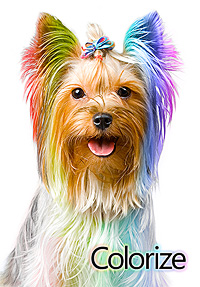
Colorize‘s Yorkie, with its intense psychedelic hairdo, seems to know the coloring business well: Widgetize’s app for iPhone is so easy to use it’s almost ridiculous. Honestly, if all photography apps were so simple, we would be spending more time taking and editing photos and less trying to learn how to use apps to take and edit photos.

Main Features

  • Full resolution available;
  • Two painting modes (Recolor and Desaturate);
  • Restore from previous sessions;
  • Zoom in/out;
  • Color picker;
  • Adjustable brush size and hardness;
  • In-app guide.

Appotography Opinion

Colorize by Widgetize for iPhoneIn Colorize you can both selectively recolor and desaturate your images. The process to achieve the desired result is simple. You load a photo from your device or take one with the built-in camera; after that you are introduced to the app’s Main Panel. At the bottom of the Main Panel there is a set of tools: the recolor and desaturate brushes, the eraser and the color picker. For better control, the tools panel can be hidden when not required and it can be brought back again by dragging it with the finger.
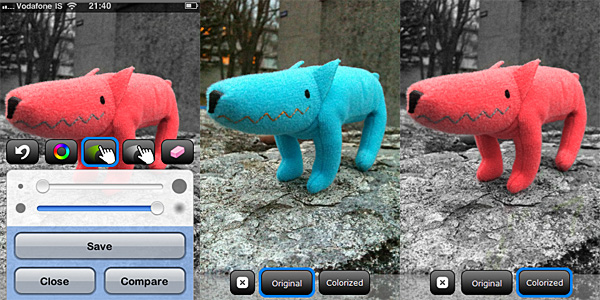
Depending on which effect you want to accomplish, you can either choose the desaturate or the recolor brush. For both brushes, it’s possible to adjust size and hardness playing with sliders in the tools panel. The recolor brush only sets the color of your object and it doesn’t affect other parameters as brightness, contrast and overall saturation. With the color picker selected, you can quickly switch between colors to be applied to your image. All you are required to do is painting with your finger over the areas you want either to recolor or desaturate. By finger-pinching, you can zoom in and out for a more refined result; by using the undo function and the eraser, you can easily correct mistakes. It’s also possible to compare the original with your edited image.

Colorize by Widgetize for iPhone
Colorize - The recoloring process.

All your projects are saved in the app’s gallery. This way, not only you can go back to keep on working on them, but you can also make changes at any moment.

Colorize does its work well and quickly. The UI works flawlessly and in general, for the simple task of selectively desaturating and recoloring photos, Widgetize’s app for iPhone is a pleasure to use.

More than a few other apps do the same as well and some of them even offer additional features. However, if you need an app exclusively focused on selective desaturation/recoloring, Colorize is really great.

Overall

Name: Colorize
Developer: Widgetize
Compatibility: iPhone, iPod Touch, iPad. iOS 3.0 or later.
Price: £1.19||$1.99||€1.59
Vote: 4/5

Colorize - Widgetize