Sfera Review

Sfera is a 360 degree photo maker for iPhone, iPod Touch and iPad, emphasizing a simple approach to 360 degree photo capturing and processing. Sfera lacks some important features that are a requirement, even for 360 photo making apps, like the possibility to save 360 degree pictures as flat photos and more control over final images.

Main Features

  • High quality on/off;
  • GPS on/off;
  • Sound recording on/off;
  • In-app guide;
  • Send URL via email or share on Facebook and Twitter.

Appotography Opinion

Sfera is one of the easiest utilities to capture 360 degree images on iPhone, iPod Touch and iPad and thus especially suited for users with little experience and, likewise, little demands.

To start the capture session, you simply tap and then slowly turn clockwise, trying to follow the aid of the white dot on the line appearing in the middle of the screen. For a most accurate result, you have to keep them aligned. The progress bar on top keeps track of your advancement as you turn to take photos; when it reaches 100%, the capture session ends. It is possible to enable sound recording while shooting, for the creation of images with a soundtrack to them.

Sfera’s engine takes all photos automatically and then stitches them together. The final images are saved in the Gallery, where you can retrieve and upload them to Sfera’s web service. You can share the URL of your images on Facebook, Twitter or send it to email recipients.
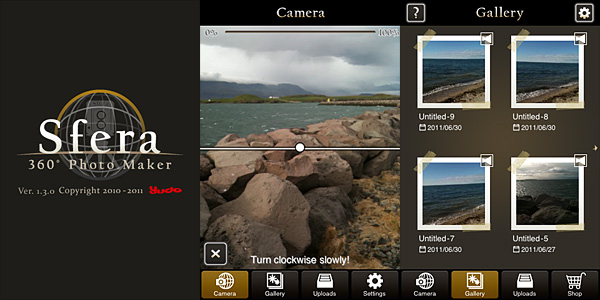
Sfera 360 photo maker by Yudo Inc. for iPhoneThe capturing process in Sfera is very straightforward and it’s easy to achieve results quickly. Since you are only presented with a 360 degree image, you don’t actually get to see how accurate and properly stitched your single shots are: possible imperfections are in such way easily disguised.

Here is a sample 360 image created in Sfera.

Proper editing in Sfera is impossible, to an extent: you cannot modify what you have captured. However, a few post processing tools are available, although exclusively as in-app purchases. A series of 7 colored filters can be obtained for $0.99 each or as a bundle for $2.99. Also available for $1.99 are contrast/brightness adjustment tools and a set of 8 very basic colored brushes plus eraser to write or draw over your images for another $0.99. In general, the in-app purchases are not worth bothering about.

The final images should also be viewable in Sfera Viewer, a separate app that can be downloaded for free from the App Store. Unfortunately, I couldn’t get the Sfera Viewer to work, because when I tried opening the .sfera file with it, I was asked to download a newer version of the app and I kept on being redirected to the App Store (and I had just downloaded the viewer from the store, so I assume there must be something wrong with it).

All in all, also given the possibilities it offers, Sfera is definitely too expensive. Considering there are so many other 360° photo makers that offer the same and more, Sfera is not the best option available for iPhone users, especially because the app does not allow to use the final images as flat panoramic photos.

Sfera is currently available in the App Store at the special price of $1.99, 62% off the regular price.

Overall

Name: Sfera
Developer: Yudo Inc.
Compatibility: iPhone (3GS, 4), iPod Touch (4th), iPad 2. iOS 4.2 or later.
Price: £2.99||$4.99||€3.99
Vote: 2/5

Sfera - Yudo Inc.

Picfx On Sale!

picfx for iphonePicfx is currently on sale. ActiveDevelopment’s app is 50% off its regular App Store price.

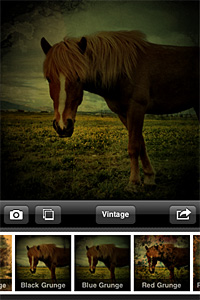
With Picfx, you can add several effects to your photos, choosing among a collection of textures, light leaks, borders and more. Picfx comes with 36 effects (including textures and borders) and 13 colored filters (from black and white to vintage) which you can apply over and over to your photos to create your own unique styles.

Picfx for iphone
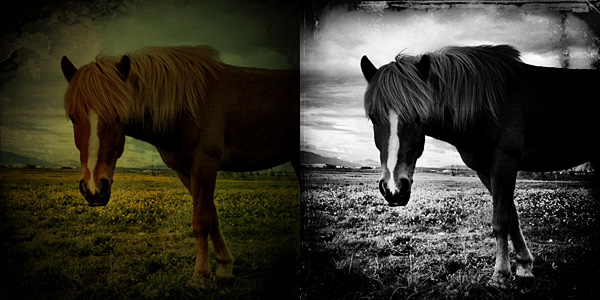
Picfx, which exclusively relies on the square format, can particularly be a special treat to users willing to give their photos an old style look. In combination with other apps, some interesting results can be achieved.

Picfx for iphone
Different styles in Picfx.

You can now purchase Picfx at the special price of $0.99 (€0.79/£0.59).

Trover and TiltShift Generator Updated

Trover photo sharing for iPhoneTrover 1.1.2 is out now. In the new release of the photo sharing app for iPhone you will find, apart from general bug fixes and performance improvements, a few additional features for quick browsing through the community’s entries.

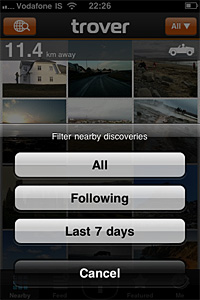
You can now search for specific users in Trover’s community. This way, you can more easily look for people you know or for users around your area. Moreover, you can now look for recent nearby discoveries applying the Last 7 Days filter.

Trover iphone
Filter nearby entries in Trover.

Finally, you can conveniently edit descriptions and locations of your own discoveries.

TiltShift GeneratorTiltShift Generator also got an important update.

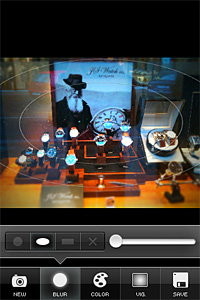
Apart from minor changes in the app’s interface (Camera and Save buttons are now of a blue color to make them stand out more), most noticeable changes in version 1.50 of the fake miniature creator include the newly added ellipse blur mode, which is now available together with linear and radial modes; also, the possibility to enable and disable Auto Adjustment for color sliders from the in-app settings. A Tell Friends button was also added in settings menu.

TiltShift Generator
The new ellipse blur in TiltShift Generator.

TiltShift Generator Free was also updated: if you have not tried it yet, you can get the free edition before purchasing the full version.

GIFVid² Now Available In The App Store

GIFVid² for iPhone.GIFVid² for iPhone is now available in the App Store. The slight name change in version 1.1 didn’t affect the way GIFVid² works; the UI is also untouched. The additions represent an upgrade to the basic features of GIFVid, but they do not introduce drastic changes. If you want to know more about how GIFVid works, you will find our full review here.

In GIFVid², both camera performance and GIF export were improved; pasting from iOS clipboard is now supported and so is video exporting; the integrated gallery, where it’s possible to browse GIFs from other users, was also enhanced.

GIFVid² for iPhoneIt’s now possible to edit GIFs by adjusting offset, brightness, contrast parameters, by adding blur and by setting loop interval. Reset is always possible for restoring the original.
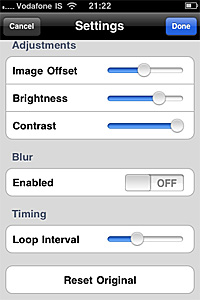
GIFVid² for iPhoneA few new sharing options were also added with the latest release: you can now share also on Tumblr, Imgur and Lockerz.
Share Your Apps With AppList.me

One of the most common information iPhone/iPad photographers like to share is the content of their personal “camera bag”: whether it is a list of apps they own or either a list of apps they like or use more frequently, it doesn’t really make a difference. Some users just take shots of their iPhone screen to upload them somewhere or to send them, which can be a problem for users with gazillions of different apps all loaded into their devices at the same time. Others simply make a plain list, which is not much handy either, because if they want to include links to the App Store, they have to do it manually. There are also more creative minds that now and then come up with other original techniques.

An easier way to share the contents of your iPhone camera bag with your friends, family or with whomever you want is using AppList.me.

AppList.me
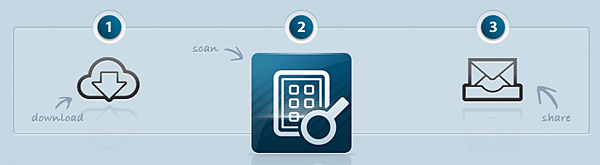
AppList.me: Download - Scan - Share

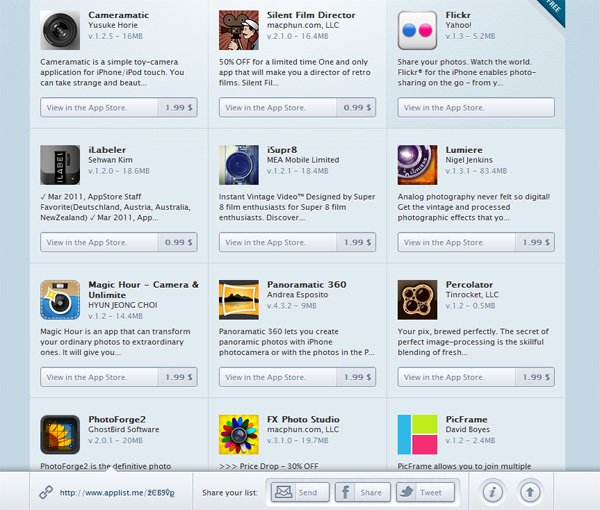
To create your list to share, you simply download the desktop app from AppList.me ( compatible with Mac and Windows) and, after launching it, you input the path where the apps are located on your computer; AppList.me scans your folder and gathers the required data, then it generates a complete list of the apps you have downloaded. You can tick off those apps you do not want to include for sharing: in this manner, you can create thematic or selective lists, like what games you have beaten so far or, precisely, what photography apps you own or use more frequently in your iPhone camera bag. When you confirm your selection, you are given a shortened URL, corresponding to a page where the list of your apps is available for display. For each app, you are given a short description, developer, price and also, when available, special offers. Using the page’s sharing features, you can send the link to email contacts or post it on Facebook and Twitter.

AppList.me
Sample list generated in AppList.me

Lists generated and shared via AppList.me never expire; however, if you lose your URL, you will not be able to retrieve it — no worries: this only means you will have to generate your list again to get a new web address.

AppList.me is currently in beta, thus it is only capable of listing apps available either in the German or in the US branches of the App Store.

AppList.me’s app is 100% free and you do not require a registration to download it or use their service. The service does not collect any information about you, just the name of the apps you have to create the list.

So, what’s in your personal camera bag? Do you mind sharing with us?

TrueHDR Review

What does true in TrueHDR mean? That other HDR on iPhone is fake? Not really. In the case of Pictional’s app, true may stand for straightforward or even hassle-free. TrueHDR is an extremely basic tool conceived simply to do what it says: creating well exposed images by merging shots taken with different settings.

Main Features

  • Full resolution available;
  • 4 capturing modes;
  • In-app guide;
  • Send via email or share on Facebook and Twitter.

Appotography Opinion

TrueHDR has four different capturing modes to create your HDR images. One mode allows to load the overexposed and underexposed shots from your iPhone, while the other three entirely rely on the built-in camera.

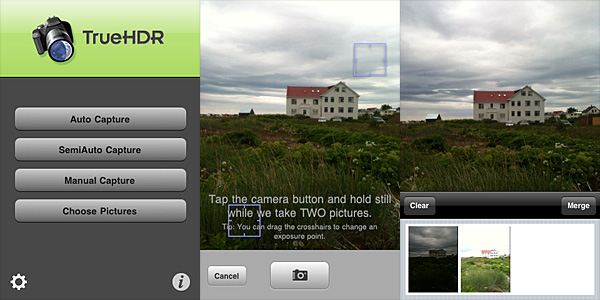
Auto Capture takes overexposed and underexposed photos and does all the necessary calculations on its own. All you have to do to use the Auto mode is tapping on the shutter button while keeping your iPhone steady.

TrueHDR for iPhone by Pictional.

SemiAuto Capture asks you to indicate bright and dark areas of the scene you are about to photograph by placing two individual crosshair cursors around the screen before pressing the shutter button once. TrueHDR’s engine does all the rest.

In Manual Capture, you have to press the shutter button twice: first after defining a bright area in your scene, then after doing the same for a dark area.

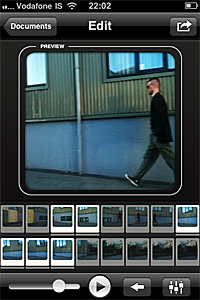
In all modes, after the camera takes the necessary shots in rapid succession, you are presented with a thumbnail view in the lower part of your screen. You can tap on the Merge button to start the post processing or Clear to start over. After the engine is done with alignment and merging, you can save or share your image.

TrueHDR for iPhone by Pictional.
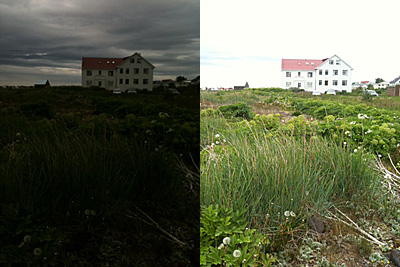
Underexposed and overexposed images taken in TrueHDR.

There are no actual differences in outcome using Auto, SemiAuto or Manual Capture: the quality of the final images remains the same. Auto Capture is the easiest to handle, especially without a tripod or other stable surfaces, while Manual Capture can be extremely hard to use if you are holding your device. TrueHDR is able to figure everything on its own, thus it’s unlikely you will need to resort to using SemiAuto and Manual in most instances.

TrueHDR for iPhone by Pictional.
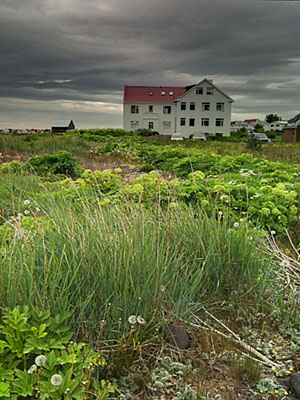
HDR composite in TrueHDR.

How does it all compare to other HDR on iPhone, like Pro HDR or iCamera HDR? The most noticeable disadvantage of TrueHDR versus the other two apps is the total lack of control over the final image. Whereas in both Pro HDR and iCamera HDR you can set values as saturation, brightness, white balance and contrast (in iCamera HDR you can also choose a tone mapping engine, add special effects, and adjust many other parameters), in TrueHDR you can only save  the HDR composite, without the possibility to retouch it in any way. This means you cannot disguise or minimize flaws, like presence of halo artifacts. Nevertheless, in my experience, TrueHDR proved to be much faster, both in shooting and in processing, than its rivals. Speed in itself perhaps cannot make up for the lack of options, but it shouldn’t be overlooked either, at least as far as precision and time consumption are concerned.

TrueHDR is currently available in the App Store at the special price of $0.99 (€0.79/£0.59).

Overall

Name: TrueHDR
Developer: Pictional LLC
Compatibility: iPhone, iPod Touch, iPad. iOS 4.1 or later.
Price: £1.19||$1.99||€1.59
Vote: 4/5

TrueHDR - Pictional LLC

Artist’s Touch for iPhone Review

Artist’s Touch for iPhone by Artamata is an application to turn your photos into paintings that also works as a drawing utility. However, the app is neither an artistic photo filter or a drawing app: both for the achievable results and for the workflow, Artist’s Touch is more like a mix between these two. As it often happens with most hybrids, Artamata’s app isn’t particularly successful in either task.

Main Features

  • Up to 1024×768 pixels resolution;
  • 11 paint tools;
  • 6 textures;
  • Adjustable brush settings;
  • In-app tutorial;
  • Send via email or share on Twitter.

Appotography Opinion

In Artist’s Touch, you can start with a photo from your iPhone, you can use the built-in camera to take a shot to process, or you can simply choose a blank canvas to paint on. The app gives you a series of tools (oil, watercolor, charcoal, pastel, chalk, ink, pencil, airbrush and scratchboard) which you can use to apply different effects to your photos or to paint on blank canvas. You can also choose a background color and a texture to add depth to your painting surface. Note that background and brush colors cannot be picked freely: you can choose among a list of a little more than 45 tints.

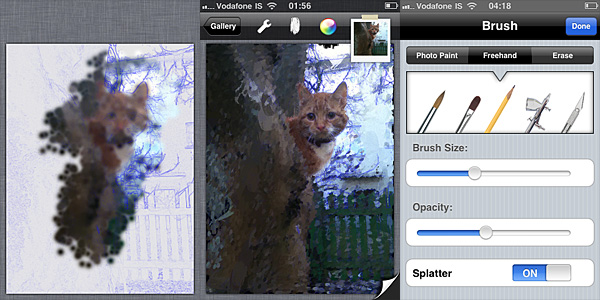
Artist's Touch for iPhone by ArtamataAs soon as you load your photo in Artist’s Touch, you are given a blank canvas with your photo’s contours highlighted as a guideline, like in a sort of blueprint. You can enable and disable the blueprint feature in any moment. To accurately apply a painterly effect to suit your taste and need, you can set brush opacity and size. By brushing with your finger over the image, you define the areas where the given effect must be applied. For better results, you start with a larger brush and gradually diminish size to bring out the details. In case of mistakes, you can activate the eraser, but there is no undo. When you are finished, you can save to your device, send with email or share on Twitter.
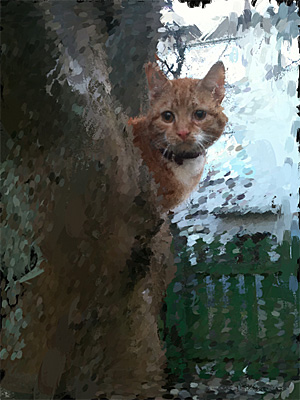
Artist's Touch for iPhone by ArtamataAs an artistic filter, Artist’s Touch remains on a rather average level: the effects are not bad, but they’re not particularly good either. The best aspect of this Artist’s Touch, which is something more than a few other apps in the same genre lack, is that you can accurately define areas of your image with higher detail. An app like AutoPainter — better filters overall, but not very accurate results — currently is not able to achieve the same. As a drawing utility, Artist’s Touch’s possibilities are very limited as well, mainly for the lack of essential features to give artists the required freedom while painting. If you want to pretend you can paint but you cannot, then perhaps this app will let you have a few moments of fleeting satisfaction — if you have enough patience to find a photo that will look reasonably good after processing it in Artist’s Touch, that is. In any case, the main obstacle to enjoyment is the app’s overall feel of awkwardness. Both among drawing apps and among photographic filters, there are other choices to obtain similar results in a much smoother and easier way. Nevertheless, even with all its flaws, a few users may find some peculiar use for Artist’s Touch.
An iPad version of Artist’s Touch is also available in the App Store.

Overall

Name: Artist’s Touch
Developer: Artamata
Compatibility: iPhone, iPod Touch, iPad. iOS 4.0 or later.
Price: £1.79||$2.99||€2.39
Vote: 3/5

Artist's Touch for iPhone - Artamata, Inc.

PhotoForge2 On Sale!

PhotoForge2 will be available to purchase for a limited time at the special price of $0.99 (€0.79/£0.59), which is roughly 66% off the regular App Store price.

PhotoForge2 On SalePhotoForge2 is one of the most comprehensive and advanced photo editing apps available in the App Store and definitely one worth having for iPhone/iPad photographers, thanks to the many tools for full control over post processing, like RAW import, curves, levels, white balance and exposure adjustment, layers support, masking features, a rich collection of effects and several, in addition to an extensive collection of sharing options.

The special offer will be valid until the release of iPad’s native support.

8mm Vintage Camera 1.2 Out Now

8mm Vintage Camera for iPhone by NexvioAfter a long wait, the updated version of 8mm Vintage Camera is now available in the App Store. Release 1.2 adds a few useful features to Nexvio’s 8mm camera, in addition to new film simulation and lens.
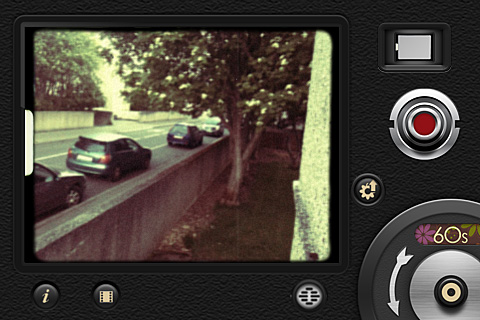
A pleasant surprise is the newly added possibility to process previously recorded videos by importing them from your device. In the older versions of 8mm Vintage Camera, you could only use videos taken from within the app; this limitation was one of the biggest concerns for the Nexvio’s app users. Unfortunately, previously taken videos are also saved in small resolution, just like videos taken in-app and processed in real time. This means that, if you process your HD videos within 8mm Vintage Camera, you will end up with a rather disappointing 480 x 360 resolution clip.

8mm Vintage Camera by Nexvio for iPhone
You can now combine projector sound with soundtrack recording and delete all your clips at once from My Reels gallery. Moreover, your videos can now be saved automatically to Camera Roll, other than to My Reels gallery.

Other relevant additions are the new lens, Super 8, and the two films, Noir and 60’s. 8mm vintage camera now comes with a total of 5 lens and 7 film effects. This short clip shows both Noir and 60’s film in combination with Super 8 lens.

Finally, AirPlay support was also added with this latest release.

King Camera Updated to 1.02

King Camera 1.02 is out! The latest release of Saycheezzz.com’s app is not only about the new fancy icon. Here are all the changes and improvements in version 1.02:

King Camera by Saycheezzz.com

  • Optimized thumbnail generation in Photodesk: now 2.5x faster;
  • Optimized cache system for Quickmatik thumbnails: now up to 20x faster;
  • Improved access speed to Photodesk when it contains over 10 pages of photos;
  • Added 90 degree Rotate Tool to Crop/Rotate;
  • New app icon;
  • Fixed bug that made photos disappear in Photodesk after app update;
  • Restored photos that disappeared with update from 1.0 to 1.01;
  • Fixed metadata and geolocation not showing properly in Photo Info with photos imported photos from Camera Roll.

What does it all mean? Simply that King Camera is faster and smoother than before, both when shooting and when editing. If the previous update (1.01) mostly took care of improving the speed of camera features, the latest release enhances the app’s performance in post-process modes.

King Camera by Saycheezzz.comOn a final note, developers informed their users that a reported bug concerning the White Balance and Exposure lock when recording video is iOS 4.3 related and that Apple seems to have fixed it in iOS 5.

King Camera will be available at the special launch price of $0.99 until the end of June!