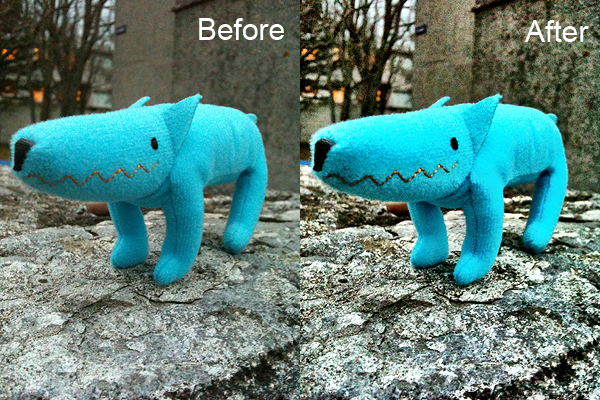
The 2.2 release introduces Clarity, a new feature which, the developers state, “can make your photos look truly stunning with just one tap”. The new feature is a processing tool whose purpose is bringing out details and enlivening dull shots in the easiest possible way.
Here you can see an example of how Clarity affects photos:
Clarity: before and after
Clarity is not the only thing worth noting in version 2.2. Other changes and improvements are the following:
Added ‘+’ button to the touch focus control to enable easy splitting into focus and exposure controls — and here is the explanation to the ‘+’ symbol in the app’s icon;
Multiple photos are now saved to Camera Roll according to the order they were selected
Better indication when camera is auto-focusing;
Improvements to Pinhole effect;
Improvements to Vintage border;
Shutter button bug fixed;
Incorrect date/time bug when saving to camera roll fixed;
Timer countdown time bug fixed;
Cancel buttons bug in sharing fixed;
Various minor bug fixes and enhancements.
What are your opinions on the new features? Do you want to share them with us? Feel free to do so!
Instagram is now version 1.5.2. Another routine update for Burbn’s app, which mainly solves various bugs.
Fix for email sharing when posting a photo;
Performance improvements in News tab;
Fixes for iPad running iOS 3.2;
Fix for Photo Library header bug on iOS 4.3 devices.
Retro Camera Plus by Urbian was also updated to version 1.0.4. Not a major update either, but it brings to the app some interesting improvements, first of all the higher resolution.
Two apps that we recently reviewed were updated in the past hours. We are talking about Dynamic Light and iSupr8. The updates are nothing big, but developers of both apps announced important improvements and changes are on their way.
Dynamic Light‘s newest release is 1.1.
The update was meant to improve memory handling by caching large images. Version 1.1 also temporarily replaces the filter Dutch Light with Ultra Contrast, an overdone HDR effect. Mediachance made clear Dutch Light will be back in a later update, together with a whole new set of photo filters.
iSupr8 was also updated to version 1.2.2.
The new release fixes crash issues that mainly affected iPhone 3GS users. A major update to the popular Super 8 video app was announced by MEA Mobile and is coming soon.
Just a very brief update to notify that three of the apps we reviewed were updated in the last hours: TiltShift Generator by Art & Mobile, Lomora 2 by Marvin Lee and Panoramatic 360 by floaty. None of these updates is a major one.
TiltShift Generator v. 1.36: fixed bug for Facebook sign-in .
Lomora 2 v. 2.2.1: fixed bug causing the app to crash on iPod Touch 4th generation.
Panoramatic 360 v. 4.3.1: fixed bugs and various improvements.
If you have experienced some problem with one of these apps, it’s recommended to update them now. Remember you can always contact the developer for further assistance and to report further issues.
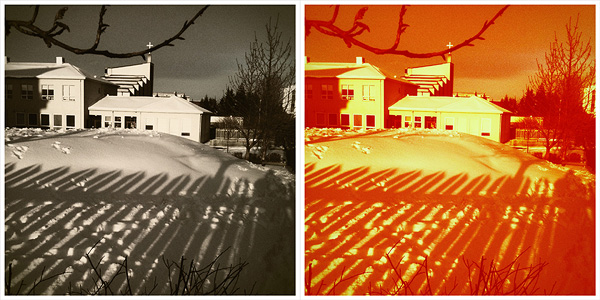
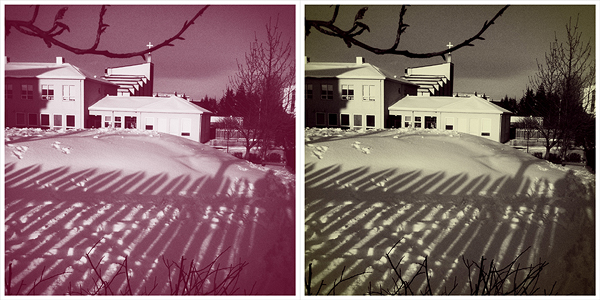
With the update to version 1.2.0, Cameramatic— one of our favorite apps — added some neat extras that will undoubtedly please its fans. I finally got around to testing the updated version. First of all, two Standard filters were added together with two B&W filters and a Standard border.
Also, now you have a thumbnail preview of all the available effects. You had a preview of the borders before, but you had to recognize the filters by name and description. Given the richness of Cameramatic’s filter collection, this new feature is particularly useful.
New Standard filters Baltazar & Firebird with White 005 borderNew B&W filters Berrychrome & Retrochrome with White 005 border
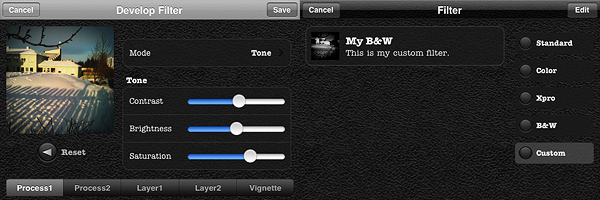
However, the most interesting new feature in Cameramatic is the custom filter development tool, which is really fantastic and gives you a lot of space for creating highly customized effects. As the name clearly states, this new feature allows you to create your own filters and save them.
You can either start by editing one of the presets or develop your filter from scratch. You have access to 2 separate levels of processing and to 2 additional layers for adding further effects; you can also set vignetting color and intensity separately. You can enable each level of processing individually, depending on your personal requirements. Among parameters, you will be able to set blending mode, brightness and contrast, adjust color channels and alpha opacity. Through the preview, you can make corrections knowing how they will affect your photos. When you are done, you save the desired filter, choose a name and a description for it. You can access your filter at any moment together with the others under the “Custom” category. Thanks to the filter development feature, you can use your newly created filters over and over again to add a unique touch to your photography.
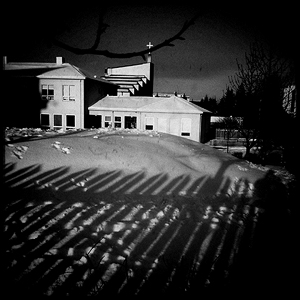
My custom filter.
I have already rated Cameramatic 5 out of 5 in my previous review, so it would be pointless to add a new rating. But rating considerations aside, I truly believe Cameramatic has made tremendous improvements from its first release. From a relatively undistinguished start, it has now become one of the most impressive photography apps you will be able to find in the App Store. Not only the developer was very responsive to users’ feedback, but he also seriously took into account the most useful suggestions in order to actually make the app better and better.
If you haven’t done so yet, go get Cameramatic now! And have fun with it!
Cameramatic version 1.2 brings some new features to the popular toycam app by youthhr for iPhone, iPod Touch and iPad. Now available new filters, frames and filters customization. Here is what’s new in the latest release in detail:
Adobe’s Photoshop Express was updated to version 2.0. Some interesting new features, including in-app purchases, were added with this last update. Here is what’s new:
New camera workflow for rapid in-app photo-taking;
In-App purchase of Adobe Camera Pack: reduce noise, self timer, and auto review;
Retina Display support;
Multi-tasking support.
The in-app purchase: Adobe Camera Pack (£2.39||$3.99||€2.99)
Reduce Noise: the Reduce Noise feature smooths out flaws to improve photos;
Self Timer: set a camera timer to 3 or 10 seconds of interval before the photo is snapped;
Auto Review: the feature allows a quick look at pictures before the action passes you by.




 Dynamic Light‘s newest release is 1.1.
 iSupr8 was also updated to version 1.2.2.
 Just a very brief update to notify that three of the apps we reviewed were updated in the last hours: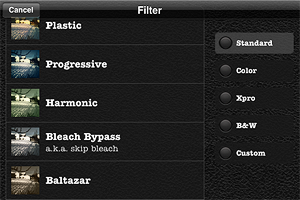
 Cameramatic version 1.2 brings some new features to the popular toycam app by youthhr for iPhone, iPod Touch and iPad. Now available new filters, frames and filters customization. Here is what’s new in the latest release in detail:
 Instagram was updated to version 1.5.1. Not a major update, but here is what’s new in this latest release of the popular photo sharing app:
 Adobe’s Photoshop Express was updated to version 2.0. Some interesting new features, including in-app purchases, were added with this last update. Here is what’s new:
 Instagram got updated to version 1.5 and here is what’s new in its latest release: