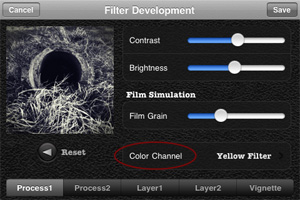
Cameramatic 1.3.0 is out. The latest version of youthhr’s toy camera for iPhone introduces a new essential feature, Color Channel, for better handling black and white photo conversion. With color channel, it’s possible to select one among the available colored filters, red, green, blue, orange, yellow, plus two other options, normal gray (a default equal weight for all color channels) and maximum channels. The same feature was recently added also to Monochromia, the monochrome sibling of Cameramatic.
In Cameramatic 1.3.0 you will also find two new filters, Slide and Cross Processing 2. Slide is an addition to Cameramatic’s Standard filter collection, while Cross Processing 2 is included in the XPro selection.
The new filters: Slide (left) and Cross Processing 2 (right).
Monochromia 1.5 is now available in the App Store. I reviewed Monochromia last month, explaining that, while I regarded this app as one of the best in its genre on iPhone, I truly felt that the impossibility to work properly with color channel settings was something that prevented users from fully taking advantage of youthhr’s monochrome converter.
The developer listened to users or, in any case, he demonstrated to agree that color channels are not a secondary aspect for better looking black and white photos. There is more to black and white than simply desaturating, and not all photos can be successfully turned into monochrome just by giving equal weight to all colors. Sometimes, to make important elements in a monochrome photo stand out or in order not to lose precious detail, it’s necessary to filter colors. In traditional black and white photography, for giving visual preeminence to specific elements of the image, special filters can be applied in front of the lens of the camera. Blocking certain colors instead of others (for example, the red filter blocks all colors but red, the blue filter blocks all but blue, etc.), filters allow to obtain a richer tonal range. The same effects can be accomplished in digital photography with post processing.
Monochromia 1.5 finally offers a color channel feature, for greater flexibility and better conversion from color to black and white. The possibility to apply filters for individual color channels makes a huge difference. From Monochromia’s developing area, you can now access the color channel settings. Other than red, green, blue, yellow, and orange filters, it’s possible to select normal grayscale and maximum channels.
Different results for different filters.
Given Monochromia’s new features, I decided to review my previous rating accordingly, giving the app a full score.
iPhone’s camera popularity has been on the rise for quite some time. It’s recent news that currently iPhone 4 is ruling Flickr’s top camera rankings for number of total uploads. If you ask iPhone photographers what’s so special in their camera of choice, each and any of them will give you different answers. Among the most appreciated qualities in Apple’s smartphone, ease of use and often unforeseen creative possibilities will be listed as some of the most frequent.
In spite of all the great apps and effects available today, what prevents some users from truly enjoying iPhone’s camera features is the lack of control over fundamental aspects of photography, first of all focus — although a few photographers will affirm these limitations are part of the charm of the medium. It is now possible to make up for iPhone’s deficiency thanks to the SRL mount, a simple device to attach SRL lenses to the iPhone’s body to power up mobile picture taking.
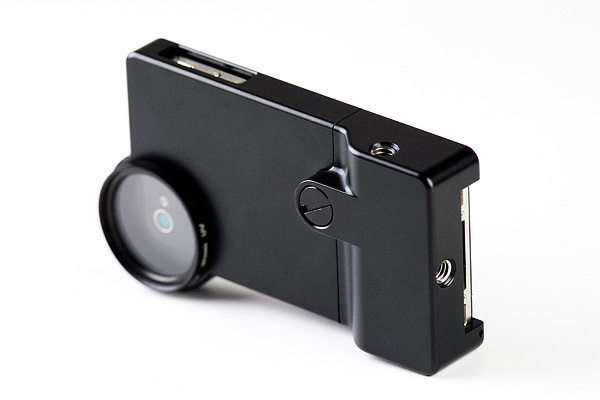
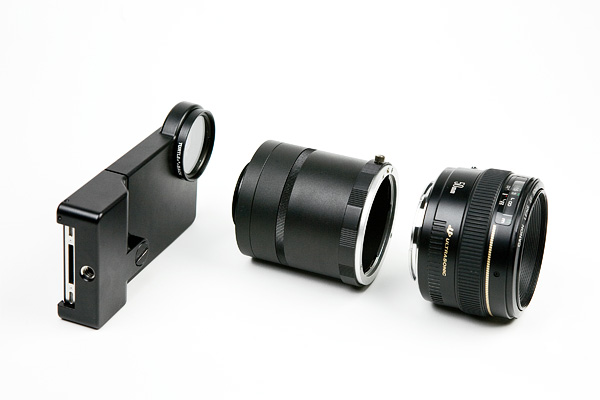
Looking at SRL mount’s pre-release images, you will see that it is basically an aluminum case equipped with lens adapter and two tripod mounts (one for vertical and anther for horizontal positioning). Other than that, the case conveniently features an UV filter and two strap loops for better portability. The SRL mount will work both with Nikon SLR and Canon EOS (not compatible with Canon EF-S and FD) lenses. The adapter will support most lenses, from telephoto to wide angle and macro, and it will grant iPhone users similar control over depth of field of DSRL cameras. However, the case will only be compatible with iPhone 4‘s body.
Must-have or not? Well, this of course depends on what are your requirements and what kind of photographer you are. Among aspects to take into account, the fact the SRL mount will give users control over manual focus, but it won’t allow autofocus. Also, given the absence of mirror within the adapter, photos taken with it will appear upside down. Finally, assuming many photographers like iPhone also and especially for its excellent accessibility and hassle-free approach in comparison to DSRL cameras, the SRL mount will be more of a gimmick than an essential accessory.
The SRL mount for iPhone 4 will be released in mid-August and it will be available for $249 through Photojojo website.
PicTools is a new photo editing app by ActiveDevelopment, creator of PicFx and PicFrame. Thanks to a well-chosen selection of instruments and to a balanced interface, PicTools has some of the potential of full-fledged photo editors, without being as demanding.
Main Features
Full resolution available;
Crop, flip and rotate;
Curves editor;
Randomize effects;
Layer blending;
12 overlay styles;
20+ effects;
10+ borders;
Undo;
Share on Facebook.
Appotography Opinion
PicTools includes a small collection of photo editing instruments for getting the most out of your photos in no time. The interface of ActiveDevelopment’s app is basic and intuitive: you load your photo to the work area and all the tools at your disposal are neatly arranged at the bottom of your screen. By tapping on each icon, you access the various menus. You can crop and rotate your image and apply as many effects as you see fit, over and over.
Overlays enables layer blending (12 modes available in all). A selection of presets can help you to get started or to get things done quickly, but you can also load images from your own device, like textures for example, and blend them all. Effects consists of several presets arranged into categories, Antique and Color. If you want more freedom, instead of picking a preset, you can play with the curves editor and build your own colored filters from scratch. PicTools also offers a randomize feature: as its name suggest, Quick uses a random combination of effects and overlays for a speedier editing. For both Overlays and Effects — and also for the Quick feature, that combines the two — you can set opacity, for a subtler or more intense result. By adding a border, which you can filter over as well for a more consistent look, you can add a final touch before saving. Among the other things, it’s possible to save photos in a square format with a black or white background: Instagram users will undoubtedly know how to take advantage of this option.
Mix presets with your own settings in PicTools.
I will be honest: I’m liking PicTools a lot. Not only it gives you enough to enhance your photos in a cinch, but it is also very simple and user-friendly and it allows great results, without going through all the trouble of tweaking with massive iPhone photo editors. Presets are extremely well-done and they can give you even nicer results if you combine them together with your own settings. PicTools will become a regular guest in my iPhone camera bag.
PicTools is currently on sale. It is now available in the App Store at the special launch price of $0.99.
Grungetastic by JixiPix Software is an app that comes with many textures and enough space for customization, to transform photos into grungy images. We have tried Grungetastic on iPhone, but the app is also available in HD version on iPad.
Main Features
Full resolution available;
Randomize effects;
43 presets;
80+ textures;
35+ borders;
Adjust strength/color;
Send to email or share on Facebook.
Appotography Opinion
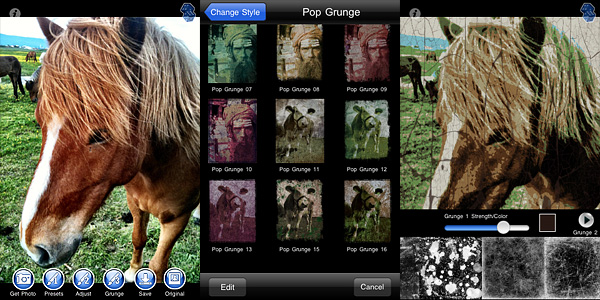
In Grungetastic, you can use both the built-in camera feature or load a photo from your device. For quick and easy editing, you can pick one of the many presets included in the app. Presets are arranged into different categories, each covering a style: Grunge, Pop Grunge, and Bleach Grunge. While Grunge is more about simply adding textural elements to photos, Bleach Grunge also adds fading, to convey more effectively the aged and distressed look. Pop Grunge mixes dirt and scratches with more or less intense posterization, for a peculiar and up-to-date graphic look.
Grunge textures and borders are the same for all style categories. You can apply two separate levels of grunge (two different textures, that is) and a border on the same image and set individually their opacity and color.
For a more distinctive result, you can create custom presets by adjusting the value of various parameters, like tone, threshold and bleach degree. You can save custom presets for further use or edit them to adapt them to your images. For unexpected combinations, you can try the Randomize button.
Pop Grunge (left) and Bleach Grunge effects applied in Grungetastic.
As with other JixiPix Software’s photo apps, rendering times in Grungetastic can be, on average, quite slow. Especially on very large images, adding effects and saving can be time-consuming. However, the interface works smoothly and the outcomes are fairly satisfactory. Given the amount of material you can work with, if you are into heavy processing and grungy, extreme effects, you will enjoy Grungetastic.
FX Photo Studio 4.0 is about to be released in the App Store. The forthcoming update promises to be extremely interesting, as MacPhun released a few details about the new features of their popular photo editing iPhone application (Mac and iPad versions soon to follow).
What will you find in version 4.0?
Masking Studio – Probably the biggest new feature in FX Photo Studio 4.0, Masking Studio will change the way you use FX Photo Studio. New effects – With version 4.0, FX Photo Studio will reach the impressive total of 194 effects! New effects were developed in collaboration with pro photographers. New sharing options – More freedom and options in the way you can enjoy your photos out of your iDevice.
If you want a taste of what you will be able to achieve, here is a preview (images courtesy of Alexander Tsepko).
We will posting our impressions on the new FX Photo Studio as soon as it becomes available, so stay tuned!
King Camera 1.04 completes the series of updates that, together with version 1.02 and 1.03, improved the app’s speed both for camera and editing modes.
Camera shutter speed is now steadily under 1s; launching and rendering times in Photodesk are also overall bettered: speed for thumbnail generation and photo import from Camera Roll are improved.
A few other details about the latest release, besides various bug fixes (sound not being properly disabled, HD burst mode crash on 3GS, flashlight issue when switching from camera to video, among the other things, although in a note, developers let users know that iOS makes impossible to turn off camera shutter sound): photo buffer limit is removed in version 1.04 to allow unlimited photo taking; moreover, you can now browse multiple pages in Photodesk while in Selection mode, so that deleting and sharing over multiple pages is possible.
King Camera is currently on sale and available at the special price of $1.99 (£1.19/€1.59) in the App Store.
With the update to version 2.1.0, GIFVid² is now capable of importing photos and videos stored in your Camera Roll. Previously, you could either create your animated GIF by recording a short video or by taking a sequence of images over a given time interval, only using the built-in camera feature, while no import was possible. Now you can create animations also making use of previously recorded/shot material. The process to create your animated GIF is exactly the same in both cases.
GIFVid² is currently 33% off the regular price (for a limited time it’s $1.99/£1.19/€1.59).
TiltShift Generator 1.55 improves control in ellipse blur mode. With the last update, you can now freely adjust width/height ratio of the recently introduced ellipse blur, simply by pinching with your fingers. The developer also revealed that EXIF support will be added with the upcoming release.
Magic Hour 1.3 is now available in the App Store. The new version of Kiwiple’s photo editing and filter creator application for iPhone introduces new features for more fun and possibilities.
The biggest addition in this release is the brand new TiltShift effect, for turning photos into fake miniature images.
Tilt shift simulation can be applied to photos edited in Magic Hour after adjusting other settings, just before saving. This means, you will not find the tilt shift option among Magic Hour’s presets or in the Filter Market, but you will be able to add it after the rest of you editing is done. There are two blur modes that you can choose from: radial and linear. Other than that, you can decide if the blur must be applied inwards or outwards. A slider allows easy resizing of the effect. In combination with other filters and/or with vignetting added, Magic Hour’s tilt shift effect looks pretty neat.
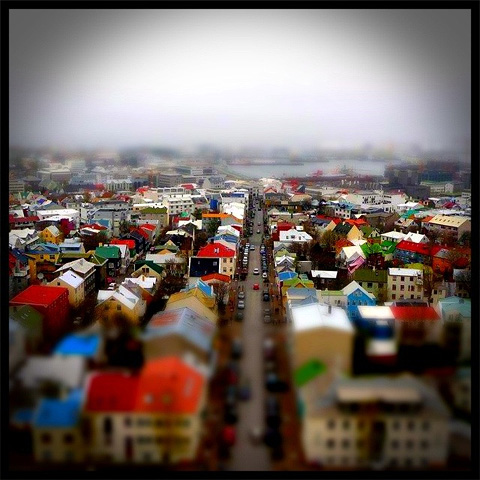
Colorful Reykjavik! Apply a fake miniature effect to your photos in Magic Hour.
Other changes in version 1.3 include a digital zoom feature for the camera mode and a fix for Facebook and Posterous sharing bug.
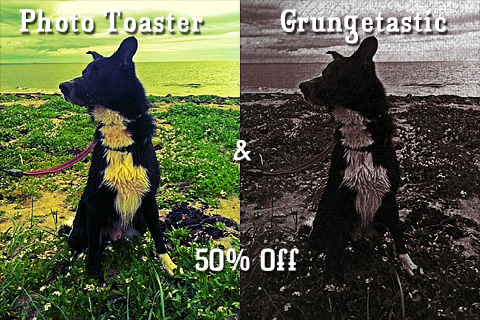
Photo Toaster and Grungetastic are currently on sale! You can get these two apps from the App Store for $0.99 (£0.59/€0.79), with a 50% discount on their original price tag.
Photo Toaster is a universal photo editing app, especially good for quick and easy processing. It offers iPhone and iPad photographers a collection of ready-to-use presets and it also allows the creation of personalized effects.
Grungetastic comes with several grungy presets, for giving photos a dirty, old, distressed look. The app includes a rich collection of textures and borders, which you can adjust to your photos to create your custom effects.
PS: the offer is valid only for the iPhone version of Grungetastic.
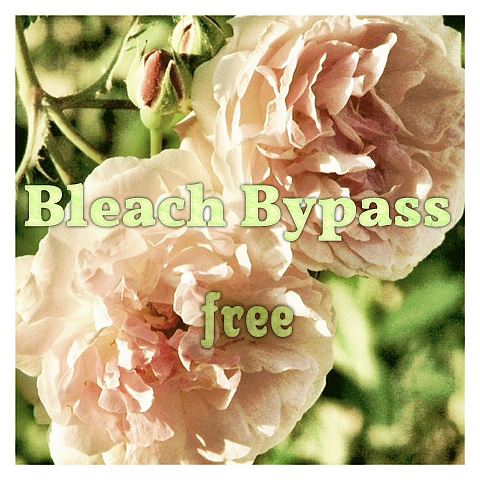
Bleach Bypass, the skip bleach filter suite by Fotosyn for iPhone is currently free for dowload in the App Store!
Bleach Bypass contains a collection of 8 filters, ranging from basic high contrast and desaturated skip bleach process look to gentler tinted effects. The app also allows vignetting and adding three types of border for a final touch. If you have not tried Fotosyn’s photo application yet, you can do it now for free. The offer is valid for a limited time only.

 In Cameramatic 1.3.0 you will also find two new filters, Slide and Cross Processing 2. Slide is an addition to Cameramatic’s Standard filter collection, while Cross Processing 2 is included in the XPro selection.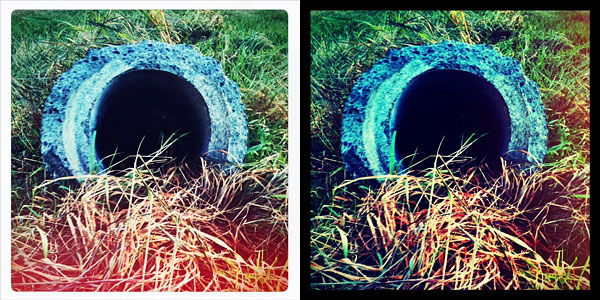
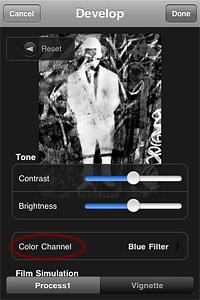 Monochromia 1.5 finally offers a color channel feature, for greater flexibility and better conversion from color to black and white. The possibility to apply filters for individual color channels makes a huge difference. From Monochromia’s developing area, you can now access the color channel settings. Other than red, green, blue, yellow, and orange filters, it’s possible to select normal grayscale and maximum channels.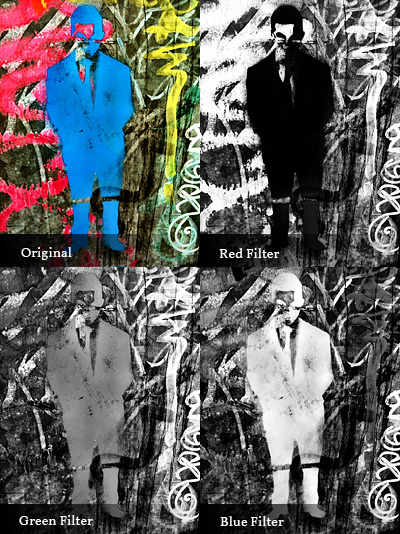

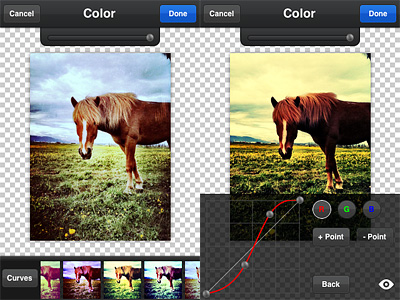 Overlays enables layer blending (12 modes available in all). A selection of presets can help you to get started or to get things done quickly, but you can also load images from your own device, like textures for example, and blend them all. Effects consists of several presets arranged into categories, Antique and Color. If you want more freedom, instead of picking a preset, you can play with the curves editor and build your own colored filters from scratch. PicTools also offers a randomize feature: as its name suggest, Quick uses a random combination of effects and overlays for a speedier editing. For both Overlays and Effects — and also for the Quick feature, that combines the two — you can set opacity, for a subtler or more intense result. By adding a border, which you can filter over as well for a more consistent look, you can add a final touch before saving. Among the other things, it’s possible to save photos in a square format with a black or white background: Instagram users will undoubtedly know how to take advantage of this option.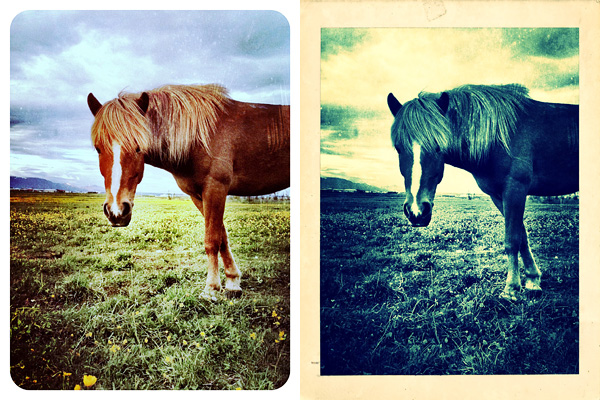
 Grunge textures and borders are the same for all style categories. You can apply two separate levels of grunge (two different textures, that is) and a border on the same image and set individually their opacity and color.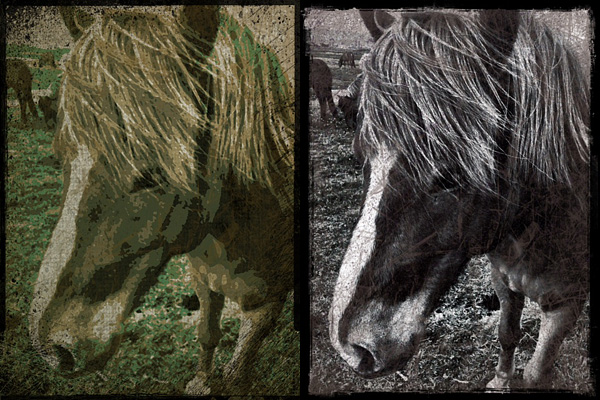


 With the update to version 2.1.0,
  TiltShift Generator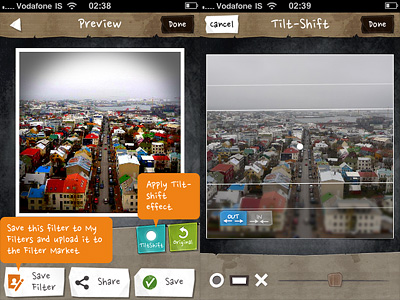

 If you have not tried Fotosyn’s photo application yet, you can do it now for free. The offer is valid for a limited time only.