The new release of PhotoToolbox improves performance of image processing on iPhone 4. This is not the only change in version 2.8.0: other than the new app icon, the most important addition is the introduction of a layer blend feature.
Blending can be enabled by scrolling the first menu wheel in Filter mode. There are 6 presets for quick blending; however, by tapping on the Blend button, you can access the blend editor and import any image in JPG and PNG format from your own device. This lets you use custom textures and allows to merge more photos together.
There are 16 classic blending modes available in all: Normal, Multiply, Screen, Darken, Lighten, Overlay, Soft Light, Hard Light, Color Burn, Color Dodge, Difference, Exclusion, Hue, Saturation, Color, Luminosity. For each mode, it’s possible to set overall intensity.
Imported textures or images can be resized according to different aspect ratios and they can also be rotated independently from the base photo you want to apply them to. Using the Front/Back switch, the order of the layers can be inverted.
Custom blends you create can be saved among the app’s presets.
Cameramatic 1.4.0 is now available in the App Store. The latest version introduces new filters and frames to its already rich collection.
The new filters, Instant and Deep, are both added to the Standard collection of Cameramatic. Their overall looks are not significantly different, but while Instant is bright and vivid, Deep has a slightly faded character. Several new frames (9 new items in total: White 07, White 08, Ivory 02, Sloppy, Film 01, Film 02, Film 03, Film 04, Hassy 02) are also part of this update. They are added to Film and Standard frame collections.
Here is a preview of the filters in combination with two of the new borders.
Deep + Sloppy border (left), Instant + Film 04 (right)
As we already wrote in a previous news today, the developers of Hipstamatic have now added an option to delete your photos from public albums.
I think it is still important to remind our readers that everything we wrote in previous posts about the Creative Commons license applied to your photos on Hipstamatic Family Albums and the general rights Hipstamatic has on your photos once you have used their online services is still valid. So, deleting your photos from the Family Albums will not remove the Creative Commons license from them – which means that if somebody downloaded your photos, they can use them freely for as long as they want – and it will not remove the rights you gave Hipstamatic on your photos once you have used their online services – rights of using your photos in any way they want, including reselling them to third parties.
While many advocates of the “free for all” Internet consider Creative Commons the only way to go for sharing of information on the Internet, you must always be careful when deciding to go this route with your photos. And you must always remember that the Creative Commons license does not overwrite the rights you gave to a company when you accepted their Terms of Service.
I know – a lot of users just want to have fun with their iPhone and do not really care about who is using their photos. But there is a substantial number of users, also according to the number of e-mails and comments we had on the topic, that do care and that should thus always read the small notes in the Terms of Service of the apps they are using.
And if you are interested in different ways of sharing your photos, somebody is working on them – read our post about OpenPhoto – and even Flickr and Google+ have much more relaxed Terms of Service when it comes to photo sharing.
Simply B&W 1.1 is out. The latest release of MR. B. Ware’s monochrome converter for iPhone comes with enhanced interface and new useful features.
It’s now possible to apply two different vignetting styles, black and white. Vignette intensity is easily adjustable with a slider. Another new feature is grain simulation, to imitate effects obtained with different types of film. Version 1.1 also adds EXIF data preservation for devices running iOS 4.1 or later.
Other noteworthy updates include:
PicTools 1.1: new effects, overlays and borders with names for easier reference, added border opacity control, save up to 5 RGB curves settings;
Hipstamatic 221: added the requested delete from Family Album feature;
Appysnap 1.1: added leaderboard and Snap tab, improved upload stability;
Click! is now version 3.1.1. The new release of Room1337’s single-handed photo app mainly improves without changing the way Click! works and without introducing new features as well.
Especially noteworthy the fix concerning the app’s preview feature. The issue prevented users from previewing images taken with Click! from within the app (note that, as we explained in our previous review, this didn’t affect saved or sent images). I could verify that the preview feature now works perfectly fine.
Fixed preview bug in 3.1.1
Version 3.1.1 improvements include fixes both to interval timer on older devices and to continuous photo memory, enhancements concerning devices running iOS 3.x, and optimization for Flickr photo sharing.
I have been hoping for this update. Monophix 3.1 is out and with it comes the long-awaited color filter feature.
Monophix is one of the most valuable tools in the App Store for easy conversion from color to black and white. In our previous review, although we recognized the worth and the potential of the app, we also explained how the final score reflected the absence of a color filtering feature. Color filtering is an essential aspect in color to monochrome conversion. To avoid mediocre results, every photographer has to take into account color filtering. In traditional photography different results are obtained by blocking certain colors by using various photographic filters. In digital photography, the same can be easily achieved in photo editing.
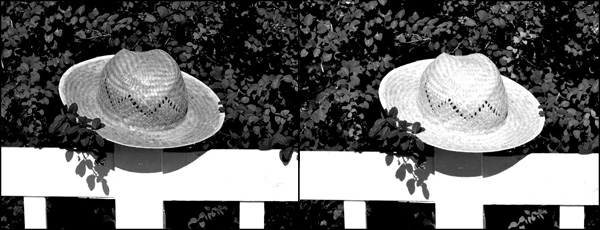
Different filters can change the look of your black and white photo.
In Monophix 3.1 you have now filters for red, green, blue, cyan, yellow and magenta. The average weight black and white is also still available. This allows better control over final results, depending on the photo and on the effect you want to achieve.
In Monophix 3.1 major improvements to the vignette feature were also made. Vignette is now more manageable, thanks to the intensity slider which was added in this version. For users who experienced this issue in previous releases, the developer informs that the vignette preview glitch was also fixed: with a slider it’s now possible to correct vignette preview distortion.
Thanks to these and other minor enhancements, we feel like reviewing the previous score of Monophix, which now gets 5 out of 5.
Note: version 3.1 contains a glitch affecting the app’s opening screen. Since we have verified the issue does not concern the app’s functioning, our final score is not influenced by it. Anyhow, the developer lets Monophix users know that with the upcoming update to 3.1.1 the problem will be solved.
PhotoForge2 2.1.1 is out. Here are the details on the latest release of the universal photo editor by GhostBird Software.
Auto-resizing – When images that are too big are loaded into the app, auto-resizing is activated. This prevents memory issues that can lead to the app crashing when it’s not possible to handle images in their original size. While loading large images does not represent a huge problem for iPhone 4 and iPad 2 users, for 3G/3Gs and iPad users it can cause serious malfunctioning. Auto-resizing is only activated in the case images too big to handle are loaded into the app. It’s possible to edit maximum image loading size from in-app settings (PhotoForge logo -> Settings -> Load Settings).
Better performance – Reduction of memory usage with textures, vignette, frames and Pop! Cam operations. This should prevent crashes when large images are being processed.
RAW support improved – Fixed issue that caused images in RAW format to load only in a low resolution preview in some instances. Metadata for RAW is also improved.
Set default IPTC info to photos – This addresses the issue of entering the same information several times for the same photo.
View EXIF metadata from each photo info screen.
Mailing list signup – It’s now possible to sign up for receiving updates, tutorials, contests, and other news from in-app settings (Photoforge logo -> Sign up for newsletter).
Uploader now always displays default titles and descriptions.
Other fixes – Hangs with uploading to Dropbox and with Pop!Cam in-app purchase dialogue (with in-app purchases disabled) are now fixed.
PhotoForge2 is still available at the special price of $1.99/£1.49/€1.59 in the App Store.
Halftone 1.6.3 is now available in the App Store. With this update, Halftone improves its overall stability. Developers at Juicy Bits took user feedback seriously enough to fulfill a few requests to enhance performance and usability of their iPhone/iPad comic panel creator.
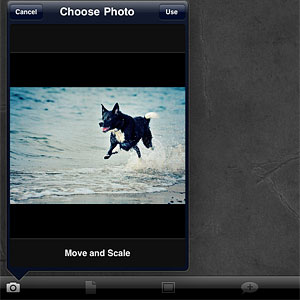
New in version 1.6.3 of Halftone is the ‘Image Cropping‘ option, which can be switched on and off from Halftone’s settings. Cropping enables applying a square format to images loaded into the work area. Not only this gives users more creative possibilities, it also allows interaction with other apps which solely rely on square format, like Instagram.
Note that ‘Image Cropping’ must be activated from the device’s settings, not from in-app settings.
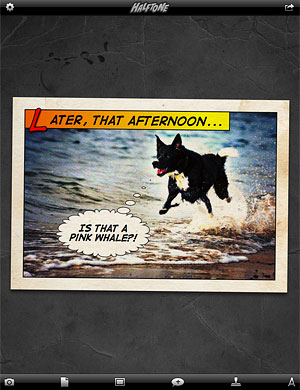
Also new in this release is the larger speech balloon’s tail area. Grabbing the tail of balloons was one of the several issues that caused some difficulty to Halftone users when creating their comic panels. Expanded touch area for balloons‘ tail allows better handling and placement of speech balloons in Halftone.
FX Photo Studio version 4.0 is now available in the App Store. The long-awaited update renews MacPhun’s photo editing app by adding several new features and by revamping old ones with improvements to their overall performance, losing nothing of the app’s original ease of use.
What’s new in version 4.0:
7 new effects;
Masking tool;
Improved performance (up to 2x faster);
Square format cropping;
Centering in Tilt-shift and Radial Blur;
In-app camera enhancement;
Restore in-app purchases;
New import/export options.
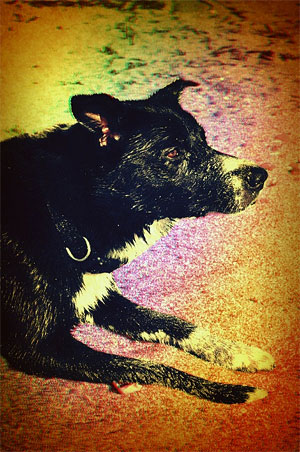
A number of new effects were added to the already extensive collection of FX Photo Studio, bringing the app’s total to 194. With version 4.0, you are given 6 brand new cross process effects, which were developed in collaboration with professional photographers. A special 3D effect is also part of this update.
The new 3D effect.
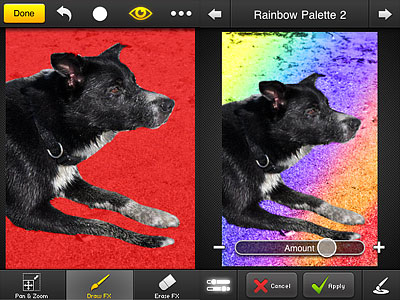
The highlight of version 4.0 is, without a doubt, the masking tool. Masking allows to apply effects selectively on images. In FX Photo Studio, you can add selectively as many effects as you wish in a row. There are four types of brush that can be used to paint over images, varying in opacity and border hardness. By zooming and panning using your fingers, painting over photos can be done quite comfortably. It’s either possible to enable mask view or disable it while painting. The ‘invert mask’ lets you easily switch among masked and unmasked areas.
Very cleverly, FX Photo Studio saves your previous mask, so that you can apply a series of effects exactly where you want to. The only drawback concerning masking is the lack of a resize function for the brush. It’s possible to make up for this by zooming in, but on finer detail it may still be problematic.
Effects applied selectively using masking.
It’s now possible to import photos directly from any Facebook account. Other than sharing them via the previously available options, edited photos can now be printed right away by taking advantage of iPhone’s AirPrint (requires iOS 4.2 or later) or they can be sent directly to Instagram.
The developer of FX Photo Studio revealed that a print-on-demand feature is in the works, so check out for future updates.
Given the new features, significantly expanding FX Photo Studio’s possibilities, I am revising the previous rating for MacPhun’s app, which now gets a well-deserved full score.
Overall
Name: FX Photo Studio
Developer: MacPhun
Compatibility: iPhone, iPod Touch. iOS 3.0 or later.
Price: £1.49||$1.99||€1.59
Vote: 5/5
iSupr8 2.0 is out. New features and a few extras are part of the latest major update for this iPhone and iPad video maker which simulates the look of the old Super 8 format (our full review can be found here). Let’s see what’s new in version 2.0 in detail.
First of all, iSupr8 now offers more editing options. There are four new film simulations that you can purchase (each for $0.99/€0.79/£0.69) + an extra film coming for free with version 2.0:
Prime-X B&W – Low contrast black and white with subtle sepia tint, for a suggestive and timeless look.
PenneMaker B&W – High contrast black and white inspired by the rough and extreme documentary style of the 60’s.
VibraChrome 40 – Warm color effect with red hue in shadows, especially suited for sunny days.
SuprCrome 40 – Slightly desaturated color effect with a touch of magenta.
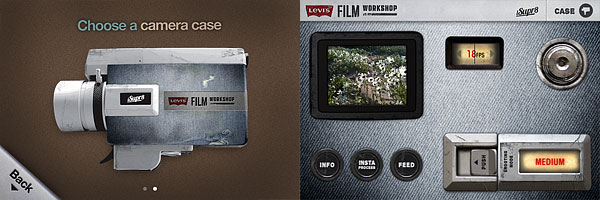
Levi’s Film Workshop (free) – Color effect with a bold indigo hue for emphasizing blues.
Every effect has adjustable settings which are accessible by tapping on the ‘preview’ thumbnail in the app’s development area. You can set vignette, noise, flicker and scratch strength, disable/enable audio, film burn and frame. Your customized settings can be saved as presets.
Among other new features, a revamped design, a selection of FPS rates (12, 18, 24) and improved sharing and community integration (make sure though you have read the Terms of Service and you agree with them before you share via iSupr8 community).
It’s also possible to choose a camera case among the ones available. Currently there are two choices, the standard black case and the special Levi’s themed edition case.
Last but not least, as mentioned above, iSupr8 is currently free in the App Store for a limited time, thanks to Levi’s Film Workshop sponsorship.

 The new release of PhotoToolbox improves performance of image processing on iPhone 4. This is not the only change in version 2.8.0: other than the new app icon, the most important addition is the introduction of a layer blend feature.
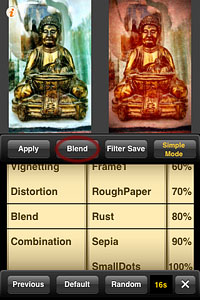 There are 16 classic blending modes available in all: Normal, Multiply, Screen, Darken, Lighten, Overlay, Soft Light, Hard Light, Color Burn, Color Dodge, Difference, Exclusion, Hue, Saturation, Color, Luminosity. For each mode, it’s possible to set overall intensity.
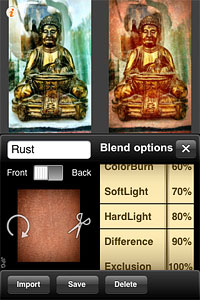 Imported textures or images can be resized according to different aspect ratios and they can also be rotated independently from the base photo you want to apply them to. Using the Front/Back switch, the order of the layers can be inverted.
 Cameramatic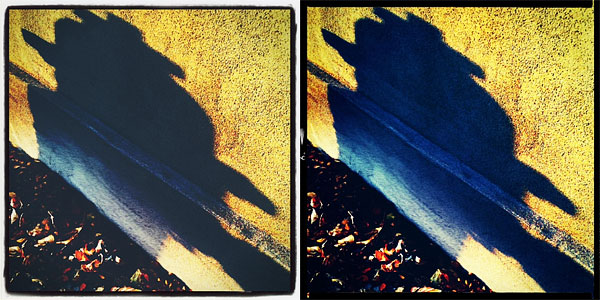
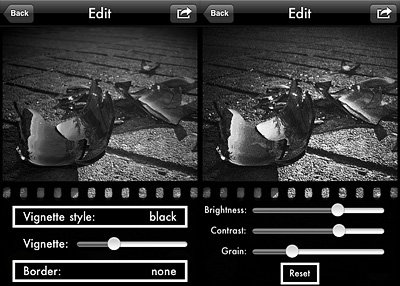 Version 1.1 also adds EXIF data preservation for devices running iOS 4.1 or later.
 Click!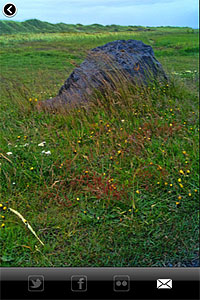


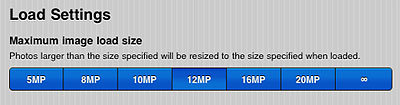 It’s possible to edit maximum image loading size from in-app settings (PhotoForge logo -> Settings -> Load Settings).
 Halftone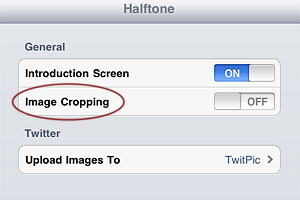
 Also new in this release is the larger speech balloon’s tail area. Grabbing the tail of balloons was one of the several issues that caused some difficulty to Halftone users when creating their comic panels. Expanded touch area for balloons‘ tail allows better handling and placement of speech balloons in Halftone.
 FX Photo Studio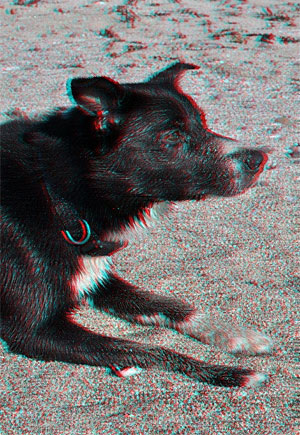

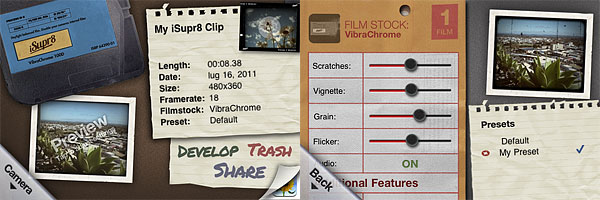 Every effect has adjustable settings which are accessible by tapping on the ‘preview’ thumbnail in the app’s development area. You can set vignette, noise, flicker and scratch strength, disable/enable audio, film burn and frame. Your customized settings can be saved as presets.