ToonPAINT 2.0: Fully Revamped With New Features and UI

Some interesting news for ToonPAINT fans: version  2.0 of the popular photo-to-cartoon app introduces new features and enhancements.

We reviewedToonPAINT in the past and, although we liked it, there were more than a few issues that prevented us from fully enjoying this app. The new release solves most of the known issues we pointed out at the time of our first evaluation, especially the problem concerning full resolution saving.

What’s new:

  • New UI and workflow;
  • Full resolution output;
  • Improved painting system;
  • Infinite undo on paint;
  • Speed optimizations on Inklines for iPhone 3GS and iPhone 4;
  • Upload your photos to Hall of Fame and vote for others’ creations;
  • New Auto Color, Alpha Brush (available with in-app purchase) and Volbeat Me coloring modes;
  • Fixes to all known crash issues.

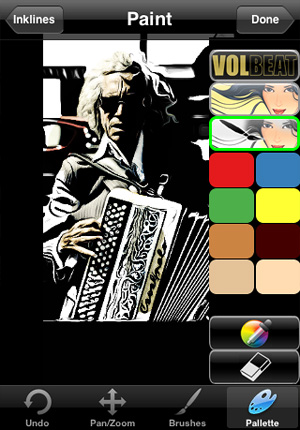
A big change in the ToonPAINT 2.0 concerns the new UI, much cleaner and better organized. The tracing features are the same, but the way each step in the processing is now improved makes using ToonPAINT easier. In ToonPAINT 2.0 you can still paint with default brush and colors, but you can also use the new painting modes, available via in-app purchase for $0.99 — £0.59 or €0.79 — each. The new painting features especially give cool results in the bat of an eye even to those that are not experienced with digital painting or to those who simply do not want to spend too much time playing with brushes and colors.

ToonPAINT by Toon-FX for iPhone

Auto Color, as the name suggests, automatically fills your picture with color; Alpha Brush uses alpha opacity to let you paint over your cartoon using your original image as source. Both features heavily rely on your original images, but while Auto Color retains more of a stylized cartoony look, Alpha Brush adds realistic tints to your creations. A third painting mode was added as an extra: Volbeat. Inspired by the visual style of the Danish rock band going by the same name, this feature basically adds a monochrome golden layer over your outline.

ToonPAINT by Toon-FX for iPhone
With Alpha Brush applied.

I have mixed feelings towards this update. The full resolution is a great improvement and the new interface is also a point in favor, but paying for each add-on separately may not be that appealing and taking away the function for smoothing lines — which was very useful but also very likely one of the main reasons that prevented an upgrade to full resolution — is another irritating change in version 2.0. The thing that I don’t really like though is that Volbeat extra. Not for the effect per se, but for its implications. When I use a photo app, I don’t like the notion of being involved in a promotional campaign, even when it’s about something I like. And I assume I’m not the only one.

Bleach Bypass: Simulating Skip Bleach Process on iPhone

Fotosyn recently released their Bleach Bypass for iPhone, an app exclusively focused on simulating skip bleach processed photography.

Bleach bypass is an incorrect color processing that consists in skipping the bleaching function in the developing of a color film. The skipping can be total or only partial. The result is an image characterized by desaturated tones, stronger dark areas, increased contrast and extreme grain. Bleach bypass is also known as skip bleach or silver retention, because the silver is retained in the emulsion along with color. Although renown and appreciated for artistic purposes — very famous is the case of Spielberg’s Saving Private Ryan, which makes use of this processing extensively — this technique is particularly costly due to equipment requirements needed to achieve it. It is however very easy to imitate digitally, so its popularity has greatly increased in the last years.

Main Features

  • Full resolution available;
  • 7 effects;
  • 3 border styles;
  • Vignette on/off;
  • Auto-save on/off;
  • Share via email.

Appotography Opinion

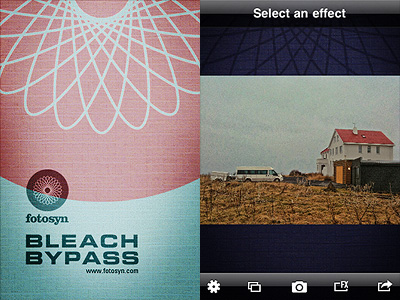
In Bleach Bypass, you can either load one of the photos in your Camera Roll or take shots  with the built-in camera. After you have your picture to process, you can apply one of the seven filters available in combination with one of the three borders included. There are three standard effects — Cinematic, Extreme, Monohint — and four tint effects — Blush, Breeze, Verve, Nostalgia. You can pick your desired filter from the FX screen which you can access by tapping on the FX button, but you have to enable vignetting or choose a border from the settings panel, which is kind of nonsense in my opinion — since there are not many variables, I think it would be easier and less time-consuming to have all of them accessible from the FX screen. Once you have the right combination, you can save or send via email.

Bleach Bypass by Fotosyn for iPhone

The processing takes place right away after you choose your effect, unlike other apps that first let you have a preview of the result and then actually process the image when you save it. This means it takes some time to switch to one effect to the other, but it also means saving the image is immediate.

Bleach Bypass by Fotosyn for iPhone
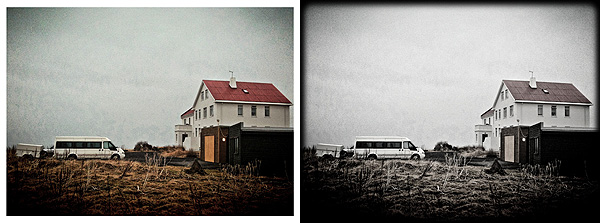
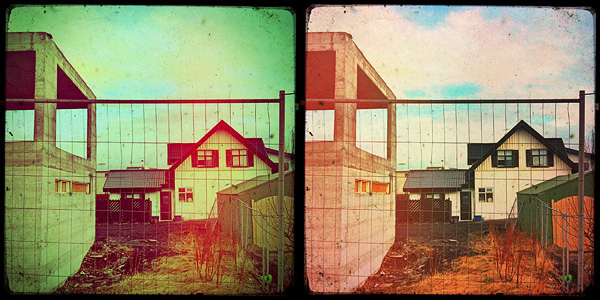
Two different combinations effect/border in Bleach Bypass app for iPhone.

The effects are very nicely done, but definitely not outstanding: on the iPhone, I’ve seen many times convincing bleach bypass-like processing; there are several apps with similar filters that aren’t labeled as bleach bypass, for instance. A few of this app’s effects look almost identical, with just very slight differences in hues and contrast. Which is kind of disappointing, since there are very few choices to begin with. All in all, it feels like the effects in Bleach Bypass could have been a single filter with adjustable parameters instead of seven individual filters which you cannot adjust at all.

Overall

Name: Bleach Bypass
Developer: Fotosyn
Compatibility: iPhone, iPod Touch, iPad. iOS 4.2 or later.
Price: £0.59||$0.99||€0.79
Vote: 3/5

Bleach Bypass - Fotosyn

Cameramatic 1.2.1: Light Leaks Feature Gets A Makeover

Cameramatic is now version 1.2.1. A major update was released not long ago, but yet again Cameramatic gives its users new enhanced features.

So, what’s new in version 1.2.1? Let’s take a look:

  • Light leak management: select light leak style manually;
  • Restore purchases;
  • Various bugs fixed.

I am pleased to see the light leaks feature was finally renovated. Light leaks were perhaps the only element I didn’t enjoy much in the previous versions of Cameramatic, because the light leaking applied was totally random before, so you couldn’t really make use of it properly.

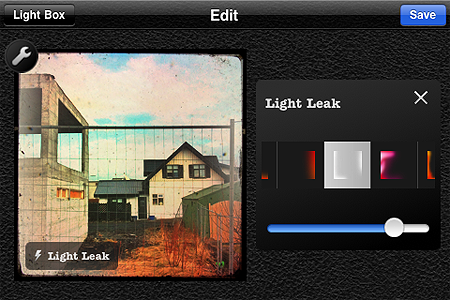
Several light leak styles to suit your customized effects combinations.

With this update not only the quality of the light leaking effects look greatly improved, but it is also possible to choose among different styles and adjust their intensity. The result is far more convincing than before!

You can now also easily restore your purchases in the case they are lost when you delete the app and install it again.

Cameramatic - youthhr

Dynamic Light 1.5: New Filters And More

After the previous release, Mediachance had anticipated a substantial improvement to their Dynamic Light app. And here it is, the promised update: version 1.5, featuring new filters, interface and useful tools for giving you more freedom while processing your photos.

  • New interface;
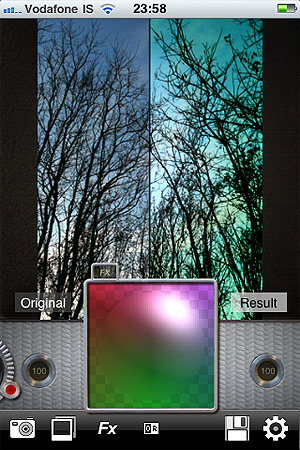
  • Adjust two parameters at once (Strength and Radius) with the new Light Ball;
  • Fine-tune all the effects with Color Mixing Light Ball;
  • Six more effects, including Dutch Light which is officially back.

The big thing about the new release is the Light Ball mixer, which gives you some extra flexibility to adjust effects to suit your photography.

Along with Dutch Light, that was brought back after a brief absence, five new filters are available with the new release of Dynamic Light: Overcooked HDR, No More HDR and the three colored effects Green Tint, Blue Tint, Red Tint, which all look like variations of Mysterious Light.

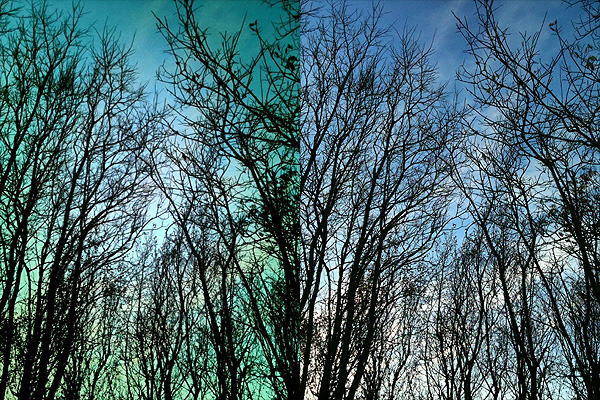
Some New Filters: Green Tint and Overcooked HDR

A final note about release 1.5: six empty slots can be seen in the newly added effect page. Indication of more filters to come?

Dynamic Light - Mediachance

FX Photo Studio 3.2

Fx Photo Studio by MacPhun, one of the most popular apps for iPhone photography, is now version 3.2. Together with general performance improvements, with this release you will get also some new extra features.

Here is what’s new in detail:

  • Full compatibility with iOS 4.3;
  • Category Sketches with 6 new filters added;
  • Enhanced effects tuning;
  • Various crashes and bugs fixed;
  • Overall functionality improved.

The new FX Photo Studio filters category, as the names clearly suggests, contains six filters that will turn your photos into hand-drawn-like images. The selection covers a variety of styles, from pencil to pen to charcoal. This, I am sure, is definitely something fans of MacPhun’s app will greatly appreciate.

Check this update out, if you haven’t done so already!

FX Photo Studio - MacPhun LLC

Camera+ 2.2 Is Here!

The announced update of Camera+ is finally here.

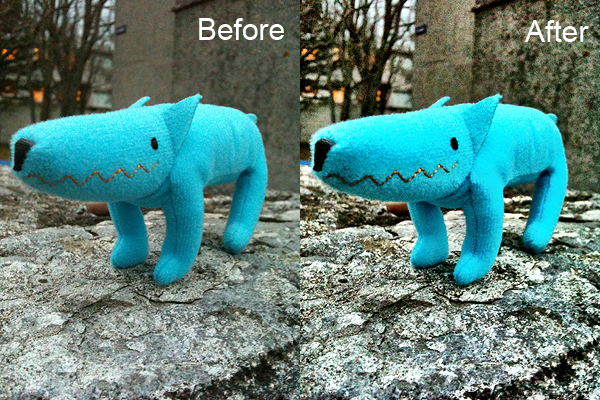
The 2.2 release introduces Clarity, a new feature which, the developers state, “can make your photos look truly stunning with just one tap”. The new feature is a processing tool whose purpose is bringing out details and enlivening dull shots in the easiest possible way.

Here you can see an example of how Clarity affects photos:

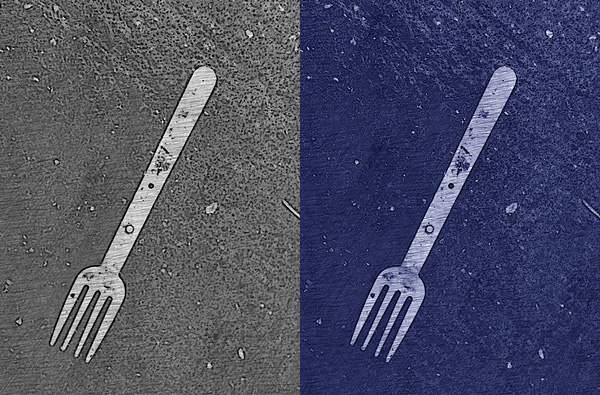
Clarity: before and after

Clarity is not the only thing worth noting in version 2.2. Other changes and improvements are the following:

  • Added ‘+’ button to the touch focus control to enable easy splitting into focus and exposure controls — and here is the explanation to the ‘+’ symbol in the app’s icon;
  • Multiple photos are now saved to Camera Roll according to the order they were selected
  • Better indication when camera is auto-focusing;
  • Improvements to Pinhole effect;
  • Improvements to Vintage border;
  • Shutter button bug fixed;
  • Incorrect date/time bug when saving to camera roll fixed;
  • Timer countdown time bug fixed;
  • Cancel buttons bug in sharing fixed;
  • Various minor bug fixes and enhancements.

What are your opinions on the new features? Do you want to share them with us? Feel free to do so!

Camera+​ - tap tap tap

iCamera HDR Review

The folks at Everimaging have brought to iOS devices their expertise in HDR photo editing. iCamera HDR may be a fairly recent addition to the App Store, but it’s definitely an app you shouldn’t overlook.

Following the great popularity of HDR photography, processing apps focused on this set of techniques are being frequently released on all iOS platforms. Not all of them are actual HDR processing software, and even when they are, some are not up to expectations.

For completeness, I must add the very first thing that made a strong impression on me before I had even tried iCamera HDR, was reading its App Store’s description. In the app’s page, developers state that other HDR apps “are all fake HDRs”. I’m not sure how they could come up with such a statement because, as far as I know, most HDR apps in the App Store use actual bracketing to process and produce their HDR composites, exactly just like iCamera HDR; this means that as a matter of fact they’re not fakes. On the other hand, apps like Dynamic Light, which we reviewed recently, produce fake HDR simply because they don’t process multiple shots with different exposure settings: they just alter one single shot to create HDR-like photographic effects. There is nothing wrong with it of course, but that is not HDR. However, as I said already, not all HDR apps work in this manner. iCamera HDR developers make it sound like they are the ultimate purists of HDR on the iPhone, which is sort of annoying and also not very accurate. Despite this attitude, which was a huge turnoff at the beginning, I tried iCamera HDR. And I was pleased by the results.

Main Features

  • Full resolution available;
  • Stabilizer;
  • Continuous LED flashlight (on supported devices only);
  • Save originals on/off;
  • Automatic, Manual and Single (fake HDR) modes;
  • Single photo HDR (fake HDR);
  • Three different tone mapping engines;
  • Adjustable brightness, contrast, saturation, shadows/highlights, b/w point, white balance, blur/sharpening;
  • Lens correction;
  • 27 photo effects;
  • Flip and rotate;
  • Share via email, Facebook and Flickr.

Appotography Opinion

With iCamera HDR, you can either use previously taken shots or the built-in camera. In both cases, you have the possibility to go for a proper HDR or for a fake HDR (single image processing). If you take the photos with the built-in camera, you can select among Automatic mode, in which the software determines on its own the lighting conditions, or Manual, which allows you to move around the square cursors to indicate light and dark areas of your image. In absence of tripod or other stable surfaces, the Stabilizer feature, with its three levels of intensity, can help you in taking sharper photos, resulting in more accurate HDR composites. You can take more sets of photos which you can save before getting to the post-processing stage; if you want, you can edit them when it suits you instead of doing it right away. This is particularly useful if you are not sure about some of the shots you have taken and you choose to take more for better results.

After you pick the images you want to work with, you have an extensive assortment of adjustable settings and tools to make the final outcome as good as it is possible. From the three available tone mapping engines — allowing you to try different solutions to get the most out of your shots by enhancing details and tones — to an array of other instruments which include white balancing, contrast and brightness adjusting, lens correcting and many more, you have at your disposal an exhaustive post-processing lab, especially tailored for HDR photography. Before saving, you can also apply one of the many photo effects included  in the app  to your image — colored filters, mainly.
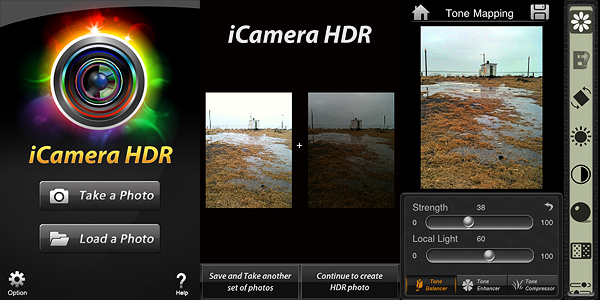
iCamera HDR by Everimaging for iPhone

iCamera HDR is a very sophisticated software that, unlike other more basic HDR apps, gives the user access to a very rich and advanced set of photographic tools for fully controlling the HDR process from the moment of shooting up to its finalization. The results obtained with iCamera HDR are excellent, also thanks to the fact the degree of flexibility and control you are given is impressive, especially for an iPhone application. The app by Everimaging is able to reduce issues that others, however good and effective, cannot correct. One of these issues is halation — that annoying bright spreading area on a photographic image, very frequently found in HDR images that make only use of two exposures instead of more, that is sometimes very hard to get rid of even for professional photographers. Comparing results obtained using the same bracketed photos — both if taken with the built-in camera and with a third party app like Bracket Mode — in some instances I noticed significant differences.
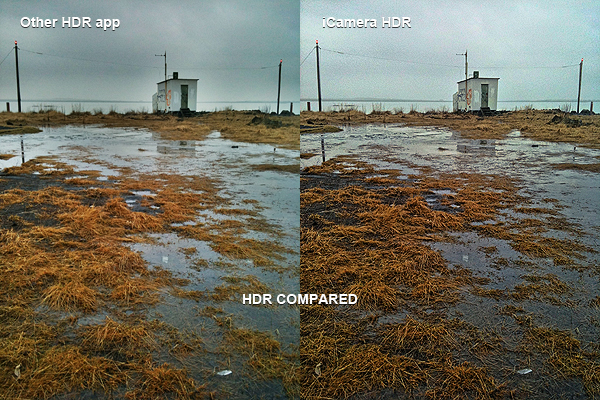
iCamera HDR by Everimaging for iPhone

Of course, on the other hand, using iCamera HDR is more time-consuming and it requires more effort than average iPhone HDR apps: the UI is clean and using the sliders to make adjustments is quite easy, but parameters are many, maybe too many for a newbie or for anybody just wanting to get the job done in a click or two. More settings mean more flexibility, but also more time to use them at their full potential. Let’s not forget speed and straightforwardness are still important aspects in iPhone photography, especially in the eyes of more casual users. On the long run, more control over your photography is definitely rewarding, but if you’re not so dedicated, then iCamera HDR is probably not the right choice.

The developers seem to be updating their product very frequently, which is always a point in favor, at least as I see it. The app is iPhone 3GS/4 and iPod Touch 4 only for now, but it was said iPad version is also in the making, so stay tuned for more to come.

Overall

Name: iCamera HDR
Developer: Everimaging
Compatibility: iPhone 3GS & 4, iPod Touch 4th. iOS 4.0 or later.
Price: £1.19||$1.99||€1.59
Vote: 5/5


iCamera HDR: All-in-One - Everimaging Ltd

Instagram and Retro Camera Plus Updates

Instagram is now version 1.5.2. Another routine update for Burbn’s app, which mainly solves various bugs.

  • Fix for email sharing when posting a photo;
  • Performance improvements in News tab;
  • Fixes for iPad running iOS 3.2;
  • Fix for Photo Library header bug on iOS 4.3 devices.

Retro Camera Plus by Urbian was also updated to version 1.0.4. Not a major update either, but it brings to the app some interesting improvements, first of all the higher resolution.

  • Fix for viewfinder issue;
  • Higher resolution;
  • Other minor improvements.

Dynamic Light and iSupr8 Updates

Two apps that we recently reviewed were updated in the past hours. We are talking about Dynamic Light and iSupr8. The updates are nothing big, but developers of both apps announced important improvements and changes are on their way.

Dynamic Light‘s newest release is 1.1.

The update was meant to improve memory handling by caching large images. Version 1.1 also temporarily replaces the filter Dutch Light with Ultra Contrast, an overdone HDR effect. Mediachance made clear Dutch Light will be back in a later update, together with a whole new set of photo filters.

iSupr8 was also updated to version 1.2.2.

The new release fixes crash issues that mainly affected iPhone 3GS users. A major update to the popular Super 8 video app was announced by MEA Mobile and is coming soon.

TiltShift Generator, Lomora 2, Panoramatic 360 Bug Fixes

Just a very brief update to notify that three of the apps we reviewed were updated in the last hours: TiltShift Generator by Art & Mobile, Lomora 2 by Marvin Lee and Panoramatic 360 by floaty. None of these updates is a major one.

TiltShift Generator v. 1.36: fixed bug for Facebook sign-in .

Lomora 2 v. 2.2.1: fixed bug causing the app to crash on iPod Touch 4th generation.

Panoramatic 360 v. 4.3.1: fixed bugs and various improvements.

If you have experienced some problem with one of these apps, it’s recommended to update them now. Remember you can always contact the developer for further assistance and to report further issues.