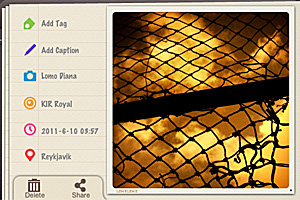
ScratchCam 1.3 Update

ScratchCam for iPhoneThe new release of ScratchCam for iPhone will shortly be available in the App Store. ScratchCam adds a grungy, aged and distressed look to any photo. If you want to know more, you will find an in-depth review of the app by clicking here.

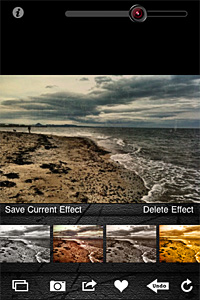
Although version 1.3 will not change the way ScratchCam works overall, it will add an essential feature to the app. In fact, with the new release, it will be possible to save favorite styles. Up to version 1.2, ScratchCam relied exclusively on effect randomization. The new feature will make it easier to make a list of preferred styles, to allow quicker selection of the right look at the right moment. Frequent users in special way will appreciate this addition, for it will definitely give them more control over their final results. Favorited styles will be accessible and manageable from the main work area.

ScratchCam for iPhoneIn version 1.3, sharing via email was also added and enhancements to the included effects were made.

ScratchCam for iPhone
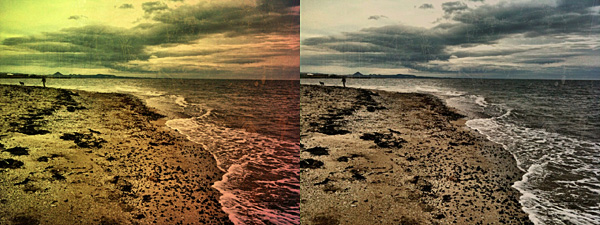
Different styles in ScratchCam for iPhone.

The new release clearly shows that ScratchCam’s developer is very responsive to sensible feedback: he actually listened to what his users deemed important to make adjustments and improve the overall usability of ScratchCam.

Last but not least, the Lite version of ScratchCam is also coming to the App Store. ScratchCam Lite will be a fully functional release, including all the features of the paid version, with the only exception of high resolution saving and a limit to the number of styles users can add to their favorites. If you want to try before purchasing, go ahead and get the Lite version.

NOTE: The developer of ScratchCam kindly provided us with preview code for this ScratchCam update.

Trover Review

Trover is a new iPhone-based social network whose purpose is to become a personalized guide to the world. Trover is not strictly about photography; in fact Trover is rather a social networking app that uses photography as a means of exploration.

Main Features

  • Full resolution available;
  • Square format;
  • Share on Facebook.

Appotography Opinion

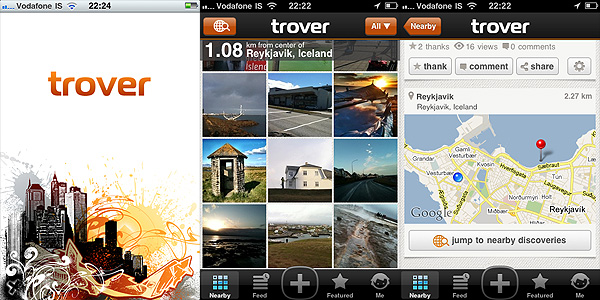
Trover helps users to discover interesting locations in an easy and entertaining visual way. By letting Trover know about your location, you give the app’s search engine elements to explore your nearby area in search for places of interest. In the Nearby section, you are thus presented with results of special interest, arranged by distance from your default location. The number of results you can get varies a lot, depending on the popularity of your location. The greater the number of users that discovered things around your area, the more results you will get. Likewise, you can share with people your own discoveries, which you can enrich with snapshots and notes.You can tag your findings, making it easier for others to search for what you have discovered.

Trover for iPhone

In the Feed section, you can browse through locations of interest arranged in chronological order, while in Featured, you can get to know what’s currently hot in the Trover community.

As in other social networks, you can interact with other members, by following them, commenting on their findings, giving them credit for their findings and so on. Taking advantage of the follow feature in Trover is really useful, because it basically allows the creation of a world map that only covers your particular interests.

Trover successfully merges the attributes of a social network with iPhone capabilities. Being able to easily take snapshots, besides writing descriptions and tagging, instantly gives a better idea of a location and its remarkable aspects. For the traveler in special way, Trover can become a really useful tool to get acquainted in reasonable times with surroundings in a quick and to the point manner. The risk is, as with all social networks, that Trover will be used by members in unforeseen ways, like as a simple means to socializing or to show off their photography, which could be good to an extent, but would definitely take away from the original app’s purpose.

Overall

Name: Trover
Developer: Trover LLC
Compatibility: iPhone, iPod Touch, iPad. iOS 4.0 or later.
Price: free!
Vote: 4/5

Trover - Trover LLC

Colorize Review

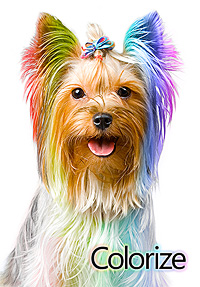
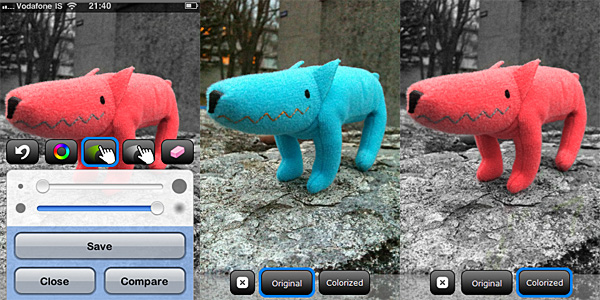
Colorize‘s Yorkie, with its intense psychedelic hairdo, seems to know the coloring business well: Widgetize’s app for iPhone is so easy to use it’s almost ridiculous. Honestly, if all photography apps were so simple, we would be spending more time taking and editing photos and less trying to learn how to use apps to take and edit photos.

Main Features

  • Full resolution available;
  • Two painting modes (Recolor and Desaturate);
  • Restore from previous sessions;
  • Zoom in/out;
  • Color picker;
  • Adjustable brush size and hardness;
  • In-app guide.

Appotography Opinion

Colorize by Widgetize for iPhoneIn Colorize you can both selectively recolor and desaturate your images. The process to achieve the desired result is simple. You load a photo from your device or take one with the built-in camera; after that you are introduced to the app’s Main Panel. At the bottom of the Main Panel there is a set of tools: the recolor and desaturate brushes, the eraser and the color picker. For better control, the tools panel can be hidden when not required and it can be brought back again by dragging it with the finger.

Depending on which effect you want to accomplish, you can either choose the desaturate or the recolor brush. For both brushes, it’s possible to adjust size and hardness playing with sliders in the tools panel. The recolor brush only sets the color of your object and it doesn’t affect other parameters as brightness, contrast and overall saturation. With the color picker selected, you can quickly switch between colors to be applied to your image. All you are required to do is painting with your finger over the areas you want either to recolor or desaturate. By finger-pinching, you can zoom in and out for a more refined result; by using the undo function and the eraser, you can easily correct mistakes. It’s also possible to compare the original with your edited image.

Colorize by Widgetize for iPhone
Colorize - The recoloring process.

All your projects are saved in the app’s gallery. This way, not only you can go back to keep on working on them, but you can also make changes at any moment.

Colorize does its work well and quickly. The UI works flawlessly and in general, for the simple task of selectively desaturating and recoloring photos, Widgetize’s app for iPhone is a pleasure to use.

More than a few other apps do the same as well and some of them even offer additional features. However, if you need an app exclusively focused on selective desaturation/recoloring, Colorize is really great.

Overall

Name: Colorize
Developer: Widgetize
Compatibility: iPhone, iPod Touch, iPad. iOS 3.0 or later.
Price: £1.19||$1.99||€1.59
Vote: 4/5

Colorize - Widgetize

King Camera Updated to 1.01

King Camera for iPhoneKing Camera 1.01 is officially in the App Store. With this update, the multi-purpose camera presents enhancements and optimization of various features, including speed in taking photos and frame design. Moreover, the latest update fixes a few reported bugs, so keep on offering your precious feedback to developers to help them to improve King Camera even more.

In detail, here is what you will find in King Camera 1.01.

King Camera for iPhone
The revised Faded Memories theme.
  • Optimized photo shutter speed: now 200% faster;
  • Optimized app size under 20MB: King Camera can now be downloaded over 3G network;
  • Optimized video saving speed;
  • Removed warning message when geolocalization is turned off;
  • Fixed zoom bug when switching from Stills to Video mode;
  • Added the 12fps option to TimeLapse/Stop-Motion video recording;
  • Removed the app’s logo from frame designs featuring it.

More is coming with the next update, so check back for further news! And remember that King Camera is still available for purchase at the special launch price of $0.99!

PhotoForge2 Updated to 2.0.2

PhotoForge2 universal app

Version 2.0.2 of GhostBird Software’s PhotoForge2 is now in the App Store for all iDevices. This long-awaited release contains some new tools and considerable improvements, including a fix for the infamous 2.0.1 bug that caused previous projects not to load properly after the update.

In detail, here is what comes with version 2.0.2 of PhotoForge2:

  • Added Rotate editor;
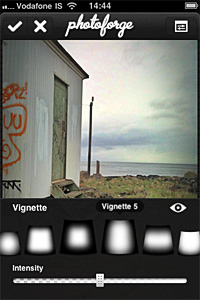
  • Added Vignette editor: 8 adjustable vignette styles available in FX menu;
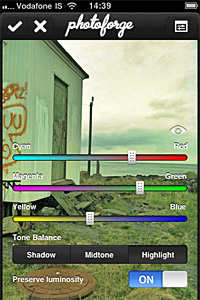
  • Added Color Balance editor: adjust color balance for midtones, highlights and shadows separately;
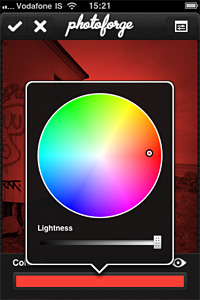
  • Added Colorize editor: apply tints to your photos;
  • Added Device to Device image transfer: transfer photos between devices easily;
  • Added invert layer mask feature, useful to quickly switch between masking and for more refined results;
  • Improved Shadows & Highlights adjustment for better results;
  • Improved performance of crop and layer transform tools;
  • Fixed bug that prevented projects to load properly in previous update;
  • Fixed but that caused graphical corruption when repeatedly cropping huge images;
  • Fixed bug in iOS 4.2.1 that made app not responsive when wifi is unavailable;
  • Graphics improvements and fixes;
  • Minor bug fixes.
PhotoForge2
PhotoForge2 - The Vignette Editor
PhotoForge2
PhotoForge2 - Colorize Editor
PhotoForge2
PhotoForge2 - The Color Balance Editor

Monochromia Review

From the same developer of Cameramatic,  Monochromia is an app focused on recreating photographic black and white effects on the iPhone.

Main Features

  • Full resolution available;
  • 15+ presets;
  • Adjust brightness and contrast;
  • Adjust vignette;
  • Add grain;
  • Send with email or share on Facebook and Twitter.

Appotography Opinion

Monochromia allows both taking pictures with the built-in camera and processing photos already stored in your device. Differently than in Cameramatic, you can choose to disable the square format restriction and therefore you can edit and save your photos in their original shape and size.

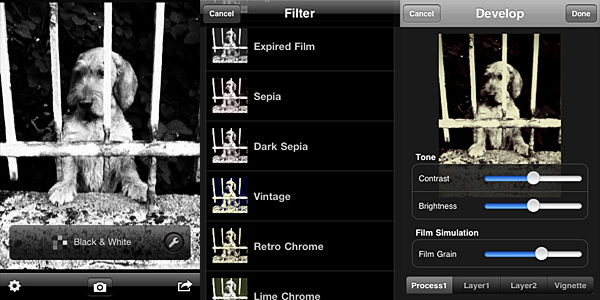
Monochromia by youthhr for iPhoneOnce you load the photo into the working area, you can open the presets menu and choose one of the ready-to-use filters that come with the app. The selection is good enough, covering a range of possibilities between basic black and white to high contrast monochrome, passing through old photo effects like sepia and silver tone. The available presets, however, don’t cover everything. It’s here that the Develop feature comes in handy.

It’s possible to access the Develop area by tapping on the monkey wrench icon. Develop in Monochromia is very similar to Filter Development in Cameramatic: by playing with parameters, you can create your own monochrome filter. You can set brightness and contrast, add a tint and determine vignetting, opacity and width. When the editing is complete, you can save, email or share on Facebook and Twitter.

Monochromia by youthhr for iPhone
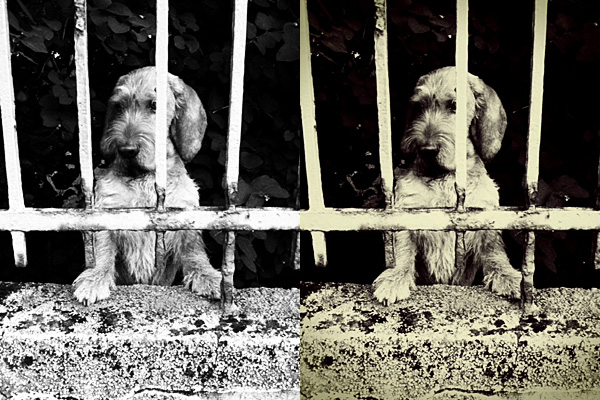
Black & White and Retro Chrome presets.

The lack of a channel mixer is probably the hardest thing to digest in Monochromia. Not that many other monochrome converters in the App Store have it, to be honest. However, a lot of other photo editing apps have recently started adding this and other sophisticated tools, making users question the actual usefulness of the average monochrome converter available in the App Store. Given the similarities with Cameramatic, Monochromia feels like a themed light version of its toy cam sibling. Not so “light” though: the price tag is exactly the same as Cameramatic. In theory, Cameramatic is less specialized, yet it’s by far more flexible, if you except the square format restriction: because of additional features, mainly, and because it is basically capable of doing the exact same things that Monochromia does.

Given these considerations, Cameramatic users will thus regard Monochromia as a clone only limited to monochrome photography of the better-known iPhone toy camera by the same developer. These users will not find any special use for Monochromia. Still, youthhr’s monochrome app is able to convert photos to black and white quickly and it allows fair customization. Achievable effects are definitely above the average black and white. Monochromia is perhaps not a must-have. Still, especially to non-Cameramatic users, it can be worth a try.

Overall

Name: Monochromia
Developer: youthhr
Compatibility: iPhone, iPod Touch , iPad. iOS 4.1 or later.
Price: £1.19||$1.99||€1.59
Vote: 4/5

Monochromia - Black & White Photography - youthhr

ProCamera Review

To this moment, the iPhone native camera app has serious limitations, especially when it comes to the most basic elements, like focus and exposure. Controlling these aspects is crucial for taking better photos. Most apps only help you overcoming iPhone’s limitations in post-processing. Yes, why not? Fixing photos is OK. However, having a good photo to work with is always the most desirable thing for any photographer.

Procamera, recently updated to version 3.1, is an app especially focused on helping iPhone photographers to take the photos they wish to take.

Main Features

  • Full resolution available;
  • Video recording;
  • Anti-shake;
  • Self-timer;
  • Set focus and exposure separately;
  • 6x zoom;
  • Reference grid on/off;
  • Burst mode;
  • White balance lock;
  • Photo compass and virtual horizon tools;
  • Crop, flip and rotate;
  • Adjust brightness and contrast;
  • Adjust white balance and saturation;
  • 35+ filter presets;
  • Auto-enhancement;
  • EXIF data access;
  • Full-screen shutter button;
  • In-app guide;
  • Send via email or share on Facebook, Twitter and Flickr.

Appotography Opinion

ProCamera is a multi-purpose camera utility which comes with a comprehensive collection of tools to help both inexperienced and dedicated iPhone photographers to take better photos in the most effective way possible.

Besides anti-shake, 6x digital zoom and self-timer, some of the most valuable features in ProCamera are the individually adjustable focus and exposure (also when recording videos), the burst mode and the white balance lock.

The Virtual Horizon function helps taking straight photos, which is particularly handy in landscape photography. Reference grids can also be activated as further aid to accurate composition. The recently introduced QuickFlick Album feature permits immediate access from camera mode to album with a swipe of your finger at any moment.
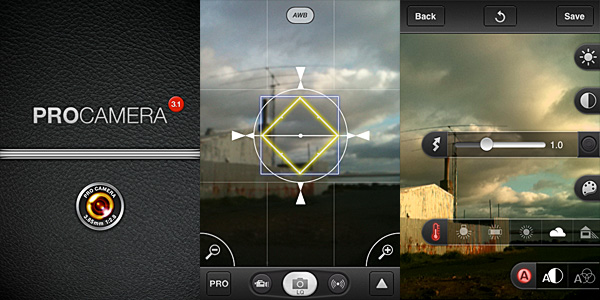
ProCamera for iPhoneWhen you have taken your photo, you can make adjustments to it before saving or sharing. You can access three different editing modes: in Pro Lab, you can set brightness, contrast, white balance and saturation; in Pro Cut you can crop, flip or straighten images; for a quick edit or for a different final effect, you can use Pro FX, which offers a series of colored filters (sepia, black and white, bleach, etc.) and one-tap auto-adjustements. Differently from photos, videos cannot be processed and they are directly saved to the Camera Roll.

After you are done with your editing, you can save, send the photos with email or share on Facebook, Twitter and Flickr. For some reason, the photos appear rotated by 90 degrees in emails, even if they are all right when saved.
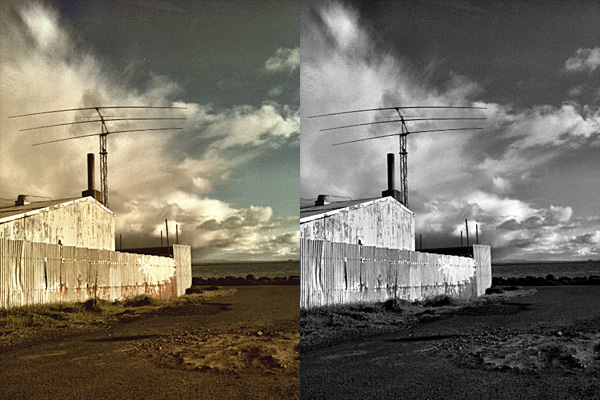
ProCamera for iPhoneThe strength of Procamera definitely resides in its wide array of camera features. Therefore, as a replacement to the native camera, the app works great, as it gives you all the necessary instruments to make the most out of iPhone’s limitations. Although getting to know all the included tools may appear overwhelming at first, especially to users with no previous experience with other — more basic — camera apps, using ProCamera is definitely rewarding on the long run. More control always means better results.

Even if ProCamera is packed with gadgets, the app’s UI always remains accessible and everything works quite smoothly. The only remark I have is that a more in-depth guide for each and every little switch and button would come in handy. The in-app manual, although useful to a degree, doesn’t cover everything in detail. A total newbie can easily get lost trying to figure out some things on his/her own.

The weakest point of the app is the Pro FX editing feature. The selection of presets is not diverse enough and most filters are just average looking. At some point, I found myself ignoring the presets and using only Pro Lab for taking care of the photos’ looks. However, ProCamera’s filters can be regarded as a mere extra, not as a major element to the app’s overall value.

Overall

Name: ProCamera
Developer: daemgen.net
Compatibility: iPhone, iPod Touch, iPad. iOS 4.1 or later.
Price: £1.79||$2.99||€2.39
Vote: 4/5


Hipstamatic - Synthetic Corp

Hipstamatic RetroWeekend: RetroPak Available Now!

For those who have missed the opportunity, Hipstamatic has a cool ongoing offer not to be missed:

all limited edition HipstaPaks released so far are available for download from the HipstaMart as a special bundle!

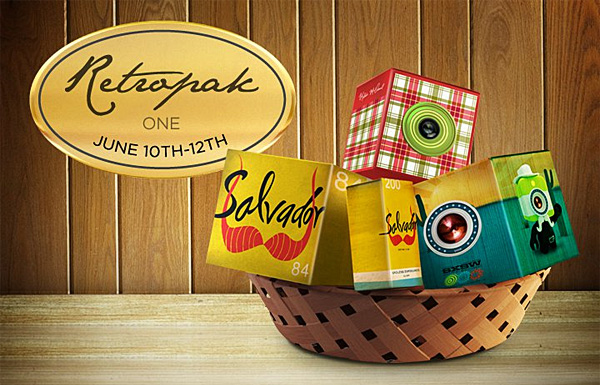
RetroPak one includes the following items:

  • Dreamcanvas film;
  • Melodie lens;
  • Salvador 84 lens;
  • Tejas lens.

Hipstamatic Retropak One

You can get the RetroPak with three lenses and a film for $1.99 (£1.19/€1.59). The offer will be valid through the week-end and it will end on Sunday at midnight (Pacific Time)!

iShuttr: Turn Your iPhone 4 Into A Point-And-Shoot Camera

Choosing the right camera case is not as simple as it seems. Some cases put the accent on stylish and fashionable looks; some others on protection and comfort: deciding what are your priorities can be tough.

Differently from most other cases, iShuttr‘s purpose is not only protecting your iPhone. iShuttr is a sleek camera case for iPhone 4, designed to turn your iDevice into a point-and-shoot camera, for more control and easier use. The project is under development and currently open for funding on Kickstarter. Although at the moment iShuttr is an iPhone 4 exclusive, there are plans to bring it also to iPhone 5 and Android models.

The ergonomic shape of iShuttr’s plastic body can be held or mounted on any standard 1/4-20″ threading tripod. iShuttr has embedded firing flash on its back side, powered by external battery system. Relying on external battery permits better management of power: preserving battery life is a critical issue for iPhone camera users. The case features also zoom in/out buttons, making more convenient to use entirely external commands, instead of the touch screen.

Given the possibilities of the upcoming iOS 5, it’s in the intention of the developers to make use of the new features to the advantage of iShuttr camera case.

The goal is to hit $50,000 by August 14. The fundraising will help developers to acquire all the needed components and the MFi test kits for building the final prototypes that will be presented to Apple for approval. The retail price for iShuttr camera case will be $69.99. With a pledge of $50 or more, you will receive the iShuttr camera case at a special price. If you pledge $100 or more, you will get two iShuttr camera cases, mini tripod and a few more extras.

If iShuttr tickles your curiosity, please take a look at the project’s page on Kickstarter for more information.

Leme Camera Review

Leme Camera combines toy camera features with photo sharing. The app was initially released as LomoLomo and it only included a few free filters, while the rest was available through in-app purchase. Currently all the filters are available for free, but it seems the developers like to make changes frequently.

Leme stands for “Life, Experiences & Memories Everywhere”.

Main Features

  • Full resolution available;
  • Square format;
  • 9 Cameras;
  • 15 color filters;
  • 10+ frames;
  • Rotate;
  • Possibility to send via email or share on Flickr, Facebook, Twitter, Picasa and Tumblr.

Appotography Opinion

Leme Camera features several camera modes, including basic, fisheye, tiltshift, 2 and 4 exposure multi-shots, and more. in general, cameras determine the photo format, but some of them are just gimmicks to add effects developers couldn’t place anywhere else, like light leaks and HDR. Depending on the camera you choose, you can load photos from your device or just use the built-in camera.

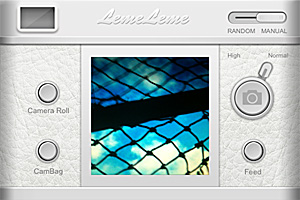
Leme Camera for iPhone
The basic camera.

Besides cameras, you can pick lenses and frames. Lenses, which come in many hues, simply apply colored filters — and in some cases, like with the God Father lens, also a texture — to the photo. Frames range from plain instant style to film strip. You can either combine all the elements together or you can tap on the random switch to get unexpected results.

After the photo is processed, you can share it with email or on social networks and/or upload it to Leme community (community registration is required). You can interact with other community members by commenting on their photos, by liking, faving and reposting their entries or by following them.

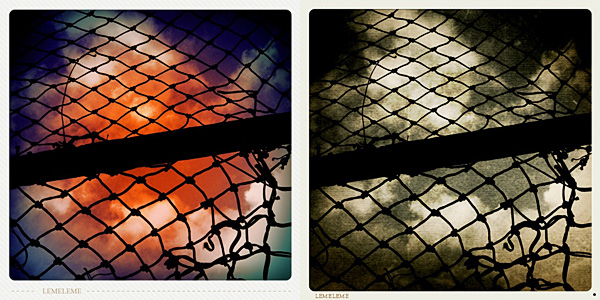
Leme Camera for iPhoneLeme Camera’s effects are very pretty, but handling them is a bother. With some cameras, you can only apply random filters. The feel you get when choosing different combinations of elements to create a final effect, is that of an extremely disorganized process. I couldn’t figure if disabling the app’s logo is possible or not: with some borders especially, that lame logo is terribly irritating, but honestly, after some time I gave up because I couldn’t care less anymore.
Leme Camera for iPhone
Random effects in Leme Camera.

Compared to other photo sharing apps, Leme Camera results more confusing, less intuitive, less immediate. The UI mimics that of other toy cameras for the iPhone, but just to get things done you have to pass through a much convoluted ordeal that actually makes you wonder if it wouldn’t be better to switch to another app. The fact you have different cameras even for adding the simplest details, like light leaks or colored flash, results in a waste of time just to understand which camera does what and how to combine different effects. Getting involved in the community is also not easy. Differently from what happens in other photography communities, members seem less eager to get acquainted with other people and their photos.

What mostly redeems Leme Camera is the quality of the filters. Other than for this reason and for its price tag — Leme is free — I cannot see any other reason to get this app.

Overall

Name: Leme Camera
Developer: MoMoTravel Consulting Inc.
Compatibility: iPhone, iPod Touch (4th), iPad 2. iOS 4.1 or later.
Price: free!
Vote: 3/5

Leme Camera - MoMoTravel Consulting Inc.